Updated November 22, 2026. Prices are Microsoft US list prices from its licensing announcement and Power Apps pricing page. Cost comparisons are our estimates and are labelled as such.
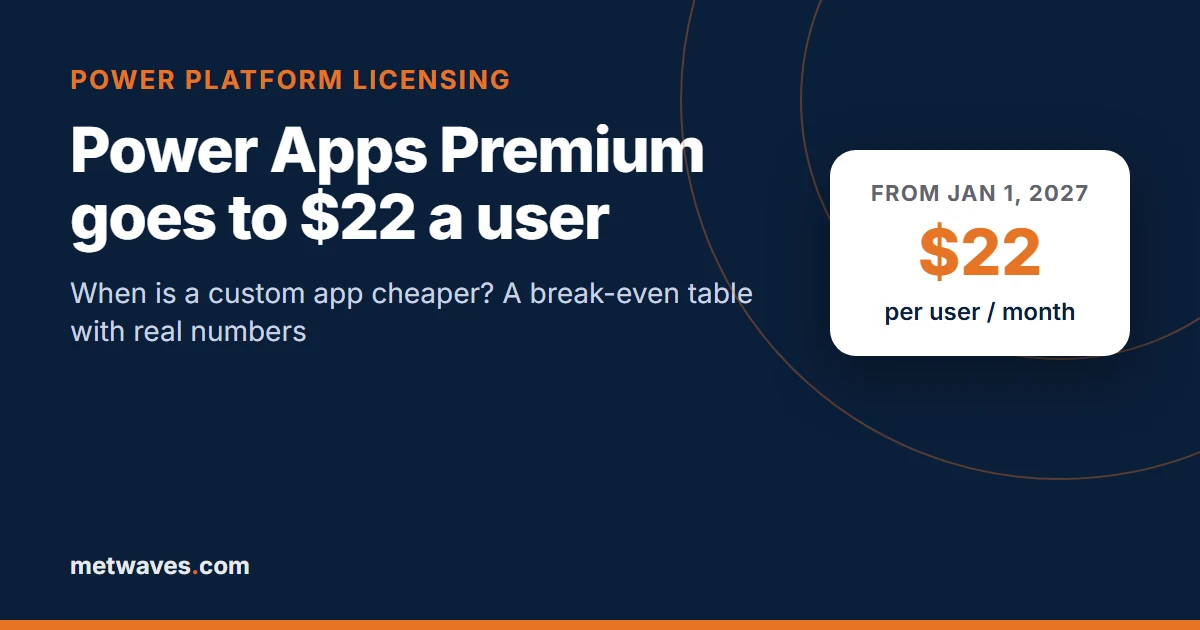
Short answer. On January 1, 2027, Power Apps Premium rises from $20 to $22 per user per month, the per app plan is already off sale to new customers, and new licenses no longer include AI Builder credits. For a typical internal app, a custom build becomes the cheaper option at roughly 90 to 100 regular users over three years; below about 60 users Power Apps usually stays cheaper. The table below lets you check your own numbers.
What is changing in Power Apps licensing, and when?
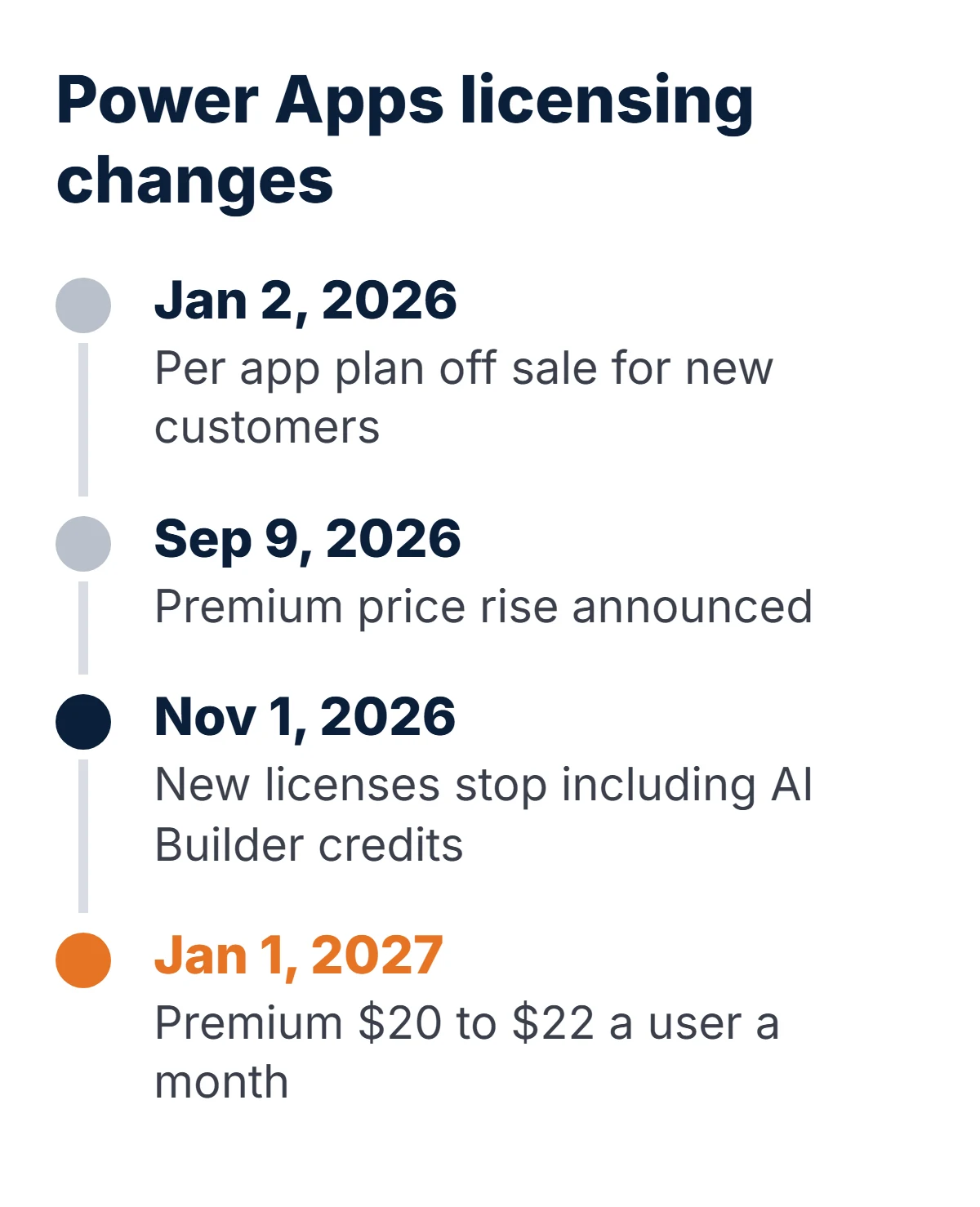
Three changes land within twelve months of each other. Together they raise the cost of running business apps on Power Apps, especially apps with many users or AI steps.
| Date | Change | Who it affects |
|---|---|---|
| January 2, 2026 | Per app plan off sale to new customers; existing Enterprise customers can keep renewing and CSP customers are not affected | New customers who planned to license one app at a time |
| September 9, 2026 | Microsoft announces the Premium price rise | - |
| November 1, 2026 | New premium licenses stop including seeded AI Builder credits; existing credits honored to end of term | Apps and flows using AI Builder (document processing, prediction, prompts) |
| January 1, 2027 | Power Apps Premium $20 to $22 per user per month; 2,000-seat plan $12 to $14 | New purchases, renewals and co-terms starting on or after this date |
- Power Apps Premium$22 per user per month from January 1, 2027 (annual billing); $20 before
- United Kingdom£15.40 per user per month ex VAT on Microsoft's UK page today; Microsoft announced the rise in US dollars, so check your reseller for the 2027 sterling price
- Existing subscriptionsKeep today's price until the term ends
- Pay-as-you-go$10 per active user per app per month, through Azure
- Dataverse included250 MB database and 2 GB file capacity per Premium license; extra database capacity $40 per GB per month
What does a Power Apps app really cost?
The license is the visible part. Four other costs decide the real bill:
- Who needs Premium. Power Apps included with Microsoft 365 covers apps that use Microsoft 365 data and standard connectors, such as SharePoint lists and Excel. The moment an app uses Dataverse, SQL Server, a custom connector or another premium connector, every user of that app needs Premium or pay-as-you-go.
- Dataverse storage. Each Premium license adds 250 MB of database capacity to the tenant pool. Apps with attachments, audit logs or years of history outgrow that, and extra database capacity is $40 per GB per month.
- AI steps. An app that reads invoices or classifies requests with AI Builder used to run on credits included in Premium. New licenses no longer include them, so those steps now consume Copilot Credits that you buy separately. If neither credit type is available, Microsoft says the AI step is blocked.
- The people who maintain it. Power Apps is quick to build in, but someone still owns environments, solutions, deployments between dev and production, and fixes when a connector changes.
Before modelling anything, export who is actually licensed and who actually uses the apps. Microsoft documents this PowerShell export, and the Power Platform admin center has a license consumption report:
Install-Module -Name Microsoft.PowerApps.Administration.PowerShell
Add-PowerAppsAccount

# Every user who has a Power Apps or Power Automate license and has used the service
Get-AdminPowerAppLicenses -OutputFilePath 'C:\temp\powerapps-licenses.csv'

# Every app in the tenant, with owner and environment
Get-AdminPowerApp | Select-Object DisplayName, EnvironmentName, @{n='Owner';e={$_.Owner.displayName}} |
    Export-Csv 'C:\temp\powerapps-apps.csv' -NoTypeInformation
At what point is a custom app cheaper than Power Apps?
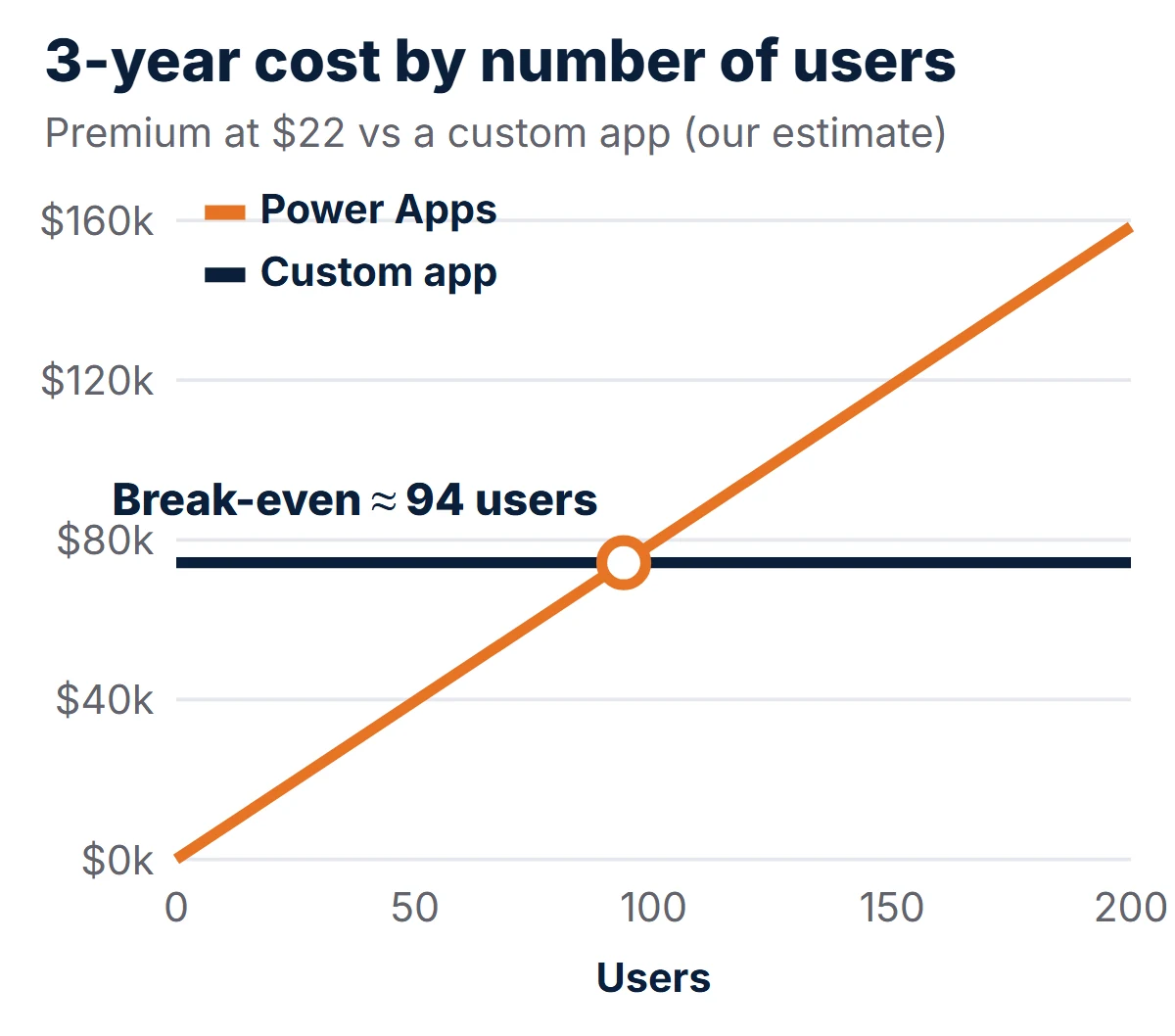
Power Apps costs scale with people. A custom app costs mostly up front and then a fairly flat amount to host and maintain, whether 50 or 500 people use it. So there is a user count where the lines cross.
Our assumptions for a typical internal business app (forms, approvals, a few reports, Microsoft 365 sign-in), built as a web app on Azure. These are our estimates, not quotes:
| Cost item | Our estimate | Notes |
|---|---|---|
| Build | $45,000 (range $30,000 to $60,000) | Design, build, testing and launch of a focused internal app |
| Hosting | $250 a month | Azure App Service plus Azure SQL Database for an internal workload |
| Maintenance and support | 15% of build a year ($562.50 a month) | Security updates, small changes, monitoring |
| 3-year total | $74,250 | Does not grow much with users |
| Power Apps Premium, 3 years | $792 per user | $22 × 36 months |
The arithmetic is simple enough to run with your own numbers:
break-even users (over N months) = (build + monthly run cost × N) / (22 × N)

Example, 36 months:  (45,000 + 812.50 × 36) / (22 × 36)  =  74,250 / 792  ≈  94 users
Break-even month for a given team: build / (users × 22 − monthly run cost)
Example, 150 users:  45,000 / (3,300 − 812.50)  ≈  18 months
How do the numbers look by team size and time?
Each cell shows the cumulative Power Apps Premium cost at $22, then the cheaper option against our custom-app estimate for the same period ($45,000 build plus $812.50 a month).
| Users | 12 months | 24 months | 36 months | 60 months |
|---|---|---|---|---|
| Custom app (est.) | $54,750 | $64,500 | $74,250 | $93,750 |
| 25 users | $6,600 · Power Apps | $13,200 · Power Apps | $19,800 · Power Apps | $33,000 · Power Apps |
| 50 users | $13,200 · Power Apps | $26,400 · Power Apps | $39,600 · Power Apps | $66,000 · Power Apps |
| 100 users | $26,400 · Power Apps | $52,800 · Power Apps | $79,200 · Custom | $132,000 · Custom |
| 150 users | $39,600 · Power Apps | $79,200 · Custom | $118,800 · Custom | $198,000 · Custom |
| 250 users | $66,000 · Custom | $132,000 · Custom | $198,000 · Custom | $330,000 · Custom |
| 500 users | $132,000 · Custom | $264,000 · Custom | $396,000 · Custom | $660,000 · Custom |
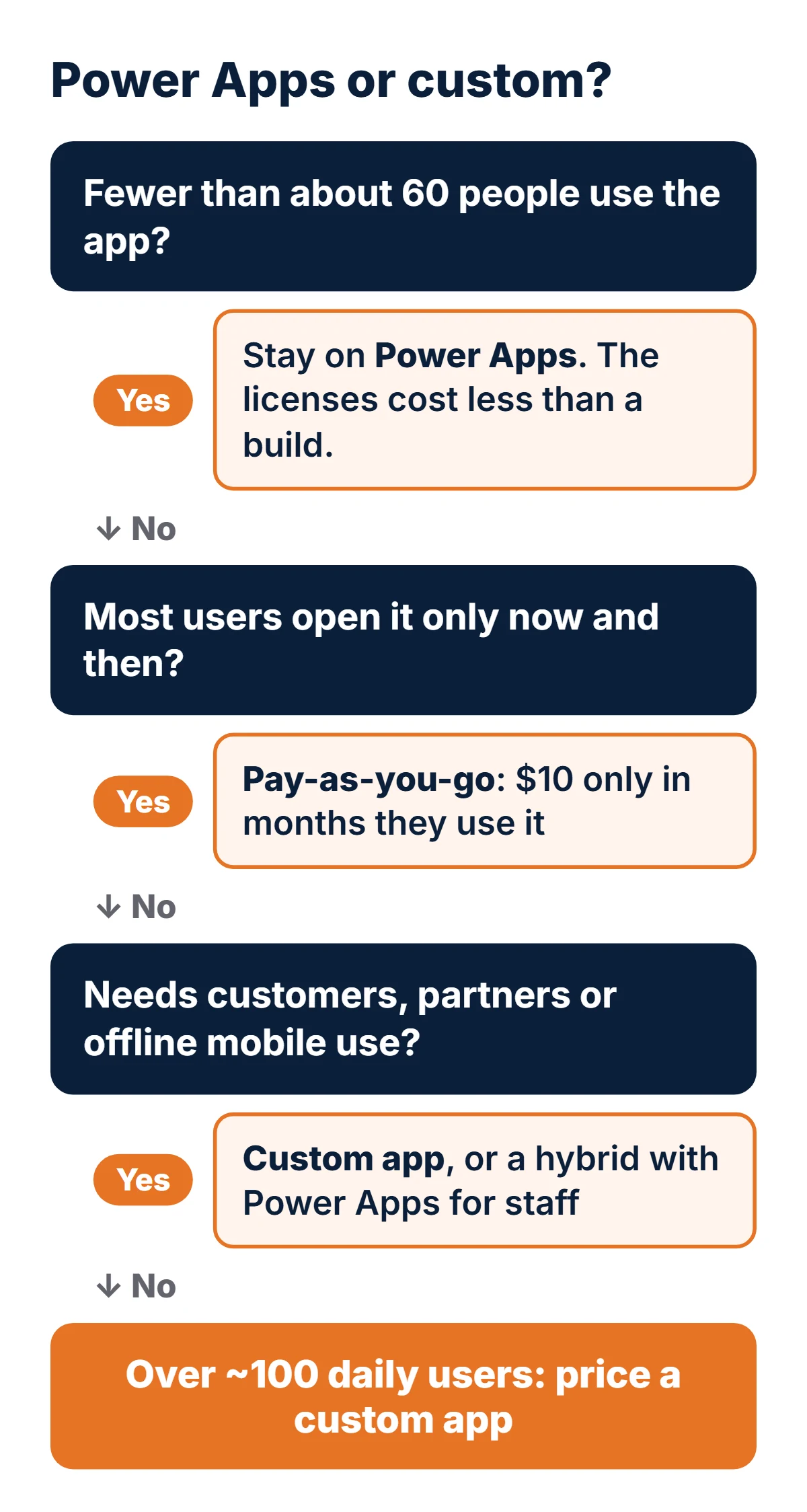
Read it like this: a 25-person team never reaches break-even, so Power Apps is the better buy. A 150-person department crosses over in the second year. At 250 users and up, the custom app pays for itself inside a year.
Is pay-as-you-go cheaper than Premium?
Sometimes. The pay-as-you-go meter charges $10 per active user per app per month, and a user is only active in a month they open that app. It needs an Azure subscription linked to the environment.
| How a person uses Power Apps | Premium from 2027 | Pay-as-you-go | Cheaper |
|---|---|---|---|
| Opens one app a few times a quarter | $22 every month | $10 only in months used | Pay-as-you-go |
| Uses one app every month | $22 | $10 | Pay-as-you-go |
| Uses two apps every month | $22 | $20 | Pay-as-you-go, just |
| Uses three or more apps every month | $22 | $30 or more | Premium |
A sensible mix is Premium for people who live in several apps and pay-as-you-go for everyone else. It does not change the break-even maths for a single, heavily used app.
When should cost not be the deciding factor?
| Situation | Better fit | Why |
|---|---|---|
| A team of 10 to 40 needs a form or approval app this month | Power Apps | Weeks to build, low license total, makers can change it |
| Customers, suppliers or the public must use it | Custom app | Power Apps licenses every user, guests included; public sites need Power Pages, priced separately |
| Offline use on phones in the field, or device hardware | Custom mobile app | Offline sync and device features are first-class in native or cross-platform apps |
| Complex logic, heavy data or strict performance | Custom app | Fewer platform limits, normal source control and testing |
| The app is core to how you make money | Custom app | You own the code and are not exposed to the next price change |
| Everything already lives in Dataverse or Dynamics 365 | Power Apps | Rebuilding the data layer rarely pays back |
What this means if you own the business
List your apps by number of active users and how critical they are. Leave small team apps where they are. For any app with more than about 100 regular users, or with customers or partners as users, get a fixed-price quote for a custom build and compare it with three years of licenses before your renewal date.
What this means if you run the code
Check which apps use premium connectors and how much Dataverse they hold. For an app you plan to move, keep Dataverse or SQL as the system of record during the move, rebuild the screens and logic as a web app with Entra ID sign-in, and run both side by side for a month before switching users over.
What does a hybrid setup look like?
Most businesses end up with a mix rather than a switch:
- Keep small team apps on standard connectors (SharePoint lists, Excel, Outlook). They need no Premium license at all.
- Move the one or two high-user apps to a custom web app. Those are where the per-user cost adds up.
- Connect both through the same data: a custom app can read and write Dataverse through its Web API, or both can share an Azure SQL database, so Power Apps screens and custom screens work on the same records during and after the move.
- License by use: Premium for heavy makers and multi-app users, pay-as-you-go for occasional users.
How do you move an app off Power Apps without disruption?
- Inventory screens, flows, connectors, Dataverse tables and security roles. Export the solution so nothing is missed.
- Decide the data home. Leave data in Dataverse at first, or move it to Azure SQL if the custom app will own it.
- Rebuild the screens as a web app (React or Angular front end, .NET or Node.js API) with Microsoft Entra ID sign-in, so staff use the accounts they already have.
- Replace flows with background jobs or keep them in Power Automate where they only use standard connectors.
- Run in parallel for a few weeks, then move users in groups and remove their licenses.
In our estimate, a focused internal app takes 8 to 14 weeks from inventory to cut-over. Plan it so the switch lands before your next renewal, since that is when the new price applies to existing subscriptions.
Frequently asked questions
How much is Power Apps Premium from January 2027?
$22 per user per month on annual billing, up from $20, from January 1, 2027. The 2,000-seat minimum plan goes from $12 to $14. Existing subscriptions keep their current price until the end of the term; the new price applies to new purchases, renewals and co-terminations starting on or after January 1, 2027.
Can we still buy the Power Apps per app plan?
Not as a new customer. Microsoft stopped selling the per app SKU to new customers from January 2, 2026. Existing Enterprise customers can keep using and renewing it, and Microsoft says Cloud Solution Provider customers are not affected. The remaining options are Power Apps Premium per user and the pay-as-you-go meter.
What does Power Apps pay-as-you-go cost?
$10 per active user per app per month, billed through an Azure subscription. A user counts only in months they open the app, and each app is counted separately. Users who already have a Power Apps Premium license are not counted.
What happened to the AI Builder credits in Power Apps Premium?
From November 1, 2026, new Power Apps Premium licenses no longer include seeded AI Builder credits. Existing seeded credits are honored until the end of the contract term. After that, AI Builder features draw on Copilot Credits, and if none are available the AI step is blocked.
At how many users is a custom app cheaper than Power Apps?
On our mid-range estimate for a typical internal business app, about 94 users over three years at $22 a user a month. The range runs from roughly 65 to 120 users depending on the build cost. Below that, Power Apps usually costs less; above it, a custom app usually does.
Do users of a custom app need a Microsoft license?
Not a Power Apps license. A custom web app can sign staff in with the Microsoft Entra ID accounts they already have through Microsoft 365. You pay for hosting and support instead of a per-user fee.
Want a real number for your app? We price custom replacements for Power Apps against your actual license counts, for businesses in the US, UK, Canada and Australia. See our web application development and application modernization services, or our cross-platform app development if your users are in the field. Our Copilot Studio helpdesk case study shows where we kept Microsoft's low-code tools because they fit. Also on the Microsoft 365 list: Exchange Web Services shuts down on April 1, 2027.

Nikit Nandan
Strategy Director
Nikit is experienced in conducting in-depth research to stay abreast of industry trends and emerging technologies.