
Invoice agent posting to SAP Business One
Business in Australia
Connected to SAP Business One, email and PDF attachments
Read the case study →
Generative AI integration services for owners, COOs and IT leads at small and mid-sized businesses in the US, UK, Canada and Australia. We find the few tasks where AI pays for itself, then connect a model to the systems you already run, so it reads your data and writes the result back.
Three AI integrations in production: SAP Business One, Microsoft Teams and SharePoint, a BIM workflow
Generative AI integration services connect a large language model to the systems you already run, such as your ERP, helpdesk, SharePoint or CRM, so it reads your data, does one task and writes the result back, with checks and a person reviewing anything uncertain. AI consulting is the step before: deciding which tasks are worth it, what they will cost to run and whether your data is ready. Metwaves does both, and our three AI systems in production are all integrations of this kind.
| Term | What it means | Where to go |
|---|---|---|
| AI consulting | Deciding which tasks to use AI for, in what order, at what cost, with what data and risk | This page |
| AI integration | Connecting a model to your systems so it reads your data and writes results back | This page |
| Software integration | Connecting two systems, with no AI involved | Software integration |
| AI chatbot | Answers questions from your content | AI chatbot development |
| AI agent | Takes actions in your systems, within set permissions | AI agent development |
| Generative AI development | Any build that uses large language models | Generative AI |
WHEN TO CALL US
Most AI spending stalls between the demo and the system people use every day. A good consultation closes that gap.
A large AI project is quoted before anyone has checked the data it needs.
Start from the tasks your people do, ranked by volume, rules and data.
Licences are bought for everyone, and use drops after the first month.
Check the data and the system access before anything is built.
A pilot works in a demo and never reaches the system people use every day.
Prove the riskiest task first, inside the real system.
Nobody knows what each task will cost to run once the model is live.
Price the build and the monthly cost per task before you commit.
Where should a small business start? With one high-volume task that follows rules and has clean data, not a company-wide platform.
THREE ANSWERS
We do not sell a strategy deck. The assessment ends in a decision for each task, and one of the three is always no.
Our invoice agent: about 1,000 supplier documents a month into SAP Business One.
The usual answer when documents vary a lot or an error costs money.
Common for approvals and routing that follow fixed criteria.
Six services, from deciding what to build to connecting it to your systems. Pick one to see what it covers and who usually asks for it.
A map of your workflows, use cases ranked by cost per task and payback, a data and risk check, and a phased plan you keep whether or not you hire us.
A model connected to your ERP, helpdesk, SharePoint or database, reading your data and writing results back, with checks and a review queue for anything uncertain.
Getting scattered data into one place a model can use, with the access rules carried through.
The riskiest task built on your data in 4 to 8 weeks, so you see it work, and what it costs per task, before funding the full build.
Which tools are approved, what staff may paste where, and where a person must review the output.
When the task needs answers from documents, or actions across several systems within set permissions.
AI INTEGRATION BY SYSTEM
Most AI integration work is one system and one task. Four of these are in production; two are not yet, and we say so.
Our agent reads about 1,000 supplier documents a month and posts clean entries to SAP Business One.
Invoice agent case study →Our Copilot Studio agent works inside Microsoft Teams and opens a ticket with the chat attached when it cannot help.
Helpdesk agent case study →Respects who may open which document. Part of the same helpdesk build.
Helpdesk agent case study →Material recommendations inside BioBuild's BIM workflow, updated whenever the model changes.
BioBuild case study →We would scope it the same way: one task, the CRM's API checked first, a review step before anything is written to the record.
Summaries or search for your users, with the running cost per user worked out before the build.
Tell us which tools you run. We check each one's API and permissions before we quote.
The model sits between your systems and a set of checks: clean results are written back, uncertain ones go to a person, and every step is logged with its cost.
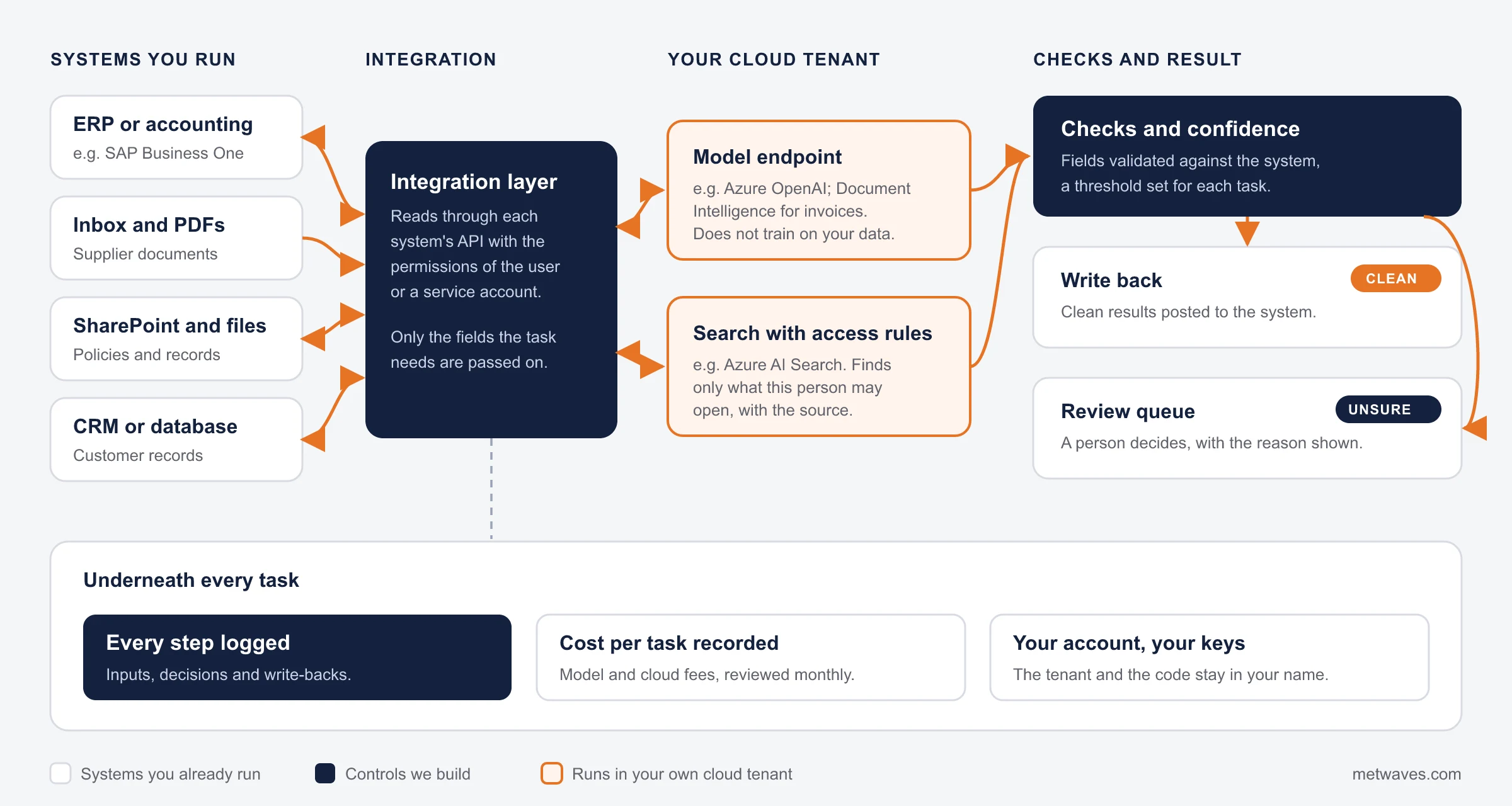
The same four rules apply to every integration we build. They also answer how to integrate AI with cloud services you already pay for.
The model runs on enterprise endpoints such as Azure OpenAI, in your account.
The AI sees only what the person or service account is allowed to open.
Inputs, decisions and write-backs are recorded and can be audited.
Nothing uncertain is written back without someone reviewing it.
PROOF
All three read from and write to a system the client already ran. Each one began as a question about a single task.
Business in Australia
Connected to SAP Business One, email and PDF attachments
Read the case study →Professional services firm, United Kingdom
Connected to Microsoft Teams and SharePoint
Read the case study →BioBuild, construction, Sweden
Connected to The BIM model and the design team's modelling tool
Read the case study →From the first call to a decision you can act on, then a monthly check once the integration is live.
30 minutes on the task you would most like to stop doing by hand, and the systems involved.
We talk to the people who do the work, not only the managers who describe it.
Where the data lives, who can reach it, and what each system's API allows.
Each task with its volume, estimated cost per task, risk and payback.
An integration build, a 4 to 8 week PoC on the riskiest task, or a clear reason not to use AI.
After go-live, the measures below, checked each month against the baseline.
The workflow map, the ranked use cases and the roadmap are yours to take to any vendor, us included, or to nobody. The assessment is run by the engineers who built the three systems on this page, so the plan is one we know how to deliver.
You pay once to build and every month to run, so we price both before you commit.
Each system the AI reads from or writes to needs its own access, mapping and tests.
Fifty supplier layouts take more work than five. Messy data adds a data engineering step.
A task where an error costs money needs more checks and a larger test set.
The share of cases a person must check shapes the review queue and the saving.
Model and cloud fees per task. Usually small per item, but they run every month.
We do not publish prices. The assessment ends with a quote per phase and an estimated running cost per task.
We agree the baseline before the build and report these measures every month.
| Measure | What it tells you | From our projects |
|---|---|---|
| Share handled without a person | How much of the task the AI finishes on its own | 30 to 50% of staff requests (helpdesk) |
| Manual work removed | The hours or keystrokes the team gets back | About 80% less data entry (invoice agent) |
| Time per task | Whether the decision or task got faster | Selection time down 40% (BioBuild) |
| Accuracy against review | How often a person corrects the AI, and why | Exception reasons logged for every document in the invoice review queue |
| Cost per task | Model and cloud fees divided by tasks handled | Estimated in the assessment, then tracked monthly |
Every engagement starts with a call about one task. The assessment decides which of these comes next.

A fixed quote agreed after the first call, ending in build it, prove it first or stop.

A 4 to 8 week PoC on the riskiest task, then a fixed scope for each phase of the integration.

Monitoring, model-cost tuning and new tasks after go-live, billed for the work done.

Our engineers inside your team, billed monthly, when you have a run of tasks to connect.
CHOOSING A PARTNER

Pilots are easy. Ask for systems in daily use, with the measured result. Ours are the three on this page.

A build price alone hides the bill that arrives every month. Ask for the cost per document, ticket or request.

If the answer is never, the assessment is a sales step.

A strategy deck with no one named to build it is a common dead end. Watch for a company-wide platform proposed before one task is proven.

They should name the tenant, the permissions and the logging, and confirm your data does not train anyone's model.
Ask it of everyone. Our answer: enterprise-wide AI programmes for large corporations. We work with small and mid-sized teams.

Name the task your team would most like to stop doing by hand. We will tell you on the call whether AI is the right fix.
Where an AI assessment usually leads next.
QUESTIONS & ANSWERS
Straight answers on cost, data, security and what an integration involves. If you don't see an answer to your question, you can send us a message from our contact form.
There are two numbers: the build and the monthly cost to run. The assessment is a fixed quote; integration builds are priced per phase after it. The running cost per task, model and cloud fees, is estimated before any build, so you know both before you commit.
Access to the system's API, a data check, the model step, confidence checks, a review queue for uncertain cases, and logging. Our invoice and helpdesk integrations each went live in 8 to 12 weeks.
Start with answers from approved policy and ticket routing, inside the tool staff already use, with a handoff to a person. Our Copilot Studio helpdesk resolves 30% to 50% of staff requests in Microsoft Teams and opens a ticket with the chat attached when it cannot help.
Use the model endpoints in your own cloud tenant, such as Azure OpenAI, connect them to your data through search that respects access rules, and log every call. The diagram above shows the flow.
No. We build on enterprise model endpoints, such as Azure OpenAI, in your own cloud account, which do not use your data to train the provider's public models. We confirm the terms for the model you choose during the assessment.
Large consultancies, platform vendors and development firms like us. The checklist above helps tell them apart. When the AI must take actions across several systems, that is AI agent development.
We say so in the assessment. Often a rule, a report or a better form fixes it, and that costs less.
AI consulting decides which tasks to use AI for and in what order. AI integration connects the model to your systems so it does the work. The terms table above sets out the rest.
Discover IT Industry Insights and Technology Trends
 Nikit Nandan
November 17, 2026
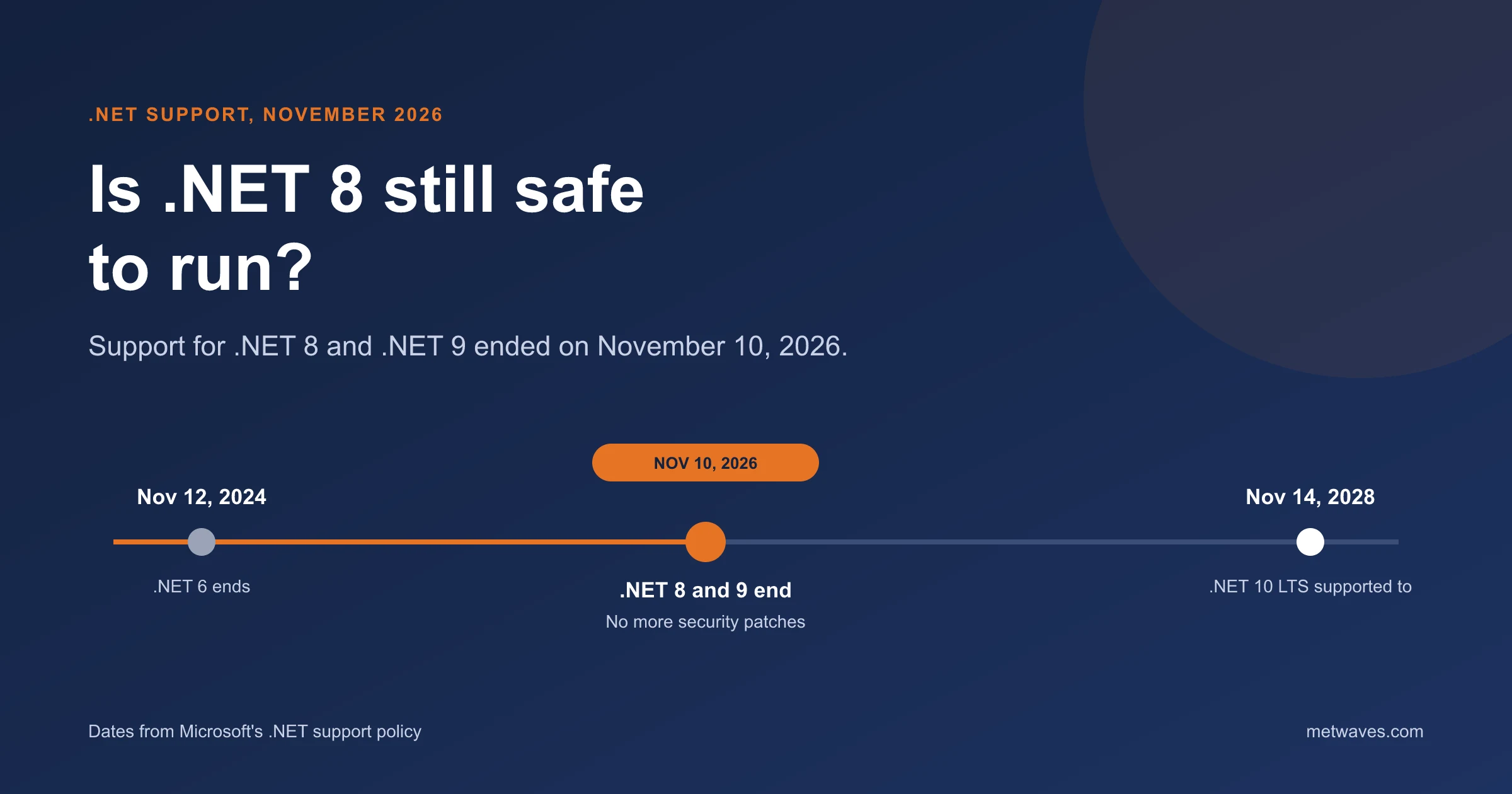
Support for .NET 8 and .NET 9 ended on November 10, 2026. What that means for apps still on them, how risky it is, and how to plan the move to .NET 10.
Learn More >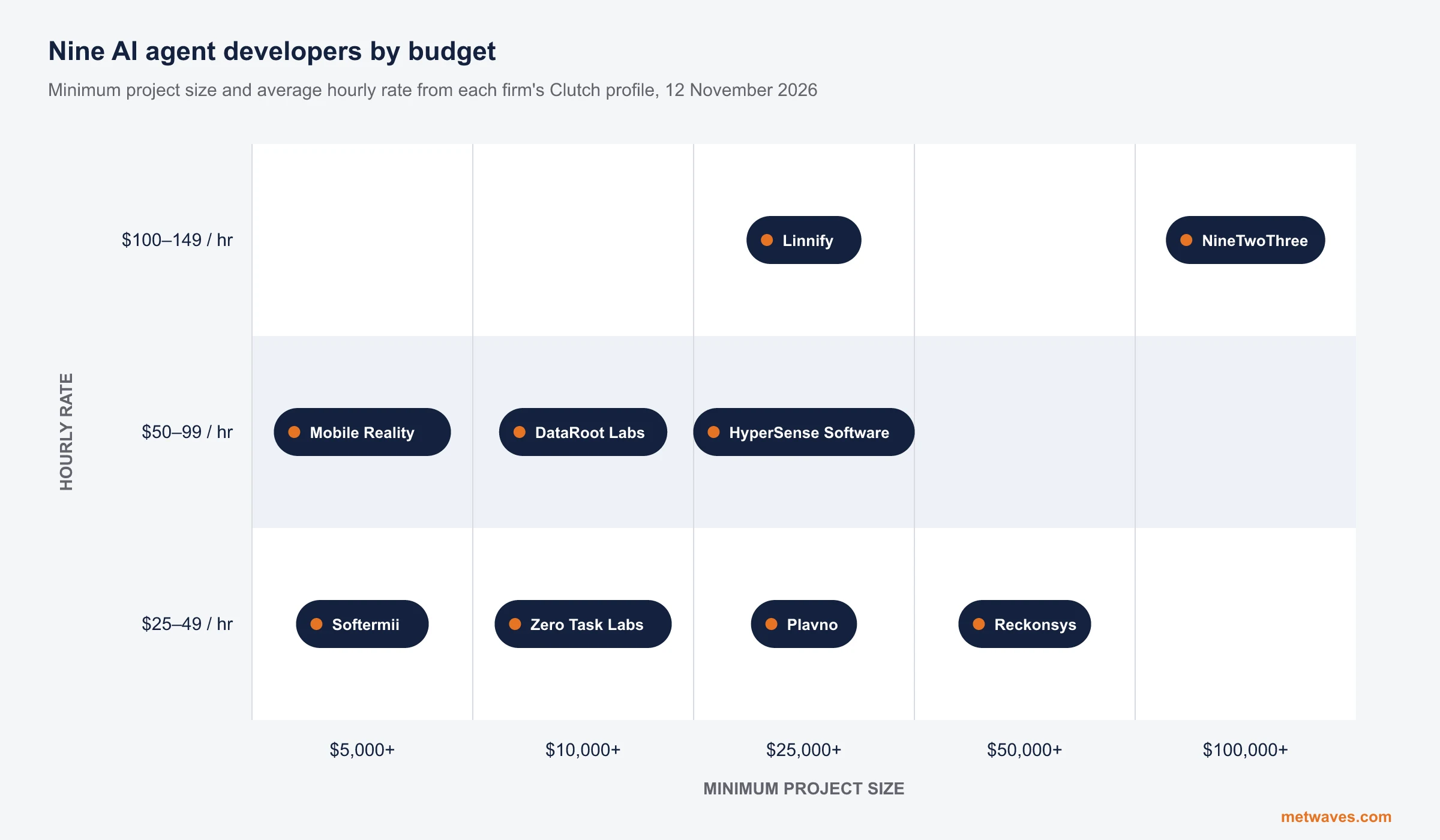 Nikit Nandan
November 12, 2026
Nine AI agent development firms a small or mid-sized business can shortlist, with Clutch figures, minimum budgets and the weaknesses their own clients name. Published by Metwaves, which is not ranked.
Learn More >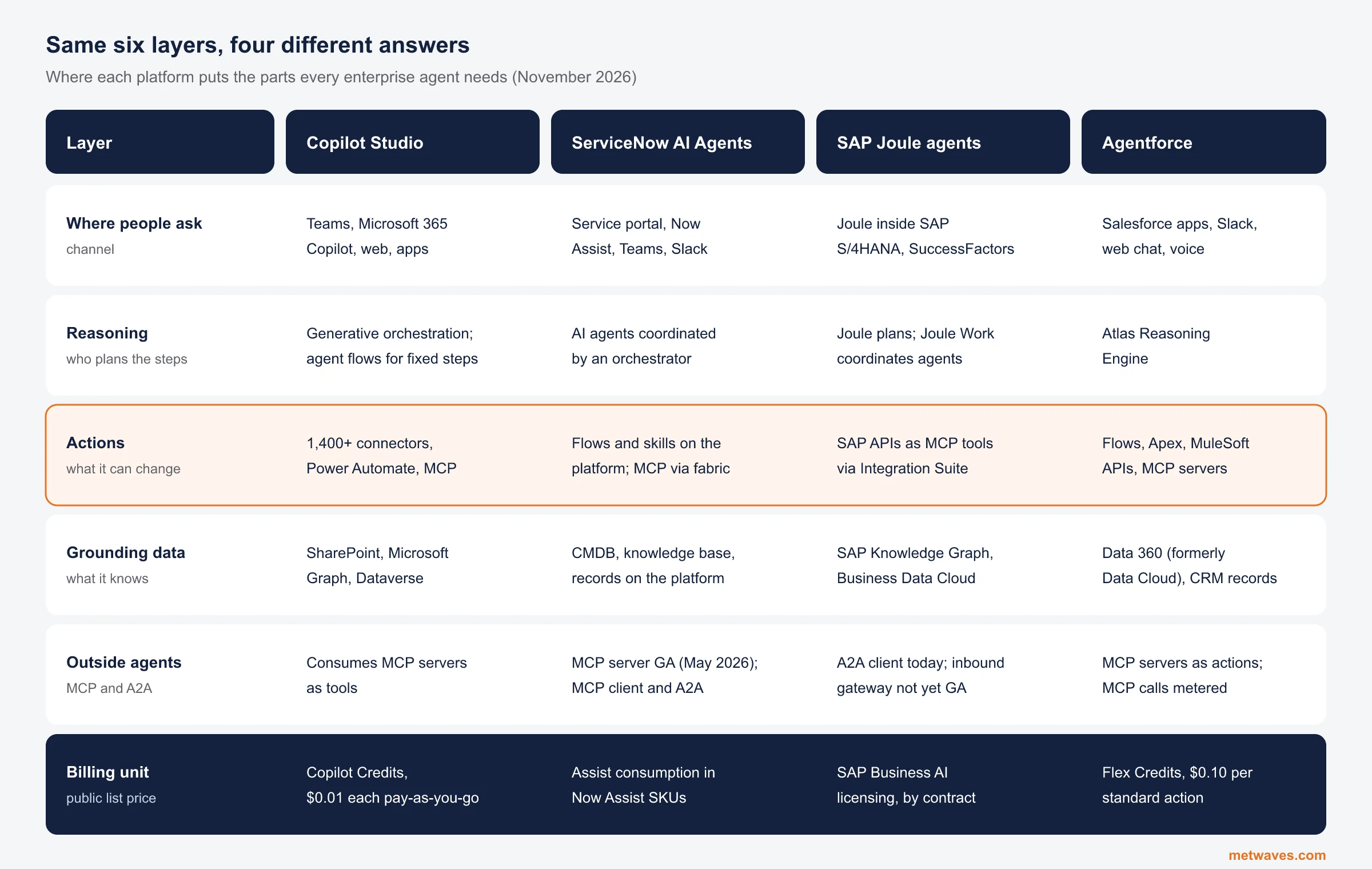 Nikit Nandan
November 12, 2026
An architecture review of the four big enterprise AI agent platforms: where each one reasons, acts, finds its data and connects to outside agents, what it costs, and when a custom build is the better choice.
Learn More >
Let us help you with free analysis & estimate.
Our product expert will contact you within 12 hours.