
AWS cloud consulting for small and mid-sized businesses
Architecture, cost and security reviews of your AWS account, and new systems built on it. For businesses with one to a handful of AWS accounts and no full-time cloud team. The root account, IAM setup and infrastructure code stay with you, and we also build on Microsoft Azure when it fits better.

Trusted by businesses across the world

BUILT ON AWS
TradeAlert: a real-time trading alert platform that handles 10,000 users at once
An experienced stock trader wanted a web platform that sends other investors real-time stock and crypto alerts, with watchlists, trade plans and MetaTrader integration. It had to stay fast under heavy load, because a late alert is useless.
We built it with React and Node.js on AWS, with automatic scaling, load balancers, Redis caching to take load off the market-data APIs, and CloudWatch monitoring. Sign-in uses multi-factor authentication, and access is limited by role.
The client was an experienced stock trader building an alert service. The platform handled up to 10,000 concurrent users, and 85% of beta testers gave positive feedback. Both figures come from our TradeAlert case study.
- Concurrent users10,000handled by the platform
- Beta testers85%positive feedback
- Built withReact, Node.js, Express, MongoDB, Redis on AWS
- ScalingAutomatic scaling, load balancers, CloudWatch
When AWS is the right choice, and when it isn't
AWS suits products whose load rises and falls, like TradeAlert. For a small, steady app it is not always the cheapest home.
Stay on AWS and tidy it up. Moving is rarely cheaper than fixing what you have.
AWS fits well. Pay for capacity as it is used. TradeAlert was built this way.
Usually Azure. Sign-in, licensing and tooling line up. See our Azure page.
Google Cloud may fit better. Keep data where its users already work.
A managed platform or a single server. Often cheaper than a full AWS setup. We will say so.
Choose the AWS region first. Then use only services offered there.
AWS cloud consulting services we provide
AWS cloud consulting is outside help to design, review, secure and reduce the cost of what your business runs on Amazon Web Services. For a small or mid-sized business it usually starts with a written review of your account, followed by a short list of fixes ranked by risk and saving, and then help building or changing systems on AWS. Metwaves works in your own AWS account, so the account, the access and the code stay in your name.
At its core the work is four jobs: reviewing how your account is set up, cutting what you pay for it, putting basic security in place, and building new applications on AWS. Below are six kinds of work, each with a written result you keep: a review, a cleaner bill, a safer account or a system that scales. We build on Azure as well, so we will say when AWS is not the right fit.

AWS architecture and security review
We read your account through a role you can revoke and write down what is risky, fragile or too expensive, ranked by impact. It covers the ground of the AWS Well-Architected Framework: security, reliability, performance, cost and operations. Typical findings: a root user with no MFA, no database restore tested, test servers running all night, logs kept forever. The findings are yours either way.

AWS cost review and clean-up
We find the idle, oversized and forgotten resources behind the bill, make the changes you approve, and track the bill for a month afterwards so you can see the effect: find, resize, switch off, then commit.

Account and security baseline
Separate accounts under AWS Organizations, single sign-on with MFA through IAM Identity Center, audit logs in CloudTrail and backups you have tested.

Infrastructure as code
Your setup written as code and deployed through a pipeline, so every change can be reviewed and the whole setup rebuilt.

New applications built on AWS
Web platforms and APIs designed to scale with use. Our TradeAlert platform runs React and Node.js on AWS with automatic scaling and load balancing. Read the TradeAlert case study.

Migration and data work on AWS
Our AWS consulting services stop where a specialist page does better: moving systems to the cloud is planned on our cloud migration page, and data platforms on our data engineering page.
What a sound AWS setup looks like
A sound setup keeps production apart, puts servers where the internet cannot reach them, and warns you about problems and spending before your customers or finance team notice.
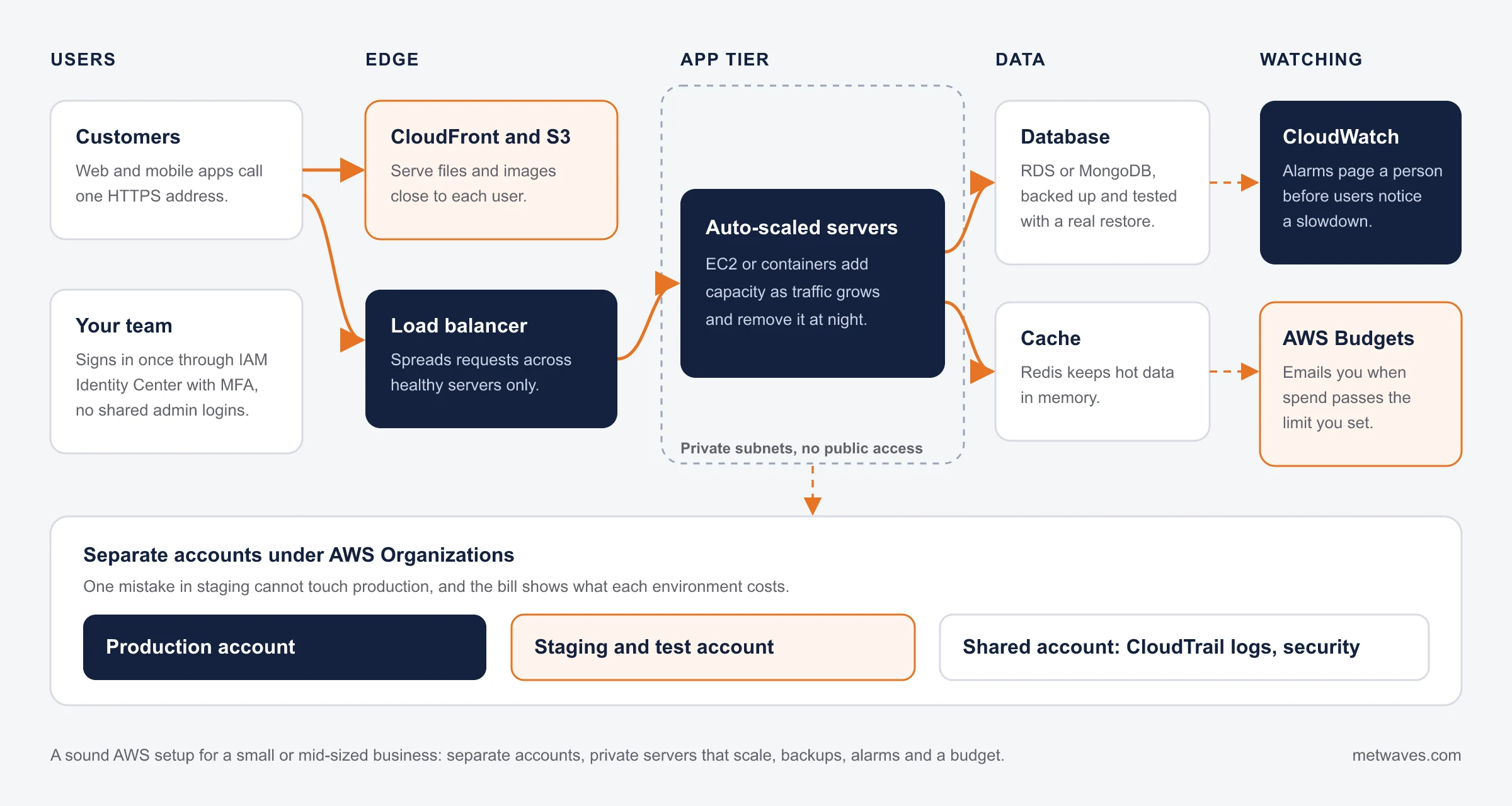

AWS bill rising every month, and nobody can say which service is causing it? Start with a cost review.
Where AWS costs hide in small accounts
Most small AWS bills fall when you resize what is oversized, switch off what is idle and commit to what is steady. These are the places we look first, with the AWS tool that shows each one.
| Cost source | What to check | Typical fix |
|---|---|---|
| Oversized EC2 instances and RDS databases | CPU and memory use in AWS Compute Optimizer | Resize, or move to Graviton instances where your software supports them |
| Test and staging environments running all night | Instance schedules and tags | Stop them out of hours and at weekends |
| NAT gateway and data transfer charges | Cost Explorer grouped by usage type | VPC endpoints for S3 and DynamoDB, fewer cross-zone hops |
| Storage nobody uses | Unattached EBS volumes, old snapshots, S3 buckets without lifecycle rules | Delete, or move to a cheaper storage class |
| CloudWatch Logs | Log groups with retention set to never expire | Set a retention period that matches what you need to keep |
| Steady workloads billed on demand | Usage that runs around the clock for months | Savings Plans or reserved capacity for the steady part only |
Cost Explorer, AWS Budgets, Compute Optimizer and Trusted Advisor show most of this. Set a budget alert first.
When to call us
Signs you need an AWS consultant

A bill nobody can explain
The AWS bill rises every month and nobody can say which service is causing it.

The person who set it up has left
The person who set up the account has left, and nobody else knows how it fits together.

One account, shared logins
Everything runs in one account, and people share the same admin login or access keys.

Backups nobody has restored
Backups exist on paper, but nobody has tried to restore one.

Releases copied by hand
Releases mean someone connecting to a server and copying files by hand.
A launch or a security questionnaire ahead
You are about to launch something that must survive a traffic spike, or pass a customer's security questionnaire.
See our cloud consulting services >

How an AWS engagement runs
Every engagement starts read-only. Nothing changes until you have agreed what to fix. If two or more of the signs above describe your account, a review will usually pay for itself in what it finds.
Tell us what runs on your AWS account, and we will tell you what a review would cover, what it costs and whether it is likely to pay for itself, before you give us any access.
First call and read-only access
We agree what you want from the account. You create an IAM role for us that is read-only and that you can revoke at any time. Everything we do is logged in CloudTrail.
Review
Architecture, security basics, reliability and cost, checked against how your business actually uses the system.
Written findings
Every finding ranked by risk and by saving, with what it takes to fix and a fixed quote for the work.
Fix or build
We make the changes you approve, as code wherever possible, so they can be reviewed and repeated.
Hand over or stay on
Your team takes over with the documentation, or we stay on with monthly check-ins.
We will not sell you a partner badge. Need AWS funding for a proof of concept or migration? Shortlist a tiered AWS Partner.
How to choose an AWS consulting company
AWS Partner tiers (Select, Advanced, Premier) reflect a firm's certified staff and AWS business, and unlock AWS funding. For a review, a cost clean-up or a build, ask who will do the work. Whoever you hire, these show whether you will stay in control of your account.
| A good partner | A warning sign |
|---|---|
| They confirm in writing that you own the root account, the IAM setup and the infrastructure code. | The account is opened under the consultant's name or billing, so you cannot leave without a migration. |
| They give you a written review before they change anything. | Every finding leads to a new service to buy, and none to a saving. |
| They talk about what to switch off and resize, not only what to add. | Changes are made by hand in the console, with no code or record to repeat them. |
| They ask for a temporary role you can revoke, never for shared passwords or long-lived access keys. | Nobody can tell you what the monthly AWS bill will be after the work is done. |
What AWS cloud consulting costs
A review is a fixed price agreed before we start; build and support work is priced by scope or by the month. A cost review should find savings larger than its own fee; if we do not think yours will, we will tell you before you pay for it. These factors move the price most.
Number of accounts and workloads
One account and one app is a short review. Ten untagged accounts take longer to map.
Size and shape of the build
A new platform is priced by scope: screens, integrations, data and how much it must scale.
How much is documented
If nobody knows why a resource exists, we have to trace what depends on it before anything is switched off.
Security and compliance needs
A customer security questionnaire or a regulated industry adds checks and written evidence.
Your AWS bill is separate and paid by you to AWS. A good review lowers it; we show the expected saving for each change before we make it.
Ways to work with us on AWS
Start with a review, or go straight to a build if you already know what you need.

AWS review
For a written list of risks and savings before you change anything. A fixed price, agreed before we start.

Cost clean-up
For a bill that has grown faster than the business. A fixed price for the changes in the review.

Build on AWS
For a new platform, API or product. A fixed scope, or a dedicated team for longer builds.

Ongoing AWS support
For changes, monitoring and monthly check-ins. Time and materials, billed monthly.
Where AWS work connects to the rest of your systems
An AWS review often leads to one of these. Each page covers the work on either side of it.
| Service | When it fits |
|---|---|
| Cloud migration | Move servers, apps and data to AWS or Azure one step at a time, with a way back. |
| Cloud consulting | Choose between AWS, Azure and Google Cloud before you commit. |
| Microsoft Azure | When your company runs on Microsoft 365, .NET and SQL Server. |
| Data engineering | Pipelines and warehouses for reporting, on the cloud you already use. |
Our AWS tech stack
TradeAlert runs on the first group, with Amazon CloudWatch, load balancing and automatic scaling. The review decides which of the second your workload needs, along with Amazon RDS, AWS Organizations, IAM Identity Center, AWS Budgets and Cost Explorer.




Frequently asked questions
Straight answers on AWS cost, access, partner status and ownership.
An AWS consultant reviews how your AWS account is set up, fixes what is risky or costs too much, and designs or builds systems on AWS. For a smaller business that means a written review first, then a short list of changes.
A review is a fixed price agreed before we start, based on how many accounts and workloads you run. Fixes and new builds are quoted by scope, and ongoing support is priced by the month. A cost review should find savings larger than its own fee; if we do not think yours will, we will tell you before you pay for it.
We do not show an AWS Partner tier or AWS competency on this page, so do not choose us for AWS partner funding. Select, Advanced and Premier tier partners can apply for AWS funding such as Partner Opportunity Acceleration for proofs of concept and migrations; find them in the AWS Partner Solutions Finder.
You create an IAM role for us, read-only for the review, and you can revoke it at any time. Every action we take is recorded in CloudTrail in your account. We never ask for shared passwords or long-lived access keys.
If your company runs on Microsoft 365, SQL Server and .NET, Azure is usually simpler. If your product's load rises and falls, or part of it already runs on AWS, AWS usually fits. We build on both.
Usually, yes: by resizing oversized servers, stopping idle test environments at night, cleaning up forgotten storage and logs, and moving steady workloads to Savings Plans. We show the expected saving per change first.
Yes. Migrations are planned and tested one system at a time, with a way back for each step. Our cloud migration page explains how we plan them.
Usually because one person built the account and nobody has checked it since, because skills such as account structure, networking and Savings Plans are needed once a year, and because an outside reviewer will point out what to remove.
You own the AWS accounts, the infrastructure code, the documentation and any application code we write. We sign an NDA before you share details of your systems.
INSIGHTS & NEWS
Discover IT Industry Insights and Technology Trends
 Nikit Nandan
November 12, 2026
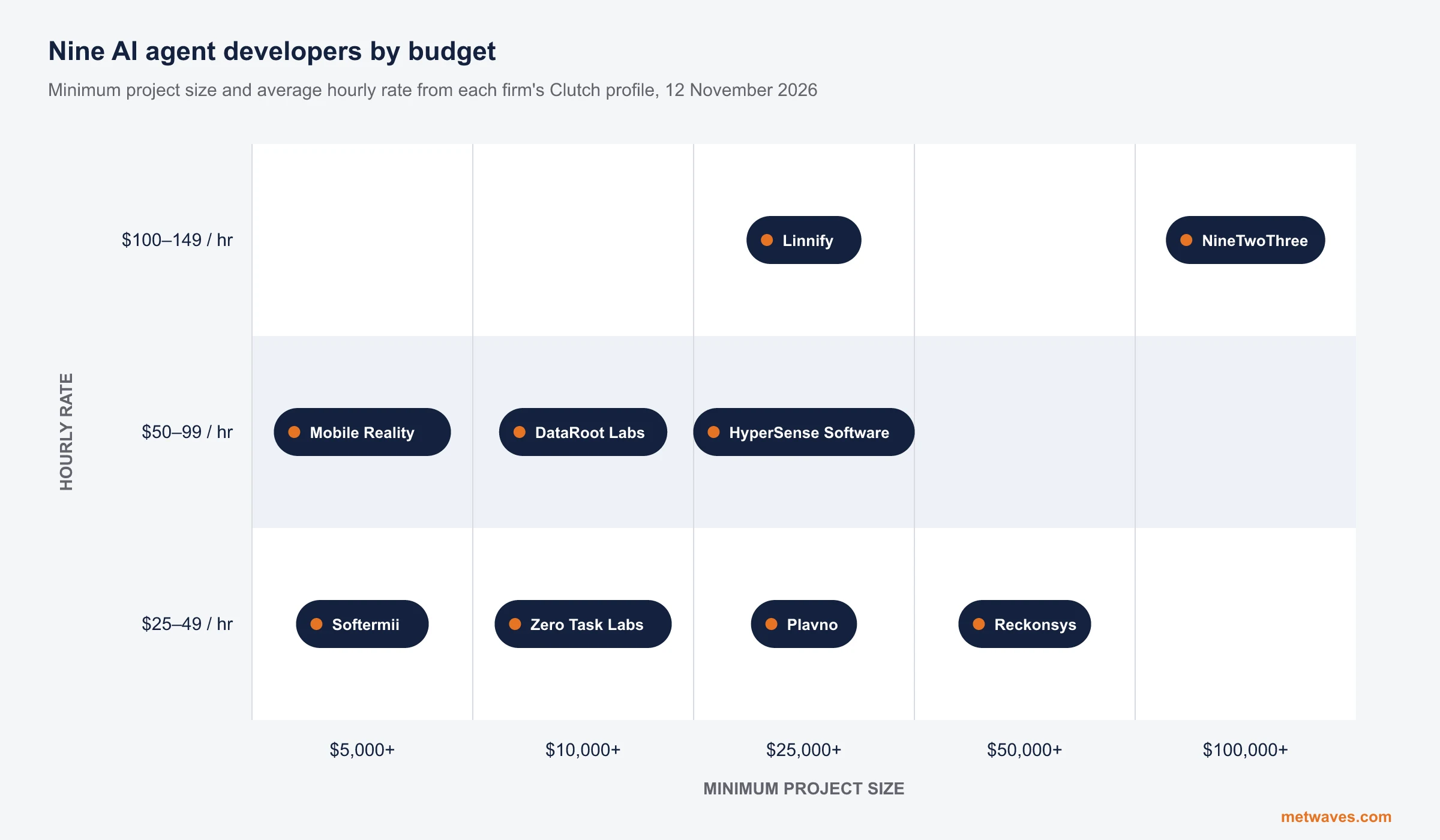
Top AI agent development companies for small and mid-sized businesses (2026)
Nine AI agent development firms a small or mid-sized business can shortlist, with Clutch figures, minimum budgets and the weaknesses their own clients name. Published by Metwaves, which is not ranked.
Learn More >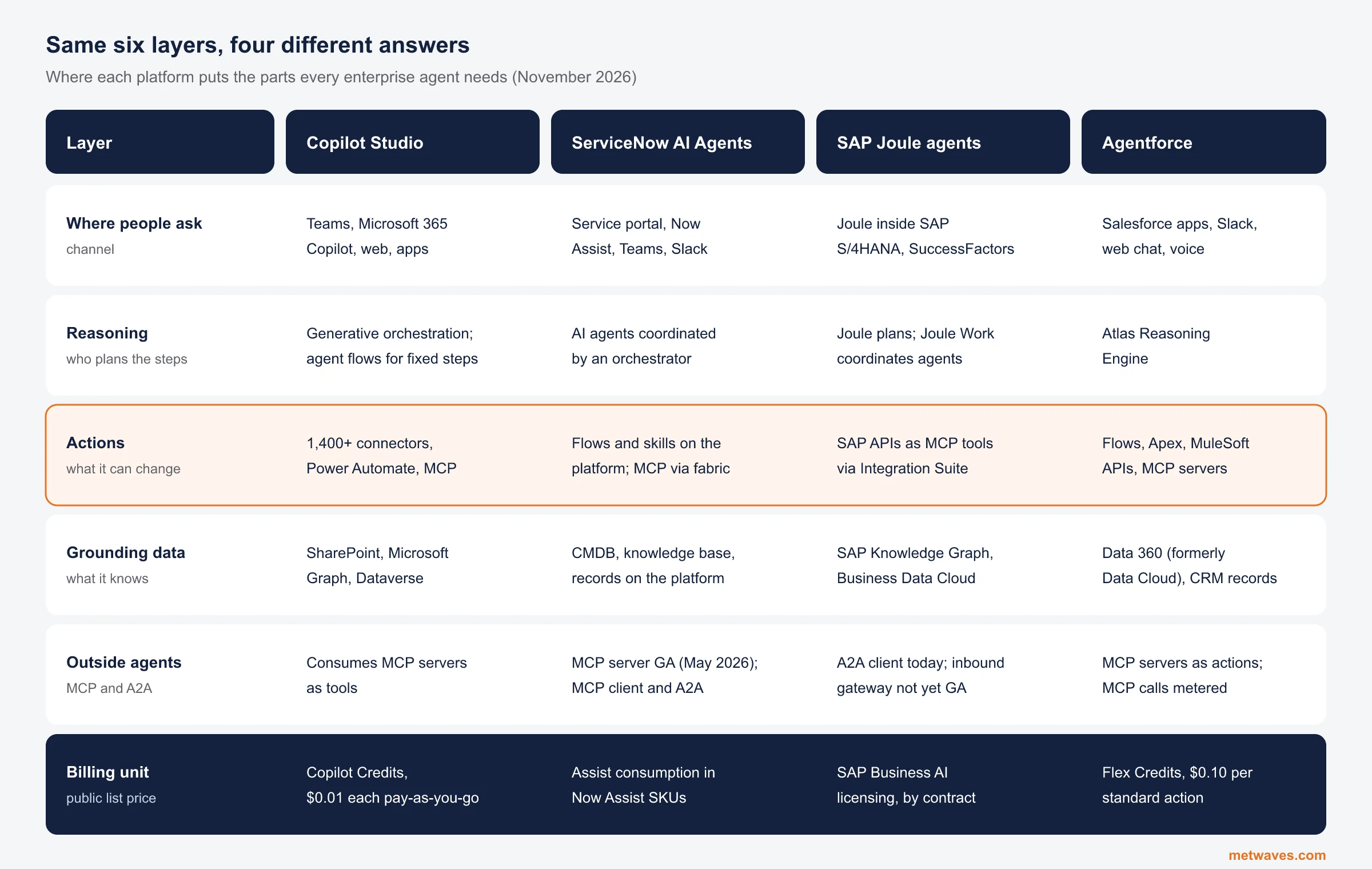 Nikit Nandan
November 12, 2026
Enterprise AI Agent Platforms Compared (2026)
An architecture review of the four big enterprise AI agent platforms: where each one reasons, acts, finds its data and connects to outside agents, what it costs, and when a custom build is the better choice.
Learn More > Nikit Nandan
November 01, 2026
Top custom software development companies for small and mid-sized businesses (2026)
Ten custom software firms a small or mid-sized business can shortlist, with Clutch figures, minimum budgets and the weaknesses their own clients name. Published by Metwaves, which is not ranked.
Learn More >Let’s build your idea!
Let us help you with free analysis & estimate.
Our product expert will contact you within 12 hours.