AI Chatbot Development Services
Chatbots that answer from your own content and hand off to a person when they should
- What is my deductible?
- What are the tuition fees for international students?
- I need help booking an SUV.
- Am I covered for this doctor's visit?
We build website, helpdesk and customer-service chatbots that answer only from documents you approve, show where each answer came from, and pass the conversation to your team when they are unsure. Three of them are live below: ask them anything.
What are AI chatbot development services?
AI chatbot development services design, build and run chatbots that answer questions for customers or staff. A well-built chatbot answers only from content you approve, such as help articles, policies and product documents, shows where each answer came from, and passes the conversation to a person when it is not sure. Metwaves builds them for websites, Microsoft Teams and customer service, and you can try three of our chatbots live before you talk to us.
Models and platforms we build chatbots with
- Google Gemini
- Dialogflow CX
- Copilot Studio
- Azure OpenAI
- OpenAI GPT
- Anthropic Claude
- Azure AI Search
- LangGraph
- Microsoft Teams
- SharePoint
- Google Cloud
- Microsoft Azure
WHEN TO CALL US
Signs your business is ready for an AI chatbot
If two or more of these sound familiar, a chatbot built on your own content will usually pay for itself in time saved.
- The same 20 questions fill your inbox or helpdesk queue every week, and the answers already exist in a policy or help article.
- Staff wait on IT or HR for answers that are written down somewhere in SharePoint, but nobody can find them.
- Website visitors arrive after hours and leave because nobody is there to answer a simple question.
- You tried an off-the-shelf bot and it gave generic or wrong answers, so customers stopped using it.
- Your team wants answers inside Microsoft Teams or on your website, not in yet another tool.
- Every enquiry lands with a person, including the ones that only need a link to the right page.
CHATBOTS WE BUILD
Custom AI chatbot development for support, staff and sales
Six kinds of chatbot, one way of keeping them accurate: approved sources, citations and a clear handoff.
Customer support chatbot
Answers product, order and policy questions on your website from your help centre and documents, and opens a ticket with the full conversation when it cannot help. Customers get an answer at any hour; your team gets fewer repeat questions and better tickets.
Internal IT and HR helpdesk bot
Runs in Microsoft Teams, answers from SharePoint policies and respects who may see which document. Built with Copilot Studio when your firm runs on Microsoft 365.
Document Q&A
Ask contracts, manuals and policy libraries questions in plain English and get the paragraph that answers it.
Sales and enquiry assistant
Answers pre-sales questions, collects what your team needs to know and books the call.
Booking and account assistants
Guides customers through reservations, plan details or course choices using your own data, like our car rental, healthcare plan and university demos.
Chatbot audit and rebuild
Already have a bot that gives poor answers? We test it against your real questions, show where it fails and fix the content, retrieval or model behind it.
HOW IT WORKS
How an accurate AI chatbot works
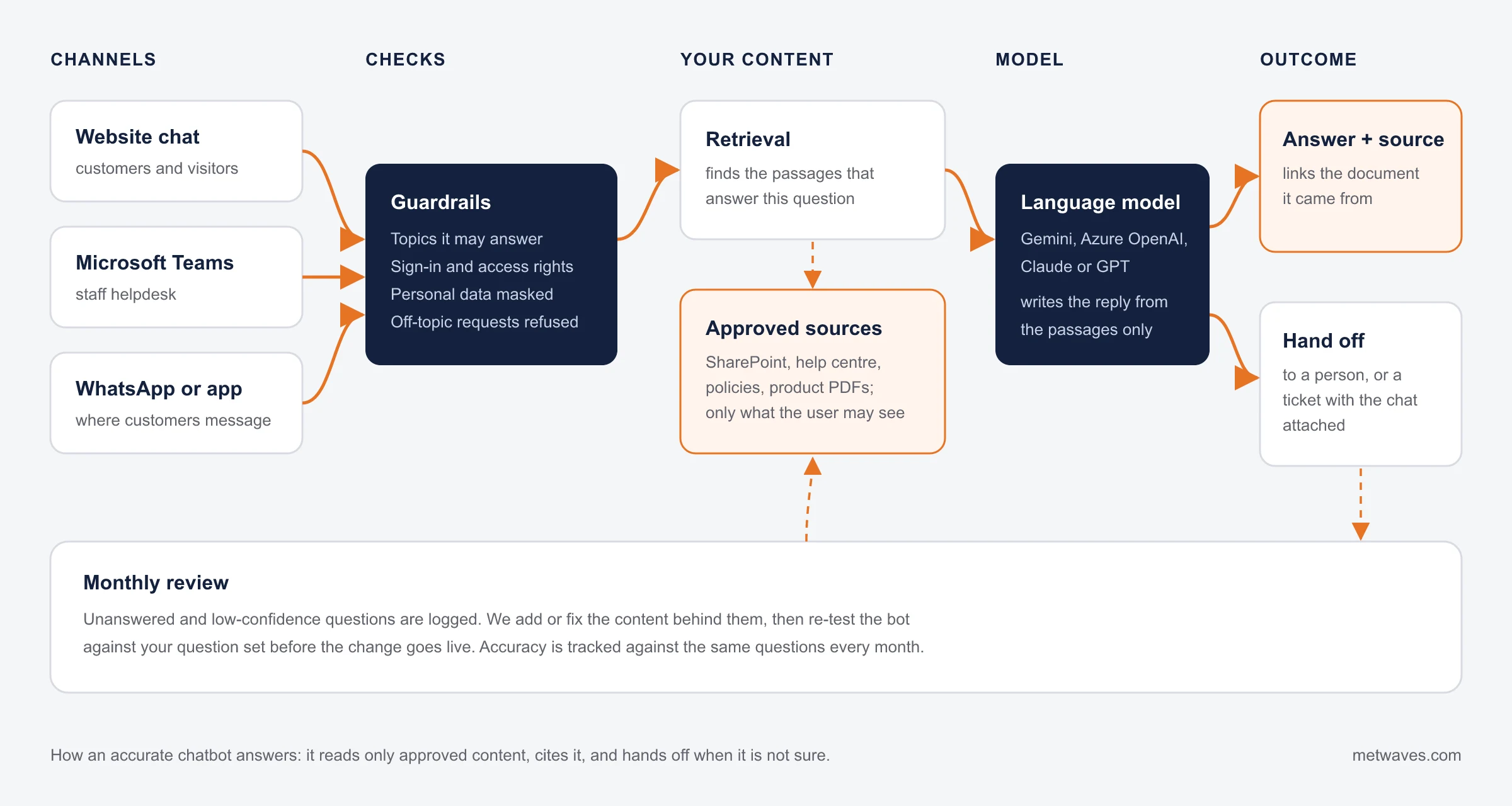
Most chatbots fail because they guess. Ours check what the person may ask, find the passages that answer it in your approved content, and only then let the language model write the reply. If the answer is not in your content, the bot says so and hands off.
INTEGRATIONS
One assistant, connected to the systems you already run
The chatbot reads only from the sources you approve and writes only to the systems you allow, such as your helpdesk for tickets or your CRM for leads.
- Website chat
- Microsoft Teams
- Messaging apps
- SharePoint and policies
- Helpdesk and ticketing
- CRM and booking systems
LIVE DEMOS
Try three of our chatbots before you talk to us
Each demo answers from its own content. Ask the sample questions, then try your own. Demos accept messages up to 300 characters and 40 messages a day.
Healthcare plan assistant
Explains plan benefits, deductibles and coverage, and helps find an appointment slot.
Try asking
- What is my deductible?
- Am I covered for this doctor's visit?
Gemini Pro on Google Cloud
Open the demoUniversity helpdesk
Answers prospective and current students on courses, fees, deadlines and visas.
Try asking
- What are the tuition fees for international students?
- How do I apply for a master's program?
Gemini Pro on Google Cloud, trained on a public university website
Open the demoCar rental assistant
Helps customers choose and reserve the right vehicle for a trip.
Try asking
- I need help booking an SUV.
- I need to reserve a van.
Gemini Pro on Google Cloud
Open the demoResults from a shipped chatbot
of staff requests resolved without a person by our Teams helpdesk agent
from start to live, including content clean-up and a pilot group
chatbot demos you can try on this site today
Source: our Copilot Studio helpdesk case study for a UK professional services firm.
MEASURING RESULTS
How to measure whether your chatbot is working
Agree these numbers before launch, so the bot is judged on results rather than on how clever it sounds.
| Measure | What it tells you | Why it matters |
|---|---|---|
| Resolution rate | Share of conversations the bot finishes without a person | The main return on the project. Our Teams helpdesk agent resolves 30–50% of staff requests. |
| Answer accuracy | Share of test questions answered correctly, from the right source | Measured on a fixed question set before launch and after every content change. |
| Handoff quality | Whether the ticket a person receives has the question, context and transcript | A bad handoff makes the customer repeat themselves, which costs more than no bot. |
| Unanswered questions | Questions the bot could not answer, grouped by topic | Each month this list tells you which content to write or fix. |
| Customer satisfaction | Thumbs up or down, or a one-question survey at the end of a chat | Read alongside resolution: a bot that closes chats but annoys people is not working. |
CASE STUDY
A Teams helpdesk agent that resolves 30–50% of staff requests
A professional services firm in the United Kingdom wanted staff to get answers to everyday IT, HR and policy questions inside Microsoft Teams. The answers already existed, spread across SharePoint sites where old and current versions sat side by side.
We cleaned up the content with the firm's owners, built a Copilot Studio agent that answers from SharePoint through an Azure AI Search index, cites the policy it used, respects document permissions, and opens a ticket with the conversation attached when it cannot help.
- Client Professional services firm, United Kingdom
- Built with Copilot Studio, Teams, SharePoint, Azure OpenAI, Azure AI Search
- Result 30–50% of staff requests resolved without a person
- Time to live 8 to 12 weeks
CHOOSING
Off-the-shelf chatbot, custom chatbot or AI agent?
Answer three questions to see what usually fits. We will tell you if a ready-made tool is enough.
Must it change records in your systems?
Refunds, bookings, updates in your CRM
Do answers come from many documents?
Policies, manuals, contracts, help articles
Do your staff work in Microsoft 365?
Teams, SharePoint, Outlook
An AI agent
It needs to take actions, so it needs permissions, guardrails and human review. See AI agent development.
A Copilot Studio assistant
Your content and people are already in Microsoft 365, so build where your staff work.
A custom chatbot over your documents
Retrieval from approved content, with citations and a handoff to your team.
An off-the-shelf chatbot
For a few FAQs on one website, a ready-made tool such as Intercom or Tidio is cheaper. We will say so.
INDUSTRIES
AI chatbots by industry
The job changes by industry, and so do the rules about what a bot may see and say.
| Industry | Common chatbot jobs | What to watch |
|---|---|---|
| Healthcare | Plan benefits, appointments, clinic information | Patient data rules such as HIPAA in the US: the bot answers general questions without personal data unless it is built and hosted for it. Healthcare demo |
| Education | Courses, fees, admissions, student services | Student records stay out of a public bot; account questions need sign-in. University demo |
| Professional services | Staff IT, HR and policy questions | Document permissions must carry through, so people only see what they may open. Case study |
| Travel and rental | Bookings, changes, vehicle and trip options | Live availability comes from your booking system, never from the model. Car rental demo |
| Retail and eCommerce | Order status, returns, product questions | Order lookups need the customer to identify themselves before the bot reads the order. |
| Financial services | Product and account FAQs, document requests | No account actions without strong sign-in, and every answer traceable to an approved source. |
HOW WE WORK
How we build your chatbot, from content to production
Each step ends with something you can test, so you never wait months to see the bot answer a real question.
- 01First
Scope and content audit
We agree what the bot may answer, which sources it may use and where it hands off. We also collect a set of real questions your customers or staff ask; it becomes the test set.
- 02Next
Prototype on your content
A working bot on your real documents, not a demo dataset, so you judge it on the questions that matter to you.
- 03Before launch
Test with real questions
We score every answer in the test set for accuracy and source, fix the content or retrieval behind the failures, and repeat until the scores hold.
- 04Launch
Go live on your channels with handoff
Website, Teams or another channel, with a clear route to a person or ticket. Our Teams helpdesk agent went from start to live in 8 to 12 weeks.
- 05Every month
Monitor and improve
We review unanswered and low-rated questions, add or fix content, and re-run the test set before each change.
COST
What drives the cost of AI chatbot development
We quote after we have seen your content and channels. These are the factors that move the price most.
- Number and state of content sourceshigh impact
One clean help centre is quick to connect. Ten SharePoint sites with old and new versions side by side need clean-up first, as they did in our Teams helpdesk project.
- Integrations and actionshigh impact
Answering questions is one job. Looking up an order, booking a slot or opening a ticket in your system means building and testing each connection.
- Channelsmedium impact
Each channel (website, Teams, a messaging app) has its own setup, sign-in and testing.
- Accuracy bar and testingmedium impact
A bot that answers policy or health questions needs a larger test set and more review rounds than a product FAQ bot.
- Languageslow impact
Each extra language needs its own test questions, and sometimes its own content.
There is also a monthly running cost: model usage per conversation, hosting, and the monthly review that keeps answers current. Ask any vendor for both numbers.
WAYS TO WORK WITH US
Ways to work with us
Every engagement starts with a call about your questions, content and channels.
| Model | Best for | How it is priced |
|---|---|---|
| Fixed-scope chatbot build | A defined set of sources, channels and handoffs | Fixed quote after scoping |
| Monthly improvement and support | A live bot that needs content updates, monitoring and new topics | Monthly |
| Audit of an existing bot | A bot that is live but gives poor answers | Fixed quote |
TECHNOLOGY STACK
The models and platforms below run in our live demos, our Teams helpdesk agent and our AI agent projects. We choose per project and can change the model later without rebuilding the bot.
Models

Google Gemini

OpenAI GPT

Anthropic Claude
Azure OpenAI
Platforms

Copilot Studio

Microsoft Azure
Dialogflow CX · Google Cloud · LangGraph
Content and search
Azure AI Search · SharePoint · Retrieval-augmented generation (RAG)
Engineering

Python

Node.js

AWS
CHOOSING A PARTNER
How to choose an AI chatbot development company
Questions that separate a team that has run chatbots in production from one that has only built demos.
Good signs
- They let you try a working bot before you sign, not only slides or a video.
- They ask for your real customer or staff questions in the first week and test against them.
- They show how the bot answers a question it cannot answer, and where the handoff goes.
- They tell you the monthly running cost (model usage, hosting, improvement), not only the build price.
- You own the content, the configuration, the conversation logs and the code.
Warning signs
- Accuracy is promised, but nobody can say how it will be measured.
- The bot answers from the open internet or from the model's general knowledge, not only from your content.
- No plan for who reviews unanswered questions after launch.
- The design depends on one model or platform that you cannot change later.
- The vendor recommends a custom build for a handful of FAQs that an off-the-shelf tool would cover.
RELATED SERVICES
Where chatbots meet the rest of your systems
AI agent development
When the assistant must take actions in your systems, not only answer.
Software integration
Connect the bot to your CRM, helpdesk, booking or accounting tools.
PoC to production
Prove an AI assistant works on your own data before you fund the full build.
Custom chatbot or ready-made?
Our guide to choosing between building and buying a chatbot.
Send us 20 questions your customers ask
We will show you how a chatbot built on your content would answer them, and tell you honestly whether a ready-made tool would do the job.
Book a Chatbot CallQUESTIONS & ANSWERS
If you don't see an answer to your question, you can send us a message from our contact form.
It depends mostly on how many content sources the bot reads, which systems it must connect to and how many channels it runs in. A product FAQ bot on one website is a small project; a helpdesk agent that reads several SharePoint sites and opens tickets is a larger one. There is also a monthly running cost for model usage, hosting and improvement. We quote after we have seen your content and channels, so the price reflects your project rather than a package.
A first working version on your own content usually comes early in the project, so you can judge it on real questions. Our Microsoft Teams helpdesk agent went from start to live in 8 to 12 weeks, including content clean-up, testing and a pilot group.
The bot answers only from content you approve, shows the source for each answer, and says it does not know when the answer is not there. Before launch we test it against a set of real questions and fix the content or retrieval behind every wrong answer. After launch, unanswered and low-rated questions are reviewed every month.
Our live bots run on websites and in Microsoft Teams. Messaging apps such as WhatsApp connect through their business APIs, and we confirm the channel, sign-in and handoff during scoping.
A chatbot answers questions. An AI agent also takes actions in your systems, such as updating a record, booking a slot or posting an invoice, within the permissions you give it. If you need actions, see our AI agent development service.
You do. The content, configuration, conversation logs and any code we write belong to you and live in your accounts where the platform allows it.
Yes. We test your current bot against your real questions, show which answers fail and why, and fix the content, retrieval or model settings behind them, or recommend a rebuild if that is cheaper.
Retrieval-augmented generation means the chatbot first searches your approved content for the passages that answer a question, then has the language model write the reply from those passages only. It is what lets a chatbot answer from your policies and products instead of guessing, and it is how each answer can link to its source.
With the enterprise model services we build on, such as Azure OpenAI, your documents and conversations are not used to train the provider's public models. We confirm the data terms for the model you choose during scoping, and we keep your content in your own cloud account where the platform allows it.
Ask to try a bot they have built, ask how it handles a question it cannot answer, and ask for the monthly running cost as well as the build price. The checklist above lists the signs we would look for.
INSIGHTS & NEWS
Discover IT Industry Insights and Technology Trends
 Nikit Nandan
November 12, 2026
Top AI agent development companies for small and mid-sized businesses (2026)
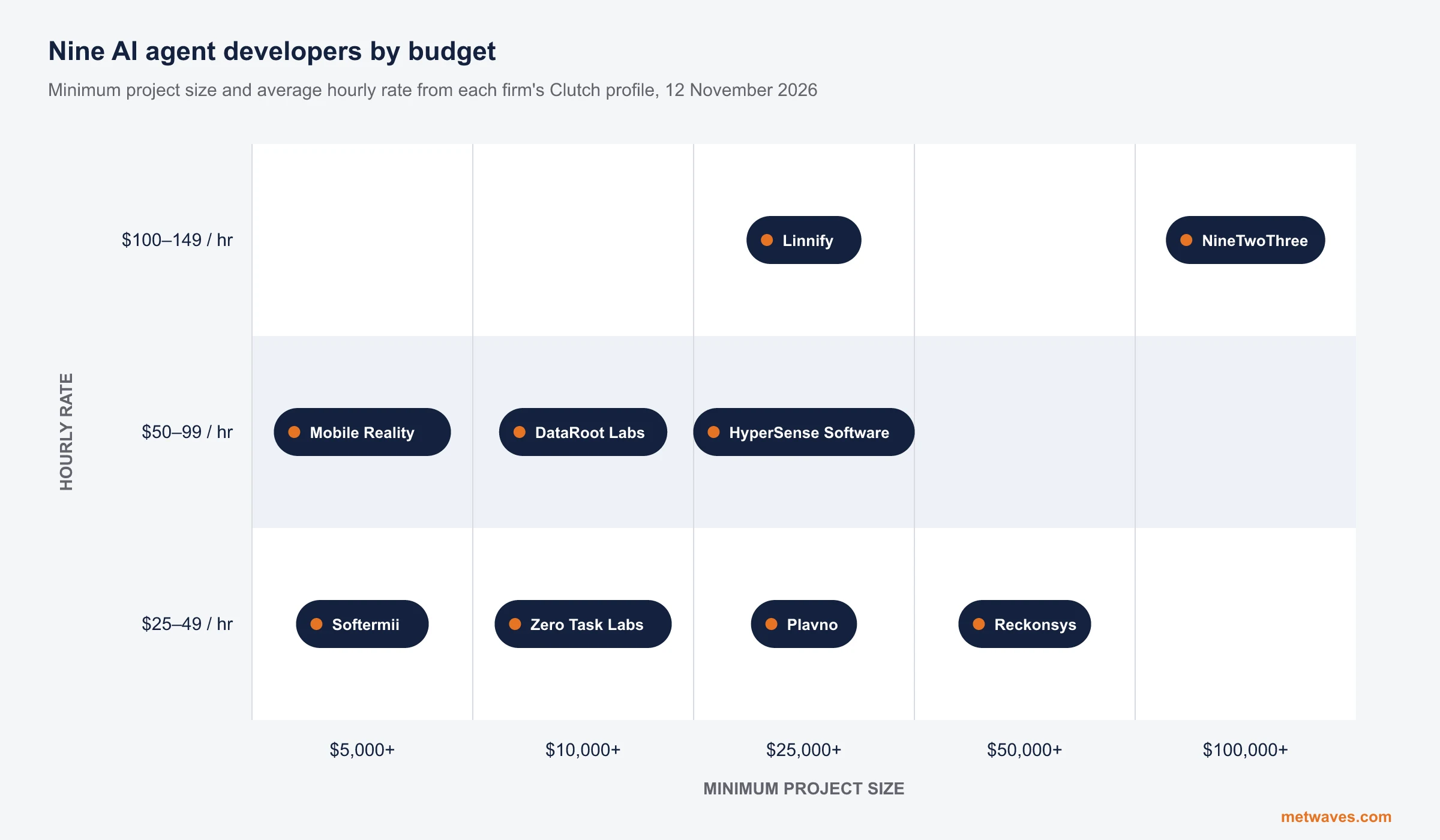
Nine AI agent development firms a small or mid-sized business can shortlist, with Clutch figures, minimum budgets and the weaknesses their own clients name. Published by Metwaves, which is not ranked.
Learn More >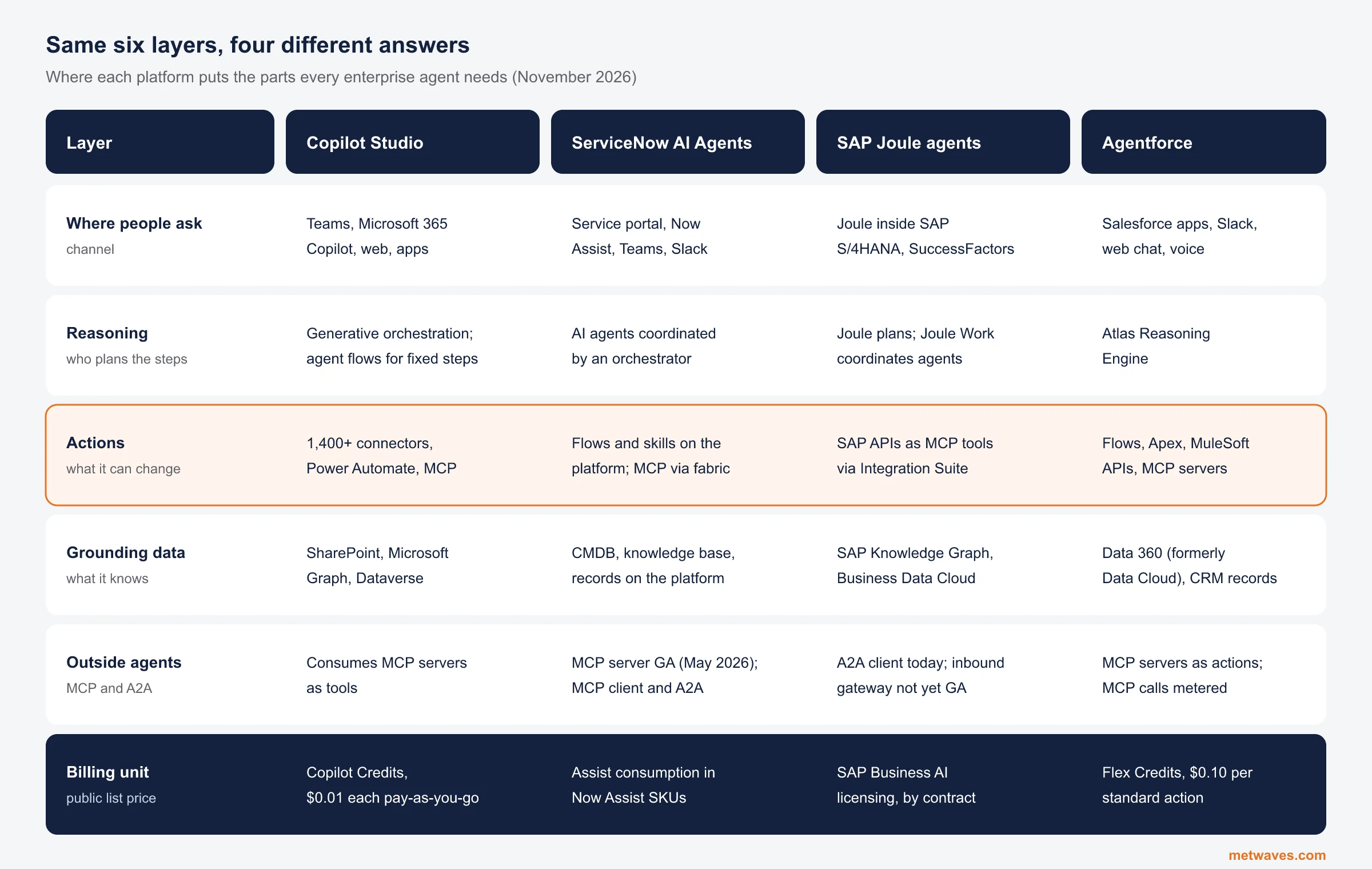 Nikit Nandan
November 12, 2026
Enterprise AI Agent Platforms Compared (2026)
An architecture review of the four big enterprise AI agent platforms: where each one reasons, acts, finds its data and connects to outside agents, what it costs, and when a custom build is the better choice.
Learn More > Nikit Nandan
November 01, 2026
Top custom software development companies for small and mid-sized businesses (2026)
Ten custom software firms a small or mid-sized business can shortlist, with Clutch figures, minimum budgets and the weaknesses their own clients name. Published by Metwaves, which is not ranked.
Learn More >Let’s build your idea!
Let us help you with free analysis & estimate.
Our product expert will contact you within 12 hours.