EdTech Software Development for Schools, Colleges and Universities

Schools, colleges, universities and course providers run on software that students judge in seconds and regulators judge in detail. Our edtech software development covers student and applicant helpdesks, learning platforms, and the integrations between your LMS, student information system and CRM, for education teams and edtech companies in the US, UK, Canada and Australia.

Our own university helpdesk demo · The same pattern live in Teams for a UK professional services firm

THE EDUCATION INDUSTRY

What the education industry is, and what it runs on

The education industry is every organisation that teaches, assesses or supports learners: public and private schools, colleges and universities, vocational and corporate training providers, and the edtech companies that sell software to all of them. Most of it is publicly funded or publicly regulated, and that shapes how it buys software: by term, with privacy and accessibility checks first.

Public schools are paid for by government in all four markets we serve, through school districts and boards in the US and Canada, local authorities and academy trusts in England, and state education departments in Australia. Universities rely more on tuition fees, international students and research funding.

Under all of it sits a common stack: a student information system (SIS) for enrolment and records, a learning management system (LMS) such as Canvas, Moodle, Blackboard or Brightspace for courses, a CRM for admissions, and single sign-on. EdTech software development mostly happens in the gaps between those systems, and in the student-facing apps and assistants on top of them.

49.6 millionstudents in US public elementary and secondary schools, fall 2022NCES Fast Facts, US Department of Education
8.92 millionpupils in schools in England in 2025/26Department for Education, Schools, pupils and their characteristics
4.16 millionstudents in Australian schools in 2025, 62.8% of them in government schoolsAustralian Bureau of Statistics, Schools 2025

K-12 schools

Public and private schools, districts, boards and academy trusts

  • Student information systems
  • Parent apps
  • Safeguarding tools

Higher education

Universities and colleges, home and international students

  • Admissions CRM
  • LMS
  • Student portals

Training providers

Vocational colleges, apprenticeships and professional bodies

  • Course platforms
  • Certificates
  • Employer reporting

EdTech companies

Start-ups and scale-ups selling to schools, universities or learners

  • SaaS platforms
  • LMS integrations
  • Mobile apps

Public bodies

Education departments, exam boards and regulators

  • Data collection
  • Reporting
  • Exams systems

CHALLENGES

The challenges the education industry faces

Six problems schools, universities and edtech companies bring to software teams, and where software helps.

01

The same questions every intake

What it looks like

Admissions and student services answer the same questions about fees, deadlines, visas and accommodation each term, and the queue peaks when staff are busiest.

Where software helps

An assistant that answers from approved pages, shows its sources, and passes everything else to a person with the conversation attached.

02

Information spread across dozens of pages

What it looks like

Course, fee and deadline details live on department sites, PDFs and portals, and older versions stay online, so answers contradict each other.

Where software helps

One source for course and fee data, published to the website, the portal and the assistant from the same place, with superseded pages taken out.

03

Systems that do not talk to each other

What it looks like

The LMS, SIS and CRM each hold part of the student, so staff re-key enrolments, class lists and grades, and the mistakes surface at census dates or exam boards.

Where software helps

Integration through LTI 1.3, OneRoster or vendor APIs, so a student is created once and flows to every system that needs them.

04

Tools that do not fit the course model

What it looks like

Rolling start dates, apprenticeships, competency assessments or certificates do not map onto a standard LMS, so staff run them in spreadsheets beside it.

Where software helps

Extend the LMS with a tool for the part that is different. Build a custom platform only when the learning model is the product.

05

Privacy and accessibility reviews

What it looks like

Every new tool needs a privacy review before it reaches students, public institutions face web accessibility rules, and many edtech products stall at procurement.

Where software helps

WCAG 2.1 or 2.2 AA and privacy by design from the first screen, with the documents reviewers ask for ready before procurement.

06

Small IT teams and fixed budgets

What it looks like

Schools and many colleges have fixed budgets and few developers, so tools that need constant attention end up unused.

Where software helps

Small releases on platforms the institution already licenses, with running costs stated up front.

AI IN EDUCATION

How AI can help education, and where a teacher must decide

AI is most useful where questions repeat and nothing is decided about a student. The further a use moves towards grades and support decisions, the more review and paperwork it needs.

Light rules

Student and applicant helpdesk

Answers questions about courses, fees and deadlines from approved pages, with a link to each source.

Person in chargestudent services take over anything personal, financial or about wellbeing.

Built on public content, so privacy risk is low. Tell users they are talking to an assistant.

Light rules

Staff IT and HR helpdesk

Answers policy, leave and IT questions in Teams from approved documents, and opens a ticket when it cannot help.

Person in chargethe service desk handles every hand-off, with the conversation attached.

Respect document permissions, so staff only see what they are allowed to open.

Light rules

Course content drafting

Drafts quizzes, summaries and revision material from the course's own content for teachers to edit.

Person in chargethe teacher reviews and publishes every item.

Check copyright on the source material and the AI provider's terms on training with your content.

Student data rules

Personalised practice and tutoring

Suggests the next activity and gives hints based on a learner's work, so practice fits the student.

Person in chargeteachers set the limits and can see what each student was shown.

Student data reaches the model. In England, the DfE's generative AI product safety standards cover products used in schools and colleges.

Decides about a student

Feedback and marking support

Drafts feedback on written work against the course rubric, for the marker to accept, change or discard.

Person in chargethe teacher or marker decides every grade.

A grade is a decision about a student. Keep AI to drafts and record who approved each result.

Decides about a student

Early warning on progress

Flags students who may need support, from attendance, LMS activity and grades.

Person in chargetutors decide whether and how to contact a student.

This is profiling. The DfE says profiling pupils usually needs a data protection impact assessment.

Before any AI touches student data

  • A contract that stops the AI provider training on student data
  • Only approved, current content in the assistant's sources
  • A person decides grades, admissions and support
  • Every answer logged with its sources
  • Students told when they are talking to an AI assistant
  • Testing with made-up student records, never real ones

STUDENT PRIVACY IN THE US

The US rules education software has to respect

Education software holds student records and often serves minors, so privacy and accessibility come first. In the US that means five sets of rules, and each reaches different organisations.

Federal law since 1974

FERPA

Protects students' education records at schools and colleges that receive US Department of Education funds. Parents hold the rights until the student turns 18 or enters a college or university.

AppliesAppliesAppliesNot directly

What it asks of software

  • A vendor sees records only as a “school official”, under the school's direct control
  • Each role sees only what it has a legitimate educational interest in
  • No passing records on to anyone else
  • Parents or students can see and ask to correct their records
Amended 2025, comply by April 22, 2026

COPPA Rule

Covers online services aimed at children under 13, or that know they collect data from them. The FTC's amendments took effect on June 23, 2025.

AppliesNot directlyAppliesApplies

What it asks of software

  • Verifiable parental consent, and separate consent before sharing data with third parties, including for targeted ads
  • A written data retention policy, published in the privacy notice
  • A written information security programme, assessed at least once a year
  • Biometric identifiers now count as personal information
In force since 2001

CIPA

Schools and libraries that receive E-rate discounts for internet access must filter harmful content for minors and adopt an internet safety policy.

AppliesNot directlyNot directlyNot directly

What it asks of software

  • Work with the school's filtering and monitoring
  • Schools must monitor minors' online activity, so logs matter
  • Support teaching about online behaviour and cyberbullying
California's SOPIPA passed in 2014

State student privacy laws

Operators of sites and apps designed and marketed for K-12 school purposes face limits on how they use student data. Other states have their own versions.

AppliesNot directlyAppliesNot directly

What it asks of software

  • No targeted advertising, and no selling student information
  • No profiles of students except for school purposes
  • Reasonable security for student data
  • Delete a student's data when the school asks
2024 rule, dates moved in April 2026

ADA Title II web rule

State and local government entities, which include public school districts, colleges and universities, must make web content and mobile apps meet WCAG 2.1 Level AA.

AppliesAppliesNot directlyNot directly

What it asks of software

  • WCAG 2.1 AA for the websites, portals and apps the institution provides
  • Large entities (50,000 people or more) by April 26, 2027
  • Smaller entities and special districts by April 26, 2028

Dates that change what education software must do

Three have passed and now apply. Three are coming, and a product planned today will be live for them.

  1. US

    Amended COPPA Rule takes effect

    Published by the FTC on April 22, 2025.

  2. UK

    DfE extends its AI product safety standards

    New standards on cognitive development, mental health and manipulation.

  3. US

    COPPA compliance date

    Separate consent for third-party sharing, a retention policy and a security programme.

  4. AU

    Children's Online Privacy Code due

    The OAIC must register it by this date; the draft was consulted on until June 2026.

  5. US

    ADA Title II: large public entities

    WCAG 2.1 AA for those serving 50,000 people or more, after a one-year extension.

  6. US

    ADA Title II: smaller entities

    Public entities under 50,000 people and special district governments.

OTHER MARKETS

Student data rules in the UK, Canada and Australia, next to the US

The laws differ, but they ask software for the same things: know where student data lives, let only the right people see it, keep it out of advertising, and make every page usable by every student.

RequirementUSUnited StatesUKUnited KingdomCACanadaAUAustralia
Student recordsFERPA for education records, plus state laws such as California's SOPIPAUK GDPR and the Data Protection Act 2018; the school is usually the controllerProvincial public-sector laws, such as Ontario's MFIPPA for school boardsState privacy laws for government schools, such as Victoria's Privacy and Data Protection Act 2014; the Privacy Act 1988 for companies
Children onlineCOPPA for under-13s; amended rule applies from April 22, 2026The ICO's Age Appropriate Design Code (Children's code), 15 standardsPIPEDA for companies, or the private-sector laws of Alberta, British Columbia and QuebecChildren's Online Privacy Code, in draft, due to be registered by December 10, 2026
VendorsA “school official” under the school's direct control, with no re-disclosureA contract or data processing agreement; a DPIA before high-risk processingPIPEDA applies to commercial vendors; schools follow their provincial lawContracts and privacy impact assessments; Victoria recommends a PIA for software that stores personal information
AccessibilityADA Title II: WCAG 2.1 AA for public institutions from April 26, 2027 or 2028Public Sector Bodies Accessibility Regulations 2018: WCAG 2.2 AA; schools partly exemptOntario's AODA: WCAG 2.0 AA for public sector organisations and businesses with 50 or more employeesDisability Standards for Education 2005, made under the Disability Discrimination Act 1992
Guidance for suppliersUS Department of Education student privacy guidanceDfE guidance on data protection in schools, edtech procurement and generative AI product safetyOntario IPC's guide to privacy and access in schoolsState education department rules, such as Victoria's for school software
RegulatorFTC (COPPA), US Department of Education (FERPA), Department of Justice (ADA)Information Commissioner's Office (ICO)Office of the Privacy Commissioner of Canada and provincial commissionersOffice of the Australian Information Commissioner (OAIC) and state commissioners

A summary for planning, not legal advice. Confirm the details for your institution with your data protection or privacy adviser.

That is the industry. Here is where Metwaves fits: education teams and edtech companies that need student-facing tools and integrations built around their own systems and calendar.

OUR WORK

Try it first, then look at the same pattern in production

Test something real rather than read a claim. Each piece of work is labelled for exactly what it is.

WORK FROM ANOTHER INDUSTRY · PROFESSIONAL SERVICES, UK

A staff IT and HR helpdesk in Microsoft Teams

Built for a UK professional services firm. It answers from SharePoint and the policy library, links every answer to its source, respects document permissions and hands off to the service desk with the conversation attached. A university IT desk or student services team has the same shape of problem.

  • 30 to 50%of staff requests resolved without a person
  • 8 to 12 weeksfrom question review to firm-wide rollout

Read the Copilot helpdesk case study >

We have not yet shipped a project for a school, college or university. When we do, it will be on this page.

Education software we build

Six kinds of system, each linked to the service page that explains how we build it.

Student and applicant helpdesks

Assistants that answer questions about courses, admissions, fees, accommodation and deadlines from your approved pages, show the source, and hand the rest to student services with the conversation attached. Our university helpdesk demo shows the pattern.

Usually bought by
Admissions, student services and international offices
  • Answers with sources
  • Out-of-hours cover
  • Hand-off to staff
  • Multiple languages

AI chatbot development >

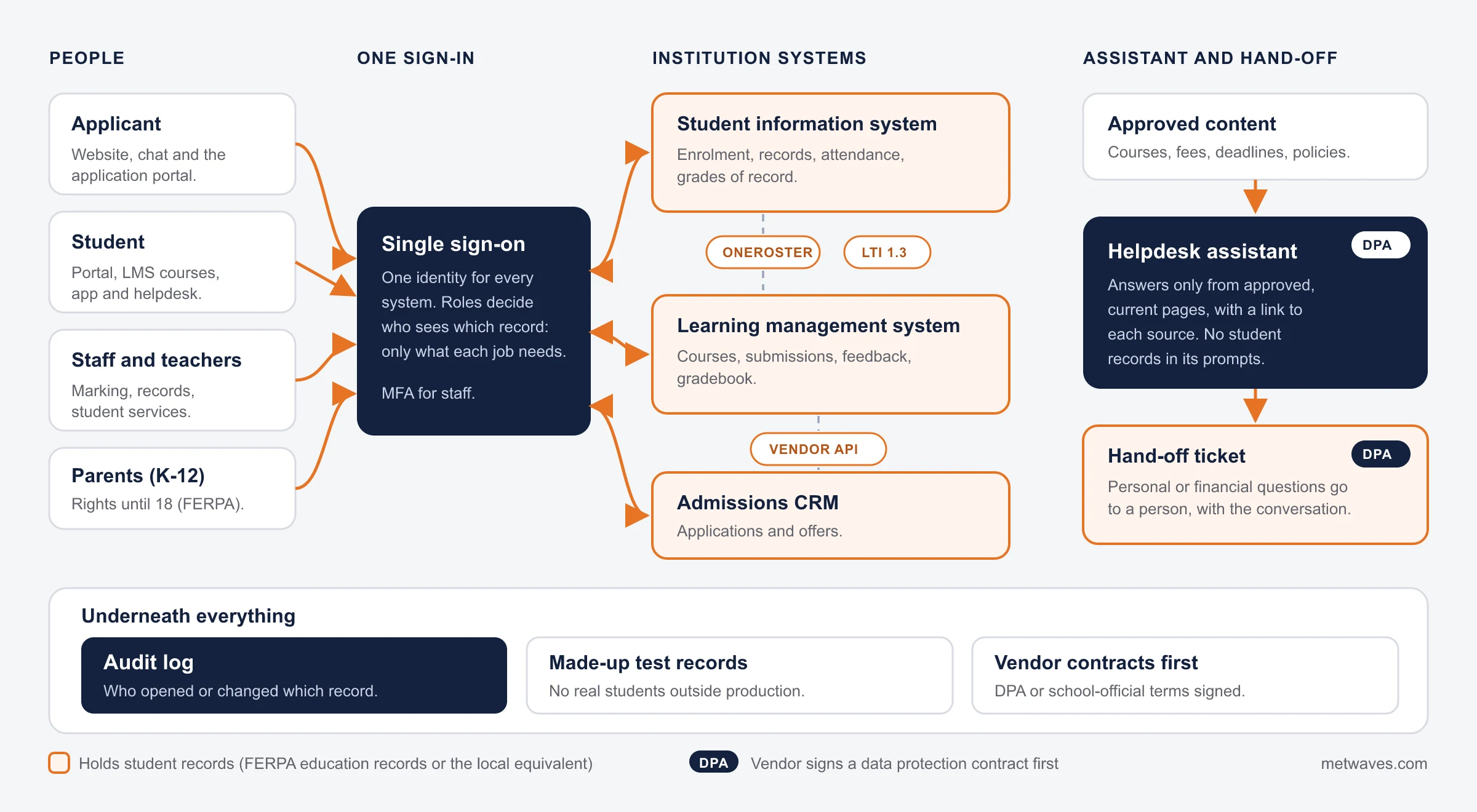
How student data moves through the system

Before any screen is designed, we map where student records live, who can see them and which outside services touch them. This is a typical university setup.

How student data moves through education software: students, applicants, staff and parents sign in once through single sign-on; the LMS, SIS and admissions CRM exchange data through LTI 1.3, OneRoster and vendor APIs; the helpdesk assistant reads only approved public content and hands over to student services through a ticket; student records sit in the SIS and LMS; an audit log, test data with made-up records and vendor contracts sit underneath
  • Holds student records
  • Vendor with a data protection contract
  • No student records
Orange boxes hold student records. Every service marked DPA has a data protection contract before it sees any.

Buy, extend or build: what usually fits

Most institutions should not build an LMS. The useful question is which part of the student journey your current tools cannot handle, and what the smallest fix is.

If you…What usually fitsWhy
Standard courses, quizzes and assignmentsAn off-the-shelf LMS: Canvas, Moodle, Blackboard or BrightspaceCheaper, proven and familiar to staff. We will tell you so on the first call.
The LMS fits, but staff re-key enrolments and gradesIntegration through LTI 1.3, OneRoster or APIsConnecting what you already license removes the re-keying without replacing anything.
Students ask the same questions every intakeA helpdesk assistant on your approved contentAnswers at any hour, with sources, and frees staff for the cases that need a person.
Your course model or learner experience is the productA custom learning platformCohorts, assessment and certificates work the way you teach, and you own the roadmap.
You sell software to schools or universitiesCustom, built for their privacy and accessibility reviewsA data map, DPIA support and WCAG testing from the first release make procurement shorter.

INTEGRATION

How education systems connect: LTI 1.3, OneRoster and vendor APIs

Most edtech work touches the LMS or the SIS. There are three routes, and the systems you already license decide which are open.

LTI 1.3

The 1EdTech standard for launching an outside tool from inside the LMS, with the student and course passed securely, and grades returned to the gradebook.

Suits
Tools teachers add to a course: practice, assessment, video, simulations
Who approves
The institution's LMS administrator, who registers the tool
Typical data
Launch context, course roster, grades

OneRoster

The 1EdTech standard for moving rosters, enrolments and results between the SIS and other systems, as CSV files or through an API.

Suits
Keeping classes and enrolments in step across systems, mostly in schools
Who approves
The district or institution IT team, and the SIS vendor
Typical data
Students, teachers, classes, enrolments, results

Vendor APIs

Every major LMS, SIS and admissions CRM has its own API, often wider than the standards but different for each product.

Suits
Data the standards do not cover, and reporting across systems
Who approves
The vendor's API terms, then the institution
Typical data
Whatever the vendor exposes: applications, finance, timetables

We confirm the route with your LMS and SIS administrators before we quote.

What edtech software costs depends on these five things

We quote after discovery, because two student portals with the same screens can differ by an integration.

high impact

Integrations

Each system the software talks to (LMS, SIS, CRM, identity) adds build, testing and coordination with its vendor.

high impact

Native mobile apps

iOS and Android apps cost more to build and maintain than a responsive web app. Many student tools do not need them.

medium impact

User roles

Students, parents, teachers and administrators each need their own screens and permissions.

medium impact

Accessibility and privacy work

WCAG testing, DPIAs and security questionnaires are part of the build, not an extra at the end.

medium impact

Content for an assistant

The number of pages, documents and languages it answers from, and how often they change.

Running costs such as hosting, AI model usage and LMS or SIS vendor fees are listed separately in every quote.

TIMING

Plan the build around the academic year

The worst time to launch a helpdesk or a new portal is the week it is needed most, so we work back from your intake dates.

  • Academic year starts
  • Peak weeks for admissions and helpdesks: no launches
  • Build, pilot and train

A planning guide: your own intake and exam dates set the real windows.

How we work with education teams

Start with something you can test, pilot in a quiet term, and review what students asked every term after launch.

  1. 1

    Try the demo

    Ask the university demo the questions your team answers most.

  2. 2

    Discovery call

    Thirty minutes on your systems, your intake calendar and what fills your inbox.

  3. 3

    Discovery

    Content audit, systems map, privacy and accessibility needs, and a costed plan.

  4. 4

    Build and test

    Made-up student records only, with accessibility checks every release.

  5. 5

    Pilot outside peak

    One faculty, year group or service first, in a quieter term.

  6. 6

    Launch and review

    Unanswered questions and hand-offs reviewed every term.

How to choose an edtech software development company

Ask these five questions of anyone you shortlist, us included. One place we may not win: we have not built a full LMS for an institution. If that is what you need, choose a firm that has.

Question to askA good answerA warning sign
Can we try something you built that students would use?Yes, here is a working demo.Slides and mock-ups only.
What happens when your assistant does not know the answer?It says so and hands over to a person, with the conversation.It always has an answer.
Which LMS and SIS have you integrated?Named systems, or a straight “not yet” and how they would do it.A logo wall with no detail.
How do you meet WCAG 2.1 or 2.2 AA?Automated and manual testing every release, including a screen reader.An overlay plug-in.
Who owns student data, logs and code?You do, from day one, in your own cloud account.Data held in the vendor's account.

Related services

Engagement models and technology choices are on each service page.

AI chatbot developmentStudent and applicant assistants on your content.
Software integrationLMS, SIS, CRM and identity kept in step.
Web application developmentLearning platforms and student portals.
Mobile app developmentStudent and parent apps for iOS and Android.
Data engineeringEnrolment and progress reporting in one place.

QUESTIONS & ANSWERS

EdTech software development: frequently asked questions

Straight answers on cost, building an LMS, chatbots, integrations, FERPA, COPPA and accessibility. If you don't see an answer to your question, you can send us a message from our contact form.

It depends on the integrations (LMS, SIS, CRM, identity), the user roles, native apps or web, and the accessibility and privacy work. A helpdesk assistant on public pages is far smaller than a learning platform with assessments and payments. We price after a short discovery, with running costs listed separately.

Usually not. Canvas, Moodle, Blackboard and Brightspace already run standard courses well. Buy one and build around it. Build a custom platform when your course model or learner experience is the product you sell.

Yes, if it answers only from approved, current pages, shows the source for each answer, says when it does not know, and hands personal or financial questions to staff. You can test this on our university helpdesk demo before you speak to us.

We would use LTI 1.3 for tools inside the LMS, OneRoster for rosters and grades, or the vendor's own API, depending on what each system supports. We have not yet shipped an LMS or SIS integration for an education client, so we scope it in discovery and test against the vendor's sandbox first.

FERPA protects education records at US schools and colleges that receive federal education funds; a vendor sees them only as a school official under the school's direct control. COPPA requires verifiable parental consent for services aimed at children under 13. Many K-12 products must meet both.

The FTC's amended rule took effect on June 23, 2025, with a compliance date of April 22, 2026. Operators now need separate parental consent before sharing a child's data with third parties, including for targeted ads, a written data retention policy and a written information security programme. Biometric identifiers now count as personal information. The FTC did not adopt its proposed rule for school-authorised edtech.

In the US, the Department of Justice's 2024 ADA Title II rule requires WCAG 2.1 AA from public schools, colleges and universities, by April 26, 2027 for large entities and April 26, 2028 for smaller ones. In the UK, public sector bodies work to WCAG 2.2 AA, with schools partly exempt.

Not for an education client yet, and we say so. We built a university helpdesk demo you can try, and a staff helpdesk in Teams for a UK professional services firm that resolves 30 to 50% of staff requests without a person.

INSIGHTS & NEWS

Discover IT Industry Insights and Technology Trends

Nikit Nandan    Nikit Nandan November 17, 2026
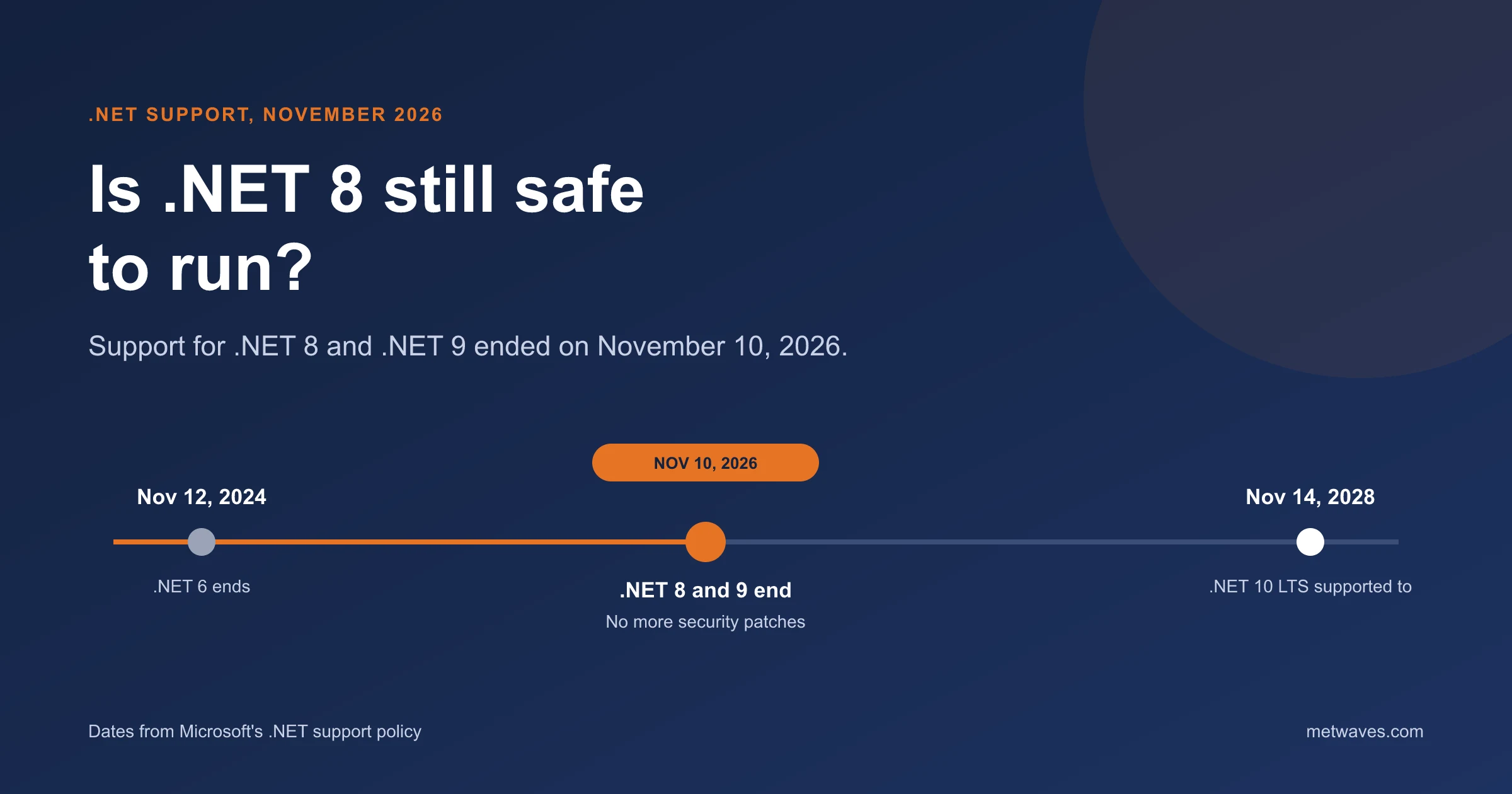
Is .NET 8 Still Safe to Run After November 2026?

Support for .NET 8 and .NET 9 ended on November 10, 2026. What that means for apps still on them, how risky it is, and how to plan the move to .NET 10.

Learn More >
Microsoft Technologies 5 min read
Nikit Nandan    Nikit Nandan November 12, 2026
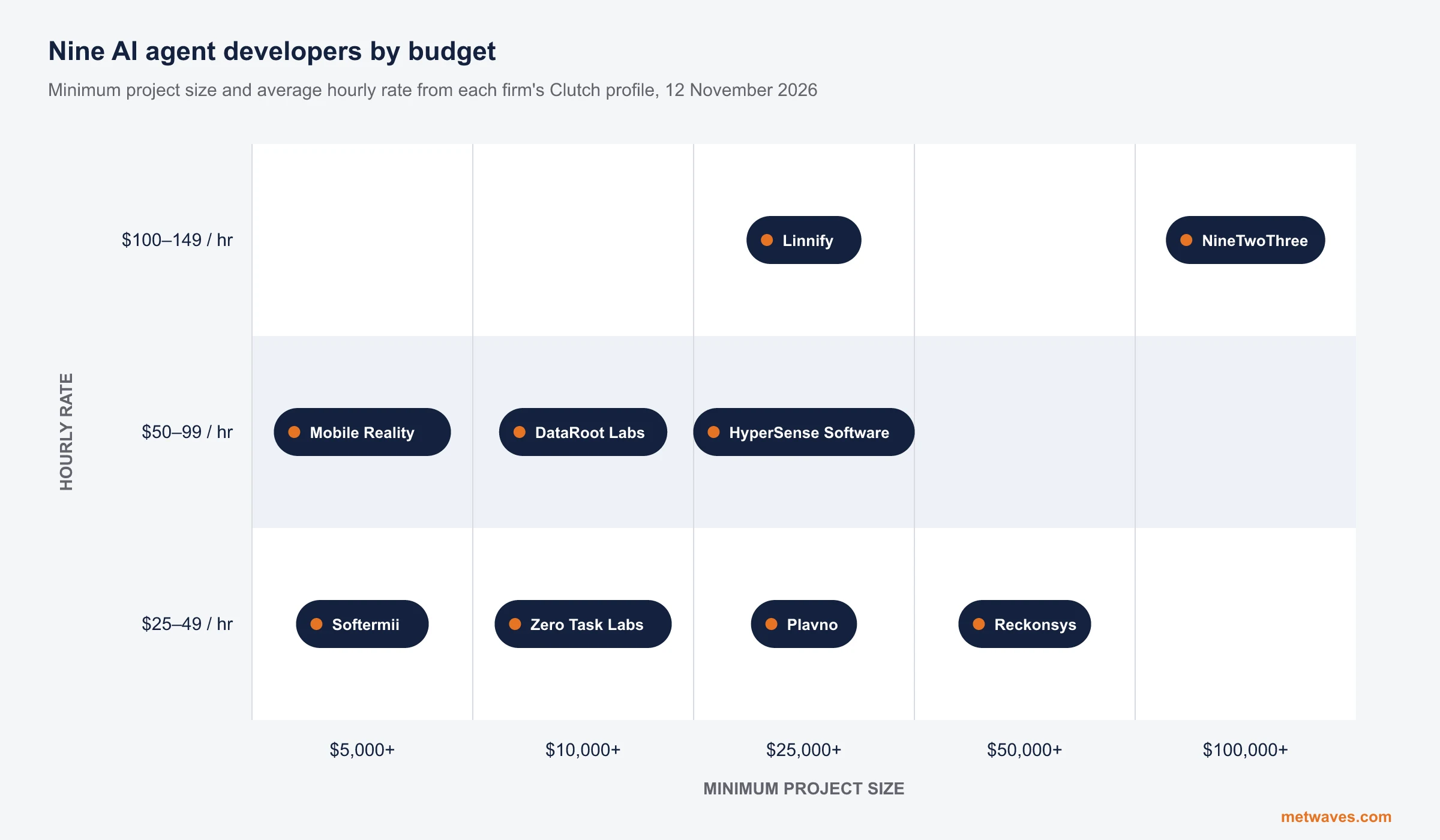
Top AI agent development companies for small and mid-sized businesses (2026)

Nine AI agent development firms a small or mid-sized business can shortlist, with Clutch figures, minimum budgets and the weaknesses their own clients name. Published by Metwaves, which is not ranked.

Learn More >
AI Development 9 min read
Nikit Nandan    Nikit Nandan November 12, 2026
Enterprise AI Agent Platforms Compared (2026)

An architecture review of the four big enterprise AI agent platforms: where each one reasons, acts, finds its data and connects to outside agents, what it costs, and when a custom build is the better choice.

Learn More >
AI Development 9 min read

Let’s build your idea!

Let us help you with free analysis & estimate. Our product expert will contact you within 12 hours.

 All your information is kept confidential and protected by NDA.