
Custom and Enterprise Web Application Development Services
Our custom web app development services cover customer and partner portals, internal tools that replace spreadsheets, dashboards and real-time apps. One team builds the app, hosts it in your cloud account and keeps it running after launch, for businesses in the US, UK, Canada and Australia.

Real-time alerts platform on AWS · Six years supporting one clinic's site · 5.0 on Clutch
WEB APPLICATION DEVELOPMENT
What web application development services are
Web application development services design, build, host and maintain software that people use in a browser: customer and partner portals, internal tools, dashboards and real-time apps. A good web application connects to the systems you already run, keeps your data in your own cloud account, and has a named team looking after it once it is live.
Website
Informs visitors: pages, articles, a contact form.
Built on a CMS. See CMS development.Web application
Does work: people sign in, enter data and move it through a process, in a browser.
Portals, internal tools, dashboards, real-time apps.Mobile app
Worth it when users work in the field, offline, or need the camera or location.
Often the field side of a web app.WHEN TO CALL US
Signs you need a custom web app
If two or more of these sound familiar, a web app built around your process will usually save more time than it costs.
“Half the business runs on one spreadsheet, and nobody knows who changed what.”
Errors surface weeks later, and there is no history to show what happened or when.
“Customers phone us to ask where their order is.”
Staff spend hours a week reading out information a portal could show the customer directly.
“We bought a tool, then built a spreadsheet to work around it.”
You pay for the licence and still keep the manual process it was meant to replace.
“Nobody wants to touch the old app.”
Web Forms, AngularJS or an old PHP build that no longer gets security fixes, and every change is a risk.
“The developer left and we are not sure we have the code.”
Without the source code and the passwords, you cannot fix, move or even safely switch it off.
“We type the same order into three systems.”
Every copy is a chance for a typo, and the systems never quite agree.
WHAT WE BUILD
Custom web app development services we provide
Seven kinds of work. Most projects combine two or three, and every one ends with code in your repository and an app in your cloud account.
Customer and partner portals
Customers check orders, download documents and raise requests themselves, and each partner sees only its own accounts. The data comes from the systems you already run, so nobody types it twice.
Connect your systems >Internal tools and workflow apps
Requests, approvals, scheduling and case handling that live in spreadsheets and inboxes today, rebuilt as one app with roles and a history of every change.
Enterprise software >Dashboards and reporting apps
Live numbers from your own databases and tools, with the data cleaned once at the source instead of in every report.
Data engineering >Real-time web apps
Alerts, prices and status that update in the browser without a page reload. TradeAlert pushes live stock and crypto alerts to its users this way.
TradeAlert case study >Modernising an old web app
We review the code, then move one part at a time to a supported framework while the old app keeps working.
Application modernization >AI features inside a web app
Search over your own documents, document reading and assistants that answer from approved content, added to the app your staff or customers already use.
AI agent development >Support and maintenance
Patches, upgrades, backups, monitoring and small monthly changes, for apps we built or take over.
What a plan covers >How a web application fits together
A web app is a front end, an API, a database and the links to your other systems, hosted where you control it. Keeping those layers separate is what lets you change one later without rebuilding the rest.
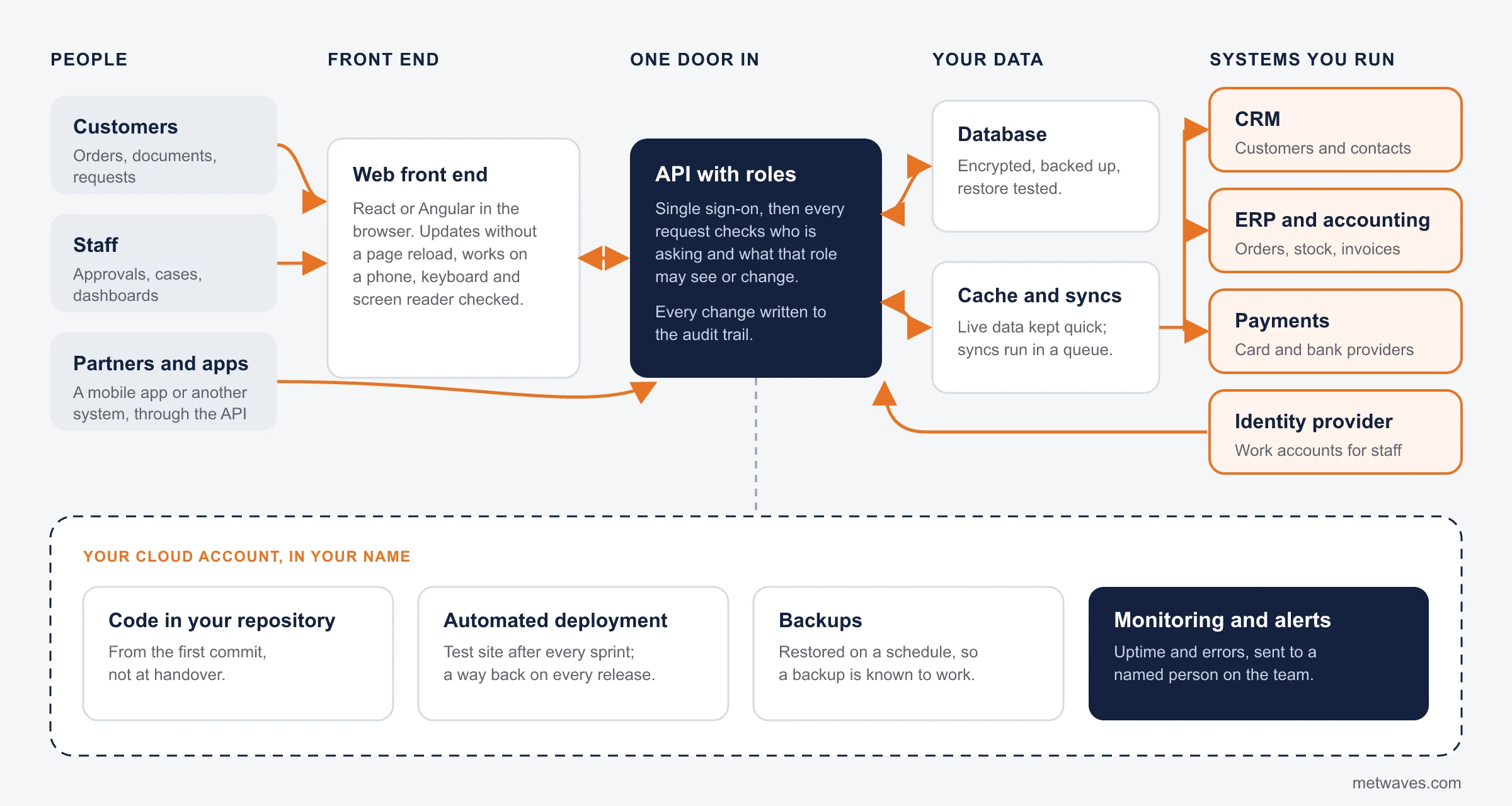
- Your app, in your cloud account
- Systems you already run
- Sign-in and roles checked on every request
ARCHITECTURE
Three architecture choices that shape the build
Each one is decided before the first sprint, because changing it later means rework across every layer.
API-first
The screens and the business logic are separate, and everything goes through a documented API.
- Fits when
- A mobile app, a partner or another system will use the same data later.
- What it costs you
- A little more design up front, much less rework when the second client arrives.
Multi-tenant
Many customer companies share one app, and each one sees only its own data and users.
- Fits when
- You plan to sell the app as a subscription. See software product development.
- What it costs you
- Tenant isolation, onboarding and billing are built and tested from the start.
Real-time
The server pushes changes to the browser the moment they happen.
- Fits when
- Live prices, alerts, dispatch boards and status screens, as in TradeAlert.
- What it costs you
- A push channel, a cache and servers that scale under load.
Most business apps are API-first; the other two are added when the plan needs them.
ENTERPRISE
Enterprise web application development services
An enterprise web app is one many departments rely on, so it needs single sign-on, roles, an audit trail and links to the systems you already run.
Most of the work is not the screens: it is access, traceability and clean data flows. For systems many departments share, see enterprise software development.
- Single sign-on
Staff sign in with the work account they already have, and lose access the day they leave, because access follows your identity provider.
- Roles and permissions
Each role sees and changes only what it should. Our Teams helpdesk agent applies the same rule to documents: it never shows content a person cannot open.
- Audit trail
Who created, changed, approved or deleted each record, and when. It answers auditors and settles disputes.
- ERP and CRM links
Our invoice agent posts about 1,000 documents a month into SAP Business One, with a review queue for anything doubtful. Read how.
- Reporting
Numbers built on the same data the app uses, not on a weekly export.
- Handover to your IT team
Documentation, runbooks, access lists and a walkthrough, so your team can run the app or hand it to someone else.
How we keep a web app secure and compliant
Every web app we build gets sign-in and role checks on the server, patched dependencies, encrypted traffic, tested backups and a check against common web attacks before launch. The data rules below depend on where your users are. They are rules your app must meet, not certifications we hold.
| Rule | Who it covers | What it means for your app |
|---|---|---|
| HIPAA | United States: healthcare providers, health plans and clearinghouses, and the business associates that handle health data for them | Encryption, strict access controls and audit trails for patient data, plus hosting and vendors that will sign the required agreements |
| UK GDPR | United Kingdom: organisations that handle personal data, together with the Data Protection Act 2018 | Collect only what you need, record why you hold it, and be able to export or delete a person's data on request |
| PIPEDA | Canada: private-sector organisations handling personal information in commercial activity | Consent for what you collect, safeguards that match the sensitivity of the data, and access on request |
| Privacy Act 1988 | Australia: agencies and organisations covered by the Australian Privacy Principles | Clear privacy notices, secure storage and a plan for notifying eligible data breaches |
| Accessibility | Any app used by the public or by staff with disabilities | Keyboard use, screen reader labels and contrast checked before launch, as in the clinic site's ADA accessibility check |
A summary for planning, not legal advice.
CHOOSING
Custom web app, off-the-shelf tool or low-code?
Build only when buying or connecting will not do the job. Orange means a custom build; green means you should probably not pay us to build anything.
If yourun a standard process that many companies share, such as CRM or a helpdesk
Buy the SaaS productThen connect it to your systems. We will say so on the first call.
If youneed a few internal forms, and your staff already work in Microsoft 365
Low-code, such as Power AppsUsually cheaper and quicker than a custom build for simple forms.
If youwin business through how your process works, or your tools will not connect
A custom web appBuilt around that process and linked to the systems you keep.
If youplan to sell the app to other companies on subscription
A software productTenants, billing and onboarding. See software product development.
If youneed to test whether people will use it before you fund the full build
A prototype firstA clickable prototype or a small first version. See prototyping.
If youhave users mostly on phones in the field, often offline
A mobile appWith the web app as the office side. See mobile development.
We will tell you on the first call if a ready-made product fits.
CASE STUDY
A real-time web platform for stock and crypto alerts
An experienced stock trader with more than ten years in the markets wanted a web platform that sends other investors real-time stock and crypto alerts, with custom watchlists, trade plans and MetaTrader integration. A late alert is worthless, so the platform had to stay quick under heavy traffic.
After wireframes and clickable prototypes, we built a React front end that updates without page reloads and a Node.js alerts engine fed by exchange APIs, with Redis caching. It runs on AWS with load balancers, automatic scaling and CloudWatch monitoring, and users sign in with multi-factor authentication.
- ClientExperienced stock trader building an alert service
- Built withReact, Node.js, Express, MongoDB, Redis, AWS
- ScaleUp to 10,000 concurrent users handled
- Beta85% positive feedback from beta testers
Industries we build web apps for
We list only industries where we have shipped work you can read about.
| Industry | What we built | Read more |
|---|---|---|
| Healthcare | A clinic site with one-click booking; Telemeds+, a telemedicine product with patient, doctor and administrator roles | Healthcare software |
| Finance and trading | TradeAlert: real-time stock and crypto alerts on AWS | Fintech software |
| Telecom | A VoIP product with an Angular web app beside its mobile and desktop apps | VoIP case study |
| Construction technology | IFC building model quantities loaded into estimating and ERP systems | BIM case study |
| Professional services | A Teams helpdesk agent that respects document permissions | Professional services software |
How we build your web application
Each step ends with something you can try, so you are never waiting months to see the app work.
- 1
Discovery call
Thirty minutes. You show us the spreadsheet, the old app or the process, and leave with a view on whether to build, buy or connect.
- 2
Scope and clickable prototype
We map the roles, screens and integrations, then your users click through a prototype. Changing a prototype costs hours; changing a finished app costs weeks.
- 3
Build in short sprints
The core workflow comes first, with working software on a test site and a demo after every sprint.
- 4
Test and launch
Functional and security testing, an accessibility check, and load testing where the app needs it. Then a planned launch with a way back if something goes wrong.
- 5
Support and improve
Patches, upgrades, backups, monitoring and a monthly list of small changes, from the same team.
What a web app costs and how long it takes
We do not publish prices, because two apps with the same screens can differ widely in integration work. These factors move the price and the timeline most.
User roles and permissions
One kind of user is simple. Customers, partners, staff and managers who each see different data multiply the screens, the rules and the testing.
Integrations
Each link to a CRM, ERP, payment provider or old database is built, tested on real data and monitored. It is often the largest single item.
Real-time data
Live updates need a push channel, a cache and servers that scale under load, as in TradeAlert.
Data migration
Moving years of records out of spreadsheets or an old app means cleaning, mapping and checking them first.
Design and accessibility
A tool for ten staff can use standard screens. A customer portal needs more design and accessibility work.
Compliance
Health or financial data adds logging and review work, cheaper built in than added later.
One public reference point: the urgent care clinic engagement, covering the build and six years of SEO and support, sat in the $10,000 to $49,999 range disclosed on Clutch.
Web application development cost by project size
Place your project before the first call. We quote after scoping, with the monthly cost in writing.
Small internal tool
- Typical scope
- One team, a few roles, one or two integrations, replaces a spreadsheet
- What moves cost and time
- The number of screens and how clean the existing data is
- Paid monthly
- Hosting and a small support plan
Customer or partner portal
- Typical scope
- Sign-in for outside users, documents, requests, account data from your systems
- What moves cost and time
- Integrations, design for the public, accessibility
- Paid monthly
- Hosting, monitoring, security patches
Enterprise web app
- Typical scope
- Single sign-on, many roles, audit trail, ERP and CRM links, reporting
- What moves cost and time
- Roles, integrations, data migration, security review
- Paid monthly
- Support plan with agreed response times
Modernising an existing app
- Typical scope
- The same features on a supported framework, moved one part at a time
- What moves cost and time
- How much of the old code and data can be kept
- Paid monthly
- Usually less than the old app, once it is patched
Hosting runs in your own cloud account, billed to you directly.
Ways to work with us
Pick the model by how settled the scope is. Every engagement starts with a 30-minute call about the process, the users and the systems involved.

Fixed cost
A defined first release with agreed screens, roles and integrations, priced after scoping.

Time and material
Scope that will change as users try the app. You pay for the hours used, sprint by sprint.

Dedicated team
An app that keeps growing, with a roadmap rather than a fixed list. Monthly, by team size.

Hybrid
A fixed price for the first release, then time and material or a support plan once it is live.
SUPPORT AND MAINTENANCE
Web application support and maintenance after launch
A support plan keeps a live web app safe and useful: patches, upgrades, backups, monitoring and a steady flow of small changes, from people who know the code. For a full support contract with agreed response times, see the dedicated page.
- Security patches for the framework, libraries and server
- Framework and library upgrades before versions go out of support
- Hosting, backups and a restore test, so a backup is known to work
- Uptime and error monitoring, with alerts to a named person
- Bug fixes, in order of how much they hurt your users
- Small changes each month: a new field, a report, a content area
Application support and maintenance >Read the urgent care case study >
“Very responsive to our email and text messages with turn around time of 48 hrs or less.”Founder, Epic Urgent and Family Care, in a verified 5.0 review on Clutch
The web stack we use, and where we used it
Each technology below shipped in a project on this page. We pick per project and extend what you already run before replacing it.





CHOOSING A PARTNER
How to choose a web application development company

Who hosts the app, and who holds the passwords?
The cloud account, domain and admin logins should be in your name, or you are locked in.

Is the code in our repository from day one?
Not at handover: from the first commit.

What does support cost per month after launch?
Get it in writing, with what it covers and how fast they respond.

Can we speak to a client whose app you still maintain years later?
Our clinic client stayed six years.

How will you test it before launch?
Listen for security checks, accessibility, load testing where it matters, and a way to roll back.
Where do you not fit?
Ask every vendor. Our answer: if you need a simple brochure website, a template builder or a freelancer will cost less than we do.

Related services
Web apps rarely stand alone. These are the services they most often sit beside.
QUESTIONS & ANSWERS
Web application development: frequently asked questions
Straight answers on cost, timelines, ownership and support. If you don't see an answer to your question, you can send us a message from our contact form.
It depends mostly on user roles, integrations, live data and how much design a public app needs, plus a monthly cost for hosting and support. We quote after a scoping call; the cost section above lists what moves the price.
You see a clickable prototype before any production code and working software after every sprint. The core workflow ships first. The timeline depends on roles, integrations and data migration; we give you one after scoping.
You do. The code lives in your repository and the app runs in your cloud account from the first commit, with admin access in your name.
A website informs visitors. A web app does work: people sign in, enter data and move it through a process. A mobile app is worth it when users work in the field, offline or need the camera.
Yes. We start with a review of the code, hosting, accounts and security, then fix what hurts most, then move to a monthly support plan. See support and maintenance.
It depends on the app's size, the changes you want each month and the response time you need. For reference, our urgent care clinic engagement, covering the build and six years of SEO and support, was in the $10,000 to $49,999 range disclosed on Clutch.
Sign-in and role checks on the server, dependencies kept patched, encrypted traffic, backups that are restored in a test, and checks against common web attacks before launch.
Yes. An enterprise web app is one that many departments rely on, so it needs single sign-on, roles, an audit trail and links to your ERP and CRM. For larger systems see our enterprise software development service.
The best one for you hosts the app in your account, puts the code in your repository from day one, tells you the monthly support cost in writing, and can show an app it still maintains years later.
They are the design, build, hosting and maintenance of browser-based software for a business: portals, internal tools, dashboards and real-time apps, connected to the systems the business already uses.
INSIGHTS & NEWS
Discover IT Industry Insights and Technology Trends
 Nikit Nandan
November 17, 2026
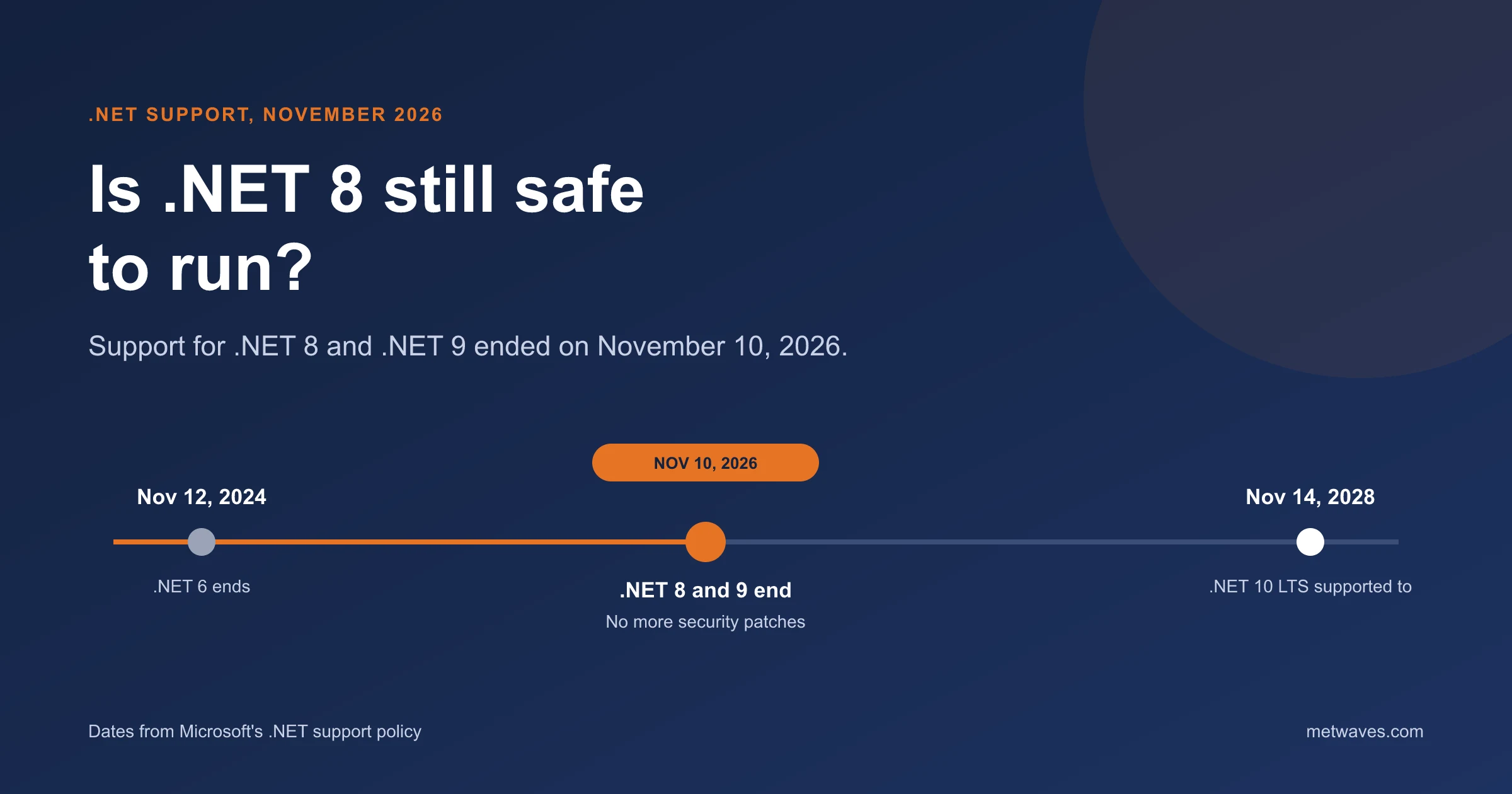
Is .NET 8 Still Safe to Run After November 2026?
Support for .NET 8 and .NET 9 ended on November 10, 2026. What that means for apps still on them, how risky it is, and how to plan the move to .NET 10.
Learn More >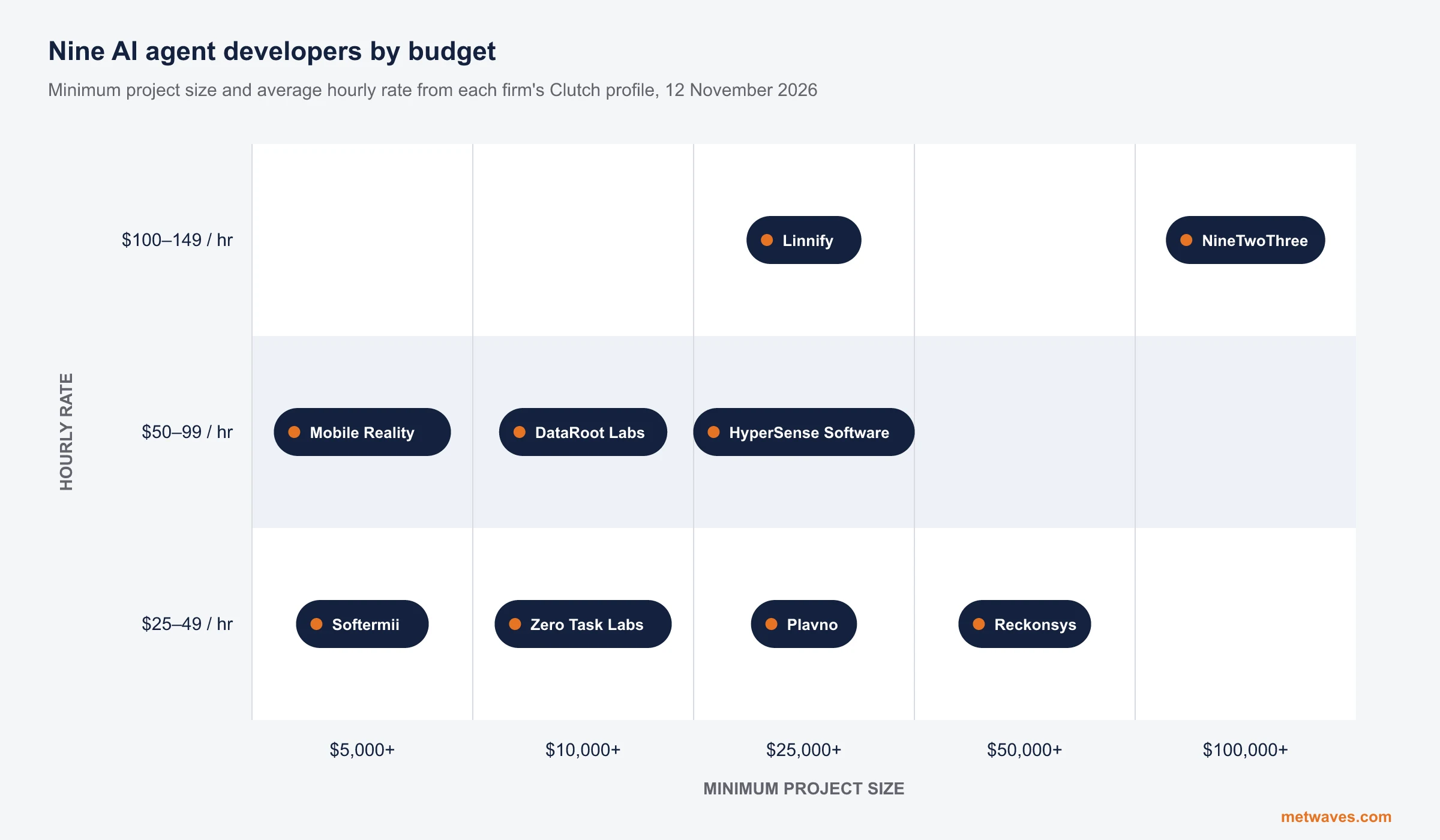 Nikit Nandan
November 12, 2026
Top AI agent development companies for small and mid-sized businesses (2026)
Nine AI agent development firms a small or mid-sized business can shortlist, with Clutch figures, minimum budgets and the weaknesses their own clients name. Published by Metwaves, which is not ranked.
Learn More >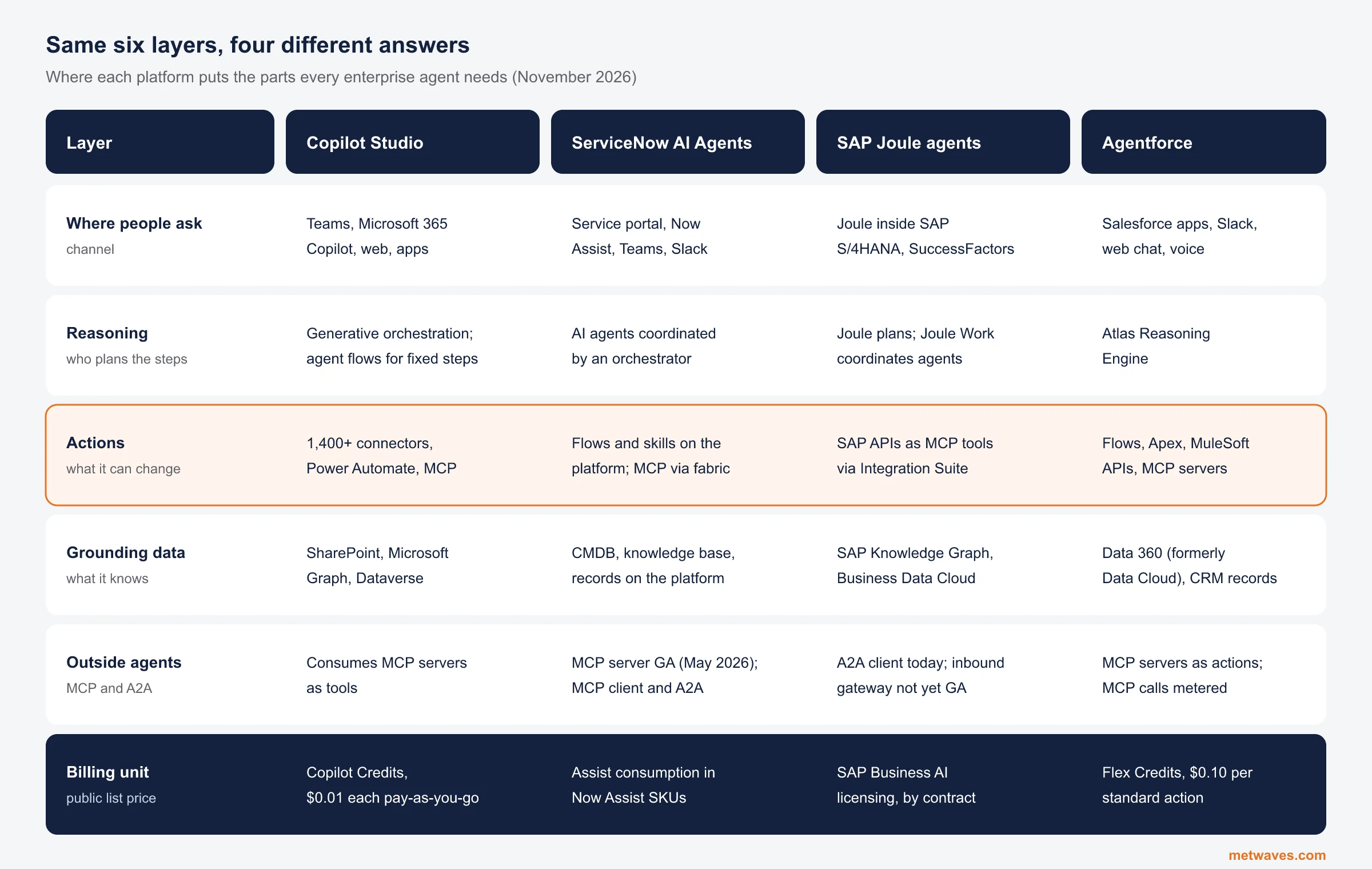 Nikit Nandan
November 12, 2026
Enterprise AI Agent Platforms Compared (2026)
An architecture review of the four big enterprise AI agent platforms: where each one reasons, acts, finds its data and connects to outside agents, what it costs, and when a custom build is the better choice.
Learn More >Let’s build your idea!
Let us help you with free analysis & estimate.
Our product expert will contact you within 12 hours.