Updated November 21, 2026. Dates are from Microsoft's updated SMTP AUTH timeline and Microsoft Learn.
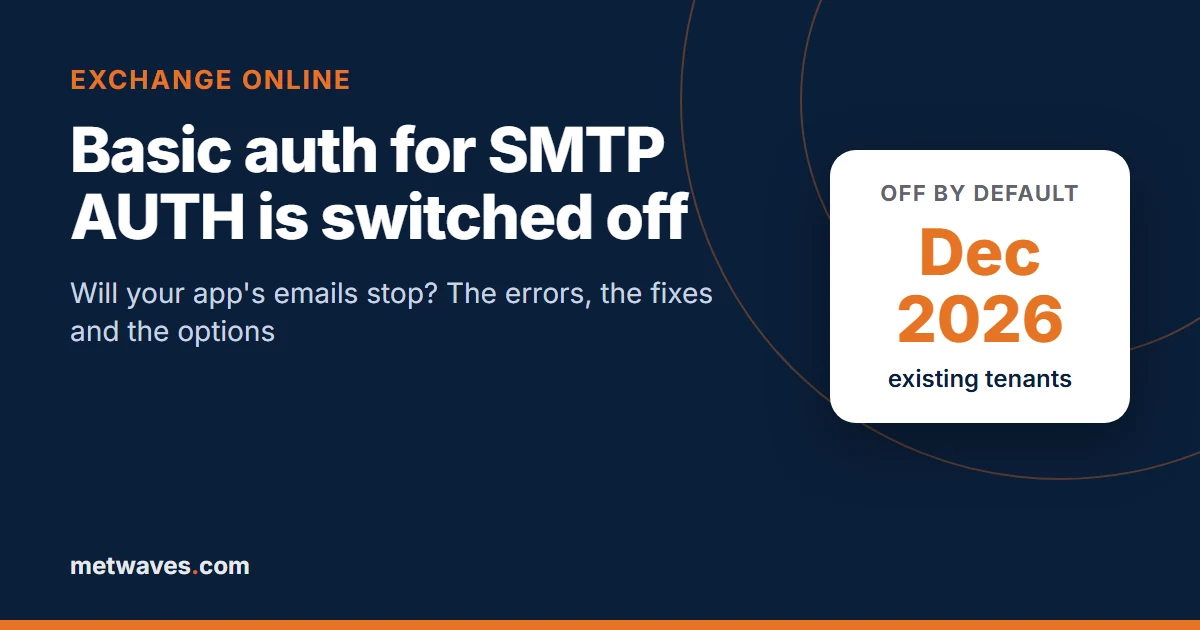
Short answer. Yes, if your app signs in to smtp.office365.com with a username and password. At the end of December 2026 Microsoft switches off basic authentication for SMTP AUTH by default in existing Exchange Online tenants, and those apps start failing with 535 5.7.139 errors. Admins can turn it back on for now, but Microsoft will set a final removal date in the second half of 2027. The fix is OAuth: XOAUTH2 on the same server, Microsoft Graph sendMail, or a different route for devices that cannot do OAuth.
What exactly is changing, and when?
SMTP AUTH (also called client submission or authenticated SMTP) is how an app, device or POP/IMAP client hands an email to Exchange Online for sending, normally on port 587. "Basic authentication" means it signs in with a plain username and password. Microsoft has been removing basic auth from Exchange Online protocol by protocol; SMTP AUTH is one of the last.
- What changesBasic auth for SMTP AUTH on
smtp.office365.comis disabled by default - WhenEnd of December 2026 for existing tenants; new tenants created after December 2026 never have it
- Can admins undo it?Yes, for now. Microsoft says admins "will still be able to enable it if needed"
- Final removalDate to be announced in the second half of 2027
- What keeps workingSMTP AUTH with OAuth, Microsoft Graph, connector relay, High Volume Email (basic auth until September 2028)
| Date | What happened or happens |
|---|---|
| April 15, 2024 | Microsoft announces the retirement of basic auth for SMTP AUTH, first for September 2025 |
| June 2025 | Plan changed to gradual rejections from March 1, 2026, reaching 100% on April 30, 2026 |
| January 27, 2026 | Plan changed again: no change until December 2026 |
| March 31, 2026 | High Volume Email for Microsoft 365 reaches general availability, for internal recipients |
| End of December 2026 | Basic auth for SMTP AUTH disabled by default in existing tenants; unavailable in new tenants |
| Second half of 2027 | Microsoft announces the final removal date |
| September 2028 | Basic auth support for High Volume Email ends |
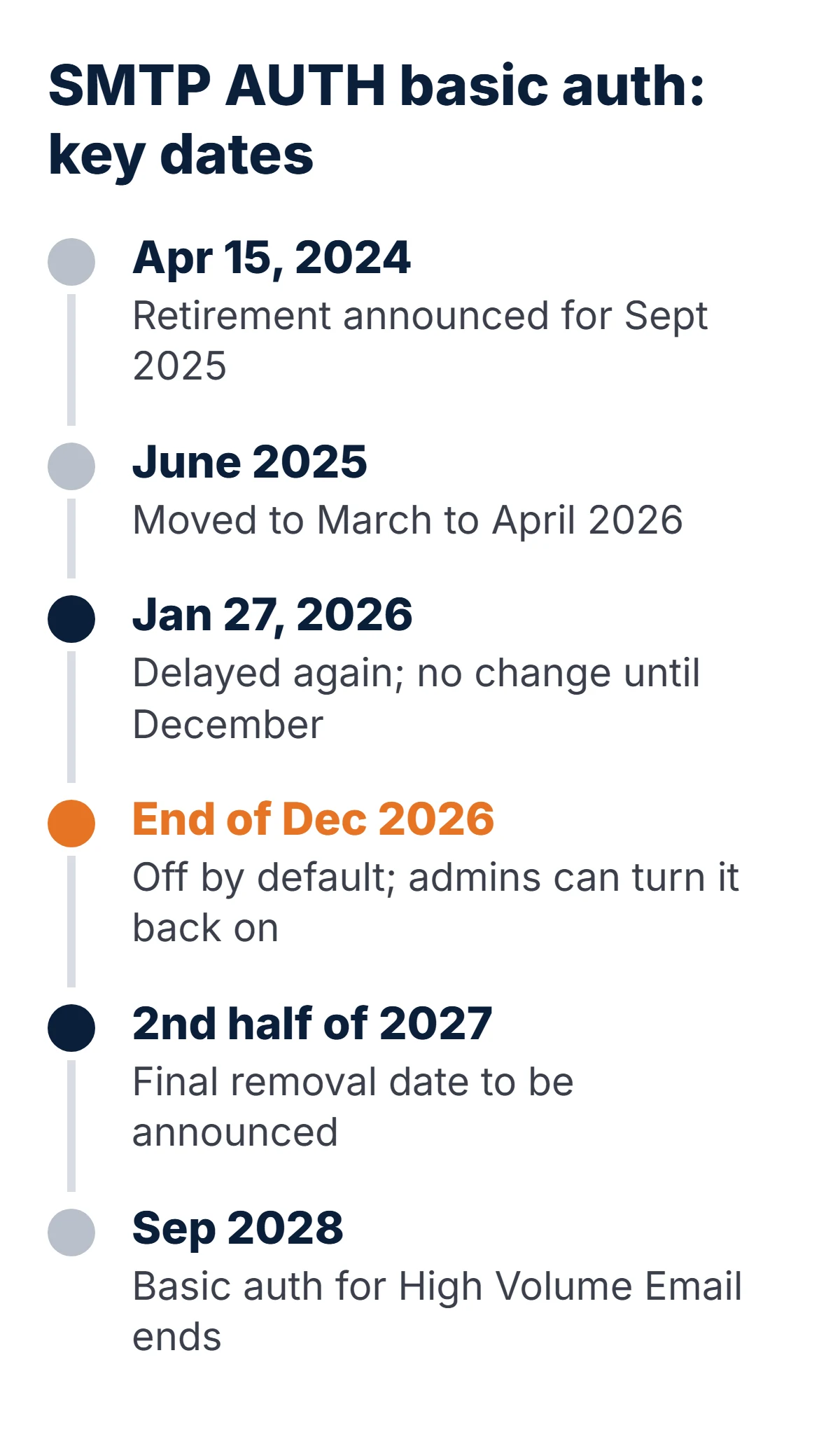
If you read an older article that says April 30, 2026, it is out of date: Microsoft replaced that plan in January 2026.
Will our app's emails stop?
They will if the app sends through smtp.office365.com (or smtp-legacy.office365.com) and signs in with a password. In small and mid-sized businesses that usually means:
- Web apps and websites sending password resets, order confirmations and contact-form mail with a Microsoft 365 mailbox password stored in config. WordPress SMTP plugins set to "Other SMTP" are a common case.
- .NET code using
System.Net.Mail.SmtpClientwithNetworkCredential, or PowerShellSend-MailMessage -Credential. Neither supports OAuth. - Python, Node.js and Java services calling
smtplib.login(), Nodemailer withauth: {user, pass}, or JavaMail with a password. - ERP, CRM, accounting and ticketing tools configured with an SMTP server, username and password.
- Printers and scanners doing scan-to-email, plus UPS units, NAS boxes, CCTV recorders and monitoring tools that email alerts.
| Sender | Affected in December 2026? |
|---|---|
| App or device signing in to smtp.office365.com with username and password | Yes |
| App signing in to smtp.office365.com with an OAuth token (XOAUTH2) | No |
Code calling Microsoft Graph sendMail | No |
| Device relaying through an inbound connector (static IP or certificate, port 25) | No |
| High Volume Email account (smtp-hve.office365.com) | Not yet; basic auth allowed until September 2028 |
| Outlook desktop, web and mobile | No; they do not use SMTP AUTH |
Some tenants are already there. Microsoft notes that if security defaults are on in Entra ID, SMTP AUTH is already disabled, and organizations created after January 2020 had SMTP AUTH off unless an admin enabled it per mailbox. If your app works today, someone made an exception for it, and that exception is what December removes.
How do we find what still uses basic auth?
- SMTP AUTH clients report. In the Exchange admin center under Reports, Mail flow, the SMTP AUTH clients report shows which accounts submit mail and whether they use basic auth or OAuth.
- Entra sign-in logs. Filter the client app to "Authenticated SMTP" to see accounts and IP addresses signing in with basic auth.
- Mailboxes with SMTP AUTH turned on. Each one is a likely sender:
Connect-ExchangeOnline

# Organization-wide setting (True = SMTP AUTH off for everyone without an override)
Get-TransportConfig | Format-List SmtpClientAuthenticationDisabled

# Mailboxes with an explicit SMTP AUTH exception
Get-CASMailbox -ResultSize Unlimited |
    Where-Object { $_.SmtpClientAuthenticationDisabled -eq $false } |
    Select-Object PrimarySmtpAddress
Then search config files and code for the server name and the password-based patterns:
grep -rniE "smtp\.office365\.com|smtp-legacy\.office365\.com|Send-MailMessage|NetworkCredential|smtplib|\.login\(" .What errors will we see when basic auth is blocked?
Exchange Online answers a blocked sign-in with an SMTP 535 reply. The text after the code tells you which control blocked it. These are the variants reported on Microsoft Q&A and in Microsoft Learn, and what each one means:
| Error text | What it means | What to do |
|---|---|---|
535 5.7.139 Authentication unsuccessful, basic authentication is disabled | Basic auth is blocked for the tenant or by an authentication policy | Move the sender to OAuth or another route |
535 5.7.139 Authentication unsuccessful, SmtpClientAuthentication is disabled for the Tenant | SMTP AUTH is off organization-wide | Enable SMTP AUTH for that one mailbox, then use OAuth |
535 5.7.139 Authentication unsuccessful, SmtpClientAuthentication is disabled for the Mailbox | SMTP AUTH is off for this mailbox | Set-CASMailbox -SmtpClientAuthenticationDisabled $false |
535 5.7.139 Authentication unsuccessful, the request did not meet the criteria to be authenticated successfully | Security defaults or a Conditional Access policy blocks legacy sign-ins | Use OAuth; do not weaken the policy |
535 5.7.139 Authentication unsuccessful, the user credentials were incorrect | Wrong or expired password, or MFA on the account | Check the account; plan OAuth anyway |
535 5.7.3 Authentication unsuccessful | Microsoft's documented failure for a rejected XOAUTH2 token | Check token scope, service principal and mailbox permission |
5.7.60 SMTP; Client doesn't have permissions to send as this sender | Signed in, but the From address is a different mailbox | Grant Send As, or send from the signed-in mailbox |
Microsoft has not published the exact text for the December 2026 default change. Its earlier retirement plan named 550 5.7.30 Basic authentication is not supported for Client Submission as the reply after full removal, so treat any 535 or 550 authentication error from December onward as this change until proven otherwise.
What are the options for sending app email after basic auth?
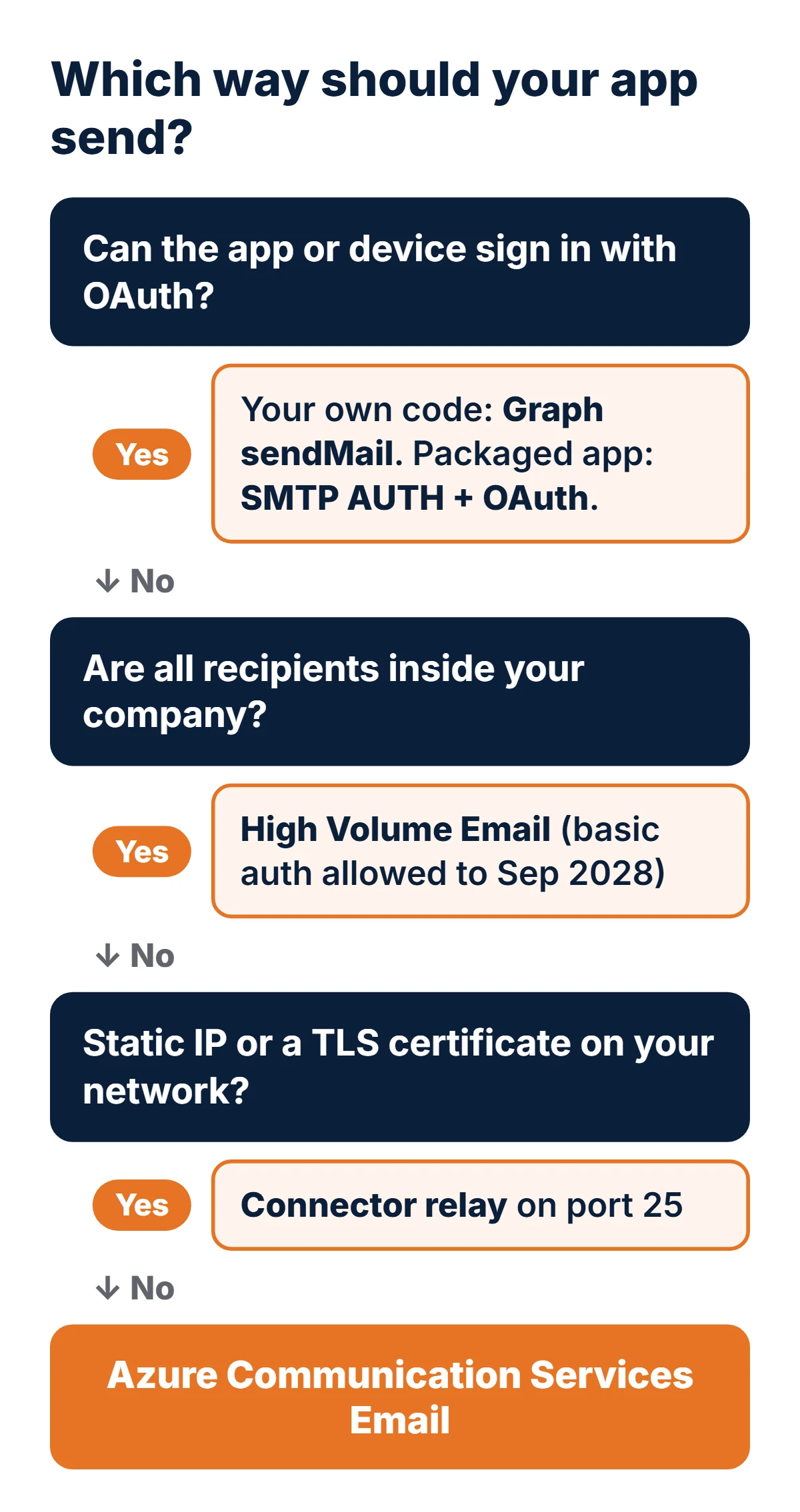
There are six realistic routes. Which one fits depends on whether the sender can do OAuth, who receives the mail and how much of it there is.
| Option | Endpoint | Sign-in | External recipients? | Limits and cost |
|---|---|---|---|---|
| SMTP AUTH with OAuth | smtp.office365.com:587 | OAuth token (XOAUTH2) | Yes | 10,000 recipients a day and 30 messages a minute per mailbox; needs a licensed mailbox |
| Microsoft Graph sendMail | graph.microsoft.com | OAuth, Mail.Send | Yes | Mailbox sending limits apply; included in Microsoft 365 |
| High Volume Email (HVE) | smtp-hve.office365.com:587 | Basic auth (to September 2028) or OAuth | No, internal only | No recipient or message rate limits per Microsoft; billed at $42 per million recipients since June 1, 2026 |
| Connector relay | yourdomain-com.mail.protection.outlook.com:25 | Static IP or TLS certificate | Yes | "Reasonable limits"; no mailbox needed; not usable from Azure-hosted apps |
| Azure Communication Services Email | smtp.azurecomm.net:587 or REST | SMTP username plus Entra app client secret | Yes | $0.00025 per email plus $0.00012 per MB (Microsoft's published example rates) |
| Direct Send | yourdomain-com.mail.protection.outlook.com:25 | None | No, internal only | Treated like anonymous internet mail; Microsoft is working on turning it off by default |
Sources: sending options, Exchange Online limits, HVE basic auth support and Azure Communication Services pricing. Check current prices before you budget.
How do we switch an app to OAuth SMTP?
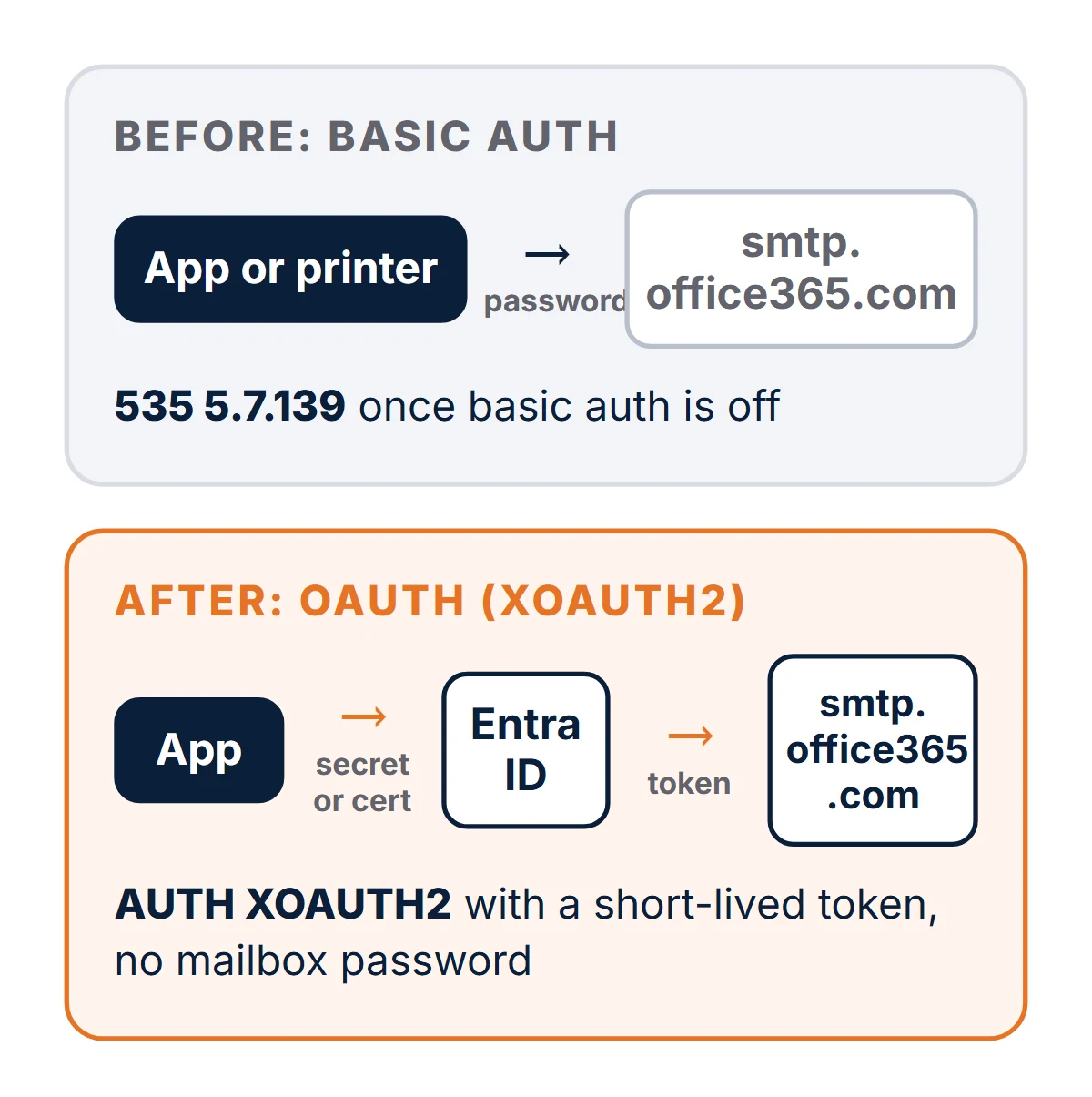
For a background app with no user signed in, Microsoft's OAuth guide for SMTP uses the client credentials flow. Five steps:
- Register an app in Microsoft Entra ID and add the application permission
SMTP.SendAsAppfrom "Office 365 Exchange Online". Grant admin consent. - Create a client secret or, better, upload a certificate.
- Register the app's service principal in Exchange Online and give it access to the sending mailbox.
- Keep SMTP AUTH enabled on that one mailbox; OAuth still uses the SMTP AUTH protocol.
- Change the app to request a token for
https://outlook.office365.com/.defaultand sign in with XOAUTH2.
Connect-ExchangeOnline

# Use the IDs from Entra ID > Enterprise applications, not App registrations
New-ServicePrincipal -AppId <app-id> -ObjectId <enterprise-app-object-id> -DisplayName "Order mailer"

Add-MailboxPermission -Identity "orders@contoso.com" -User <enterprise-app-object-id> -AccessRights FullAccess

# Only needed if the From address differs from the mailbox above
Add-RecipientPermission -Identity "orders@contoso.com" -Trustee <enterprise-app-object-id> -AccessRights SendAs

Set-CASMailbox -Identity "orders@contoso.com" -SmtpClientAuthenticationDisabled $false
In .NET, System.Net.Mail.SmtpClient cannot send an OAuth token, so swap it for MailKit and MSAL:
// dotnet add package MailKit
// dotnet add package Microsoft.Identity.Client
var app = ConfidentialClientApplicationBuilder.Create(clientId)
    .WithClientSecret(clientSecret)                     // or .WithCertificate(cert)
    .WithAuthority($"https://login.microsoftonline.com/{tenantId}")
    .Build();

var token = await app.AcquireTokenForClient(new[] { "https://outlook.office365.com/.default" })
                     .ExecuteAsync();

using var smtp = new MailKit.Net.Smtp.SmtpClient();
await smtp.ConnectAsync("smtp.office365.com", 587, SecureSocketOptions.StartTls);
await smtp.AuthenticateAsync(new SaslMechanismOAuth2("orders@contoso.com", token.AccessToken));
await smtp.SendAsync(message);   // a MimeKit MimeMessage
await smtp.DisconnectAsync(true);
In Python, the standard library can do it once MSAL supplies the token. The SASL string is user=…^Aauth=Bearer …^A^A, base64-encoded, exactly as Microsoft documents it:
import base64, smtplib, msal

app = msal.ConfidentialClientApplication(
    CLIENT_ID, authority=f"https://login.microsoftonline.com/{TENANT_ID}", client_credential=CLIENT_SECRET)
token = app.acquire_token_for_client(scopes=["https://outlook.office365.com/.default"])["access_token"]

xoauth2 = base64.b64encode(f"user=orders@contoso.com\x01auth=Bearer {token}\x01\x01".encode()).decode()

with smtplib.SMTP("smtp.office365.com", 587) as smtp:
    smtp.starttls()
    smtp.ehlo()
    code, reply = smtp.docmd("AUTH", "XOAUTH2 " + xoauth2)
    if code != 235:                      # 235 2.7.0 Authentication successful
        raise RuntimeError(f"SMTP OAuth failed: {code} {reply!r}")
    smtp.send_message(msg)
Tokens last about an hour, so request a fresh one per batch rather than caching it in config. Store the secret or certificate in a vault, not next to the old password.
When is Microsoft Graph sendMail the better choice?
When you own the code. Graph sends over HTTPS on port 443, so there is no SMTP session to manage, firewalls that block port 587 stop mattering, and the permission can be limited to the mailboxes the app should send from. The call is one request:
POST https://graph.microsoft.com/v1.0/users/orders@contoso.com/sendMail
Authorization: Bearer <token for https://graph.microsoft.com/.default>
Content-Type: application/json

{
  "message": {
    "subject": "Order 10482 confirmed",
    "body": { "contentType": "HTML", "content": "<p>Thanks, your order is confirmed.</p>" },
    "toRecipients": [ { "emailAddress": { "address": "customer@example.com" } } ]
  },
  "saveToSentItems": true
}
A successful send returns 202 Accepted. To stop the app sending as anyone in the company, grant Mail.Send through RBAC for Applications in Exchange Online (role Application Mail.Send over a management scope) instead of tenant-wide consent in Entra ID. Large attachments need an upload session rather than one request. The same mailbox limits apply, so bulk marketing email still belongs in a dedicated email service.
What about printers, scanners and apps we cannot change?
Most multifunction printers cannot fetch an OAuth token. Pick by who receives the mail:
- Internal recipients only: High Volume Email accepts basic auth until September 2028 and has no per-mailbox rate limits. Microsoft removed external sending from HVE in June 2025.
- External recipients, fixed office IP: create an inbound connector that trusts your static IP (or a certificate) and point the device at your MX host on port 25. Add the IP to your SPF record.
- External recipients, no fixed IP: Azure Communication Services Email speaks SMTP on
smtp.azurecomm.netport 587 and takes a username and password, where the password is an Entra app client secret. That suits devices that only understand username and password. Rotate the secret on a schedule. - A legacy app with no vendor: put a small relay service in front of it that accepts mail on your network and forwards it with OAuth or Graph. It is a short build and removes the stored mailbox password.
How much work is this, and what is the plan?
Our planning estimates, not Microsoft's. Each assumes access to the app's config or code and an admin who can register apps in Entra ID.
| Situation | Estimate (ours) |
|---|---|
| Packaged app that already supports OAuth for Microsoft 365 | Half a day to 2 days, including the Entra app and test |
| Custom code moved to MailKit + OAuth or to Graph sendMail | 1 to 4 days per app, including tests and secret storage |
| Printers and scanners at one site moved to a connector relay or HVE | 1 to 3 days per site |
| Legacy app behind a new relay service | 1 to 2 weeks |
What this means if you own the business
Anything that emails customers, such as invoices, password resets, booking confirmations and alerts, may go silent in the first week of January. Ask for the SMTP AUTH clients report now, and give each sender an owner and a fix date before the holidays. Re-enabling basic auth is a fallback for a missed sender, not the plan.
What this means if you run the code
Swap password sign-in for XOAUTH2 or Graph, use certificates over secrets, scope send permissions to specific mailboxes, and log the full SMTP reply on failure. Test against a mailbox with basic auth disabled now, so December changes nothing for you.
- Pull the SMTP AUTH clients report and the list of mailboxes with SMTP AUTH enabled.
- Map each sender to a route with the decision tree above.
- Fix customer-facing senders first: web apps, invoicing, booking.
- Move devices to a connector relay, HVE or Azure Communication Services.
- Disable SMTP AUTH on each mailbox once its sender is moved.
- Before December 31, test every sender against a mailbox with basic auth off.
Frequently asked questions
When does Microsoft turn off basic auth for SMTP AUTH?
At the end of December 2026, Microsoft disables basic authentication for SMTP AUTH by default in existing Exchange Online tenants. Tenants created after December 2026 do not have it at all. Microsoft will announce the final removal date in the second half of 2027.
Can we turn basic auth for SMTP back on after December 2026?
Microsoft says administrators will still be able to enable it if needed after the December 2026 change, until the final removal date it will announce in the second half of 2027. As of November 2026 Microsoft had not published the exact procedure, so plan the move to OAuth rather than rely on re-enabling.
What does error 535 5.7.139 mean?
535 5.7.139 means Exchange Online rejected the sign-in on smtp.office365.com. The text after it gives the reason: basic authentication is disabled, SMTP AUTH is disabled for the tenant or the mailbox, security defaults or Conditional Access blocked the legacy sign-in, or the credentials were wrong.
Does this affect printers and scanners that email scans?
Yes, if they sign in to smtp.office365.com with a username and password. Most devices cannot use OAuth, so the usual fixes are an inbound connector relay using a static IP address or certificate, High Volume Email for internal recipients, or Azure Communication Services Email.
Is SMTP relay through a connector affected?
Relay through an inbound connector that authenticates by static IP address or TLS certificate is not SMTP AUTH and is not part of this retirement. Any relay that signs in with a username and password to smtp.office365.com is affected.
Should we use OAuth SMTP or Microsoft Graph sendMail?
Use Graph sendMail when you control the code: it is a single HTTPS call, can be scoped to specific mailboxes, and avoids SMTP entirely. Use SMTP AUTH with OAuth (XOAUTH2) when a packaged app supports it but cannot call Graph.
Want it fixed before December? We move app and device email off basic auth for businesses in the US, UK, Canada and Australia: inventory, OAuth or Graph changes, connector and device setup, and a test of every sender. See our software integration services or application support and maintenance, and our Azure consulting for Azure Communication Services. Also on Microsoft 365's retirement list: Exchange Web Services shuts down on April 1, 2027.

Nikit Nandan
Strategy Director
Nikit is experienced in conducting in-depth research to stay abreast of industry trends and emerging technologies.