Published November 28, 2026. Dates and mappings are from OpenAI's deprecations page and Assistants migration guide, and Microsoft's Foundry Agent Service migration guide, checked on November 21, 2026.
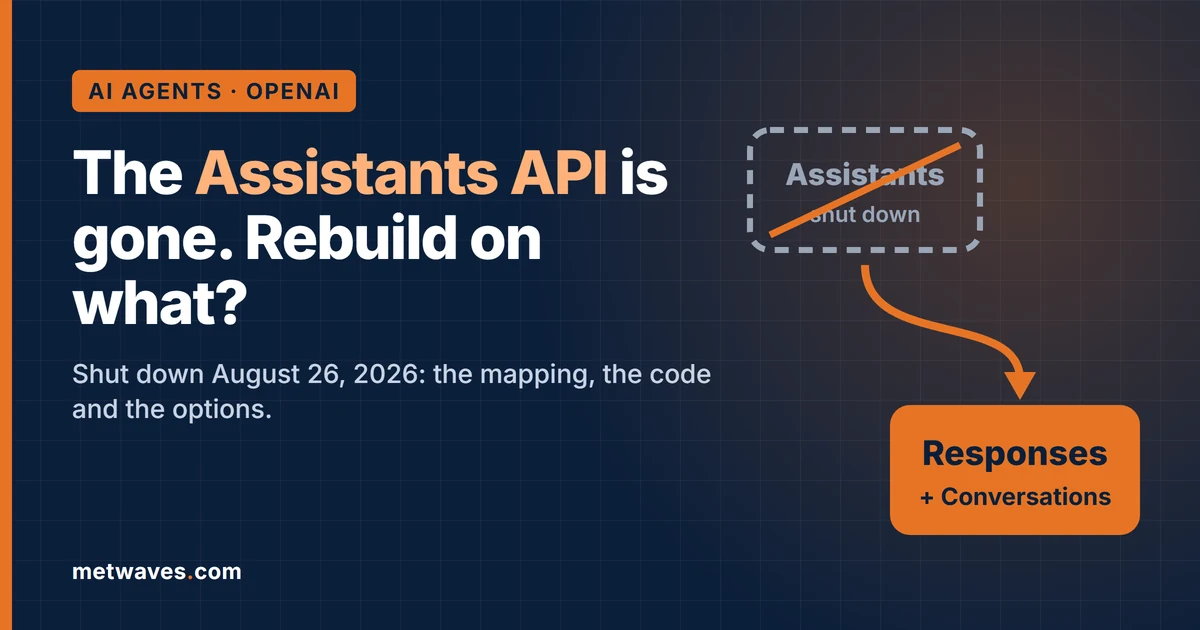
Short answer. OpenAI shut down the Assistants API on August 26, 2026, so calls to assistants, threads and runs no longer work. For most agents the natural rebuild target is the Responses API with the Conversations API, with the instructions and tools kept in your own code, because OpenAI's reusable prompt objects are also being shut down on November 30, 2026. Choose the OpenAI Agents SDK for multi-agent handoffs, LangGraph for long workflows across several model providers, or Microsoft Foundry Agent Service if you must stay on Azure.
Key dates at a glance
- Deprecation noticeAugust 26, 2025, with the Responses API and Conversations API named as the replacement
- ShutdownAugust 26, 2026: the Assistants API is no longer available
- Reusable prompts/v1/prompts and prompt objects deprecated June 3, 2026; shutdown November 30, 2026
- EvalsThe Evals dashboard, API and graders are read-only; shutdown November 30, 2026, with Promptfoo named as the migration path
- AzureMicrosoft's guide moves Azure OpenAI Assistants and classic Foundry agents to the new Foundry Agent Service, built on the Responses API
- Response storageResponse objects are kept for 30 days by default; conversation items are not subject to that limit
From Assistants to Responses
Dates from OpenAI's deprecations page.
- April 2024Assistants v2 released v1 beta retirement announced
- Aug 26, 2025Assistants API deprecation notice Replacement: Responses + Conversations
- Jun 3, 2026Reusable prompt objects deprecated Move prompt content into your code
- Aug 26, 2026Assistants API shut down
/v1/assistants, threads, runs - Nov 30, 2026
/v1/promptsand Evals shut down Evals: migrate to Promptfoo
What exactly stopped working on August 26, 2026?
Everything under the Assistants API: creating and listing assistants (/v1/assistants), threads and their messages (/v1/threads), runs and run steps. In the Python SDK, that is everything under client.beta.assistants and client.beta.threads. If your product still calls them, users are seeing errors where answers used to be.
The part that hurts most is history. OpenAI's guide says the call that listed a thread's messages "no longer works; use your stored messages instead." If your app kept its own copy of each conversation, you can rebuild it. If it relied on OpenAI's threads as the only record, that history cannot be fetched through the API any more.
What survives: vector stores and uploaded files are still used by the file_search tool in the Responses API, as OpenAI's file search guide shows, so a document knowledge base usually does not need rebuilding. Function definitions carry over with small changes.
How do Assistants concepts map to the Responses API?
What each Assistants concept became
Left: shut down. Right: what to use now.
- Assistants APIUse now
- AssistantModel, instructions and tools in your code
- ThreadConversation
- RunResponse
- Run stepItem
- Message historyRebuild from your own stored messages
| Assistants API | Now | What changes for you |
|---|---|---|
| Assistant (stored model, instructions, tools) | Request configuration in your application | You pass model, instructions and tools on each call. Keep them in code and version them. |
| Thread | Conversation | Create with client.conversations.create(); store the ID per chat session |
| Message | Item | Conversations hold items: messages, tool calls and tool outputs |
| Run (and polling) | Response | One responses.create call returns output items; no polling |
| Run step | Output item | Tool calls appear as items in response.output |
| requires_action + submit_tool_outputs | function_call items + function_call_output input | Your code runs the tool loop explicitly |
| file_search with tool_resources | file_search tool with vector_store_ids | Same vector stores; the IDs move into the tool definition |
OpenAI's migration guide also suggests turning each assistant into a dashboard "prompt". We do not recommend that route now: the deprecations page lists /v1/prompts and reusable prompt objects for shutdown on November 30, 2026, with the advice to "Move prompt content into your application code." Putting instructions in code also means they go through review and version control like the rest of your logic.
What does the code change look like?
A knowledge-base assistant with file search, before:
# Before: Assistants API v2 (shut down August 26, 2026)
assistant = client.beta.assistants.create(
    model="gpt-4o",
    instructions="You answer questions about our product manuals.",
    tools=[{"type": "file_search"}],
    tool_resources={"file_search": {"vector_store_ids": [VECTOR_STORE_ID]}},
)
thread = client.beta.threads.create()
client.beta.threads.messages.create(thread_id=thread.id, role="user", content=question)
run = client.beta.threads.runs.create_and_poll(thread_id=thread.id, assistant_id=assistant.id)
messages = client.beta.threads.messages.list(thread_id=thread.id)
And after. The vector store is the same; the instructions and tools are now yours:
# After: Responses + Conversations
INSTRUCTIONS = "You answer questions about our product manuals."   # lives in your code now
TOOLS = [{"type": "file_search", "vector_store_ids": [VECTOR_STORE_ID], "max_num_results": 5}]

conversation = client.conversations.create()          # one per chat session; store its id

response = client.responses.create(
    model="gpt-6.2-sol",
    instructions=INSTRUCTIONS,
    tools=TOOLS,
    conversation=conversation.id,
    input=question,
)
print(response.output_text)
Function calling is where most of the rework sits. Assistants paused a run with requires_action and waited for submit_tool_outputs. With Responses, the model returns function_call items and your code sends back function_call_output items with the matching call_id:
# Function calling: you run the loop yourself, there is no run to poll
response = client.responses.create(model="gpt-6.2-sol", instructions=INSTRUCTIONS,
                                   tools=[LOOKUP_ORDER], conversation=conv_id, input=question)

while True:
    calls = [item for item in response.output if item.type == "function_call"]
    if not calls:
        break
    outputs = [{
        "type": "function_call_output",
        "call_id": call.call_id,
        "output": json.dumps(run_tool(call.name, json.loads(call.arguments))),
    } for call in calls]
    response = client.responses.create(model="gpt-6.2-sol", instructions=INSTRUCTIONS,
                                       tools=[LOOKUP_ORDER], conversation=conv_id, input=outputs)

print(response.output_text)
Put a step limit on that loop in production; an unbounded loop is the fastest way to a surprise token bill.
To carry old chats across, convert your stored messages to conversation items in their original order and keep a mapping from the old thread ID to the new conversation ID, as OpenAI's guide describes:
# Rebuild a chat's history from messages your app stored before the shutdown
def to_items(stored_messages):
    items = []
    for m in stored_messages:                       # keep the original order
        part = "input_text" if m["role"] == "user" else "output_text"
        items.append({"type": "message", "role": m["role"],
                      "content": [{"type": part, "text": m["text"]}]})
    return items

conversation = client.conversations.create(items=to_items(stored))
save_mapping(old_thread_id=stored_thread_id, conversation_id=conversation.id)
Should you rebuild on Responses, the Agents SDK, LangGraph or Foundry?
What should you rebuild on?
Start at the top. Most single agents stop at the first question.
One agent, OpenAI models, simple tools?
YesResponses API.
NoGo to 2.
Several agents, handoffs, guardrails?
YesOpenAI Agents SDK.
NoGo to 3.
Long workflows, approvals, any model?
YesLangGraph.
NoGo to 4.
Must stay in Azure with managed hosting?
YesFoundry Agent Service.
NoStart with the Responses API.
| Option | Best for | Trade-off |
|---|---|---|
| Responses + Conversations API | Single agents on OpenAI models: Q&A over documents, support, internal tools | You write the tool loop and limits yourself; tied to OpenAI's API |
| OpenAI Agents SDK | Several cooperating agents, handoffs, guardrails, sessions and built-in tracing | A framework to learn; uses the Responses API by default, other providers through adapters |
| LangGraph | Long, branching workflows with state, human approval steps, retries and several model providers | More engineering; you host it |
| Microsoft Foundry Agent Service | Teams on Azure that want managed hosting, Azure identity, networking and monitoring | Azure-specific; check regional and tool availability |
The Agents SDK's starting point is short:
from agents import Agent, Runner

agent = Agent(name="Manuals assistant", instructions=INSTRUCTIONS)
result = Runner.run_sync(agent, "How do I reset the controller?")
print(result.final_output)
We built our SAP Business One invoice agent on LangGraph with Azure OpenAI, because it needed validation steps, a review queue and the option to swap models. For a document Q&A assistant, plain Responses is usually enough. Our review of enterprise AI agent platforms goes deeper on the hosted options.
Is this the moment to change model provider?
It can be, because you are rewriting the call path anyway. The question is how much you value staying close to OpenAI's own features versus being able to switch models later.
- Staying on OpenAI. The Responses API is OpenAI's primary interface and gets new built-in tools first: web search, file search, MCP and computer use. If your agent leans on those, rebuilding directly on Responses is the shortest path.
- Keeping options open. Put a thin layer of your own between the agent logic and the model call: one function that takes messages and tools and returns text and tool calls. Then the provider becomes a configuration choice, and you can test GPT-6.2 Sol against Claude Sonnet 5.5 on the same cases. LangGraph and the Agents SDK's provider adapters give you this without writing it yourself.
- Moving to Azure. Microsoft describes its new Foundry Agent Service as built on the Responses API, with conversations instead of threads, so code written for OpenAI's Responses API needs fewer changes to move there than Assistants code did. Check that the models, tools and regions you need are available first.
Whichever you choose, keep conversation history in your own database as well as in the provider's conversation store. The Assistants shutdown showed what happens when the provider holds the only copy.
How do you find every place that still depends on it?
Old Assistants code hides in more places than the main app: background jobs, admin scripts, low-code automations and integrations a contractor wrote years ago. Search the code and the configuration:
# Code: SDK calls and raw REST paths
rg -n "beta\.assistants|beta\.threads|/v1/assistants|/v1/threads|runs\.create_and_poll|submit_tool_outputs"

# Config and data: stored assistant and thread IDs
rg -n "asst_[A-Za-z0-9]+|thread_[A-Za-z0-9]+"
Then check outside the codebase: workflow tools such as Zapier, Make or Power Automate that call OpenAI, and any SaaS product that let you "connect your OpenAI assistant". Those connectors need their own update, or a replacement.
What is a realistic migration plan?
Effort ranges below are estimates for one production assistant with a few tools; they grow with the number of tools and how much history must be carried over.
- Inventory (1 to 2 days). Search the codebase for
beta.assistants,beta.threads,/v1/threadsand/v1/runs. List each assistant's model, instructions, tools and vector stores. - Move configuration into code (1 to 3 days). Instructions and tool schemas into versioned files; pick the current model you have tested.
- Rewrite the call path (3 to 10 days). Conversations instead of threads, responses instead of runs, an explicit tool loop with a step limit.
- Carry history over (1 to 5 days). Convert stored messages to conversation items and keep an ID mapping.
- Test against real questions (3 to 10 days). Compare answers on 50 to 200 saved real questions, check tool calls and cost per conversation.
- Replace the evaluation setup if you used OpenAI Evals, which shuts down on November 30, 2026.
What catches teams out after the move?
- Storage defaults. Response objects are saved for 30 days by default; set
store=Falseif you must not keep them. Conversation items are not subject to the 30-day limit, per OpenAI's conversation state guide, so set your own retention policy. With Zero Data Retention, OpenAI treatsstoreas false regardless, according to its data controls guide. - Your code now owns the loop. Timeouts, retries and step limits that the run used to hide are now yours.
- Model choice. Many Assistants apps were pinned to models that have since moved on. Re-test prompts on the model you choose; behavior differs.
- Streaming. Assistants streamed run and message events; Responses streams typed events such as
response.output_text.deltaandresponse.completed. Front ends that parsed the old event names need updating, and this is easy to miss in testing because non-streaming calls work fine. - Citations. File search citations now arrive as annotations on the output text items. If your interface showed "source" links under answers, map the new annotation format before go-live, or users lose the ability to check where an answer came from.
- Prompts in the dashboard. Anything still referencing a prompt ID stops working on November 30, 2026.
What this means for owners
- If customers see errors from an assistant feature, this is the cause; the fix is a rebuild, not a setting.
- Most single assistants are a few weeks of work (estimate); multi-agent setups take longer.
- Ask whether chat history was stored in your own database. If not, past conversations cannot be recovered through the API.
- Use the move to add logging and limits the old setup never had.
What this means for developers
- Grep for
beta.assistants,beta.threadsand prompt IDs; both shutdowns apply. - Keep instructions and tool schemas in code, not in
/v1/prompts. - Implement the
function_call/function_call_outputloop with a step cap. - Decide
storeand conversation retention explicitly, and re-run your test questions on the new model.
Frequently asked questions
When did the OpenAI Assistants API shut down?
OpenAI shut down the Assistants API on August 26, 2026, one year after its deprecation notice of August 26, 2025. The named replacement is the Responses API together with the Conversations API.
What replaces Assistants threads?
Conversations. You create one with the Conversations API, store its ID per chat session and pass it to each Responses API call. A conversation holds items, which include messages, tool calls and tool outputs.
Can we recover old Assistants API threads?
Not through the API. OpenAI's migration guide says the call that listed thread messages no longer works and tells you to use your own stored messages, converting them into conversation items in their original order.
Do we need to rebuild our vector stores?
Usually not. The file_search tool in the Responses API uses vector stores through vector_store_ids, so existing stores and files can be referenced from the new tool definition.
Should we move our instructions into OpenAI's reusable prompts?
No. OpenAI deprecated /v1/prompts and reusable prompt objects on June 3, 2026, with shutdown on November 30, 2026, and advises moving prompt content into your application code.
Is the Responses API the same as the OpenAI Agents SDK?
No. The Responses API is the HTTP API for model calls and tools. The Agents SDK is an open-source framework that uses the Responses API by default and adds agents, handoffs, guardrails, sessions and tracing.
What about the Azure OpenAI Assistants API?
Microsoft's migration guide moves Azure OpenAI Assistants and classic Foundry agents to the new Foundry Agent Service, which is built on the Responses API and uses conversations instead of threads.
Other deadlines coming up
Need your assistant rebuilt? We migrate Assistants API agents to the Responses API, the Agents SDK, LangGraph or Foundry, carry history over where it was stored, and add the logging, limits and tests the old setup lacked. See our AI agent development service or our application modernization service.

Nikit Nandan
Strategy Director
Nikit is experienced in conducting in-depth research to stay abreast of industry trends and emerging technologies.