Updated November 25, 2026. Facts are from Microsoft Learn and the .NET support policy, checked on that date.
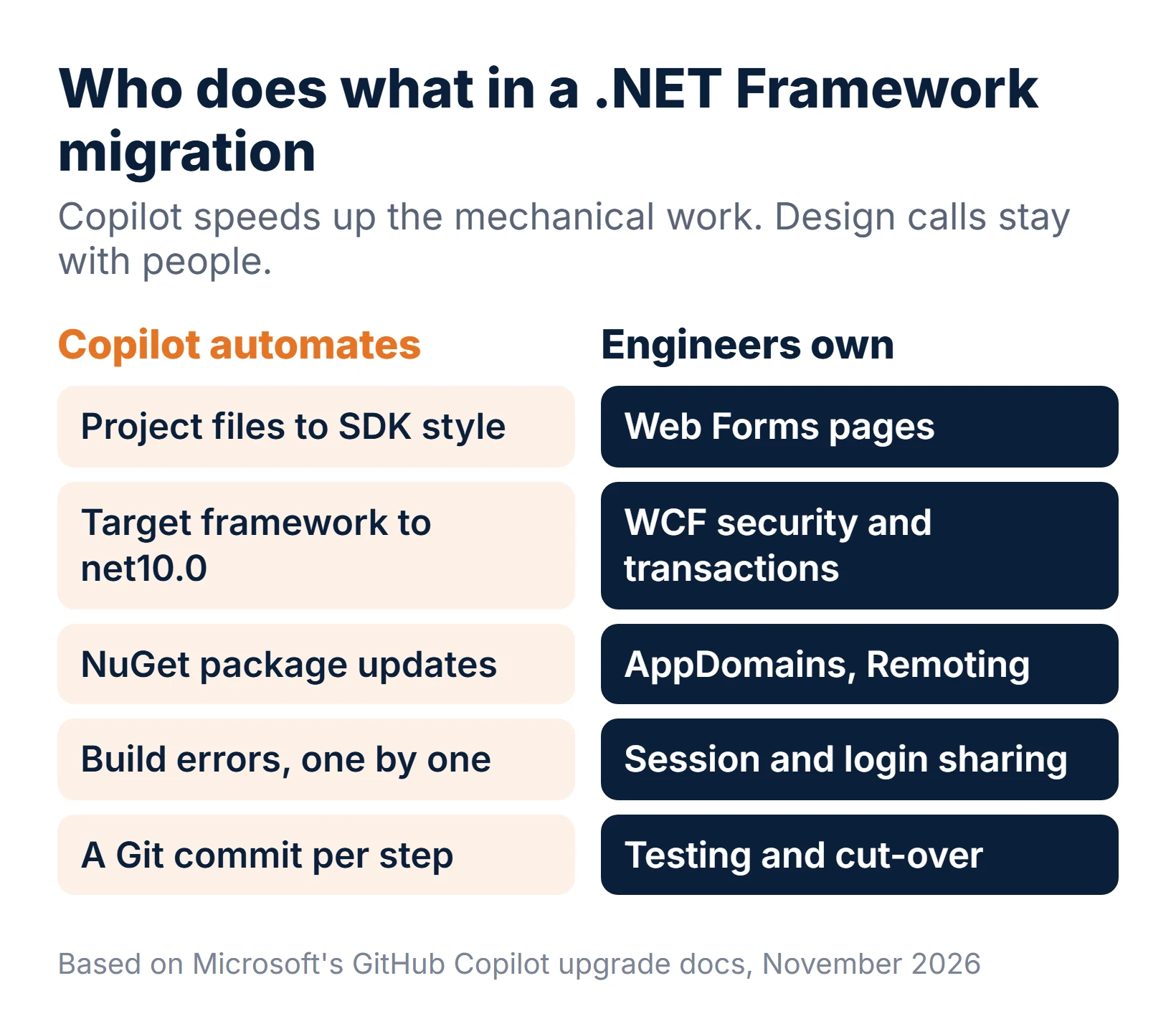
Short answer. Microsoft has officially deprecated the .NET Upgrade Assistant and now points everyone to GitHub Copilot app modernization. As of November 2026, Copilot can do most of the mechanical work of moving a .NET Framework app to .NET 10: project files, target frameworks, packages and build errors. It cannot redesign the parts that do not exist on modern .NET, such as Web Forms pages, AppDomains and some WCF features, so a real migration is still Copilot plus engineers.
- Upgrade AssistantOfficially deprecated and "no longer actively developed" (Microsoft Learn). Still installable.
- ReplacementGitHub Copilot app modernization, documented since November 2026 as "GitHub Copilot upgrade".
- Where it runsVisual Studio 2026, Visual Studio 2022 17.14.17+, VS Code, GitHub Copilot CLI, GitHub.com.
- .NET 8 and .NET 9Out of support since November 10, 2026.
- Target for migrations.NET 10 LTS, released November 11, 2025, supported to November 14, 2028. Latest patch: 10.0.15.
What happened to the .NET Upgrade Assistant?
The .NET Upgrade Assistant was Microsoft's tool for moving projects from .NET Framework to modern .NET. Its documentation now opens with this notice: ".NET Upgrade Assistant is officially deprecated. Use the GitHub Copilot modernization chat agent instead" (Upgrade Assistant overview). The porting guide adds that it is "no longer actively developed" and should be used only "if you can't use the modernization agent", for example where GitHub Copilot is not allowed.
Microsoft does not publish a single deprecation date. The change to the docs landed in late 2025, alongside Microsoft's November 2025 post on modernizing .NET with GitHub Copilot. Its predecessor, try-convert, was archived on May 17, 2024 and carries the line "This tool is not supported in any way" (GitHub).
The tool has not disappeared. You can still turn it on, which matters for teams that cannot send code to an AI service (install guide):
# Command-line version (still published on NuGet)
dotnet tool install -g upgrade-assistant
upgrade-assistant upgrade

# Visual Studio: Tools > Options > Projects and Solutions > Modernization
#   > "Enable legacy Upgrade Assistant"
What is GitHub Copilot app modernization, and where does it run?
It is a GitHub Copilot agent that plans and carries out .NET upgrades. Microsoft uses several names for it: the Visual Studio Installer component is "GitHub Copilot app modernization", while the newest docs, updated November 19, 2026, call it "GitHub Copilot upgrade" and describe it as an agent that works "across Visual Studio, Visual Studio Code, GitHub Copilot CLI, and GitHub.com" (overview). They are the same product.
| Where | Requirement | How you start it |
|---|---|---|
| Visual Studio | Visual Studio 2026, or Visual Studio 2022 17.14.17+ with the GitHub Copilot app modernization component | Type @Modernize in Copilot Chat, or right-click the project and choose Modernize |
| VS Code | The "GitHub Copilot upgrade" extension | Type @upgrade in Copilot Chat |
| GitHub Copilot CLI | The upgrade-agent plugin | /plugin install upgrade-agent@upgrade-agent-plugins |
| GitHub.com | Copilot Business or Enterprise with coding agents enabled | Assign the task to the Copilot coding agent |
Licensing is lighter than many expect: Microsoft's install page lists "GitHub Copilot subscription (paid or free)". One small conflict to know about: the Upgrade Assistant page says Visual Studio 2022 17.14.16, while the install page and Microsoft's blog say 17.14.17. Install the latest 17.14 update and the question goes away.
How does a Copilot upgrade actually run?
Microsoft describes three stages: assessment, planning and execution. "Copilot first prompts you to create a new branch if you're working in a Git repository," then writes its working files into the repository, and "creates a Git commit for every portion of the process" (Microsoft Learn). That is the most useful design choice in the tool: every change is reviewable and reversible.
.github/upgrades/{scenarioId}/
    assessment.md            # what it found: frameworks, packages, blockers
    upgrade-options.md       # choices it needs you to make
    plan.md                  # ordered steps, project by project
    tasks.md                 # live progress dashboard
    scenario-instructions.md
    {task}/progress-details.md
In practice the loop is: change a project, build, read the compiler errors, fix them, build again. "If Copilot can't correct the problem, it asks for your help." Expect it to stop on the same things every time: APIs that no longer exist, and design questions where two answers are possible.
Which upgrade paths and project types does Copilot support?
According to Microsoft's scenarios and skills page, Copilot supports these paths:
| From | To | Notes |
|---|---|---|
| .NET Framework (any version) | .NET 8 or later | Choose .NET 10. .NET 8 left support on November 10, 2026. |
| .NET Framework (any version) | .NET Framework 4.8.1 | Useful as a first step for very old apps |
| .NET Core 1.x to 3.x | .NET 8 or later | Usually the easiest of the four |
| .NET 5 or later | .NET 8 or later | Version bumps, for example .NET 8 to .NET 10 |
The same page lists named skills, including "Upgrading ASP.NET Framework to Core (MVC and Web API)", "Upgrading WCF to CoreWCF", "Upgrading EF6 Code-First to EF Core", "Scaffolding a YARP proxy project", "Upgrading MVC System.Web adapters", a Web Forms to Blazor scenario and an Azure migration scenario. Project types covered include ASP.NET Core, Web Forms, Blazor, Azure Functions, WPF, WinForms, WinUI, MAUI and Xamarin, class libraries, console apps and test projects.
What can Copilot not migrate for you?
Copilot converts code. It cannot convert a feature that modern .NET does not have. Microsoft keeps a list of .NET Framework technologies unavailable on .NET 6+: application domains, Remoting, Code Access Security (CAS), security transparency, System.EnterpriseServices and Windows Workflow Foundation (WF). ASP.NET Web Forms is not on that page, but it was never ported either; Microsoft's Blazor for Web Forms developers guide covers the rebuild, and notes that Web Forms "will continue to be supported for many years" on .NET Framework.
| You use | On .NET 10 | Copilot helps? | Engineer work |
|---|---|---|---|
| ASP.NET MVC / Web API | ASP.NET Core MVC and minimal APIs | Yes, a named skill | Filters, auth, HttpContext.Current calls, config |
| ASP.NET Web Forms | Nothing equivalent; rebuild in Blazor or Razor Pages | Partly, Web Forms to Blazor scenario | UI redesign, ViewState logic, page lifecycle code |
| WCF services (server) | CoreWCF NuGet packages, or gRPC / REST | Yes, WCF to CoreWCF skill | Bindings CoreWCF lacks, message security, distributed transactions |
| AppDomains, Remoting | Not available | No | Redesign as separate processes, AssemblyLoadContext or HTTP/gRPC calls |
| Windows Workflow Foundation | Not available | No | Replace with code or a workflow engine |
| Entity Framework 6 | EF Core; EF6 6.3 and later also runs on modern .NET | Yes, EF6 to EF Core skill | Query behaviour differences, lazy loading, migrations history |
| WinForms / WPF | Supported on Windows | Yes | Third-party controls, designer issues, deployment |
These are the errors your team will see first, and none of them is fixed by changing a version number:
error CS0234: The type or namespace name 'Web' does not exist in the namespace 'System'
              (are you missing an assembly reference?)

System.PlatformNotSupportedException: Operation is not supported on this platform.
   at MyApp.ReportRunner.Start()      // Delegate.BeginInvoke: async delegates relied on Remoting
The first appears wherever code references System.Web, which does not exist on .NET 10. The second comes from BeginInvoke on a delegate, which compiles but throws at run time on modern .NET; the fix is Task.Run and async/await. Calls such as AppDomain.CreateDomain also throw PlatformNotSupportedException, which is why a test run, not just a clean build, has to be part of the plan.
How do you migrate a large ASP.NET app without a big-bang rewrite?
Microsoft's answer is incremental migration: "Incremental migration is an implementation of the Strangler Fig pattern" (Microsoft Learn). A new ASP.NET Core app on .NET 10 sits in front of the old one. It serves the routes you have already moved and forwards everything else to the .NET Framework app through YARP (Yet Another Reverse Proxy), Microsoft's reverse-proxy library. The System.Web adapters package, Microsoft.AspNetCore.SystemWebAdapters (2.3.0 on NuGet), lets shared libraries keep using HttpContext on both sides while they move.
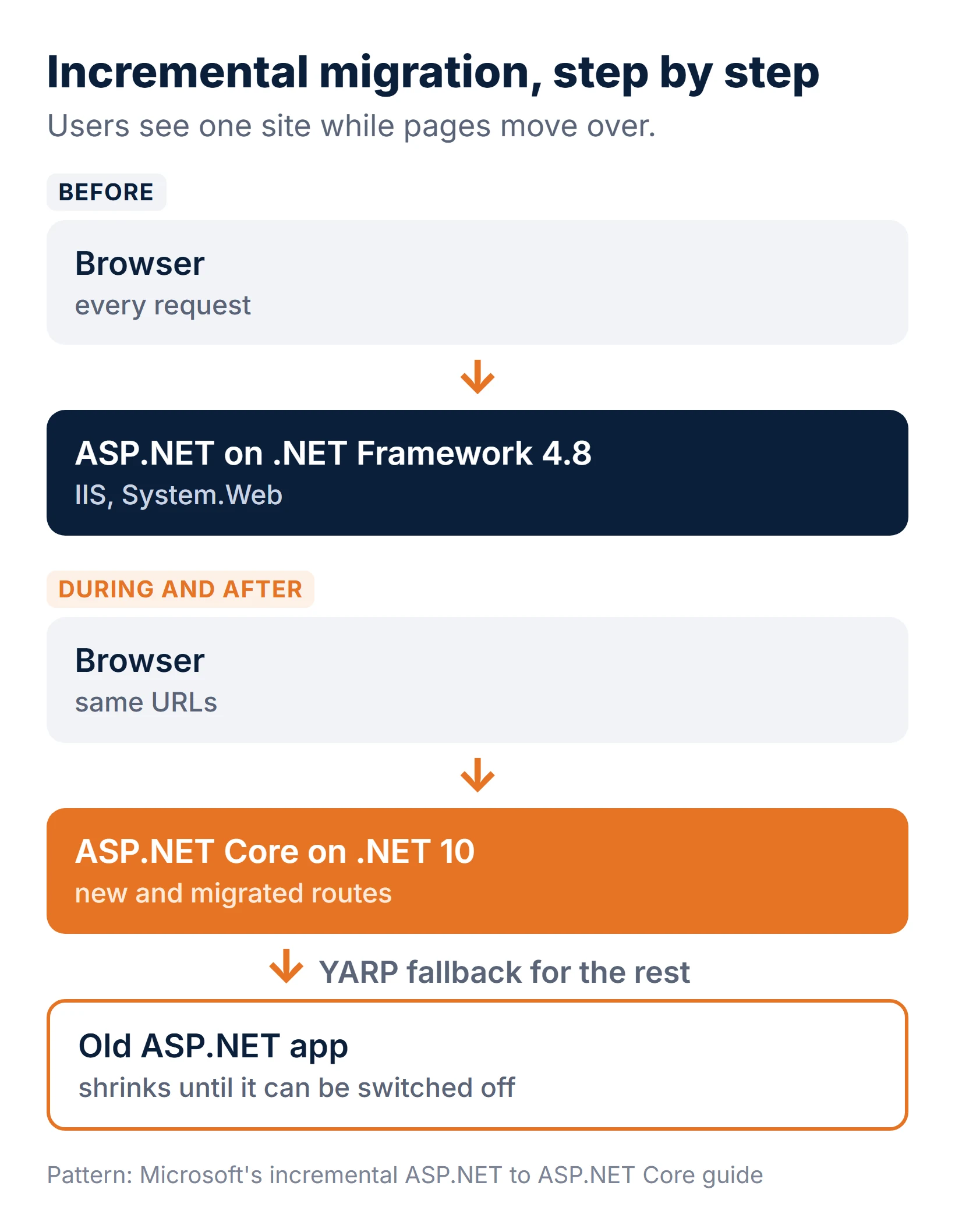
The core of the setup, taken from Microsoft's remote app setup guide, is a fallback route in the new app's Program.cs:
using Microsoft.Extensions.Options;
using Microsoft.AspNetCore.SystemWebAdapters;

var builder = WebApplication.CreateBuilder(args);

builder.Services.AddSystemWebAdapters()
    .AddRemoteAppClient(options =>
    {
        options.RemoteAppUrl = new(builder.Configuration["RemoteAppUri"]);
        options.ApiKey = builder.Configuration["RemoteAppApiKey"];
    });
builder.Services.AddReverseProxy();

var app = builder.Build();

// Routes already migrated to ASP.NET Core are mapped here.

app.MapForwarder("/{**catch-all}",
        app.Services.GetRequiredService<IOptions<RemoteAppClientOptions>>().Value.RemoteAppUrl.OriginalString)
    .WithOrder(int.MaxValue)   // lowest priority: only unmatched requests are forwarded
    .ShortCircuit();

app.Run();
The old app registers the matching server side in Global.asax.cs with AddSystemWebAdapters().AddRemoteAppServer(...), using the same RemoteAppApiKey (a GUID). Session state and sign-in can then be shared, so users never notice which app answered. Copilot's "Scaffolding a YARP proxy project" skill sets much of this up; deciding the order in which routes move is still a human call.
How long does a .NET Framework to .NET 10 migration take?
The honest answer is that the shape of the app decides it, not the size. These ranges are our planning estimates for a typical small or mid-sized business application with some automated tests, using Copilot for the mechanical steps. They are not Microsoft figures, and a code assessment replaces them with a real number.
| Part of the app | Effort with Copilot (estimate) | What drives it up |
|---|---|---|
| Class libraries with no System.Web | Days per library | Old packages with no .NET 10 version |
| ASP.NET MVC / Web API, 20 to 50 controllers | 2 to 6 weeks | Custom filters, auth, heavy HttpContext.Current use |
| Web Forms, 30 to 100 pages | 2 to 6 months | Every page is rebuilt; ViewState and code-behind logic |
| WCF services | 2 to 8 weeks per service family | Message security, transactions, duplex callbacks |
| WinForms / WPF desktop app | 2 to 8 weeks | Third-party control suites, installers |
| Testing and parallel run | 20 to 30% on top | No automated tests to start from |
What this means for owners
Copilot lowers the cost of the routine part of a migration, so the price now depends mostly on Web Forms, WCF and old design choices. Ask for an assessment that names those parts and prices them separately. Budget for testing: a build that compiles is not an app that works.
What this means for developers
Run the assessment first and read assessment.md before accepting the plan. Keep Copilot on its own branch, review each commit, and add characterization tests around the risky code before it changes. Target net10.0, not net8.0, even where a template defaults to 8.
What does a realistic Copilot-plus-engineers plan look like?
- Inventory. List every project, its target framework, and whether it uses System.Web, WCF, Web Forms, AppDomains or Remoting.
- Prepare. Convert
packages.configtoPackageReference, move to SDK-style project files, and fix compiler warnings. Microsoft lists these as the first steps. - Assess with Copilot. Run
@Modernizeon a branch, read the assessment, and decide target and approach per project. - Libraries first. Upgrade leaf libraries before the projects that depend on them; Microsoft calls this post-order depth-first.
- Front door. Stand up the ASP.NET Core app with the YARP fallback, deploy it, and confirm nothing changed for users.
- Move routes. Migrate pages and endpoints in business-value order; rebuild Web Forms pages and redesign WCF where needed.
- Retire. When the fallback route stops receiving traffic, switch off the old app.
A minimal project file at the end looks like this:
<Project Sdk="Microsoft.NET.Sdk.Web">
  <PropertyGroup>
    <TargetFramework>net10.0</TargetFramework>
    <Nullable>enable</Nullable>
    <ImplicitUsings>enable</ImplicitUsings>
  </PropertyGroup>
</Project>
Is it worth moving now, or can it wait?
.NET Framework 4.8 is still supported as part of Windows, so an app on it is not in the same position as one on .NET 8, which lost support on November 10, 2026. The reason to move is different: new libraries, hosting options and developer tools target modern .NET, and the tooling that made migration cheap is now Copilot-based and improving. If you are already paying for a rewrite of one area, the incremental route lets you start there.
Frequently asked questions
Is the .NET Upgrade Assistant still available?
Yes, but it is officially deprecated and no longer actively developed. In Visual Studio you turn it back on under Tools, Options, Projects and Solutions, Modernization, Enable legacy Upgrade Assistant, and the command-line version still installs with dotnet tool install -g upgrade-assistant. Microsoft recommends GitHub Copilot app modernization instead.
What replaced the .NET Upgrade Assistant?
GitHub Copilot app modernization, which Microsoft's newest docs call GitHub Copilot upgrade. It runs in Visual Studio 2026, Visual Studio 2022 version 17.14.17 or later, Visual Studio Code and the GitHub Copilot CLI.
Do we need a paid GitHub Copilot licence to use it?
Microsoft's install page lists a GitHub Copilot subscription, paid or free. Running it as a coding agent on GitHub.com needs Copilot Business or Enterprise with coding agents enabled.
Can GitHub Copilot convert ASP.NET Web Forms to .NET 10?
Not directly. Web Forms does not exist on modern .NET, so the pages have to be rebuilt, usually in Blazor or Razor Pages. Copilot has a Web Forms to Blazor scenario that helps, but the result is new UI code that engineers must design, review and test.
Which .NET version should a .NET Framework app move to?
.NET 10. It is the current long-term support release, supported to November 14, 2028. .NET 8 and .NET 9 support ended on November 10, 2026, so they are no longer sensible targets.
How long does a .NET Framework to .NET 10 migration take?
It depends on what the app uses. A solution of class libraries and Web API controllers can move in a few weeks; one with Web Forms pages, WCF services or AppDomains can take months, because those parts are rebuilt rather than converted. A code assessment gives a real number before you commit.
Planning a .NET Framework migration? We modernize .NET apps for small and mid-sized businesses in the US, UK, Canada and Australia: an assessment first, then an incremental move to .NET 10 with the old app running until the new one is proven. See our application modernization services and .NET development pages, or see how we test migrated apps before cut-over.

Nikit Nandan
Strategy Director
Nikit is experienced in conducting in-depth research to stay abreast of industry trends and emerging technologies.