Updated November 2026. Every date below was checked against Intuit's own support and developer pages, linked where they are used.
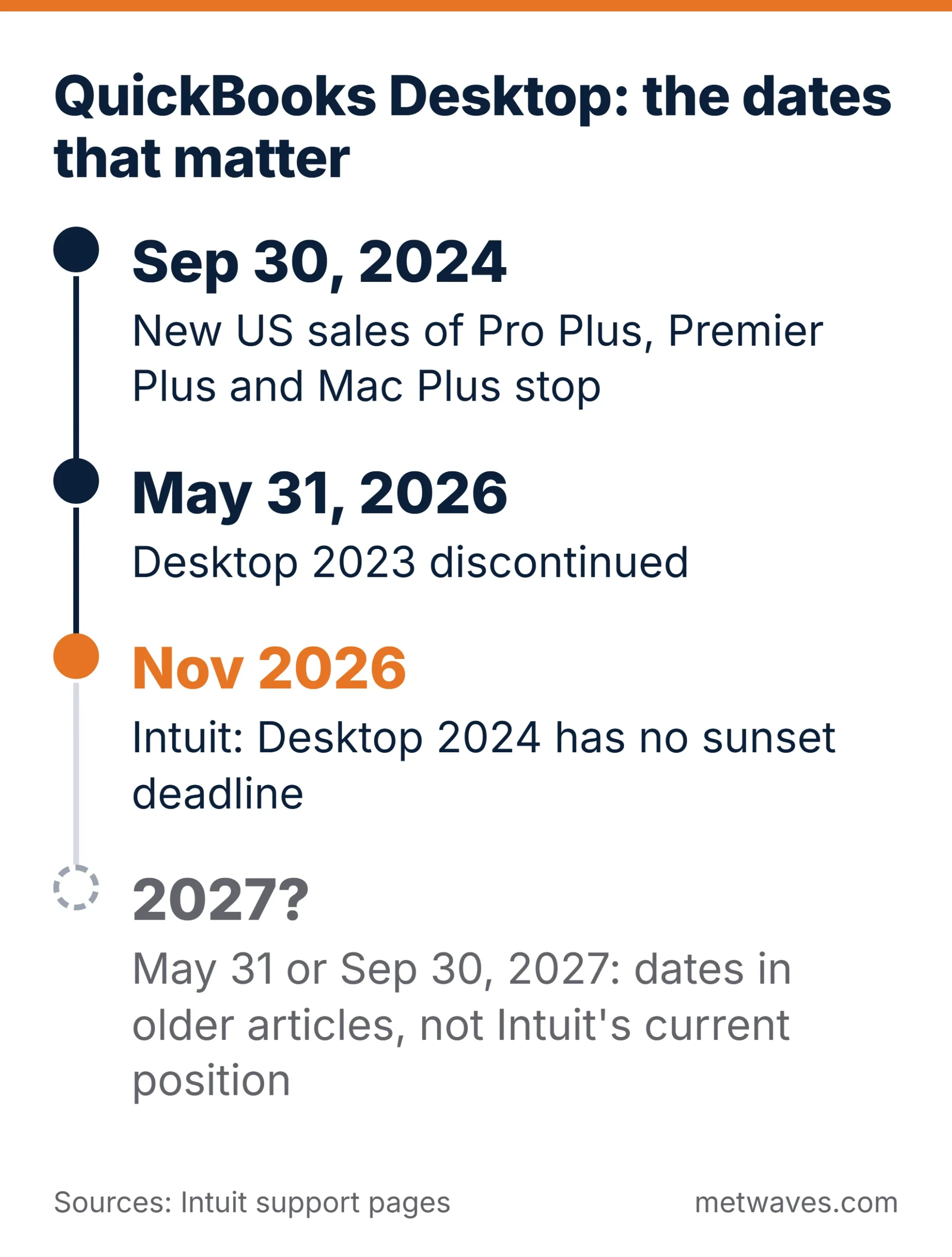
Short answer. No, not on Intuit's current word. As of November 2026, Intuit says QuickBooks Desktop 2024 (Pro Plus, Premier Plus and Enterprise) won't be discontinued in May 2027 and has no sunset deadline, even though many articles still quote May 31 or September 30, 2027. Desktop 2023 was discontinued on May 31, 2026, so if your custom integration runs against 2023 or older, upgrade it now; if it runs on 2024, it keeps working, but it is worth deciding this year whether to harden it or rebuild it for QuickBooks Online.
- Desktop 2024 sunsetNone announced. Intuit: 2024 "won't be discontinued in May 2027" (page updated Nov 5, 2026).
- Desktop 2023Discontinued May 31, 2026. No security updates, payroll, bank feeds or payments on that version.
- New Pro / Premier / Mac subscriptionsNot sold to new US customers since September 30, 2024. Existing subscribers can keep renewing.
- EnterpriseStill sold, same 24.0 platform, same no-sunset statement.
- Annual releasesDesktop Plus 2024 and Enterprise 24.0 were the last. Updates now ship through the year instead.
- Desktop SDKVersion 18.0, 64-bit, supports Desktop 2024 from release R22. No Intuit REST API for Desktop.
Is QuickBooks Desktop being discontinued in 2027?
For years Intuit ran QuickBooks Desktop on a three-year cycle: each annual version lost its connected services on May 31, three years after release. On that rule, Desktop 2024 would have ended on May 31, 2027, and that is the date most accounting firms and blogs still print.
Intuit has since changed the rule. Its What's new in QuickBooks Desktop 2024 page, last updated November 5, 2026, says: "QuickBooks Desktop 2024—Pro Plus, Premier Plus, and Enterprise Solutions—won't be discontinued in May 2027." It adds that Intuit is "moving away from the historical 3-year software lifecycle", that "there's no sunset deadline for this release", and that support, security patches and tax compliance updates continue.
The sources disagree, so here is what each one says and how much weight to give it:
| Source | What it says about Desktop 2024 | How to read it |
|---|---|---|
| Intuit, Desktop 2024 help page (Nov 2026) | Not discontinued in May 2027; no sunset deadline | The primary source. Plan on this. |
| Texas Society of CPAs (May 2026) | Discontinued on May 31, 2027 | Applies the old three-year rule; written before Intuit's change |
| Overman CPA and others | Support ends September 30, 2027 | Not found on any Intuit page we checked |
Two cautions. First, "no sunset deadline" is a policy statement, not a contract; Intuit can announce a date later, as it did for every earlier version. Second, the statement names Pro Plus, Premier Plus and Enterprise Solutions. It does not name QuickBooks Mac Plus 2024 or the Accountant editions, so check Intuit's page for those before you assume the same.
What did Intuit actually change?
Three changes, made at different times, explain most of the confusion:
- The stop-sell (2024). Intuit's announcement says that after September 30, 2024 it stopped selling new subscriptions of QuickBooks Desktop Pro Plus, Premier Plus, Mac Plus and Enhanced Payroll to US customers. It applies "only to new purchases, not a discontinuation (sunset)", existing subscribers can keep renewing, and Enterprise is not affected. The decision covers the United States only.
- The last annual release. Intuit's release-process page (updated October 19, 2026) says "QuickBooks Desktop Plus 2024 and QuickBooks Desktop Enterprise 24.0 were our final annual platform releases." New features now arrive as updates through the year, not as a 2025 or 2026 version you install.
- The end of the three-year cycle. Because there is no newer platform to move to, Intuit now keeps version 24.0 current instead of retiring it in 2027.
For an integration, the practical effect is good news: the version you test against today is the version you will be running for a while, and its SDK keeps getting fixes.
Which editions does this cover: Enterprise, Pro, Premier or Mac?
| Edition | Can new US customers buy it? | 2027 sunset? | Desktop SDK integrations |
|---|---|---|---|
| Pro Plus / Premier Plus 2024 | No, since Sep 30, 2024 (renewals continue) | No sunset deadline | Supported |
| Enterprise Solutions 24.0 | Yes | No sunset deadline | Supported |
| Mac Plus 2024 | No, since Sep 30, 2024 | Not named in Intuit's statement | Not supported on Mac |
| Any edition, 2023 or older | No | Already discontinued | Still connects, but unsupported |
Outside the US the picture differs. The stop-sell was US-only, and Intuit's SDK support page lists Canadian editions through 2024 but UK editions only through 2022, and excludes QuickBooks for Mac entirely. If your company file is UK or Mac, your integration is already on borrowed time.
What happens when a Desktop version is discontinued?
Discontinued does not mean the program stops opening. It means Intuit switches off the services that depend on its servers. Intuit's discontinuation policy for Desktop 2023 lists what stopped after May 31, 2026:
- Critical security updates and live technical support.
- Desktop Payroll (Assisted, Basic and Enhanced): tax tables, forms and filing.
- Payment processing, merchant deposit downloads and eInvoicing.
- Online banking: bank feeds, online payments and transfers.
- Emailing forms and reports, multicurrency exchange-rate updates, Accountant's Copy transfer.
The list does not mention the SDK or the Web Connector. That fits how they work: they talk to the company file on the local machine, not to Intuit's servers. Intuit's own SDK page says of very old versions that they "are no longer supported by Intuit; however, applications written to integrate with these products should continue to work." So the integration usually keeps running. What breaks is anything it relied on through Intuit: a sync that expected bank-feed transactions, a workflow that emailed invoices from QuickBooks, a payroll export. And everything now runs on software that gets no security fixes.
Will our custom QuickBooks Desktop integration keep working?
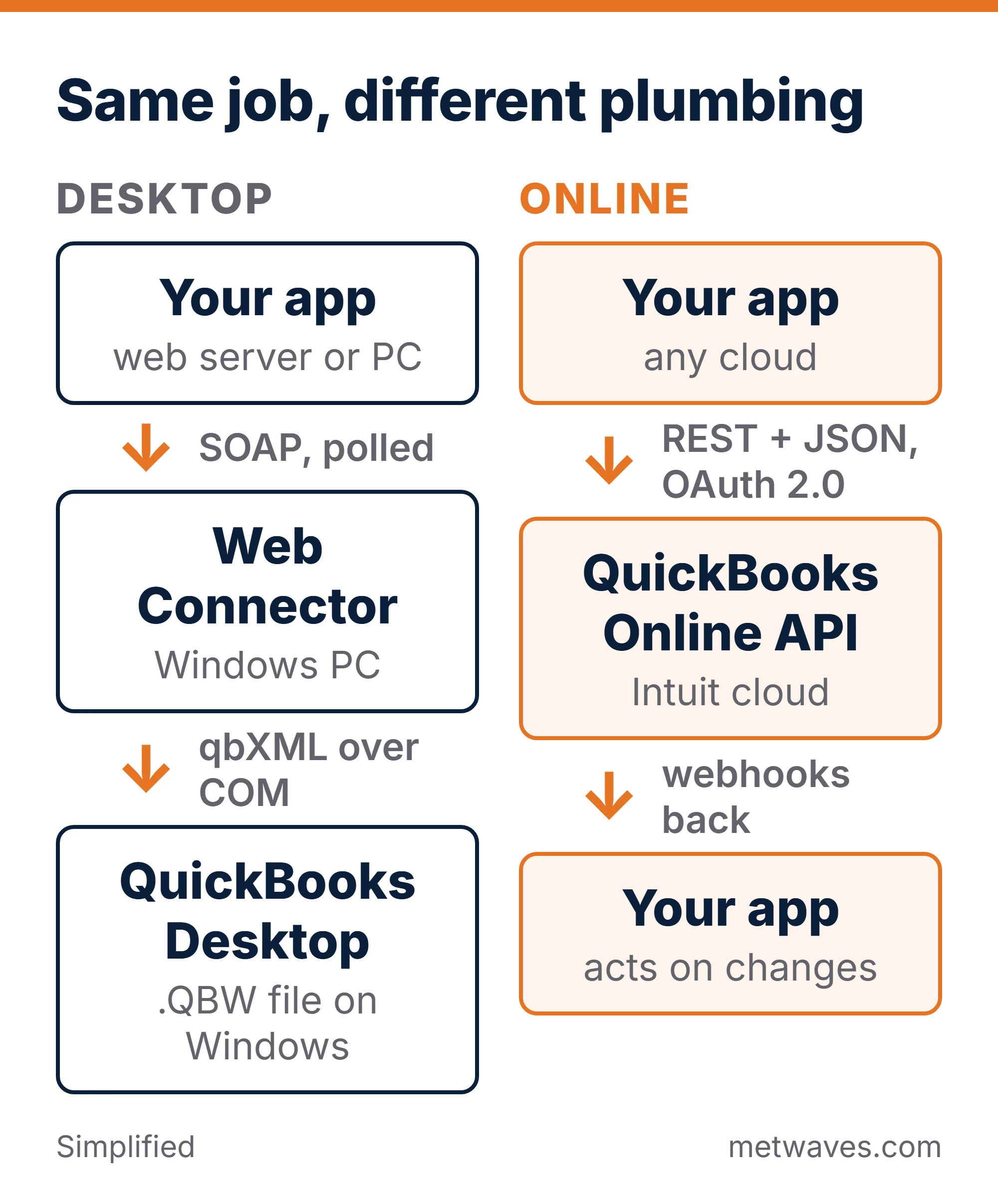
On Desktop 2024, yes. There is no Intuit REST API for Desktop; every custom integration uses the QuickBooks Desktop SDK in one of two ways, and both remain supported.
1. Direct COM calls (an app on the same Windows machine or network)
The app builds a qbXML request (qbXML is Intuit's XML format for QuickBooks Desktop data) and hands it to the QuickBooks request processor, a COM component (Microsoft's Component Object Model) that ships with QuickBooks. In C# it looks like this:
var rp = new QBXMLRP2Lib.RequestProcessor2();
rp.OpenConnection2("", "Orders Sync", QBXMLRP2Lib.QBXMLRPConnectionType.localQBD);
string ticket = rp.BeginSession("", QBXMLRP2Lib.QBFileMode.qbFileOpenDoNotCare);
try
{
    string responseXml = rp.ProcessRequest(ticket, requestXml);
    // parse responseXml, check statusCode on each response element
}
finally
{
    rp.EndSession(ticket);
    rp.CloseConnection();
}
And the request itself, here adding an invoice:
<?xml version="1.0" encoding="utf-8"?>
<?qbxml version="16.0"?>
<QBXML>
  <QBXMLMsgsRq onError="stopOnError">
    <InvoiceAddRq requestID="1">
      <InvoiceAdd>
        <CustomerRef><FullName>Acme Supply</FullName></CustomerRef>
        <TxnDate>2026-11-24</TxnDate>
        <RefNumber>INV-1042</RefNumber>
        <InvoiceLineAdd>
          <ItemRef><FullName>Consulting</FullName></ItemRef>
          <Quantity>10</Quantity>
          <Rate>150.00</Rate>
        </InvoiceLineAdd>
      </InvoiceAdd>
    </InvoiceAddRq>
  </QBXMLMsgsRq>
</QBXML>
The version in the processing instruction matters. A robust app calls QBXMLVersionsForSession after the session starts and sends the highest version the running QuickBooks supports, which is how Intuit's SDK guide suggests supporting several QuickBooks versions with one app.
2. The QuickBooks Web Connector (a cloud app reaching a desktop file)
A web store or SaaS app cannot call COM on someone's PC, so Intuit provides the Web Connector (QBWC): a small Windows program that polls your web service on a schedule over SOAP, asks for qbXML requests, runs them against QuickBooks and posts the responses back. Your service implements methods such as authenticate, sendRequestXML, receiveResponseXML and closeConnection. The user installs a .qwc file that tells the Web Connector where to call:
<?xml version="1.0"?>
<QBWCXML>
  <AppName>Orders to QuickBooks</AppName>
  <AppURL>https://sync.example.com/qbwc</AppURL>
  <AppDescription>Pushes web orders into QuickBooks Desktop</AppDescription>
  <AppSupport>https://sync.example.com/support</AppSupport>
  <UserName>qbwc-sync</UserName>
  <OwnerID>{57F3B9B1-86F1-4FCC-B1EE-566DE1813D20}</OwnerID>
  <FileID>{90A44FB5-33D9-4815-AC85-BC87A7E7D1EB}</FileID>
  <QBType>QBFS</QBType>
  <Scheduler><RunEveryNMinutes>15</RunEveryNMinutes></Scheduler>
</QBWCXML>
The SDK version to be on
Intuit's current Desktop SDK is 18.0. It is 64-bit, and its qbXML 18.0 spec supports US and Canadian QuickBooks 2024 from release R22. Intuit also notes that the 64-bit SDK is not backward-compatible with the 32-bit SDK and supports QuickBooks 2022 and later. An integration written years ago against a 32-bit SDK is the one most likely to need real work.
What are the real risks for a Desktop integration now?
The 2027 deadline was never the main risk. These are:
- The Windows box. Every Desktop integration depends on a Windows machine with QuickBooks installed, often under someone's desk. If it is off, asleep or mid-update, nothing syncs.
- Session errors. The best-known one is
0x80040408: Could not start QuickBooks, usually because QuickBooks is already open under another Windows user, a different company file is open, or the file's single-user or multi-user mode does not match whatBeginSessionasked for. - Silent polling gaps. If the Web Connector stops running, orders queue up on your server and nobody notices until month-end.
- Old code nobody owns. Many of these integrations were written once, a decade ago, in VB6 or .NET Framework against a 32-bit SDK, by someone who has left.
- Growth limits. New US customers cannot buy Pro Plus or Premier Plus. If you add a second company that needs QuickBooks, it will be on Enterprise or QuickBooks Online, and your integration has to handle both.
- Policy can change again. Intuit retired every earlier Desktop version. "No sunset deadline" buys time, not certainty.
What are our options?
| Option | What happens to the integration | Typical effort (estimate) | Fits when |
|---|---|---|---|
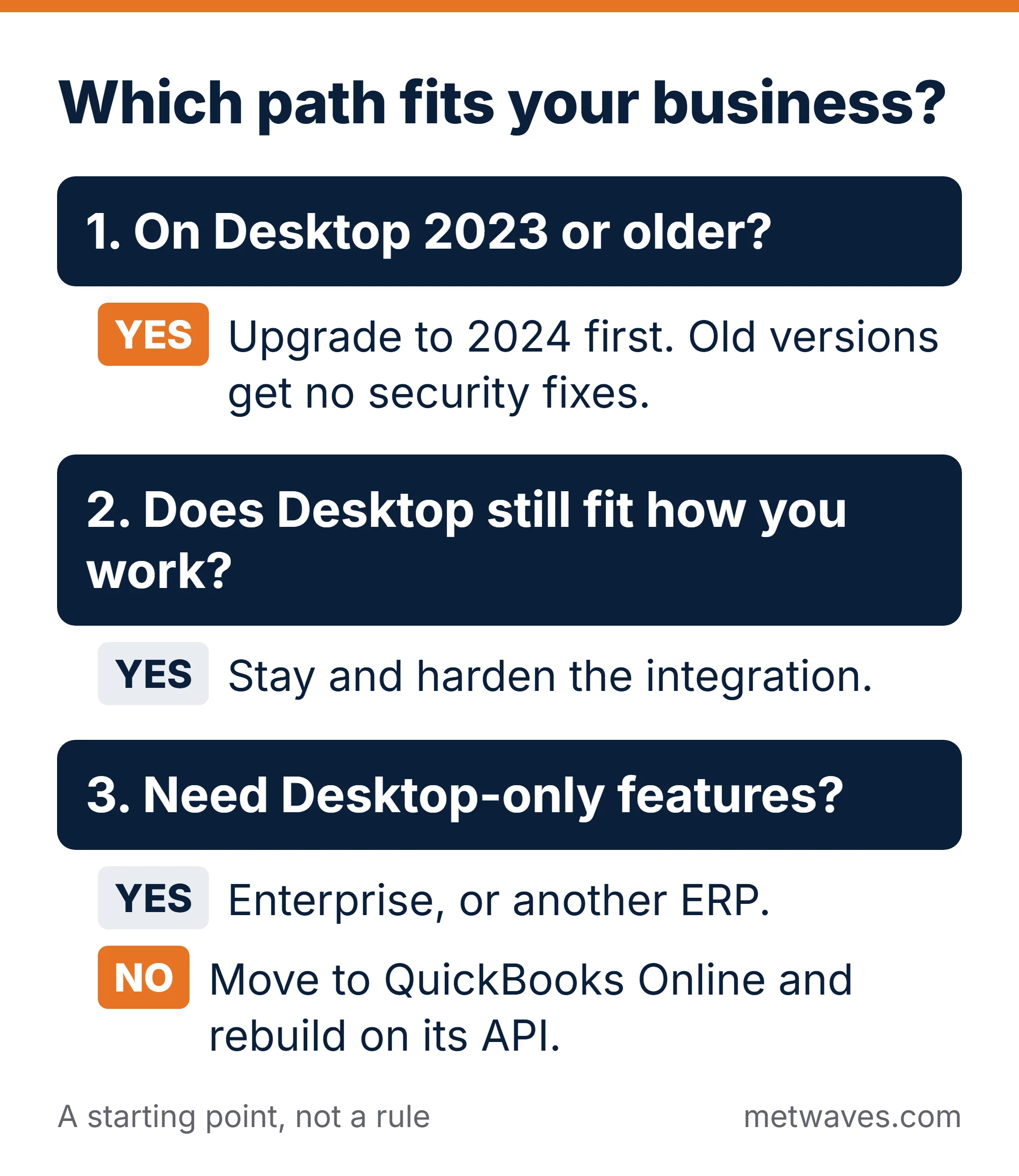
| Stay on Desktop 2024 and harden it | Same code; move to SDK 18.0, add monitoring and retries | 1–3 weeks | Desktop still does the job and the integration is stable |
| Upgrade from 2023 or older to 2024 | Re-test every qbXML call; 32-bit code may need the 64-bit SDK | 1–4 weeks | You are on a discontinued version today |
| Move to Enterprise 24.0 | Same SDK; re-test, check Enterprise-only features you start using | 1–3 weeks | You need more users, inventory or a product Intuit still sells |
| Host Desktop on a cloud server | Web Connector runs on the hosted server; network and login change | 1–3 weeks | Staff work remotely and you want to keep Desktop |
| Move to QuickBooks Online | Rebuilt on the REST API with OAuth 2.0 and webhooks; qbXML code does not carry over | 4–14 weeks | You want cloud access and no Windows dependency |
| Move to another ERP | Rebuilt against the new system's API | Varies widely | You have outgrown QuickBooks altogether |
Effort ranges are our estimates for a typical small or mid-sized business integration touching three to eight QuickBooks record types. Yours depends on the code, the data and how many systems are involved.
How do we harden a Desktop integration we are keeping?
- Inventory it. List every program that talks to QuickBooks: the Web Connector apps (open QBWC and read the list), anything under Edit > Preferences > Integrated Applications in QuickBooks, and scheduled scripts.
- Confirm versions. QuickBooks on 2024 R22 or later, SDK on 18.0, 64-bit where the code allows.
- Make failures loud. Log every qbXML
statusCodethat is not 0, alert when the Web Connector has not called in for longer than its schedule, and keep a dead-letter queue for requests that failed. - Make retries safe. Store the QuickBooks
TxnIDagainst your own order or invoice ID, and check for it before adding again, so a retry never creates a duplicate invoice. - Stabilise the machine. A dedicated Windows server or hosted desktop with QuickBooks set to open no company on start-up, one Windows user for the sync, and updates scheduled outside sync windows.
- Write it down. One page: what syncs, which direction, how often, where the logs are, who to call.
What does a rebuild for QuickBooks Online involve?
The QuickBooks Online API is a different product: REST endpoints, JSON, OAuth 2.0 sign-in, numeric IDs instead of full names, a SyncToken instead of EditSequence, and webhooks instead of polling. Business logic and field mappings carry over; the plumbing does not.
Two things make the move smoother. Intuit's own Desktop-to-Online conversion keeps your Desktop file untouched, and, per Intuit's developer guide, it generates an ID mapping table so an integration can match old Desktop IDs to new Online IDs. The same guide lists Desktop features that are changed or missing in QuickBooks Online, such as progress invoicing, price levels, assemblies, units of measure and custom fields on lists. If your integration depends on one of those, design around it before you migrate, not after.
Moving off QuickBooks Desktop is a planned project, not an emergency. Run the old and new integrations side by side for at least one month-end close before you switch the Desktop sync off.
What this means for you
- For ownersThere is no 2027 cliff for Desktop 2024. You have time to choose.
- If you are still on 2023 or older, you are already unsupported. Budget the upgrade now.
- Ask one question of your integration: if it stopped tonight, how long until someone noticed?
- For developersTarget Desktop 2024 R22+ and SDK 18.0 (64-bit).
- Store QuickBooks IDs against your own keys so every write is safe to retry.
- Keep the business rules separate from the qbXML layer, so a later move to the QuickBooks Online API replaces one layer, not the whole app.
Frequently asked questions
Is QuickBooks Desktop being discontinued in 2027?
Not according to Intuit. Its Desktop 2024 help page, updated November 5, 2026, says Desktop 2024 Pro Plus, Premier Plus and Enterprise "won't be discontinued in May 2027" and have no sunset deadline. Articles quoting May 31 or September 30, 2027 are based on the older three-year rule.
When was QuickBooks Desktop 2023 discontinued?
After May 31, 2026. Since then Desktop 2023 gets no security updates or live support, and payroll, bank feeds, payment processing and emailing forms no longer work on that version.
Will my QuickBooks Web Connector integration stop working?
Not on Desktop 2024, which Intuit still supports. On a discontinued version it usually keeps connecting, because the SDK works with the local company file, but it runs on software that no longer gets security fixes, and any feature that relied on Intuit's online services stops.
Can I still buy QuickBooks Desktop Pro or Premier?
Not as a new US customer. Intuit stopped selling new Pro Plus, Premier Plus and Mac Plus subscriptions in the US after September 30, 2024. Existing subscribers can renew, and QuickBooks Desktop Enterprise is still sold.
Is there a QuickBooks Desktop API?
Yes, but not a REST one. Desktop is integrated through the QuickBooks Desktop SDK, currently version 18.0, which exchanges qbXML messages through a COM request processor on Windows or through the QuickBooks Web Connector for web apps.
Should we move to QuickBooks Online now?
Only if it fits how you work. Moving means rebuilding the integration on the QuickBooks Online API and checking for Desktop features Online lacks. If Desktop 2024 serves you well, hardening the integration is a sound choice for now.
Not sure which path fits? We review QuickBooks Desktop integrations, harden the ones worth keeping and rebuild the rest on the QuickBooks Online API. See our software integration services, or read how we built an AI invoice processing agent that posts to SAP Business One, the same kind of accounting integration with checks before anything is posted. For older Windows and .NET Framework code, our application modernization and .NET development pages cover the rebuild, and cloud consulting covers moving the sync server off a desk PC. Book an integration review.

Nikit Nandan
Strategy Director
Nikit is experienced in conducting in-depth research to stay abreast of industry trends and emerging technologies.