Updated November 25, 2026. Dates come from Microsoft's VBScript deprecation timeline and the Microsoft 365 Developer blog.
Short answer. Microsoft Access is not being removed, but VBScript is. Windows will stop enabling VBScript by default around 2026 to 2027 and later remove it, and Access databases whose VBA code uses VBScript's regular expressions or runs .vbs files will break first. Check your database now; if it needs work anyway, that is the moment to decide between keeping Access with a SQL Server back end, moving to Power Apps, or replacing it with a web app.
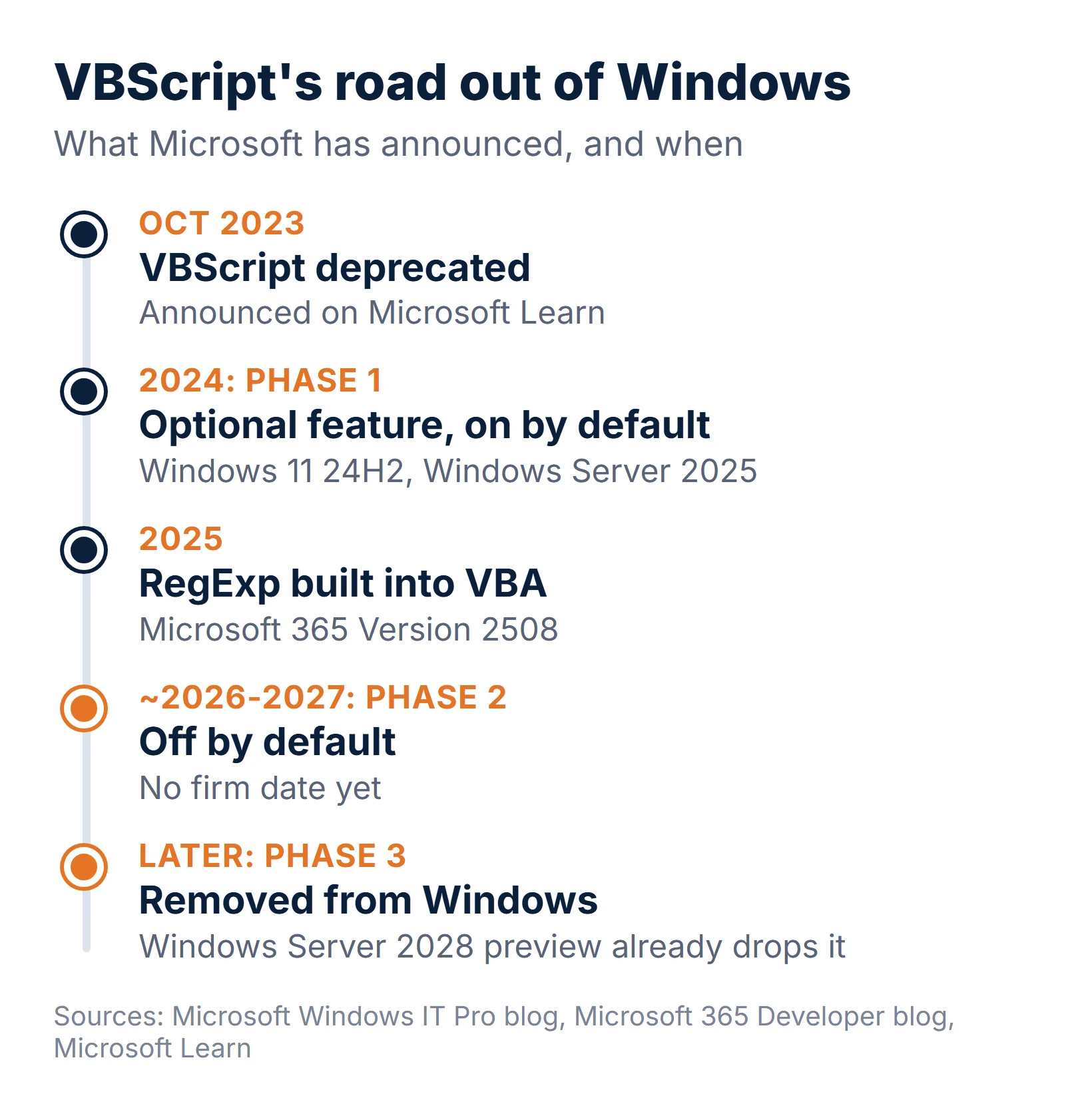
- VBScript phase 1 (2024)An optional Windows feature, installed and on by default in Windows 11 24H2 and Windows Server 2025.
- VBScript phase 2 (~2026-2027)Off by default. Microsoft says "around 2027" in one post and "approximately 2026 or 2027" in another.
- VBScript phase 3 (no date)Removed from future Windows. The Windows Server 2028 preview already lists it as removed.
- VBA fixRegExp is built into VBA from Microsoft 365 Version 2508 (Build 19127.20154).
- Access limits2 GB per database file and 255 concurrent users.
- Access 2024 supportEnds October 10, 2029.
Is Microsoft Access being discontinued?
No. Access ships in Microsoft 365, Access 2024 follows the Modern Lifecycle Policy with a retirement date of October 10, 2029, and the Access Runtime is still "available as a free download" for users who only run databases. The part of Access that did die was the web: Microsoft stopped new Access web apps in June 2017 and "shut down any remaining web apps and web databases by April, 2018" (Microsoft).
The limits that push businesses off Access have not changed either. The Access specifications cap a database at "2 gigabytes, minus the space needed for system objects" and 255 concurrent users. In practice, shared databases on a network drive tend to slow down and corrupt long before 255 users.
What does VBScript have to do with Access?
Access databases are programmed in VBA (Visual Basic for Applications), which is part of Office. VBScript is a different language that ships with Windows. They look alike, and over the years many Access developers borrowed VBScript components from inside VBA. Those borrowed parts are what break.
Microsoft names two in its guide for VBA projects: once VBScript is removed, calling .vbs files from VBA stops working, and "References to VBScript RegExp library will break unless the Office client is updated to a supported build." The fix for the second is already shipping: "RegExp classes are included in the VBA for Office by default" from Microsoft 365 Version 2508. On that version, both New RegExp and CreateObject("VBScript.RegExp") keep working even with VBScript disabled. On older builds, the late-bound call fails once VBScript is turned off.
One gap to note: Microsoft's article does not say how perpetual or LTSC versions of Office, such as Office 2021 or 2024, will handle RegExp. If your users are on those, test rather than assume.
How do you check whether your Access database uses VBScript?
It takes an hour, not a project. Export the code to text, search it, then test on a machine without VBScript.
Step 1: export every module, form and report to text
' Paste into a new module in a COPY of the database, then run:
'   ExportAllCode "C:\AccessExport"
Public Sub ExportAllCode(ByVal folder As String)
    Dim obj As AccessObject
    For Each obj In CurrentProject.AllModules
        Application.SaveAsText acModule, obj.Name, folder & "\" & obj.Name & ".bas"
    Next
    For Each obj In CurrentProject.AllForms
        Application.SaveAsText acForm, obj.Name, folder & "\" & obj.Name & ".form.txt"
    Next
    For Each obj In CurrentProject.AllReports
        Application.SaveAsText acReport, obj.Name, folder & "\" & obj.Name & ".report.txt"
    Next
End Sub
Step 2: search the export for VBScript dependencies
Select-String -Path C:\AccessExport\* `
  -Pattern 'VBScript\.RegExp', 'New RegExp', '\.vbs\b', 'wscript', 'cscript', 'ScriptControl' |
  Select-Object Filename, LineNumber, Line
In the VBA editor, also open Tools, References and look for "Microsoft VBScript Regular Expressions 5.5". A hit on ScriptControl means code is evaluating script at run time, which usually means VBScript; treat it as affected until tested.
Step 3: test on a machine without VBScript
Microsoft documents the removal command in its detection guide. Run it on a test virtual machine, never on a user's PC, then exercise every form and button:
# Is the VBScript feature present? (PowerShell, as administrator)
Get-WindowsCapability -Online | Where-Object Name -like 'VBSCRIPT*'

# Simulate phase 3 on a TEST machine only
Dism /Online /Remove-Capability /CapabilityName:VBSCRIPT~~~~
Step 4: fix what you found
' Before: needs the VBScript engine on older Office builds
Dim re As Object
Set re = CreateObject("VBScript.RegExp")

' After: Microsoft 365 Version 2508 or later, RegExp is part of VBA
Dim re As New RegExp
re.Pattern = "^\d{5}(-\d{4})?$"          ' US ZIP or ZIP+4
If Not re.Test(Nz(Me.ZipCode, "")) Then MsgBox "Check the ZIP code."

' Before: runs a VBScript file
Shell "wscript.exe ""C:\Scripts\export.vbs""", vbHide
' After: the same job rewritten in PowerShell
Shell "powershell.exe -NoProfile -ExecutionPolicy Bypass -File ""C:\Scripts\export.ps1""", vbHide
If the fixes are small and the database is otherwise healthy, you can stop here. If the audit turns up a database that is also near 2 GB, shared over a VPN, or needed by people outside the office, the VBScript work is the trigger to choose a proper replacement.
What are the real alternatives to Microsoft Access?
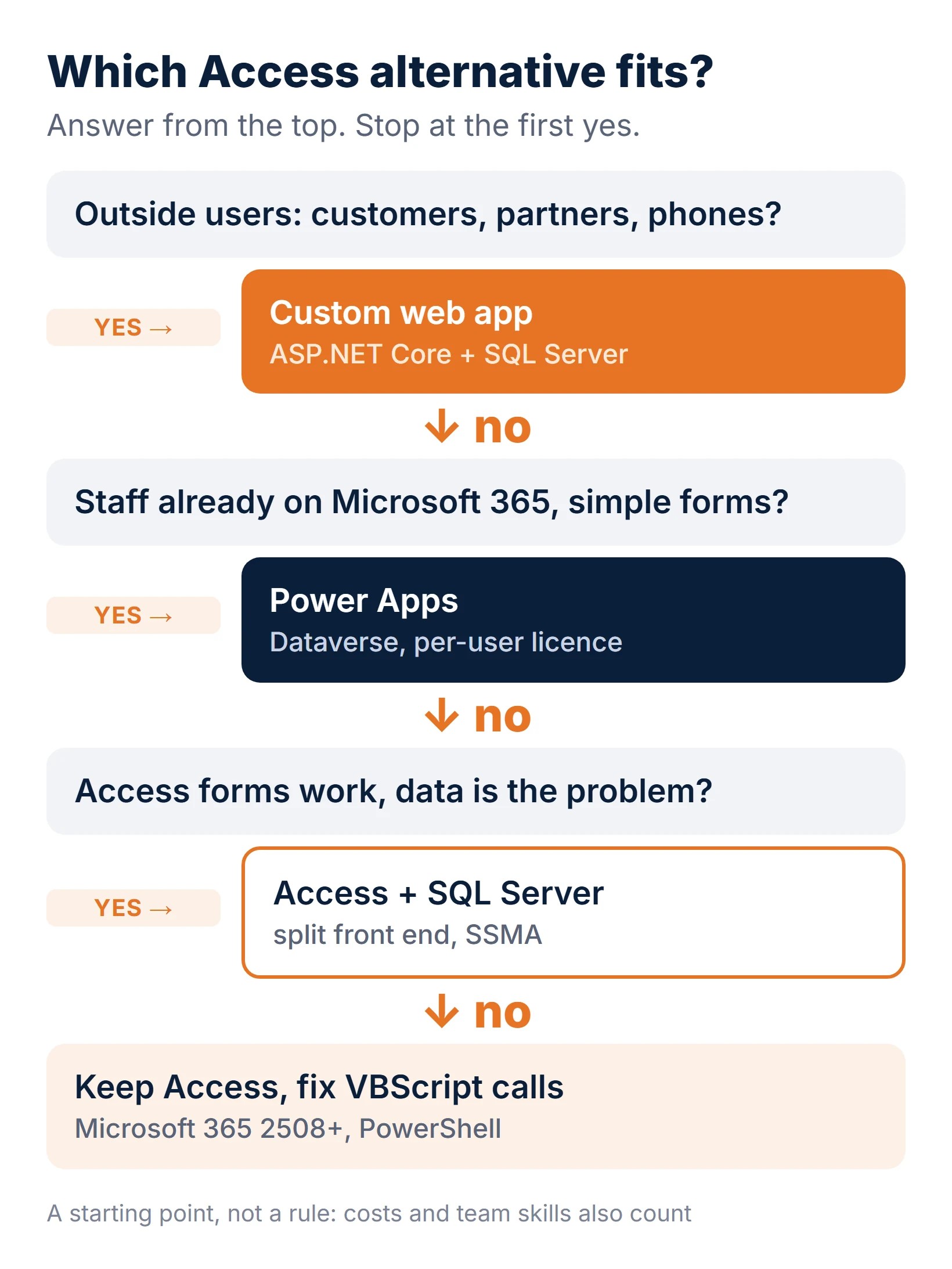
There are four realistic paths for a small or mid-sized business. Licence prices are Microsoft's US list prices as of November 2026; effort figures are our estimates for a typical departmental database of 20 to 60 tables and 30 to 80 forms, not vendor numbers.
| Option | Best for | Data limit | Licence cost | Effort (estimate) |
|---|---|---|---|---|
| Keep Access, fix VBScript calls | Healthy database, few users, one site | 2 GB | Existing Microsoft 365 or Access licences | Days |
| Access front end + SQL Server back end | Forms work; data size, speed or corruption is the problem | 50 GB on free SQL Server 2025 Express; more on paid editions | Express is free; Standard is licensed per core | 2 to 6 weeks |
| Power Apps + Dataverse | Simple internal forms; staff already on Microsoft 365 | Dataverse capacity, add-on $40 per GB per month | Premium $20 per user per month, paid yearly | 1 to 3 months |
| Custom web app (ASP.NET Core + SQL Server) | Outside users, phones, integrations, complex rules | Database edition limits | No per-user fee; hosting and build cost | 2 to 6 months |
When is Access with a SQL Server back end enough?
When users like the forms and reports and the trouble is the data. Splitting the database keeps the Access front end on each PC and moves the tables to SQL Server. Microsoft's SQL Server Migration Assistant (SSMA) for Access does the move; it supports "SQL Server 2019 (15.x) and later versions on Windows and Linux, Azure SQL Database, and Azure SQL Managed Instance", and the current release is v10.6.
The free option got better this year. SQL Server 2025 Express raises the maximum database size to 50 GB, up from 10 GB in earlier versions, limited to "the lesser of 1 socket or 4 cores" and a 1,410 MB buffer pool. For most departmental databases, that is room for years.
Linked tables then point at SQL Server through ODBC. A typical connection string with Microsoft's current driver looks like this:
ODBC;Driver={ODBC Driver 18 for SQL Server};Server=sql01.corp.local;Database=Orders;
Trusted_Connection=Yes;Encrypt=Yes;
Two things catch teams out. Driver 18 encrypts by default, so a server with a self-signed certificate fails to connect until the certificate is trusted or TrustServerCertificate=Yes is set for testing. And queries that ran fine on a local file can be slow over the network if Access pulls whole tables to filter them; the fix is pass-through queries, views or stored procedures on the server for the heavy ones.
When does Power Apps make sense?
Power Apps is Microsoft's low-code platform and the replacement Microsoft itself pointed Access web app users to. It fits simple, form-based apps used by staff who already sign in to Microsoft 365. The pricing page lists Power Apps Premium at $20.00 per user per month, paid yearly, which includes "250 MB database and 2 GB file" of Dataverse capacity per licence. At list price, 25 users cost $500 a month, or $6,000 a year, every year.
One warning for anyone reading older guides: Dataverse for Teams is being retired. Microsoft's important changes page says "You can't create new Dataverse for Teams environments starting November 15, 2026", and environments not upgraded are suspended on September 15, 2027 and decommissioned on October 30, 2027. Build on full Dataverse or SQL Server instead.
Power Apps is a poor fit when the Access app has complex VBA logic, heavy reports, many external users who would each need a licence, or data your team wants to own outside the Microsoft platform.
When should you build a web app instead?
A custom web app is the right replacement when any of these is true:
- Customers, suppliers or field staff need to use it, often on phones.
- It must exchange data with other systems: accounting, CRM, e-commerce, shipping.
- The database is near the 2 GB limit, or more than a handful of people edit at once.
- You need sign-in with your company accounts, an audit trail and role-based permissions.
- Per-user licence fees would grow faster than the business.
A typical build moves the tables to SQL Server first (the same SSMA step as above), so Access and the new app can run side by side on the same data while screens are rebuilt one area at a time. The app itself is usually ASP.NET Core on .NET 10, Microsoft's current long-term support release; .NET 8 is no longer a sensible target because its support ended on November 10, 2026.
What this means for owners
VBScript is not a reason to panic; it is a reason to check. If the check finds small fixes, do them and move on. If it finds an app that outgrew Access, compare the yearly cost of per-user licences with a one-off build, and remember that moving the data to SQL Server first keeps the business running during the change.
What this means for developers
Export the code, search it, and test on a VM with the VBSCRIPT capability removed. Move RegExp code to the VBA built-in class and get users onto Microsoft 365 Version 2508 or later. Replace .vbs calls with PowerShell. If you split the database, plan pass-through queries for anything that filters large tables.
What usually goes wrong when replacing Access?
- Hidden business rules. Years of logic live in form events, macros and query criteria, not in any document. Export everything and list the rules before anyone rebuilds a screen.
- Reports. Access reports are quick to build and slow to replace. Count them early; some are better rebuilt as Excel exports or Power BI views.
- Data quality. SSMA moves the data faithfully, including duplicates, free-text dates and orphaned records. SQL Server's constraints will reject some of them, so plan a clean-up pass.
- Copies in the wild. Users often keep their own copies of the front end, or a second database nobody mentioned. Find them before cut-over, not after.
What is a sensible plan for the next 90 days?
- List every Access file in use, who owns it, its size, and how many people use it at once.
- Run the four-step VBScript check on each one that matters.
- Update Office to Microsoft 365 Version 2508 or later where RegExp is used.
- Move the data of any database over 1 GB or shared by more than a few people to SQL Server with SSMA.
- Decide the long-term front end per database, using the decision tree above, and schedule the rebuilds that need one.
Frequently asked questions
Is Microsoft discontinuing Access?
No. Access is still part of Microsoft 365, Access 2024 is supported to October 10, 2029, and the free Access Runtime is still offered. What Microsoft is removing is VBScript, a Windows component some Access databases depend on.
Will my Access database stop working when VBScript is disabled?
Only the parts that use VBScript. Microsoft names two: VBA code that uses the VBScript regular expression library, and VBA that runs .vbs script files. Tables, queries, forms and ordinary VBA keep working.
When will Windows disable VBScript?
Microsoft says phase 2, when VBScript is no longer enabled by default, comes around 2027; a later Microsoft 365 post says approximately 2026 or 2027. There is no firm date. Phase 3 removes it from future Windows versions, and the Windows Server 2028 preview already lists it as removed.
What is the cheapest Microsoft Access alternative?
Usually keeping the Access forms and moving the tables to SQL Server. SQL Server 2025 Express is free and holds up to 50 GB per database, against Access's 2 GB limit, and Microsoft's SQL Server Migration Assistant for Access moves the data.
Is Power Apps a good replacement for Access?
For simple internal forms used by staff who already have Microsoft 365, it can be. Power Apps Premium lists at $20 per user per month, paid yearly, so the cost grows with headcount. Do not start on Dataverse for Teams: new environments cannot be created from November 15, 2026.
When should we replace Access with a custom web app?
When people outside the office need it, when it must work on phones, when it has to connect to other systems, or when the database is close to the 2 GB limit. A web app on ASP.NET Core and SQL Server removes all four limits.
Outgrowing Access? We replace Access databases with web applications for small and mid-sized businesses in the US, UK, Canada and Australia, moving the data to SQL Server first so the old app keeps working until the new one is ready. See our web application development services, or our application modernization and software integration pages if the database also feeds other systems.

Nikit Nandan
Strategy Director
Nikit is experienced in conducting in-depth research to stay abreast of industry trends and emerging technologies.