Updated November 21, 2026. Dates are from PHP's supported versions page; WordPress compatibility is from the WordPress core team's PHP compatibility table.
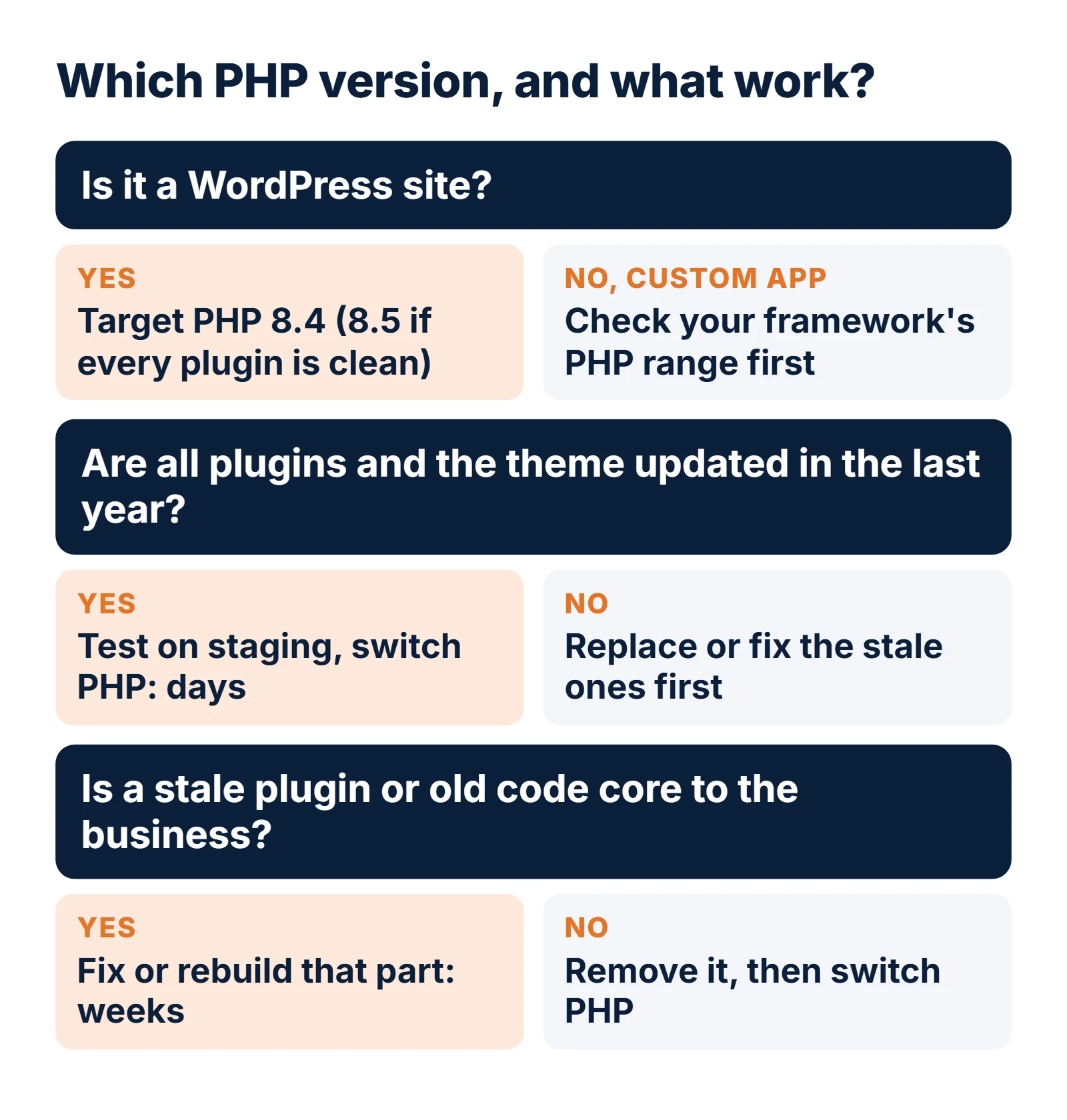
Short answer. PHP 8.2 gets its last security fixes on December 31, 2026. After that, any new PHP vulnerability stays open on servers running it. For most WordPress sites and PHP business apps the right move is PHP 8.4, which gets security fixes until December 31, 2028; choose PHP 8.5 (to December 31, 2029) if every plugin and library you use already supports it. The PHP switch itself takes minutes. The work is checking the plugins, themes and custom code that run on it.
Key dates and facts
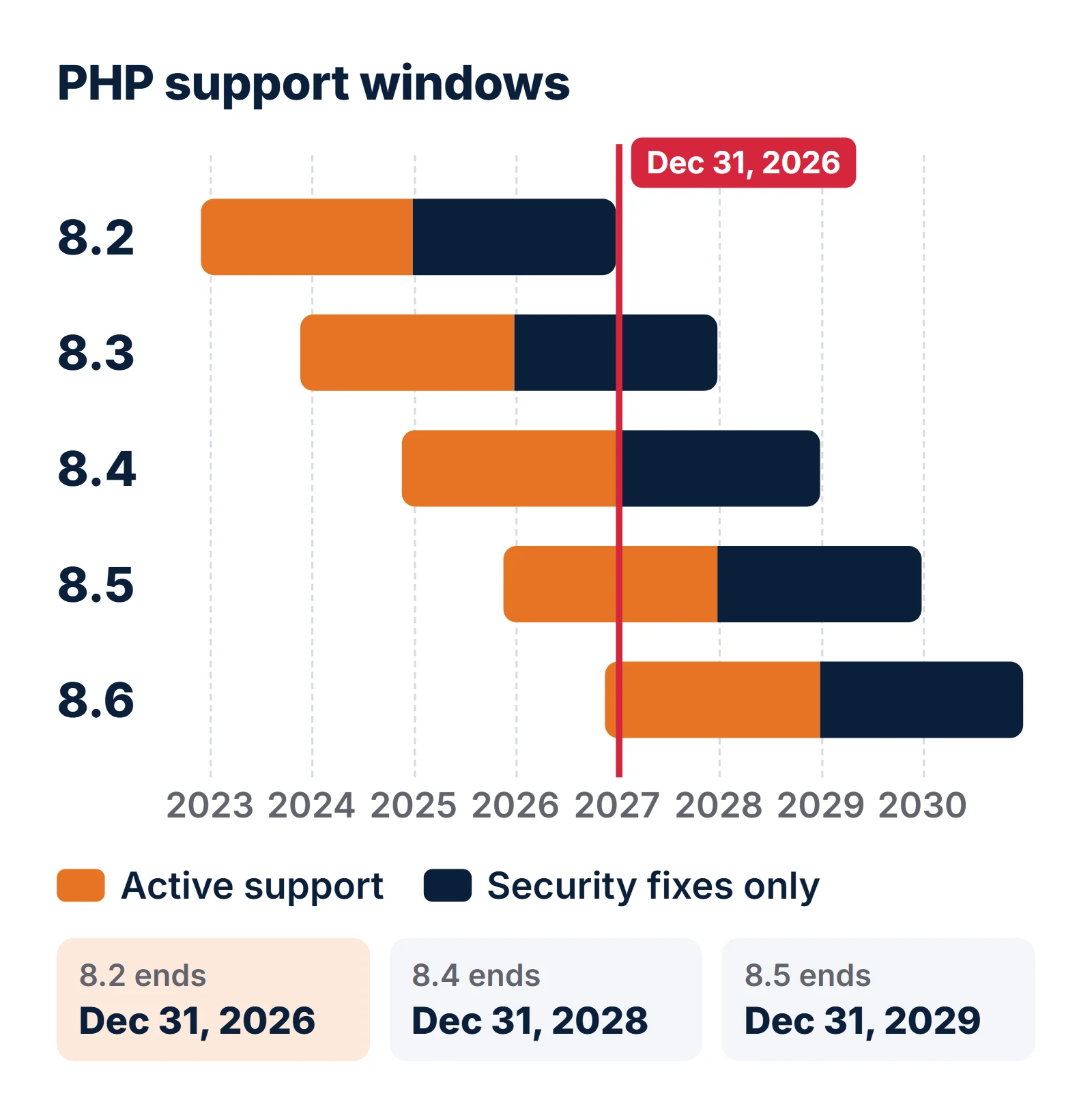
- PHP 8.2 end of lifeDecember 31, 2026 (security support ends)
- PHP 8.1Already end of life since December 31, 2025
- PHP 8.3Security fixes only, until December 31, 2027
- PHP 8.4Active support ends December 31, 2026; security fixes until December 31, 2028
- PHP 8.5Active until December 31, 2027; security fixes until December 31, 2029
- PHP 8.6Released November 19, 2026; security fixes until December 31, 2030
- WordPress 7.1Runs on PHP 7.4 to 8.5; WordPress.org recommends PHP 8.3 or newer
What happens to a site on PHP 8.2 after December 31, 2026?
PHP gives each release two years of active support (bug and security fixes) and then two years of security fixes only. PHP 8.2 came out on December 8, 2022, its active support ended on December 31, 2024, and its security support ends on December 31, 2026. After that the PHP project lists it on its unsupported branches page and stops releasing fixes for it.
The site keeps working. What changes is that a vulnerability in PHP itself, found in 2027 or later, will be fixed in 8.3, 8.4, 8.5 and 8.6 only. You will also start seeing it in other places:
- The WordPress dashboard. WordPress asks its own servers whether your PHP version still gets security updates. When the answer is no, the dashboard shows a "PHP Update Recommended" box with the message: "Your site is running on an outdated version of PHP (8.2.x), which does not receive security updates. It should be updated."
- Security scans and questionnaires. Vulnerability scanners flag end-of-life PHP as a finding on their own, and customer security reviews ask whether your software stack is supported.
- Plugin and library updates. Authors drop old PHP versions over time. Laravel 13, Symfony 8 and Drupal 11 already require PHP 8.3 or newer.
Two sources do not line up here, so it is worth knowing both. On November 21, 2026 the WordPress update API
(api.wordpress.org/core/serve-happy) still reported PHP 8.1 as receiving security updates, although php.net
lists 8.1 as end of life since December 31, 2025. The dashboard warning can therefore lag behind the real date.
Plan by php.net's dates, not by when WordPress starts warning.
One genuine exception: some Linux distributions backport security fixes into their own PHP packages after php.net
stops. Debian 12 ships PHP 8.2, and Debian's LTS schedule runs to June 30, 2028. If your server uses the
distribution's own php8.2 packages and you apply updates, you are covered for longer. Most shared and
managed WordPress hosting does not work that way, so ask your host.
Which PHP version should you move to: 8.3, 8.4, 8.5 or 8.6?
PHP 8.4 for most sites. It has two more years of security fixes, every current WordPress and Laravel release supports it, and plugin authors have had two years to catch up with it.
| PHP 8.3 | PHP 8.4 | PHP 8.5 | PHP 8.6 | |
|---|---|---|---|---|
| Security fixes until | Dec 31, 2027 | Dec 31, 2028 | Dec 31, 2029 | Dec 31, 2030 |
| WordPress 7.1 | Supported | Supported | Supported | Not yet listed |
| Laravel | 12 and 13 | 12 and 13 | 12 and 13 | Not yet listed |
| Plugin and library readiness | Very high | High | Good, check each one | Too new (released Nov 19, 2026) |
| Pick it if | Never as a target: only 1 year left | Default choice | All plugins and packages already support it | Wait a few months for the ecosystem |
What breaks when you move from PHP 8.2 to 8.4 or 8.5?
Less than you might fear. Most of what changes in 8.3, 8.4 and 8.5 is deprecation: PHP logs a notice saying a feature will go away, but the code still runs. Deprecations only break a page when the site shows errors on screen or an error handler turns notices into exceptions. The changes that really break code are removed extensions and stricter type checks.
| Version | Change | What you see | Fix |
|---|---|---|---|
| 8.2 (now) | Dynamic properties deprecated | Deprecated: Creation of dynamic property Foo::$bar is deprecated | Declare the property, or add #[\AllowDynamicProperties] to the class |
| 8.2 (now) | utf8_encode(), utf8_decode() and "${var}" strings deprecated | Deprecation notices | Use mb_convert_encoding(); write "{$var}" |
| 8.3 | get_class() without arguments; ++ on empty or non-alphanumeric strings | Deprecation notices | Use get_class($this); use str_increment() |
| 8.4 | Implicitly nullable parameters deprecated | Implicitly marking parameter $x as nullable is deprecated | Write ?Type $x = null |
| 8.4 | IMAP, OCI8, PDO_OCI and PSpell removed from core (moved to PECL) | Call to undefined function imap_open() (fatal) | Install the PECL extension or replace the code |
| 8.4 | trigger_error(..., E_USER_ERROR) and the E_STRICT constant deprecated; exit() becomes a real function | Notices; TypeError for odd exit() arguments | Throw an exception instead; pass an int or string to exit() |
| 8.4 | round() with an invalid mode, str_getcsv() with multi-byte separators | ValueError (fatal if uncaught) | Fix the arguments |
| 8.5 | Backtick operator, (boolean)/(integer)/(double) casts, case 1;, null as array key | Deprecation notices | shell_exec(); (bool), (int), (float); case 1: |
| 8.5 | curl_close(), imagedestroy(), finfo_close() deprecated | Deprecation notices | Delete the calls; handles are freed automatically |
The 8.4 deprecation you will meet most in older plugins and business code is the nullable parameter one, because it was a common way to write optional arguments for years:
// Before: PHP 8.4 logs
// Deprecated: find_customer(): Implicitly marking parameter $email as nullable is deprecated,
// the explicit nullable type must be used instead
function find_customer(string $email = null) { /* ... */ }

// After: works on PHP 7.1 and later, no notice
function find_customer(?string $email = null) { /* ... */ }
And the 8.4 change that takes sites down: any plugin that reads a mailbox with imap_open() (helpdesk,
email-to-ticket and email-to-post plugins often do) stops with a fatal error unless your host installs the IMAP
extension from PECL. Check for it before you switch:
grep -rn "imap_open\|oci_connect\|pspell_" wp-content/plugins wp-content/themesThe full lists are in the PHP manual: 8.3 deprecations, 8.4 deprecations, 8.4 incompatible changes, 8.4 removed extensions and 8.5 deprecations.
How do you check a WordPress site before switching PHP?
Never switch PHP on the live site first. A staging copy and an afternoon of testing catch nearly everything. These are the steps, with the commands where a command helps.
1. Take an inventory
php -v
wp core version
wp plugin list --fields=name,status,version,update_version
wp theme list --fields=name,status,version,update_version
Look for plugins with no update in years, and for plugins whose WordPress.org page warns that they have not been tested with the last three major WordPress releases. Those are the ones that break.
2. Update everything on a staging copy
WordPress core, the theme and every plugin to their latest versions, still on PHP 8.2. Most PHP 8.4 fixes already exist in recent plugin releases, so this step alone removes most problems.
3. Scan the code for PHP compatibility
The PHPCompatibilityWP ruleset for PHP_CodeSniffer reads your theme and plugins and reports code that will not work on the PHP version you name. Use the version 3 line, which covers PHP 8.4 and 8.5; it is still labelled alpha, so treat its results as a guide, not a verdict.
composer require --dev "phpcompatibility/phpcompatibility-wp:^3.0@alpha"
vendor/bin/phpcs -p wp-content/themes/your-theme wp-content/plugins \
  --standard=PHPCompatibilityWP --runtime-set testVersion 8.4- --extensions=php
4. Run staging on the new PHP version with logging on
// wp-config.php on staging
define( 'WP_DEBUG', true );
define( 'WP_DEBUG_LOG', true );      // writes wp-content/debug.log
define( 'WP_DEBUG_DISPLAY', false ); // never show notices to visitors
Then click through what earns money: checkout, forms, logins, bookings, search, and the admin screens your staff use.
Afterwards, read wp-content/debug.log. Lines starting PHP Fatal error must be fixed before you
switch; PHP Deprecated lines can be fixed over the next months.
5. Switch production, with a way back
On cPanel hosting, PHP is set per domain in MultiPHP Manager; managed WordPress hosts have a PHP setting in their dashboard. Switch at a quiet time, keep the old version available for a week, and watch the error log for the first few days.
What about custom PHP business apps on Laravel, Symfony or plain PHP?
For a custom application the PHP version is tied to the framework version, so check the framework first.
| Framework version | PHP versions supported | Framework security fixes until |
|---|---|---|
| Laravel 11 | 8.2 to 8.4 | Ended March 12, 2026 |
| Laravel 12 | 8.2 to 8.5 | February 24, 2027 |
| Laravel 13 | 8.3 to 8.5 | March 17, 2028 |
| Symfony 7.4 | 8.2 or newer | See Symfony's release page |
| Symfony 8.x | 8.4.1 or newer | See Symfony's release page |
A Laravel 11 app on PHP 8.2 is therefore out of support twice: the framework since March 2026, the language from January 2027. Moving it to Laravel 13 on PHP 8.4 fixes both, and Laravel's own notes describe 13 as a small upgrade from 12. For code that has to change, two tools do most of the mechanical work:
# Which packages stop you from installing PHP 8.4?
composer why-not php 8.4.0

# Rector rewrites code for a target PHP version (dry run first)
composer require --dev rector/rector
<?php
// rector.php
use Rector\Config\RectorConfig;
return RectorConfig::configure()
->withPaths([__DIR__ . '/app', __DIR__ . '/src'])
->withPhpSets(php84: true);vendor/bin/rector process --dry-run # review the diff, then run without --dry-runSee Rector's documentation for the rule sets. Apps on frameworks that no longer exist in a supported form, or hand-rolled PHP from the 2000s and 2010s, are a different decision: often the cheaper path is to rebuild the business-critical parts in stages rather than patch code nobody can test.
Should you upgrade, fix or rebuild?
| Your situation | What to do | Typical effort (estimate) |
|---|---|---|
| WordPress site, plugins and theme updated within the last year | Update, test on staging, switch to PHP 8.4 | 1–3 days |
| WordPress site with a custom theme or plugins built years ago | Fix the custom code flagged by the scan, then switch | 1–2 weeks |
| A business-critical plugin is abandoned | Replace it with a maintained plugin, or rebuild that feature as a small custom plugin | 1–4 weeks |
| Laravel 10 or 11 app | Upgrade Laravel to 13 and PHP to 8.4 together | 1–4 weeks |
| Plain PHP or an end-of-life framework, few tests | Stabilise on PHP 8.4 if the scan is clean; otherwise plan a staged rebuild | Weeks to months; needs a code review |
What this means for you: owner or IT manager
- PHP 8.2 stops getting security fixes on December 31, 2026; the site keeps running but stops being patched.
- Target PHP 8.4. It is supported to the end of 2028 and works with current WordPress and Laravel.
- Ask your host which PHP versions your plan offers, and whether their PHP 8.2 gets backported fixes.
- If a plugin you depend on has not been updated in years, budget to replace it.
What this means for you: developer
- Scan with PHPCompatibilityWP (
testVersion 8.4-) or Rector before you switch. - Grep for
imap_*,oci_*andpspell_*: those extensions left core in 8.4. - Fix implicit nullable parameters:
?Type $x = null. - Run staging with
WP_DEBUG_LOGon and treat every fatal error as a blocker.
What should you do before December 31, 2026?
- Find every PHP site and app you run, and the PHP version each one uses (
php -v, or Tools > Site Health > Info > Server in WordPress). - Make a staging copy of the most important one.
- Update and scan it, as above.
- Test on PHP 8.4 and fix what breaks.
- Switch production and watch the logs for a week.
- Write December 31, 2028 in the plan, the end of PHP 8.4 security support.
If your stack has other deadlines this quarter, see how we approached the same question for Angular 20, which loses support on November 28 and .NET 8, which lost it on November 10.
Frequently asked questions
When does PHP 8.2 reach end of life?
PHP 8.2 gets security fixes until December 31, 2026. From January 1, 2027 it is end of life and the PHP project releases no more fixes for it.
Will my WordPress site stop working on PHP 8.2 in 2027?
No. It keeps running. It just stops getting security fixes for PHP itself, and the WordPress dashboard will start recommending a PHP update.
Which PHP version should a WordPress site use in 2027?
PHP 8.4 for most sites. WordPress 7.1 supports PHP 7.4 to 8.5 and WordPress.org recommends 8.3 or newer; 8.4 gives security fixes until December 31, 2028. Use 8.5 if every plugin already supports it.
Is PHP 8.3 a good upgrade target?
Only as a short stop. PHP 8.3 already gets security fixes only, and they end on December 31, 2027, so you would upgrade again within a year.
Should we use PHP 8.6?
Not yet. PHP 8.6 was released on November 19, 2026 and the WordPress compatibility table does not list it yet. Give plugins and libraries a few months to catch up.
What breaks most often when moving to PHP 8.4?
Fatal errors from code that uses extensions removed from core in 8.4, such as IMAP (imap_open), and old plugins that pass bad arguments now rejected with ValueError or TypeError. Most other changes are deprecation notices that do not stop the site.
How long does a PHP upgrade take for a WordPress site?
As a planning estimate, one to three days for a site with maintained plugins, and one to two weeks when custom code needs fixing. An abandoned plugin the business relies on adds the time to replace it.
Want it done before the deadline? We move WordPress sites and custom PHP applications to supported PHP versions for businesses in the US, UK, Canada and Australia: staging copy, compatibility scan, fixes and a switch with a rollback plan. When the code is past saving, we rebuild the parts that matter in stages. See our application modernization service and CMS and WordPress development, or ask for a PHP upgrade check.
For ongoing patching after the upgrade, see application support and maintenance. For a business app that has outgrown its PHP codebase, see web application development.

Nikit Nandan
Strategy Director
Nikit is experienced in conducting in-depth research to stay abreast of industry trends and emerging technologies.