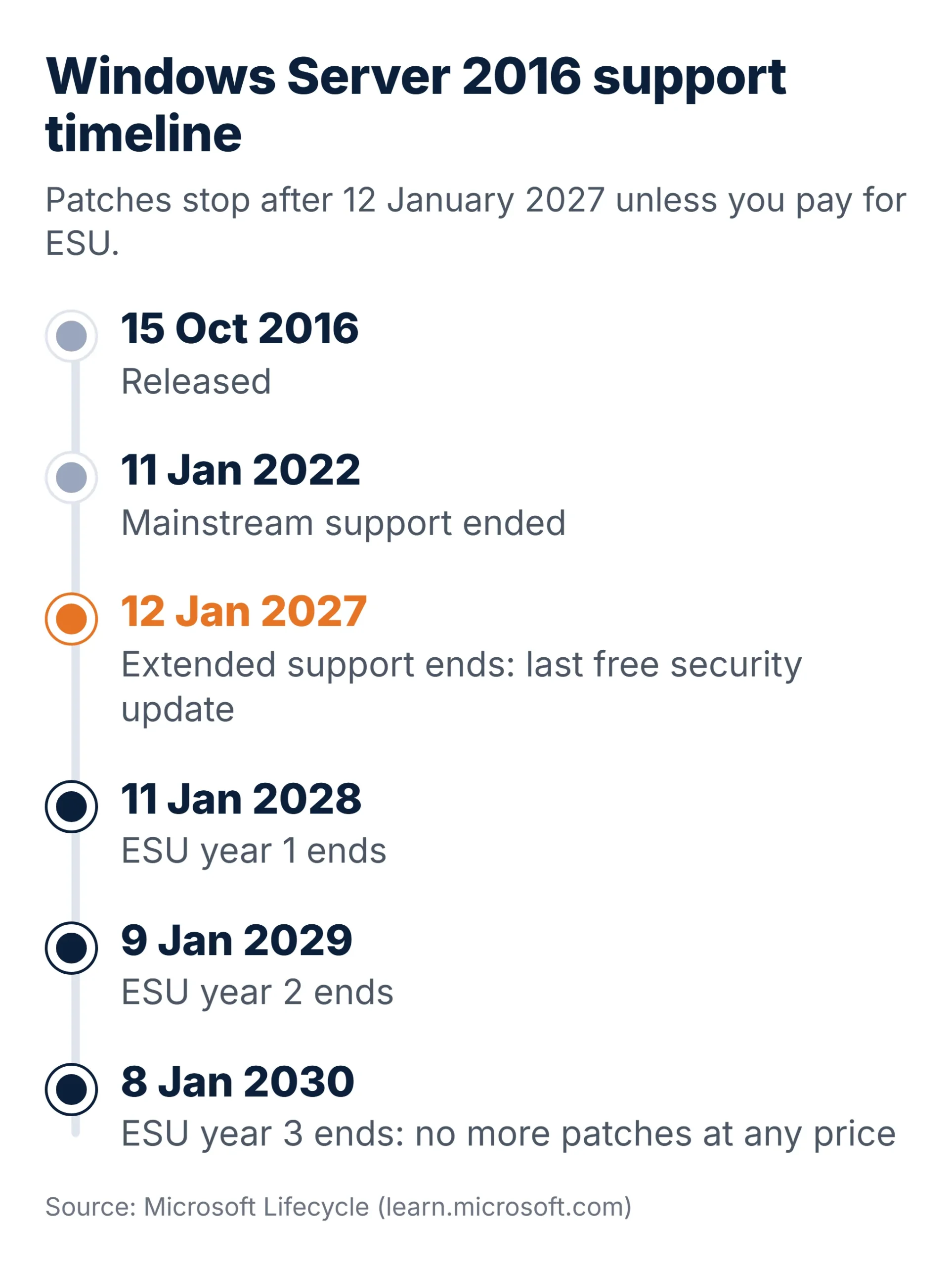
Short answer. Windows Server 2016 gets its last free security update on Tuesday, 12 January 2027. The servers and the apps on them keep running after that, but every new Windows vulnerability stays open unless you pay for Extended Security Updates (ESU), which stop for good on 8 January 2030. Use the next few weeks to decide, app by app, whether to upgrade the server in place, rehost the app on a newer Windows Server, or move the app itself to a managed platform such as Azure App Service.
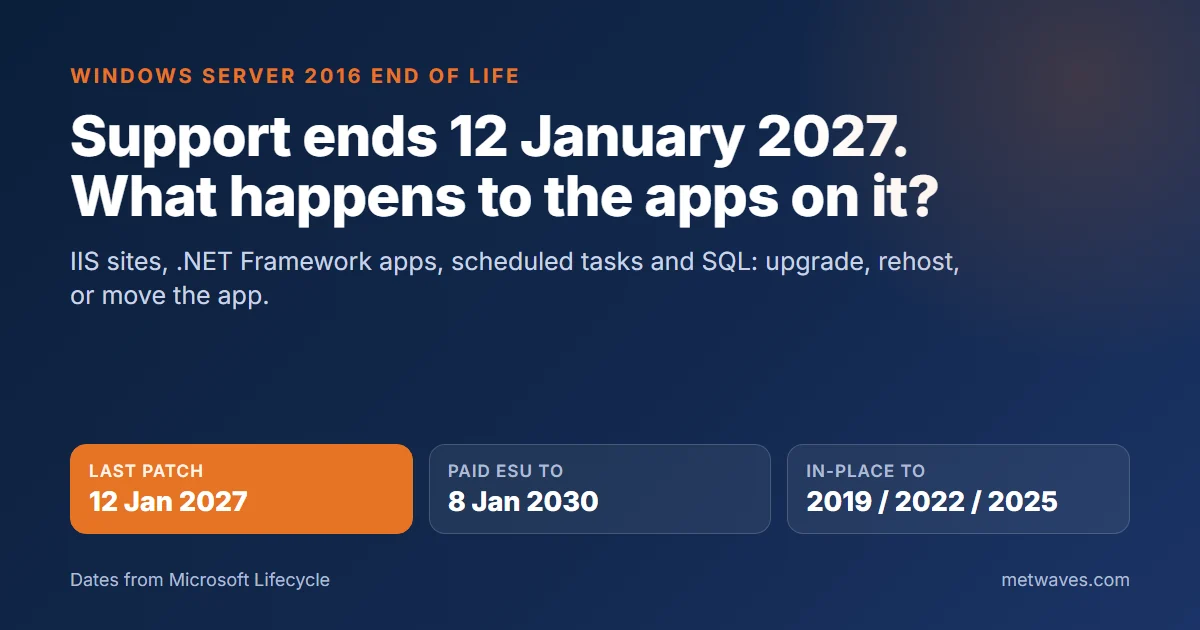
- End of extended support12 January 2027 (Microsoft's lifecycle page shows "1/13/2027 6:59:59 AM", see below)
- Mainstream support ended11 January 2022, so there have been no non-security fixes for almost five years
- Paid ESUUp to three years: to 11 January 2028, 9 January 2029 and 8 January 2030. Paid in Azure too, unlike 2012
- In-place upgradeSupported from 2016 straight to Windows Server 2019, 2022 or 2025
- ContainersWindows Server 2016 container base images follow the same end date
Dates and rules are from Microsoft's Windows Server 2016 lifecycle page and ESU FAQ, checked on 21 November 2026.
When exactly does Windows Server 2016 support end: 12 or 13 January 2027?
You will see both dates quoted. Both come from the same Microsoft data. The lifecycle page lists the extended end date as "1/13/2027 6:59:59 AM" while saying dates are shown in Pacific Time. That timestamp is the last second of 12 January in Pacific Time written as UTC, and 12 January 2027 is a Tuesday, the final Patch Tuesday. Microsoft's own ESU table gives it plainly as January 12, 2027, which is the date to plan against.
| Milestone | Date | What it means |
|---|---|---|
| Windows Server 2016 released | 15 October 2016 | Fixed Lifecycle Policy: 5 years mainstream, 5 years extended |
| Mainstream support ended | 11 January 2022 | Security fixes only from here |
| Extended support ends | 12 January 2027 | Last free security update |
| ESU year 1, 2, 3 end | 11 Jan 2028, 9 Jan 2029, 8 Jan 2030 | Paid Critical and Important fixes only |
| Windows Server 2019 ends | 9 January 2029 | Only two years more than ESU would buy you |
| Windows Server 2022 ends | 14 October 2031 | Mainstream support ended 13 October 2026 |
| Windows Server 2025 ends | 14 November 2034 | The longest runway available today |
One small trap: one answer in Microsoft's ESU FAQ says Windows Server 2016 extended support "ends on January 12, 2026". That is a typo. The table at the top of the same FAQ and the lifecycle page both say 2027.
What actually changes for the apps on 12 January 2027?
Nothing visible. No service stops, no licence expires, nobody gets locked out. That is exactly why these servers linger. What changes is underneath:
- No security patches. When the next flaw in IIS, the TCP/IP stack, SMB or the Windows kernel is published, the fix ships for 2019 and later. Your 2016 server keeps the hole, and the published fix tells attackers where to look.
- No help from Microsoft. Even with a support contract, issues on an out-of-support product are limited to ESU installation problems.
- Audits start failing. Payment-card (PCI DSS) assessments, SOC 2 reviews, cyber-insurance forms and enterprise customers' security questionnaires ask whether you run supported operating systems.
- Software around it moves on. Agents for backup, monitoring and endpoint protection, and newer .NET and SQL Server versions, are tested on supported Windows versions first and drop older ones over time.
The apps themselves are usually the real issue. A Windows Server 2016 box at a small or mid-sized business is rarely "just a server". It is an IIS site built on ASP.NET 4.x, two or three scheduled tasks that move files at night, a Windows service someone wrote in 2017, and often a SQL Server instance. SQL Server 2016 on the same box already left support on 14 July 2026.
What is running on your Windows Server 2016 machine?
Before choosing a route, write down every app and job on the server. On each machine, run these in an elevated PowerShell window. They only read; they change nothing.
# IIS sites and the .NET CLR each app pool runs (v4.0 means .NET Framework 4.x)
Import-Module WebAdministration
Get-Website | Select-Object Name, State, PhysicalPath
Get-ChildItem IIS:\AppPools | Select-Object Name, managedRuntimeVersion, managedPipelineMode

# Installed .NET Framework 4.x (Release 528040 or higher means 4.8)
Get-ItemProperty 'HKLM:\SOFTWARE\Microsoft\NET Framework Setup\NDP\v4\Full' | Select-Object Release, Version

# .NET (Core) runtimes, if any app uses them
dotnet --list-runtimes

# Your scheduled tasks, without Windows' own
Get-ScheduledTask | Where-Object TaskPath -notlike '\Microsoft\*' |
  Select-Object TaskName, TaskPath, State

# Services that are not part of Windows
Get-CimInstance Win32_Service | Where-Object PathName -notmatch 'Windows\\(system32|SysWOW64)' |
  Select-Object Name, StartMode, StartName, PathName

# SQL Server instances on the box
Get-Service -Name 'MSSQL*' | Select-Object Name, Status
For each item, also note: who uses it, whether it is reachable from the internet, what it connects to (file shares, partner SFTP, on-premises Active Directory), and whether anyone still has the source code. Those answers decide the route more than the technology does.
What are the options, and which one fits each app?
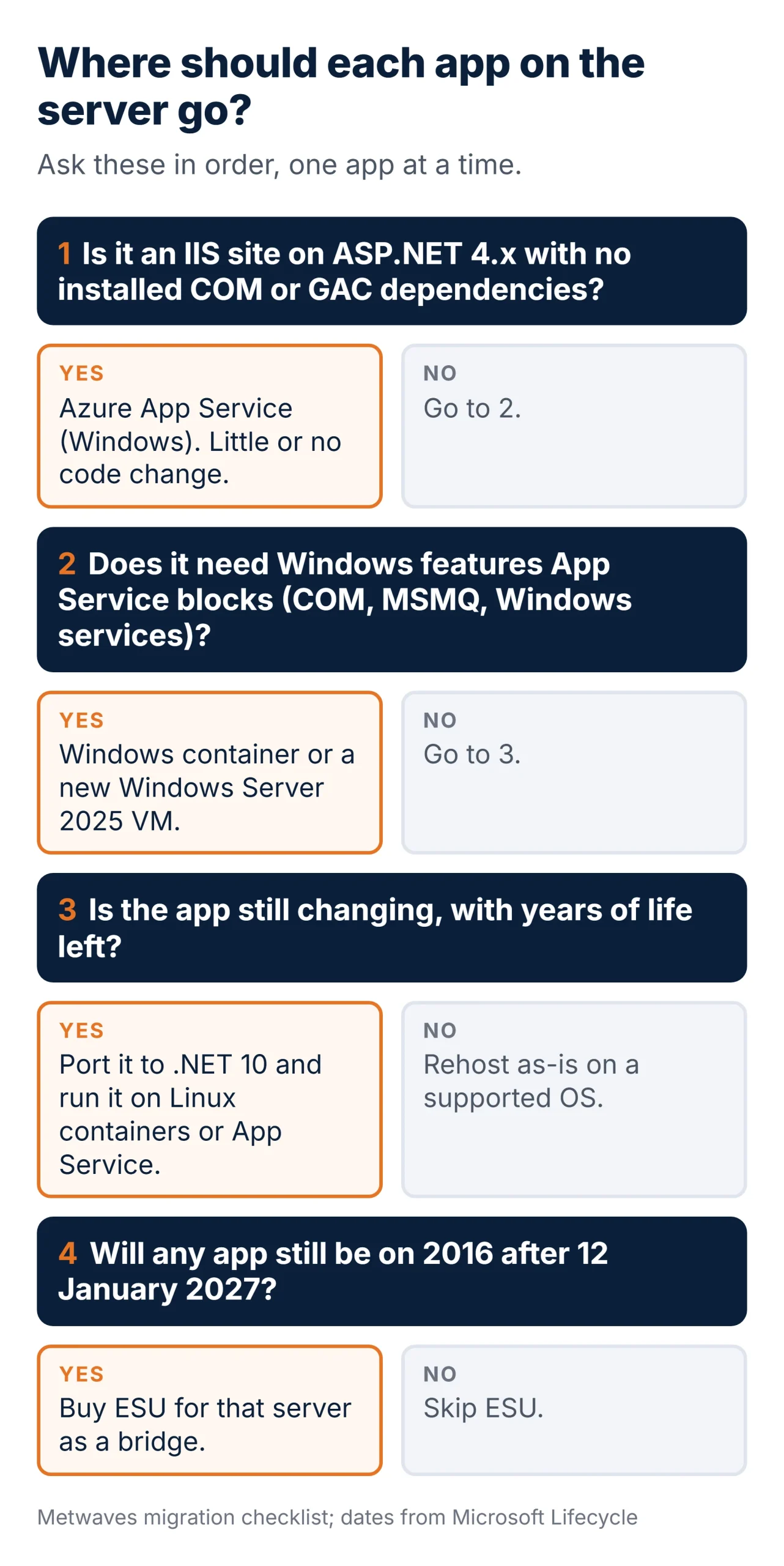
There are five realistic routes. Most businesses end up using two or three of them across their servers. The effort column is our estimate for a typical small-business app with source code available; your numbers depend on the app.
| Route | What you do | Best for | Watch out for | Effort (estimate) |
|---|---|---|---|---|
| Buy ESU | Pay for up to three more years of security fixes | An app that cannot move before January | Needs Software Assurance or subscription licences, or Azure Arc; price rises with core count | Hours to enrol |
| In-place upgrade | Run Windows Server 2025 (or 2019/2022) setup over the existing install | Stable servers with standard roles, on hardware that supports the new OS | Old drivers and agents; no switch between Core and Desktop Experience; needs a new licence | 1 to 3 days per server |
| Rehost | Build a clean Windows Server 2025 VM (on-premises or Azure) and reinstall the app | Apps with installers, COM components or Windows services | Finding the original install steps, certificates and service accounts | 3 to 10 days per app |
| Move to App Service | Deploy the ASP.NET 4.x site to Azure App Service on Windows | IIS sites with nothing installed on the server beyond the site | No COM registration, GAC installs, MSMQ or writes outside the app's folder | 1 to 3 weeks per app |
| Port to .NET 10 | Move the code from .NET Framework to .NET 10 and host on Linux containers or App Service | Apps still under active development with years of life left | Web Forms and WCF server code do not port as-is | 1 to 6 months, depending on size |
How much does Windows Server 2016 ESU cost?
There are two ways to buy it, and Windows Server 2016 is the first version where ESUs are paid even in Azure.
- Through volume licensing. Microsoft's ESU FAQ prices each year at "100% of full license price annually", counting cores the same way as the Windows Server licence underneath (16-core minimum per server, or 8 cores per VM when licensing by virtual core). Year 2 and 3 can only be bought if you bought year 1.
- Through Azure Arc. You connect the server to Azure Arc and pay monthly per core, with no keys to manage. Microsoft's public retail price list shows the Windows Server 2016 meters at $0.007132 per core-hour for Standard and $0.041067 for Datacenter, effective 1 August 2026. That is about $5.21 and $29.98 per core per month.
Two worked examples at those list prices, before any agreement discounts:
| Server | Licensing basis | Cores billed | Approx. per month | Approx. per year |
|---|---|---|---|---|
| One 4-vCPU VM running Standard | Virtual cores (8-core minimum per VM) | 8 | $42 | $500 |
| One 16-core host running Datacenter, all VMs covered | Physical cores (16-core minimum) | 16 | $480 | $5,760 |
Rules that catch people out:
- Eligibility. On-premises ESU needs active Software Assurance, subscription licences, or licences from a hosting (SPLA) provider. Client access licences also need Software Assurance to access ESU-covered servers.
- Late enrolment is back-billed. If you enrol through Arc in March 2027, the first bill includes January and February.
- ESU is not support. It is Critical and Important security fixes only. No bug fixes, no new features, no troubleshooting beyond the updates themselves.
ESU is the right call for a server you genuinely cannot move by January. As a long-term plan it is poor value: three years of ESU on a Datacenter host costs more than a new Windows Server 2025 licence, and you still have to migrate in 2030.
Can you upgrade Windows Server 2016 in place?
Yes. Microsoft supports an in-place upgrade from 2016 directly to Windows Server 2019, 2022 or 2025 using installation media. Since Windows Server 2025, non-clustered servers can jump up to four versions at once; clusters can only move one version at a time with a rolling upgrade (Microsoft's upgrade paths).
- Take a full backup or a VM snapshot, and test restoring it.
- Check vendor support for every agent and app on the box: antivirus, backup, monitoring, line-of-business software.
- Run setup's compatibility scan first. From the mounted Windows Server 2025 media:
.\setup.exe /auto upgrade /compat scanonly - Disable NIC Teaming before the upgrade if the server uses it, and re-enable it afterwards.
- Run the upgrade in a maintenance window, then run your app smoke tests and check event logs.
Limits to know: you cannot switch between Server Core and Desktop Experience during the upgrade, you cannot change language, and each new version needs its own licence. Domain controllers have their own upgrade procedure.
An in-place upgrade fixes the operating system date and nothing else. A .NET Framework 4.8 app on a fresh Windows Server 2025 install is supported, but it is still a .NET Framework app with the same code, the same dependencies and the same deployment by hand. For servers that are fine as they are, that is a perfectly good outcome.
How do you move an IIS app to Azure App Service?
For many line-of-business web apps, this is the best value route: Microsoft patches the operating system and IIS, and you stop owning a server. App Service on Windows runs ASP.NET 4.8 sites, including Web Forms and MVC, without code changes, as long as the app does not depend on things installed on the server.
Things App Service will not let you do, from the App Service sandbox rules:
- Register COM components or install assemblies into the Global Assembly Cache (GAC).
- Run a Windows service, or use MSMQ.
- Write files anywhere except the app's own folders under
D:\home, and the local disk is not a place to keep data. - Join the app server to your on-premises domain. Windows authentication moves to Microsoft Entra ID.
If none of those apply, the move is mostly configuration. A minimal deployment with the Azure CLI:
az group create -n rg-legacy-apps -l eastus
az appservice plan create -g rg-legacy-apps -n plan-legacy --sku P1v3
az webapp create -g rg-legacy-apps -p plan-legacy -n contoso-orders --runtime "ASPNET:V4.8"
az webapp deploy -g rg-legacy-apps -n contoso-orders --src-path ./publish.zip --type zip
Then move connection strings and app settings out of web.config into the App Service configuration,
put the database behind a private endpoint, and point DNS at the new site after a side-by-side test.
Apps that do need COM, a Windows service or MSMQ can still leave the old server in a Windows container. Microsoft publishes .NET Framework images on current Windows Server bases, for example:
FROM mcr.microsoft.com/dotnet/framework/aspnet:4.8.1-windowsservercore-ltsc2022
WORKDIR /inetpub/wwwroot
COPY ./publish/ .
What about the scheduled tasks and Windows services?
These are the parts nobody documented. Give each one an owner and a target:
- File moves and nightly imports become Azure Functions with a timer trigger, WebJobs next to the App Service site, or Azure Data Factory pipelines if they move data between systems.
- Long-running Windows services that poll a queue or a folder become a .NET Worker Service in a container, or stay as a service on the new Windows Server 2025 VM.
- Jobs that talk to on-premises file shares or printers usually stay on a supported on-premises server, or need a hybrid connection designed for them.
Whatever the target, add logging and an alert when a job fails. On the old server, a silent failure of a scheduled task is often discovered by a customer.
What this means for you: owner
Budget for one decision per app, not per server. Use ESU only where a move cannot finish by 12 January 2027, and put an end date on it. Ask your team or supplier for the inventory above before anyone quotes a price.
What this means for you: developer
Run the inventory, find the hidden dependencies (COM, GAC, file shares, service accounts) and test each app on Windows Server 2025 or App Service in a staging slot before January. Script the deployment as you go.
What is a realistic plan between now and 12 January 2027?
About seven weeks remain, including the holidays. A plan that works for most small and mid-sized businesses:
- This week: inventory every Windows Server 2016 machine and the apps on it, using the commands above.
- Next week: rank apps by exposure. Anything reachable from the internet or holding customer or payment data goes first.
- By mid-December: upgrade or rehost the simple servers, and move the first IIS app to App Service.
- Before 12 January: enrol the servers you cannot move in ESU through Azure Arc, so they keep getting patches without a gap.
- In 2027: work through the ESU servers one by one and cancel ESU as each one moves. Arc stops billing when a server is upgraded or migrated to Azure.
If your apps run on .NET 8 rather than .NET Framework, the runtime has its own deadline: read is .NET 8 still safe after November 2026?.
Frequently asked questions
Does Windows Server 2016 stop working after January 12, 2027?
No. The servers and apps keep running. What stops is Microsoft's free security patching, so any vulnerability found after that date stays open unless you buy Extended Security Updates or move to a supported version.
Is the end date January 12 or January 13, 2027?
January 12, 2027 is the last day of support and the final Patch Tuesday. Microsoft's lifecycle page shows 1/13/2027 6:59:59 AM, which is the end of January 12 in Pacific Time written as UTC.
Are Windows Server 2016 ESUs free in Azure?
No. Windows Server 2012 and 2012 R2 got free ESUs on Azure virtual machines, but Microsoft says Windows Server 2016 ESUs are a paid offering in Azure as well as on-premises.
How much do Windows Server 2016 ESUs cost?
Through volume licensing, each year costs 100 percent of the full licence price. Through Azure Arc, Microsoft's retail price list shows about $5.21 per core per month for Standard and $29.98 for Datacenter, with minimums of 8 cores per VM or 16 per physical server.
Can I upgrade Windows Server 2016 straight to Windows Server 2025?
Yes. Microsoft supports an in-place upgrade from Windows Server 2016 to 2019, 2022 or 2025 with installation media. Clusters can only move one version at a time with a rolling upgrade.
Will my .NET Framework 4.8 app run on Windows Server 2025 or Azure App Service?
In most cases yes. .NET Framework 4.8.1 ships with Windows Server 2025, and App Service on Windows runs ASP.NET 4.8 sites. Apps that register COM components, install into the GAC or need MSMQ need a VM or a Windows container instead of App Service.
Need a hand? We move line-of-business apps off ageing Windows servers for businesses in the US, UK, Canada and Australia: inventory, a fixed quote per app, then the upgrade, rehost or move to Azure. See our application modernization services, our Azure consulting and .NET development pages, or ongoing application support if you want someone to keep the servers patched afterwards.

Nikit Nandan
Strategy Director
Nikit is experienced in conducting in-depth research to stay abreast of industry trends and emerging technologies.