Updated November 2026. Limits, token rules and fees are from Intuit's developer documentation, linked where they are used. Effort and cost figures are our estimates and are labelled as such.
Short answer. A QuickBooks Online API integration for a small or mid-sized business typically takes 3 to 14 engineer-weeks, depending on how many record types it syncs and whether data flows one way or both (our estimate). Intuit's own API fees are often zero for a single company: writes are free, and the free Builder tier includes 500,000 metered reads a month, with the Silver tier at $300 a month in the US if you need more. Most of the real cost is in the build: OAuth 2.0 token handling, mapping your data to QuickBooks entities, webhooks plus change data capture, and testing through a month-end close.
- API styleREST with JSON. Base URL
https://quickbooks.api.intuit.com/v3/company/{realmId}/, sandbox onsandbox-quickbooks.api.intuit.com. - Sign-inOAuth 2.0. Access tokens last 1 hour; refresh tokens 100 days (rolling), 5 years at most.
- Rate limit500 requests a minute per company, 10 a second per company and app. HTTP 429 when exceeded.
- Change trackingWebhooks (must answer HTTP 200 within 3 seconds) plus change data capture for the last 30 days.
- Intuit feesBuilder tier free with 500,000 CorePlus (read) calls a month. Silver: $300/month, 1M included, then $3.50 per 1,000 (US).
- API versionMinor versions below 75 were retired on August 1, 2025. Send
minorversion=75.
What does the QuickBooks Online API give you?
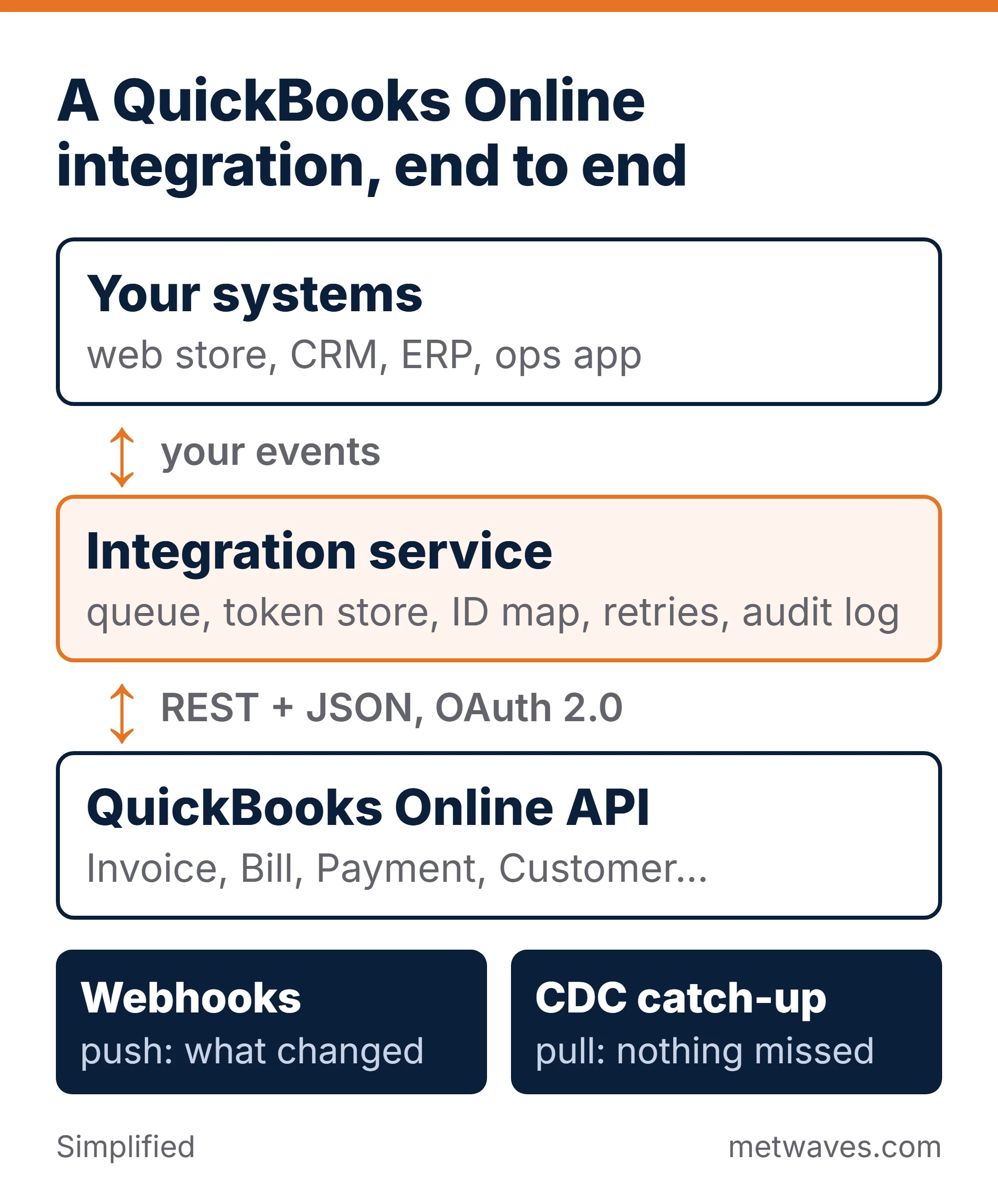
The QuickBooks Online Accounting API is a REST API: you send HTTPS requests with JSON bodies and get JSON back. Every request is scoped to one QuickBooks company, identified by its realm ID. The entities most integrations need are Customer, Vendor, Item, Invoice, Bill, Payment, BillPayment, JournalEntry and Account, plus reports such as profit and loss.
Compared with QuickBooks Desktop, which is integrated through the Windows-only Desktop SDK and qbXML (Intuit's XML message format), this removes the Windows machine, the Web Connector and the company-file locking. In return you take on OAuth, rate limits and Intuit's API fees.
Every developer account gets sandbox companies for testing, and Intuit does not meter or charge sandbox calls. Build and test there, then switch the base URL and keys for production.
How does authentication work?
QuickBooks Online uses OAuth 2.0, the standard "Connect to QuickBooks" sign-in flow. An admin of the QuickBooks company approves your app once; after that your server holds tokens and never sees a password.
- Send the user to Intuit's authorization page with your client ID, the scope
com.intuit.quickbooks.accounting, a registered HTTPS redirect URI and a randomstatevalue (Intuit requires it, to block cross-site request forgery). - Intuit redirects back with an authorization
codeand therealmId. - Your server exchanges the code for an access token and a refresh token.
- Call the API with
Authorization: Bearer <access token>. When it expires, refresh it.
https://appcenter.intuit.com/connect/oauth2
  ?client_id=YOUR_CLIENT_ID
  &response_type=code
  &scope=com.intuit.quickbooks.accounting
  &redirect_uri=https%3A%2F%2Fsync.example.com%2Fqbo%2Fcallback
  &state=8f3c1d0e9b7a4c26a1f5e2d7c3b9a604
The token rules, from Intuit's authorization FAQ, are where most production bugs come from:
- Access tokens are valid for 3,600 seconds (one hour). An expired one returns HTTP 401.
- Refresh tokens are valid for 100 days, rolling: each use extends them. All refresh tokens now have a hard maximum of five years.
- The refresh token value changes at least every 24 hours. Always save the newest one from each response; the old value goes stale.
- Refresh one at a time. If two workers refresh with the same token, the second gets
invalid_grant, and repeated attempts can revoke the connection.
import requests

TOKEN_URL = "https://oauth.platform.intuit.com/oauth2/v1/tokens/bearer"

def refresh(store, client_id, client_secret):
    with store.lock(store.realm_id):            # one refresh at a time per company
        resp = requests.post(
            TOKEN_URL,
            auth=(client_id, client_secret),
            data={"grant_type": "refresh_token",
                  "refresh_token": store.refresh_token},
            headers={"Accept": "application/json"},
            timeout=30,
        )
        resp.raise_for_status()                 # invalid_grant means: ask the user to reconnect
        tokens = resp.json()
        store.save(access_token=tokens["access_token"],
                   refresh_token=tokens["refresh_token"],   # always the newest value
                   expires_in=tokens["expires_in"])
How do you create and update invoices, bills and payments?
Each entity has the same pattern: POST to create, GET by ID to read, POST with Id and SyncToken to update, and a SQL-like query endpoint to search. References point at other records by ID, not by name. Creating an invoice:
curl -X POST "https://quickbooks.api.intuit.com/v3/company/$REALM_ID/invoice?minorversion=75" \
  -H "Authorization: Bearer $ACCESS_TOKEN" \
  -H "Accept: application/json" -H "Content-Type: application/json" \
  -d '{
    "CustomerRef": { "value": "58" },
    "DocNumber": "INV-1042",
    "TxnDate": "2026-11-27",
    "Line": [{
      "DetailType": "SalesItemLineDetail",
      "Amount": 1500.00,
      "SalesItemLineDetail": { "ItemRef": { "value": "12" }, "Qty": 10, "UnitPrice": 150.00 }
    }]
  }'
Updating safely uses optimistic locking. QuickBooks returns a SyncToken with every record; send it back with your change. A sparse update changes only the fields you send:
POST /v3/company/{realmId}/invoice?minorversion=75
{ "Id": "145", "SyncToken": "3", "sparse": true, "DueDate": "2026-12-31" }
If someone edited the invoice in QuickBooks after you read it, the call fails with error 5010 Stale Object. Re-read, re-apply, retry. Searching uses the query endpoint, capped at 1,000 records per response, so page through larger sets:
GET /v3/company/{realmId}/query?minorversion=75&query=
  select * from Invoice where MetaData.LastUpdatedTime > '2026-11-20T00:00:00-08:00'
  startposition 1 maxresults 1000
Errors you will meet, from Intuit's error code list:
| Error | What it means | What to build |
|---|---|---|
| HTTP 401 | Access token expired or revoked | Refresh, retry once, then flag the connection |
| HTTP 429 | Throttled | Wait 60 seconds (Intuit's guidance), then retry from a queue |
| 5010 Stale Object | Record changed since you read it | Re-read and re-apply the change |
| 6240 Duplicate Name Exists Error | A customer, vendor or employee already uses that name | Match on your stored ID first, then on name |
| 6140 Duplicate Doc Num | That invoice or document number is already used | Check your ID map before creating |
How do you keep both systems in sync: webhooks or change data capture?
Use both. Webhooks tell you quickly that something changed; change data capture (CDC) makes sure nothing was missed. Intuit's own webhook best practices recommend exactly that.
A webhook is an HTTPS POST from Intuit to your endpoint, in CloudEvents format, with a type such as qbo.invoice.updated.v1, the entity ID and the realm ID. It tells you what changed, not the new values, so you fetch the record afterwards. The rules that matter:
- Answer HTTP 200 within 3 seconds. Put the event on a queue and process it elsewhere.
- Failed deliveries are retried at 10s, 20s, 30s, 5m, 20m, 2h, 4h, 6h, then every 6 hours.
- Events can arrive out of order; the event
timeis the source of truth. - Verify every request: an HMAC-SHA256 of the raw body, keyed with your app's verifier token, must equal the
intuit-signatureheader.
import base64, hashlib, hmac

def is_from_intuit(raw_body: bytes, signature: str, verifier_token: str) -> bool:
    digest = hmac.new(verifier_token.encode(), raw_body, hashlib.sha256).digest()
    return hmac.compare_digest(base64.b64encode(digest).decode(), signature or "")
CDC is a single read that returns every changed record of the entity types you list since a given time, including deletions. Per Intuit's CDC documentation it looks back at most 30 days and returns up to 1,000 objects, so run it often with short windows:
GET /v3/company/{realmId}/cdc?entities=Invoice,Payment,Customer&changedSince=2026-11-26T09:00:00-08:00What are the QuickBooks Online API rate limits?
| Limit | Value |
|---|---|
| Requests per company (realm) | 500 per minute |
| Requests per company and app | 10 per second |
| Batch requests | 40 per minute per company and app; 120 per minute per company; 30 operations per batch recommended |
| Records per query response | 1,000 |
| Request timeout | 120 seconds |
| Lines per transaction (except journal entries) | 10,000 |
Source: Intuit, API call limits and throttles. Intuit's FAQ says higher throttling limits are not currently available on any partner tier.
For a single business these limits are rarely the problem; a nightly backfill or first-time import is. Throttle your own queue to stay under 10 requests a second, and spread large imports across hours, not minutes.
What does Intuit charge for QuickBooks Online API access?
Since 2025 every app sits in the Intuit App Partner Program. Per Intuit's program FAQ (updated October 2, 2026), calls split into two kinds:
- Core calls: most data-in operations, such as creating or updating invoices, bills, customers and vendors. Unmetered and free.
- CorePlus calls: most data-out operations, such as reading records, querying and fetching reports. Metered since November 3, 2025.
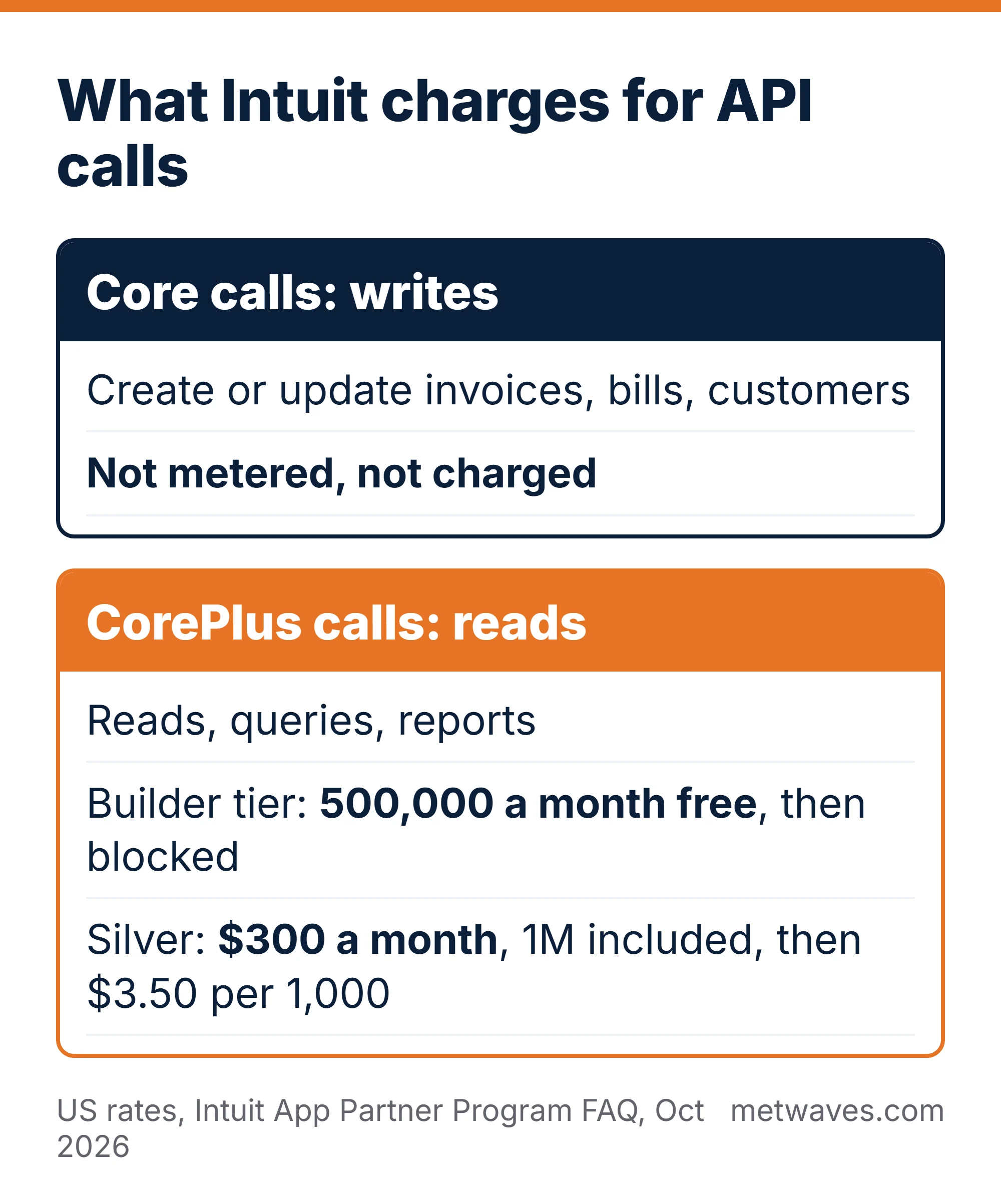
| Tier | Monthly fee | CorePlus calls included | Above the allowance |
|---|---|---|---|
| Builder (default) | $0 | 500,000 a month, per workspace | Blocked (HTTP 429) until the 1st of next month |
| Silver | $300 (UK £225, Canada $425) | 1,000,000 | $3.50 per 1,000 (UK £2.60, Canada $4.85) |
| Gold, Platinum | Higher; see Intuit's rate card | Higher | Lower per-call rates |
Sandbox calls, OAuth calls, failed calls and the Payments and Desktop APIs are not metered. What this means in practice for one business with its own integration: an integration that polls six entity types every minute makes about 259,000 reads a month, within Builder. Poll every 10 seconds and you pass 1.5 million, which is Silver plus overage. Webhooks plus a CDC call every 15 minutes need about 2,900 CDC reads a month, plus one read per record that actually changed. Design for webhooks and the platform fee stays at zero; poll carelessly and it becomes a line item.
The fee applies to the workspace that owns the app in Intuit's developer portal. If a vendor builds the integration under its own workspace for many clients, all their calls add up together; for a private, single-company integration, register the app in your own workspace.
How does our qbXML code map to the QuickBooks Online API?
If you are moving off QuickBooks Desktop, the business logic survives and the calls are rewritten. The mapping we work from:
| QuickBooks Desktop (qbXML) | QuickBooks Online API | Watch for |
|---|---|---|
| CustomerAdd / CustomerMod | POST /customer | Display names must be unique across customers, vendors and employees (6240) |
| InvoiceAdd | POST /invoice | Items referenced by ID, not FullName |
| BillAdd | POST /bill | Vendor and expense accounts by ID |
| ReceivePaymentAdd | POST /payment | Apply to invoices with LinkedTxn |
| ItemInventoryAdd | POST /item, Type Inventory | Needs quantity on hand, start date and income, expense and asset accounts |
| ListID, TxnID | Id | New IDs after migration; use Intuit's conversion ID map |
| EditSequence | SyncToken | 5010 Stale Object on conflicts |
| Iterators, MaxReturned | STARTPOSITION, MAXRESULTS | 1,000 per page |
| FromModifiedDate filters | CDC or MetaData.LastUpdatedTime query | CDC looks back 30 days at most |
| SDK event subscriptions | Webhooks | 3-second response, verify signature |
| SalesOrderAdd | No core entity; Intuit lists a Sales Order API among its premium APIs | Check availability on your tier before you design around it |
Intuit's developer guide also lists Desktop features that are changed or missing in QuickBooks Online, including progress invoicing, price levels, assemblies, units of measure, group items and custom fields on lists. If your Desktop integration writes to any of them, that part needs a new design, not a translation.
How long does a QuickBooks Online integration take, and what does it cost?
| Scope | What it includes | Effort (estimate) |
|---|---|---|
| One-way push, 2–3 record types (e.g. orders to invoices) | OAuth, token store, mapping, idempotent writes, logging, alerts | 3–5 engineer-weeks |
| Two-way sync, 4–8 record types including payments | Above plus webhooks, CDC catch-up, conflict rules, reconciliation report | 6–10 engineer-weeks |
| Rebuild of an existing Desktop integration | Above plus Desktop ID mapping, data checks after conversion, parallel run | 8–14 engineer-weeks |
| App connecting many QuickBooks companies | Per-company tokens, rate-limit scheduler, tier and usage monitoring, Intuit's app assessment | 12–20+ engineer-weeks |
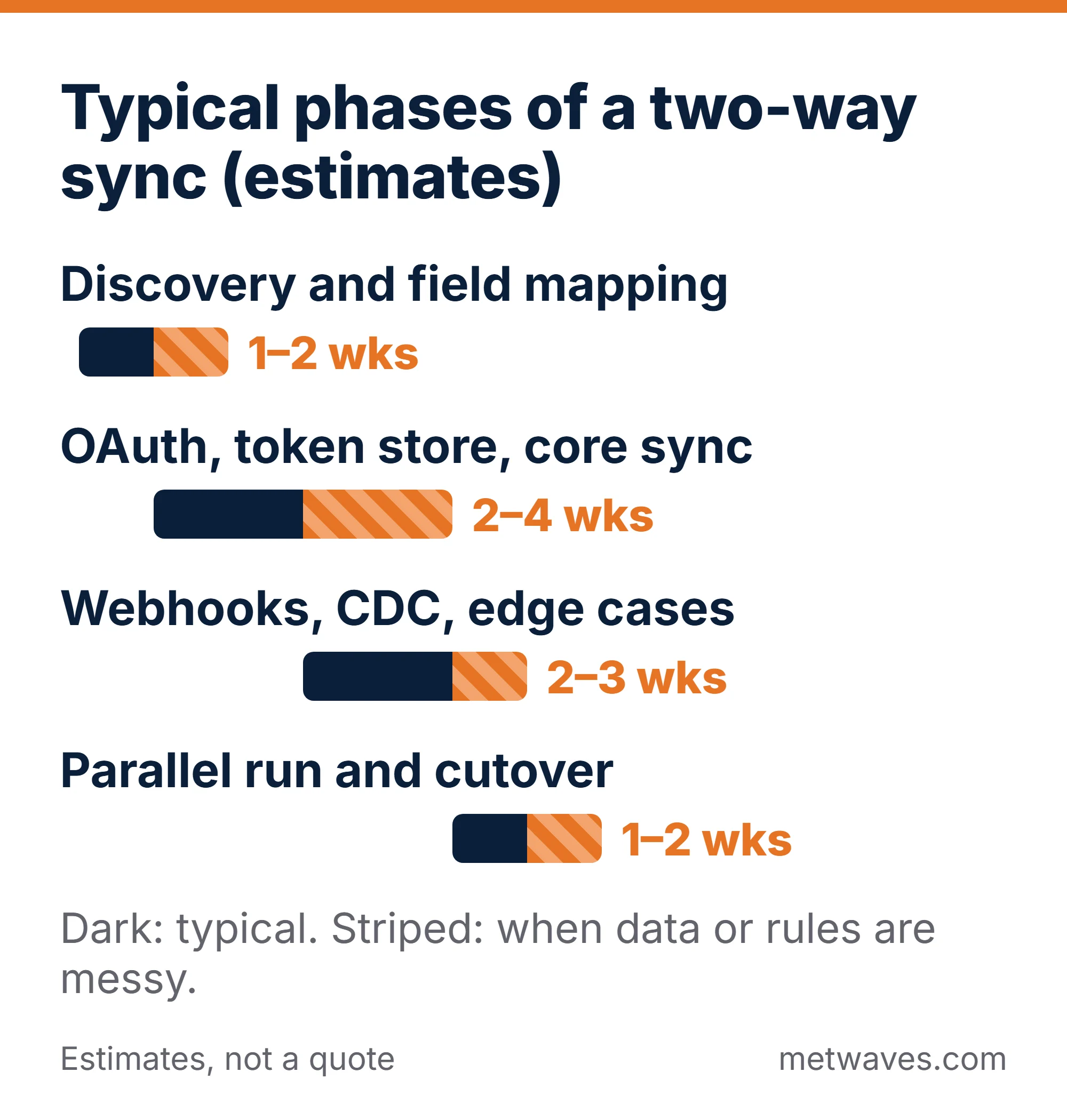
To turn weeks into money, multiply by your team's or vendor's rate. As an illustration only, not a quote: 6 to 10 engineer-weeks is 240 to 400 hours, which at a blended $80 to $150 an hour is roughly $19,000 to $60,000. Then add the running costs:
| Running cost | Typical amount |
|---|---|
| Intuit platform fee | $0 on Builder for most single-company integrations; $300/month and up on Silver |
| Hosting (queue, small database, function or container) | Usually tens of dollars a month for one company (estimate) |
| Maintenance (API changes, new fields, fixes) | 10–20% of the build per year (estimate) |
| Your QuickBooks Online subscription | Separate; set by your plan with Intuit |
What moves a project toward the top of these ranges: inventory and cost of goods, multiple currencies, sales tax across many jurisdictions, more than one QuickBooks company, unclear ownership of which system wins a conflict, and no test data. What keeps it at the bottom: one direction, few record types, clean customer and item lists, and a person on your side who can answer accounting questions within a day.
What this means for you
- For ownersBudget for the build, not the API: Intuit's fee is often $0 for one company.
- Ask for webhooks plus CDC in the design. Polling is what turns reads into a bill.
- Plan one month-end close with old and new running side by side before you switch.
- For developersPin
minorversion=75, store the newest refresh token every time, and serialise refreshes per realm. - Keep an ID map (your key to QuickBooks
Id) and check it before every create. - Answer webhooks in under 3 seconds, queue the work, and run CDC to catch gaps.
Frequently asked questions
Is the QuickBooks Online API free?
Often, for a single company. Writes (Core calls) are free and unmetered. Reads (CorePlus calls) are metered: the free Builder tier includes 500,000 a month and blocks calls above that. The Silver tier costs $300 a month in the US, includes 1 million reads and charges $3.50 per 1,000 after that.
What are the QuickBooks Online API rate limits?
500 requests a minute per company and 10 requests a second per company and app. Batch requests are limited to 40 a minute per company and app. Throttled calls return HTTP 429; Intuit advises waiting 60 seconds before retrying.
How long do QuickBooks Online access tokens last?
Access tokens last one hour. Refresh tokens last 100 days and extend each time they are used, up to a hard limit of five years. The refresh token value changes at least every 24 hours, so always store the newest one.
Can we reuse our QuickBooks Desktop qbXML code?
The business rules and field mappings, yes. The calls, no. QuickBooks Online uses REST and JSON, references records by ID instead of full name, uses SyncToken instead of EditSequence, and replaces SDK events with webhooks.
How long does a QuickBooks Online integration take?
Our estimate for a typical small or mid-sized business is 3 to 5 engineer-weeks for a one-way push of two or three record types, 6 to 10 for a two-way sync with payments, and 8 to 14 to rebuild an existing Desktop integration.
Should we use webhooks or change data capture?
Both. Webhooks tell you quickly what changed; change data capture, which looks back up to 30 days, catches anything a webhook missed. Intuit recommends running CDC from the last processed event and once a day as a safety net.
Planning the move? We build and rebuild QuickBooks integrations, from a one-way invoice push to a two-way sync with your ERP or web store, and we size them with a short review before we quote. See our software integration services and our AI invoice processing agent for SAP Business One, which validates every entry before posting it to the accounting system. If the sync feeds reporting, our data engineering team can take it from there, and Python is the stack we use most for this kind of service. Book an integration review.

Nikit Nandan
Strategy Director
Nikit is experienced in conducting in-depth research to stay abreast of industry trends and emerging technologies.