Published November 27, 2026. Prices are list prices from OpenAI and Anthropic, checked on November 21, 2026. Worked examples use GPT-6.2 Sol; Claude Sonnet 5.5 has the same list prices, so the arithmetic carries over.
Short answer. An agent's token bill grows faster than its usage because every step re-sends the instructions, the tool definitions and everything that happened earlier in the task, so a 12-step task can consume 200,000 input tokens. Retries, tool-call loops and bulky tool results make it worse. In November 2026 the biggest fixes are prompt caching (cached input costs 5% to 10% of the normal price), trimming what tools return, smaller models for simple steps, hard caps on steps, and batch processing for work that can wait.
Key facts at a glance (prices per 1 million tokens, November 21, 2026)
- GPT-6.2 Sol$2.00 input, $0.10 cached input, $2.50 for a 30-minute cache write, $10.00 output
- Claude Sonnet 5.5$2.00 input, $0.10 cache hit, $2.50 for a 5-minute cache write, $10.00 output
- Small modelsGPT-6 Luna and Claude Haiku 5.5: $0.10 input, $0.50 output
- Caching thresholds1,024 tokens on GPT-5.6 and later; 512 tokens on the current Claude models
- BatchHalf price for the models above on both providers, for work that can wait
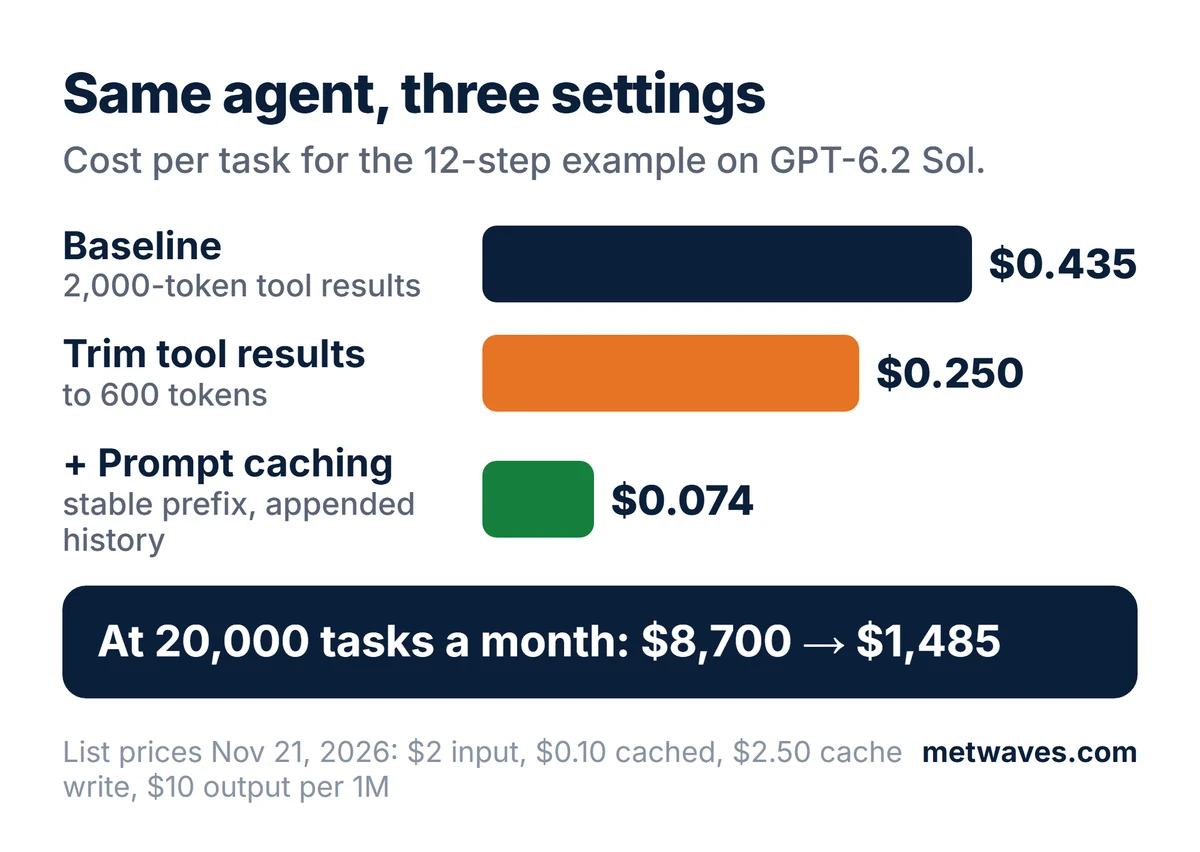
- Worked example in this article$0.435 per task cut to $0.074 without changing the model
Why does the token bill grow faster than usage?
Language model APIs are stateless: each call sends the whole context again. An agent task is a loop of calls. The model asks for a tool, your code runs it, and the next call includes the original instructions, the tool definitions, the user's request, every earlier tool call and every earlier tool result.
Take a modest agent: a 4,000-token prefix (system instructions plus a dozen tool definitions), a 500-token request, and 12 steps where each step adds a 250-token tool call and a 2,000-token tool result. Input per call is 4,500 + (step - 1) x 2,250 tokens:
step  1:  4,500 input tokens
step  6: 15,750
step 12: 29,250
-----------------------------
total input for one task:  202,500 tokens
total output:                3,000 tokens

cost on GPT-6.2 Sol ($2 in, $10 out per 1M):
  202,500 x 2 / 1,000,000 = $0.405
    3,000 x 10 / 1,000,000 = $0.030
  per task                   $0.435
  x 20,000 tasks a month     $8,700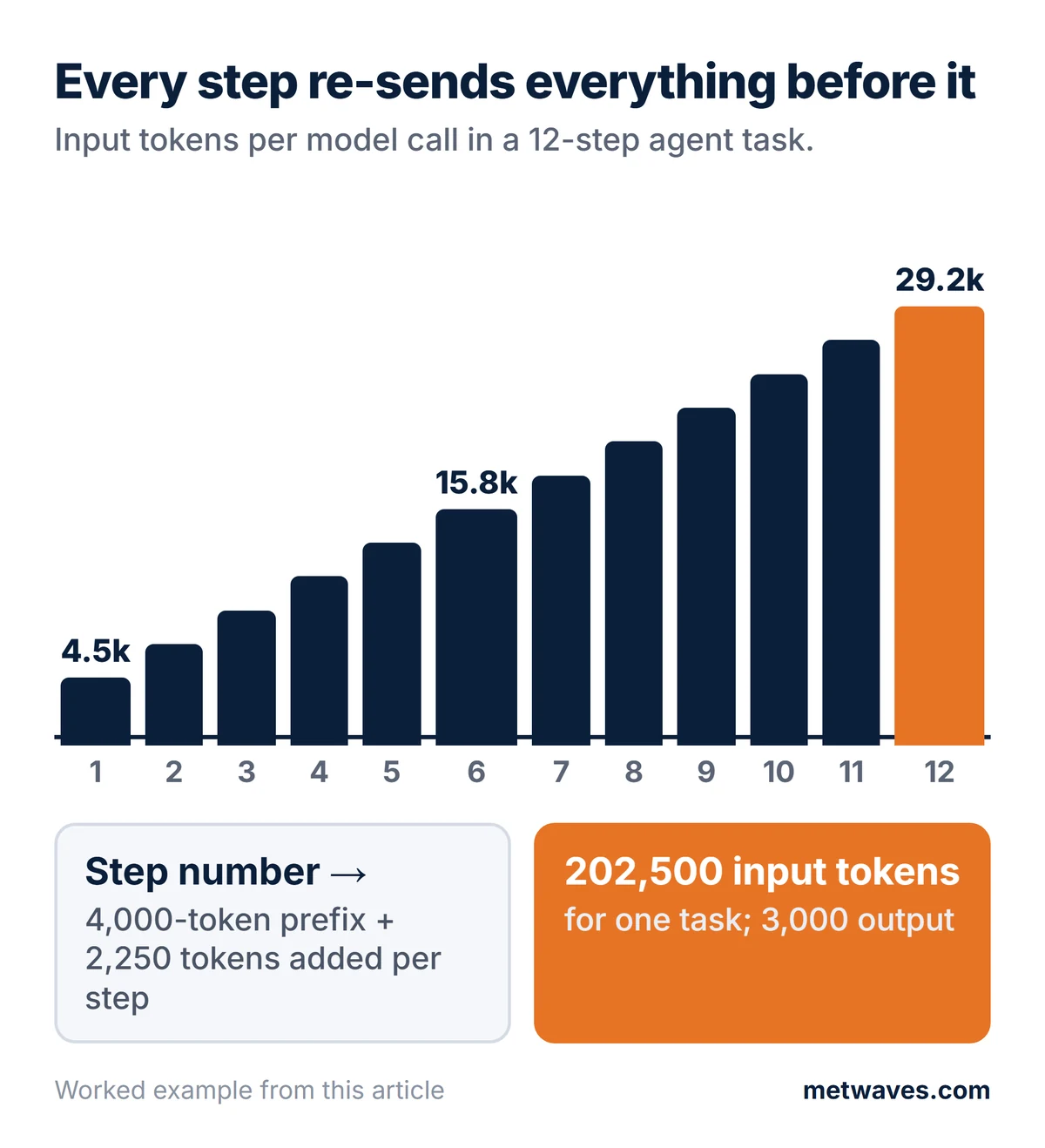
Input per call grows in a straight line, so the total grows with the square of the number of steps. That is why a task that loops for 30 steps instead of 12 costs not 2.5 times as much but more than 5 times: about 1.1 million input tokens and $2.30 on the same assumptions.
What else pushes the bill up?
| Cause | What it looks like in the logs | Fix |
|---|---|---|
| Bulky tool results | A CRM lookup returns 40 fields and 20 records when the agent needed 3 fields of 1 record | Return only the fields the step needs; paginate; summarize |
| Tool-call loops | The same tool called again and again with near-identical arguments | Cap steps per task; detect repeats; return clearer errors |
| Retries on failure | Whole tasks re-run after a timeout or a validation error | Retry the single failed call, not the task; idempotent tools |
| Cache misses | Cached tokens near zero although the prefix never changes | Remove timestamps and per-user text from the top of the prompt |
| Too many tools | Long tool definitions sent on every call | Give each agent only the tools for its job |
| Wrong model for the step | The flagship model classifying emails or extracting dates | Route simple steps to a small model |
| Reasoning tokens | Output tokens far higher than the visible answer | Lower the reasoning effort for routine steps; reasoning is billed as output |
| Endless conversations | Chat sessions that carry weeks of history into each call | Summarize old turns; start new sessions per task |
How do you find out where the tokens go?
Every API response reports usage. Log it per call, tagged with the task, the step and the tool, and add it up per task. The field names differ by provider, which trips up many dashboards:
| Provider | Input (fresh) | Input (from cache) | Cache writes | Output |
|---|---|---|---|---|
| OpenAI Responses API | input_tokens minus cached | input_tokens_details.cached_tokens (included in input_tokens) | cache_write_tokens on GPT-5.6 and later | output_tokens (includes reasoning) |
| Anthropic Messages API | input_tokens (after the last cache breakpoint) | cache_read_input_tokens | cache_creation_input_tokens | output_tokens |
Once cost per task is visible, the expensive tasks usually share a cause from the table above. Sort by cost, read the five most expensive traces, and fix what you see.
Fix 1: How does prompt caching cut the cost?
Providers can reuse the processed prefix of a prompt if it is identical to a recent one. Because an agent's calls are append-only, each call's prefix is the whole previous call. With caching, you pay full price once and a small fraction afterwards:
- OpenAI. Caching is on by default for supported models. On GPT-5.6 and later, a prefix needs 1,024 tokens; a 30-minute cache write bills at 1.25 times the input price and a 12-hour write at 2.5 times, while reads cost 0.1 times (0.05 times on some models), per OpenAI's prompt caching guide.
- Anthropic. Add one top-level
cache_controlfield for automatic caching. Writes cost 1.25 times input for 5 minutes or 2 times for 1 hour; reads on Claude Sonnet 5.5 and Opus 5.5 cost 0.05 times. The minimum is 512 tokens on current models, per Anthropic's caching guide.
# Anthropic: automatic caching of the growing conversation
response = client.messages.create(
    model="claude-sonnet-5-5",
    max_tokens=2048,
    cache_control={"type": "ephemeral"},      # 5-minute cache; {"type": "ephemeral", "ttl": "1h"} for 1 hour
    system=SYSTEM_PROMPT,                      # fixed text first: no dates, user names or request IDs
    tools=TOOLS,                               # same order every call
    messages=history,
)
print(response.usage.cache_read_input_tokens, response.usage.cache_creation_input_tokens)
The one rule that matters on both: put everything that never changes first and in the same order on every call. A timestamp or user ID at the top of the system prompt makes every prefix unique and silently turns caching off. In our 12-step example, caching alone takes the task from $0.435 to $0.12.
Fix 2: How much do you save by trimming what tools return?
Tool results are re-sent on every later step, so a bloated result is paid for many times over. Return only the fields the agent needs, cap the number of records, and summarize long documents before they enter the conversation. For file search, set max_num_results on the tool, as shown in OpenAI's file search guide.
def find_customer(email: str) -> dict:
    rec = crm.contacts.search(email=email, limit=1)[0]
    return {                                  # 5 fields, not the 40 the CRM returns
        "id": rec["id"], "name": rec["name"], "tier": rec["tier"],
        "open_orders": rec["open_orders_count"], "owner": rec["account_owner"],
    }
In the example, cutting tool results from 2,000 to 600 tokens takes the task from $0.435 to $0.25 by itself. Combined with caching, it reaches $0.074.
Fix 3: Which steps can run on a smaller model?
GPT-6 Luna and Claude Haiku 5.5 cost $0.10 per million input tokens and $0.50 per million output, a twentieth of the mid-size models. They are well suited to routing a request, classifying an email, extracting fields from a form or checking a format. Keep the larger model for planning and the hard judgment calls, and prove the split on your own test cases before switching. Claude Haiku 5.5's lower price applies to prompts up to 100,000 tokens; above that it costs $0.50 input and $2.50 output.
Fix 4: How do you stop loops and retries from running up the bill?
MAX_STEPS = 12
MAX_TASK_TOKENS = 150_000

def run_task(task):
    used, seen = 0, set()
    for step in range(MAX_STEPS):
        resp = call_model(task.history)
        used += resp.usage.input_tokens + resp.usage.output_tokens
        if used > MAX_TASK_TOKENS:
            return escalate(task, reason="token budget exceeded")
        call = next_tool_call(resp)
        if call is None:
            return resp                                   # finished
        key = (call.name, canonical_json(call.arguments))
        if key in seen:
            return escalate(task, reason=f"repeated tool call: {call.name}")
        seen.add(key)
        task.history += run_tool(call)                    # retry this call only, never the whole task
    return escalate(task, reason="step limit reached")
Escalating to a person with a reason costs far less than a task that loops 50 times, and the reasons show you which tool or prompt to fix.
Fix 5: Which work can go through batch processing?
Both providers price batch requests at half the standard rate for these models: on Claude Sonnet 5.5, $1 input and $5 output per million tokens; GPT-6.2 Sol's batch rates are the same. Anything that does not need an answer in seconds qualifies: overnight reconciliations, back-filling summaries, re-scoring a backlog of documents. Batch discounts stack with caching on Anthropic.
Do bigger context windows make the bill worse?
They make it easier to run up. Current models accept very long inputs: Claude Sonnet 5.5 and GPT-6.2 Sol both handle hundreds of thousands of tokens, and Anthropic bills its 1-million-token window at the standard rate. That removes the error that used to stop a runaway conversation. A task that would once have failed at the context limit now simply carries on, paying for every token on every step.
Two habits keep long context affordable:
- Summarize instead of accumulate. After a sub-task finishes, replace its raw tool results with a short summary of what was found and decided. The next steps carry 300 tokens instead of 6,000.
- Retrieve instead of stuff. Do not paste whole documents or whole tables into the prompt "in case they help". Give the agent a search tool and let it fetch the two or three passages it needs.
Watch for price tiers too. Some models charge more once a prompt passes a threshold: OpenAI lists separate long-context rates above 272,000 input tokens for several models, and Claude Haiku 5.5 is five times dearer above 100,000. A task that drifts over the line on its last few steps pays the higher rate for those calls.
Which fix should you do first?
| Fix | Effort (estimate) | Typical saving (estimate) | Risk |
|---|---|---|---|
| Stable prefix + prompt caching | Hours to 2 days | 50% to 75% of input cost on multi-step tasks | Low |
| Trim tool results | 1 to 5 days | 20% to 50% of input cost | Low; check accuracy |
| Step and token caps with escalation | 1 to 2 days | Removes the worst outliers | Low |
| Small model for simple steps | 1 to 2 weeks including tests | Up to 95% on the steps moved | Medium; needs evaluation |
| Batch for non-urgent work | Days | 50% on the work moved | Low |
The savings ranges are estimates; your logs will tell you which applies. Start with caching and caps, because they are cheap and safe, then measure again.
What this means for owners
- Ask for cost per task, not just the monthly invoice. A rising bill with flat cost per task is growth; a rising cost per task is a problem.
- Expect 50% to 80% savings on a multi-step agent that has never been tuned (estimate).
- Set a monthly budget alert with the provider and a per-task cap in the software.
- Re-check after every model change: new models can price and tokenize differently.
What this means for developers
- Log usage per call with task, step and tool; compute cost with each provider's field rules.
- Keep the system prompt and tools byte-identical across calls; move dynamic text to the end.
- Return minimal tool results; set
max_num_resultsand field lists. - Cap steps and tokens per task, detect repeated tool calls, and escalate with a reason.
If you are choosing who should build or tune your agent, see our guide to AI agent development companies. The invoice agent case study shows how a review queue keeps both errors and costs visible.
Frequently asked questions
Why are AI agent token costs so high?
Because every step of an agent re-sends the instructions, tool definitions and all earlier steps, so input tokens grow with each call and the total grows roughly with the square of the number of steps. Large tool results, loops and retries multiply it further.
How much does prompt caching save?
On current models a cache read costs 5% to 10% of the normal input price. In our 12-step example on GPT-6.2 Sol, caching alone cut the cost per task from $0.435 to about $0.12, and with trimmed tool results to $0.074.
Why is our prompt cache not working?
Usually because something at the start of the prompt changes on every call, such as a timestamp, a request ID or the user's name, or because the prefix is shorter than the minimum: 1,024 tokens on OpenAI's GPT-5.6 and later and 512 tokens on current Claude models.
Are reasoning tokens billed?
Yes. Reasoning tokens are billed as output tokens, the most expensive kind, even though they are not shown as part of the answer. Lower the reasoning effort for routine steps.
Should we switch to a cheaper model to cut costs?
Switch per step, not wholesale. Small models such as GPT-6 Luna or Claude Haiku 5.5 cost a twentieth of mid-size models and handle routing, classification and extraction well. Keep the larger model for planning and judgment, and confirm on your own test cases.
What is the LLM cost per 1,000 tokens?
As of November 21, 2026, GPT-6.2 Sol and Claude Sonnet 5.5 cost $0.002 per 1,000 input tokens and $0.01 per 1,000 output tokens; GPT-6 Luna and Claude Haiku 5.5 cost $0.0001 input and $0.0005 output per 1,000 tokens.
Is your agent's bill climbing? We review agent traces, find where the tokens go and tune caching, tool results, model routing and limits, with accuracy checked on your own test cases. See our AI agent development service, or start with a proof of concept that measures cost per task before you scale.

Nikit Nandan
Strategy Director
Nikit is experienced in conducting in-depth research to stay abreast of industry trends and emerging technologies.