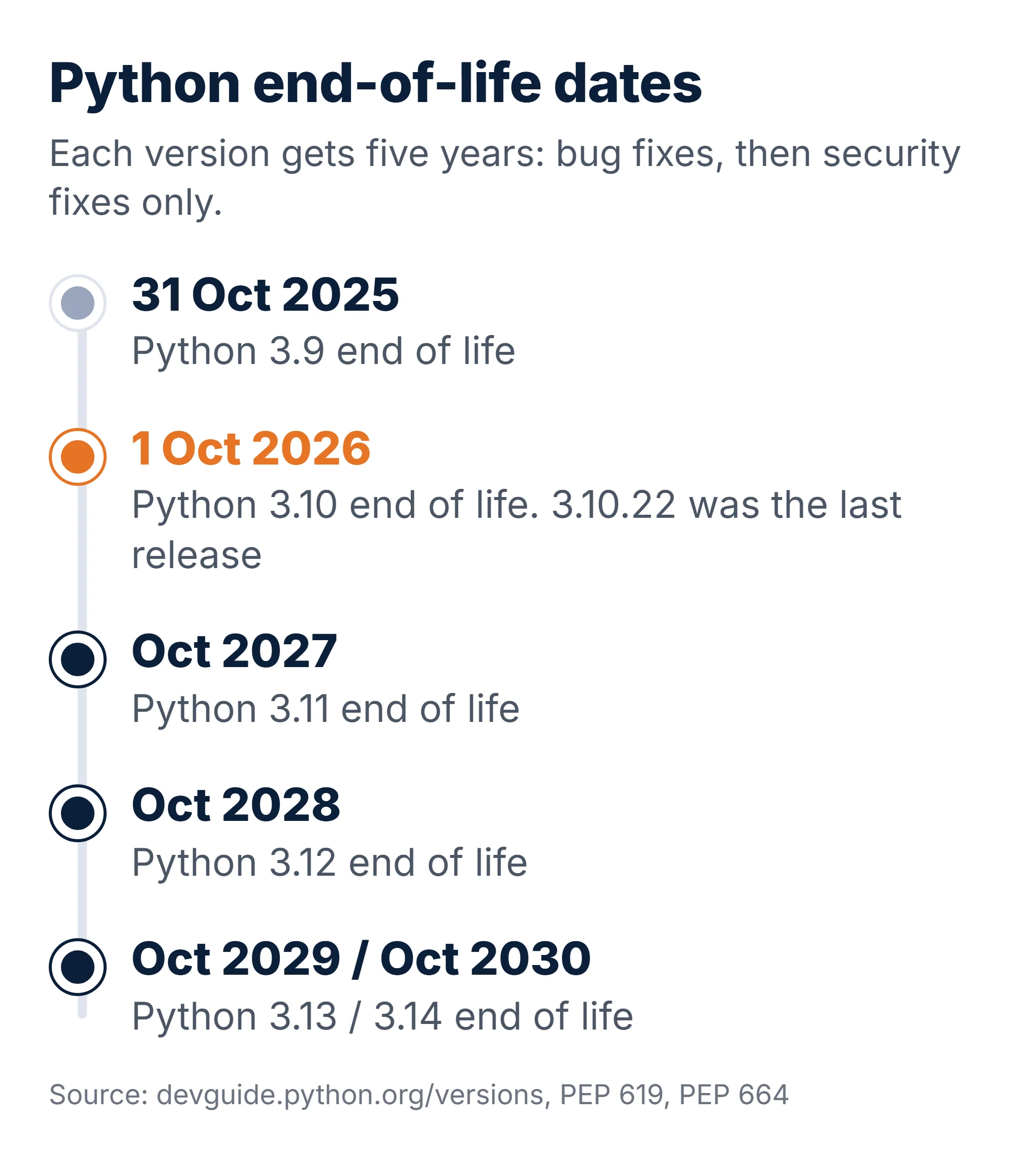
Short answer. Python 3.10 reached end of life on 1 October 2026: 3.10.22 was its final release, and no security fixes will follow. Python 3.11 goes the same way in October 2027. The bigger cost of staying is already showing: NumPy, pandas, SciPy, scikit-learn and Django have released versions that refuse to install on 3.10, so every month you stay you also fall further behind on your libraries. Move to Python 3.13 or 3.14, not 3.11.
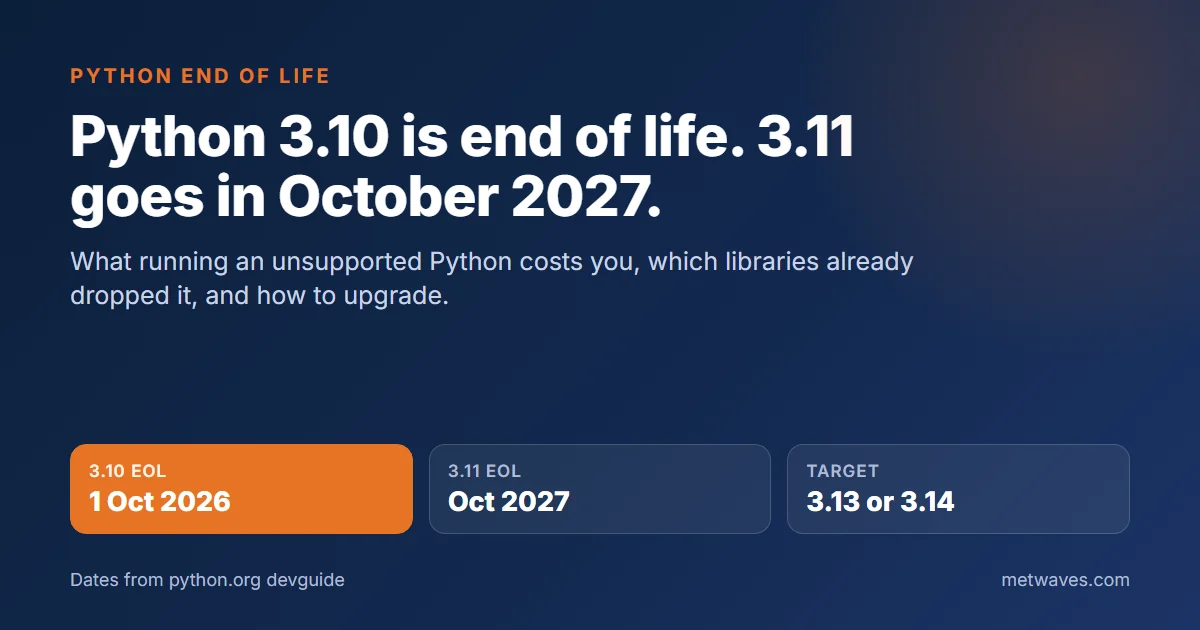
- Python 3.10End of life 1 October 2026. Final release 3.10.22
- Python 3.11Security fixes only; end of life October 2027
- Python 3.12Security fixes only; end of life October 2028
- Recommended targets3.13 (to October 2029) or 3.14 (to October 2030)
- AWS Lambdapython3.10 deprecated 31 October 2026; function updates blocked from 31 August 2027
Dates are from the Python developer's guide, PEP 619 and PEP 664; library data from PyPI, checked on 21 November 2026.
When does each Python version reach end of life?
Each Python release gets about five years. For roughly the first one and a half to two years it receives bug fixes with installers; after that it gets security fixes only, as source releases, until end of life (EOL). After EOL the core team ships nothing for it.
| Version | First release | End of life | Status today |
|---|---|---|---|
| Python 3.9 | 5 October 2020 | 31 October 2025 | End of life |
| Python 3.10 | 4 October 2021 | 1 October 2026 | End of life (3.10.22 was the last) |
| Python 3.11 | 24 October 2022 | October 2027 | Security fixes only |
| Python 3.12 | 2 October 2023 | October 2028 | Security fixes only |
| Python 3.13 | 7 October 2024 | October 2029 | Security fixes only |
| Python 3.14 | 7 October 2025 | October 2030 | Bug fixes |
| Python 3.15 | 9 October 2026 | October 2031 | Bug fixes, newest |
The devguide gives 3.11's end of life as a month, not a day; PEP 664 says security releases continue "until approximately October 2027". Plan against 1 October 2027.
What does running an unsupported Python cost you?
Nothing breaks on the day. The costs build up in four places.
1. Security fixes stop
Python's standard library parses archives, email, URLs, HTTP and XML, which is exactly the code attackers aim at. When the next flaw in one of those modules is fixed, the fix ships in 3.11 and later only. A web app, API or data pipeline on 3.10 keeps the bug. One caveat: if your Python comes from a Linux distribution (Ubuntu 22.04 LTS ships 3.10 as its system Python), the vendor may keep patching its own package. Docker images, pyenv and uv installs, and Windows installs from python.org get nothing.
2. Your libraries leave without you
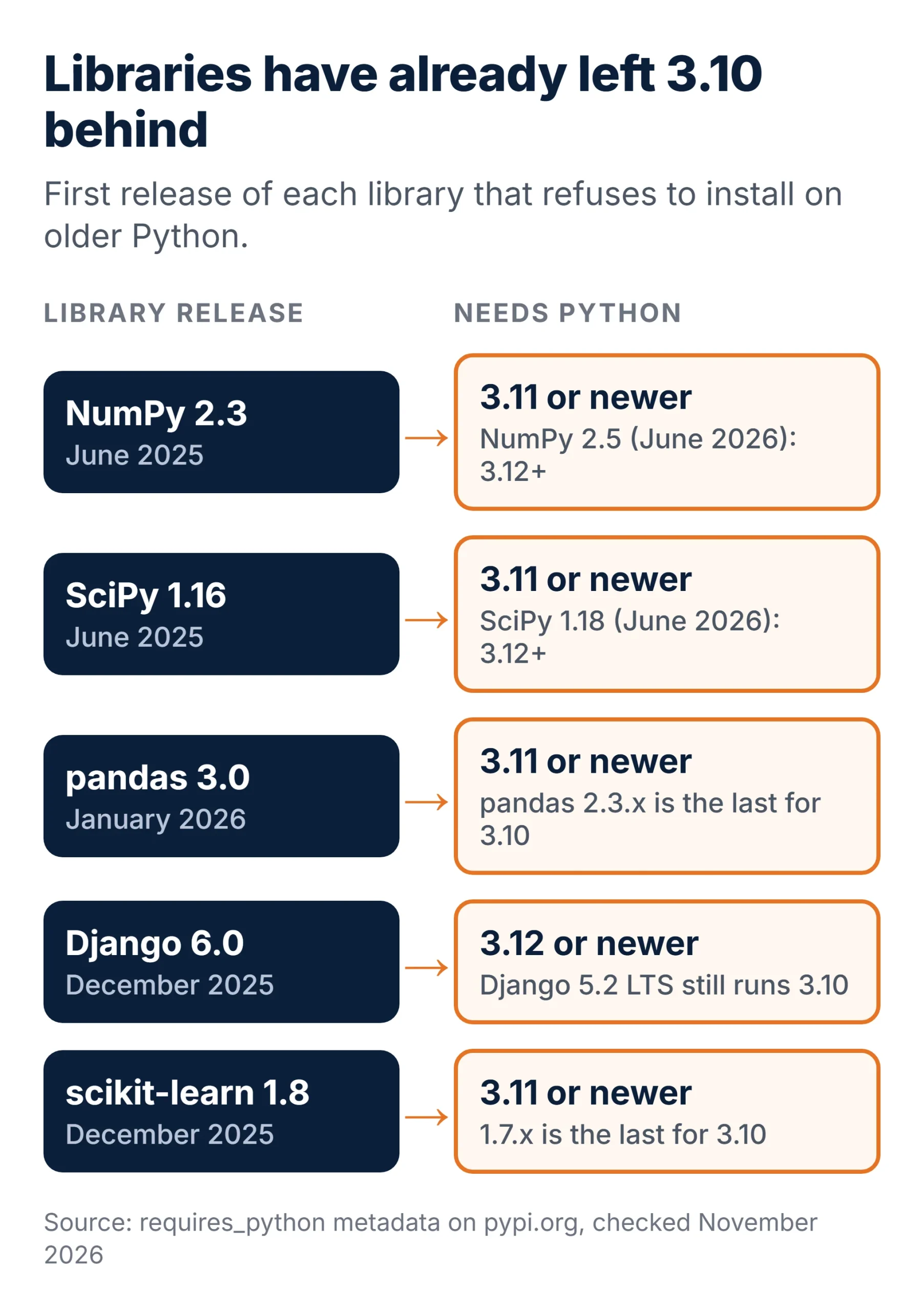
Most scientific Python projects follow SPEC 0, which drops support for a Python version three
years after its release, well before its end of life. The result, from each package's requires_python on
PyPI:
| Library | Last version for Python 3.10 | First version needing 3.11+ | Already needs 3.12+ |
|---|---|---|---|
| NumPy | 2.2.6 | 2.3.0 (June 2025) | 2.5.0 (June 2026) |
| SciPy | 1.15.3 | 1.16.0 (June 2025) | 1.18.0 (June 2026) |
| pandas | 2.3.3 | 3.0.0 (January 2026) | Not yet |
| scikit-learn | 1.7.2 | 1.8.0 (December 2025) | Not yet |
| Django | 5.2 LTS | Not applicable | 6.0 (December 2025) |
| SQLAlchemy | 2.0.x | 2.1.0 (September 2026) | Not yet |
| FastAPI | 0.162.5 | 0.162.6 (November 2026) | Not yet |
Notice the right-hand column: NumPy and SciPy already need 3.12, so even 3.11 is behind on the scientific stack. Pinning old versions works for a while, until a security fix lands in a version you can no longer install. Django users have a little more room: Django 5.2 LTS still runs on 3.10 and gets security fixes until April 2028.
The same is happening outside the scientific stack. PyTorch 2.15 (October 2026), Polars 2.1 (October 2026) and Apache Airflow 3.4 (November 2026) all declare Python 3.11 as their minimum on PyPI. If your machine learning models or data pipelines run on 3.10, the next release of the framework you depend on will not install.
3. Cloud runtimes set their own deadlines
AWS Lambda deprecated the python3.10 runtime on 31 October 2026. Creating new functions on it is
blocked from 29 July 2027 and updating existing ones from 31 August 2027 (AWS deprecation
policy). python3.11 runs on Amazon Linux 2 and is deprecated on 30 June 2027, so it is a poor target
too. python3.13 and python3.14 run on Amazon Linux 2023 with deprecation planned for
30 June 2029 (Lambda runtimes).
4. You leave free performance on the table
Python 3.11 was the big speed release: the Python docs say it is "between 10-60% faster than Python 3.10", with an average 1.25x speedup on the standard benchmark suite (What's new in 3.11). Later versions kept improving. For CPU-bound API handlers and batch jobs, the upgrade often pays for some of its own cost in compute.
How do you find everything still running Python 3.10?
The version hides in more places than the developers' laptops. Before planning, list every runtime that executes your Python code. A few commands cover most estates:
# Container images built on old Python base images
grep -rnE "FROM python:3\.(9|10|11)" --include="Dockerfile*" .

# Version pins in project metadata and CI
grep -rnE "requires-python|python_requires|python-version" pyproject.toml setup.cfg setup.py .github/workflows 2>/dev/null

# AWS Lambda functions on old runtimes (repeat per region)
aws lambda list-functions --query "Functions[?Runtime=='python3.10' || Runtime=='python3.11'].[FunctionName,Runtime]" --output table

# On each server or VM
python3 --version; ls /usr/bin/python3*
Also check the places nobody greps: scheduled scripts on a utility server, notebooks that a finance or operations team runs by hand, vendor tools that bundle their own Python, and build agents in CI. For each one, note the owner, whether it touches customer data or the internet, and whether it has tests. Upgrade the exposed ones first: public APIs, web apps and anything that parses files uploaded by users.
Which version should you upgrade to?
| Target | End of life | Choose it when | Avoid it when |
|---|---|---|---|
| 3.11 | October 2027 | Almost never: only as a stepping stone if a dependency blocks 3.12 | You want more than 11 months before the next upgrade |
| 3.12 | October 2028 | A vendor or platform certifies 3.12 but not later | You can go further; NumPy and Django 6 already require it, so it is a minimum, not a target |
| 3.13 | October 2029 | Most production apps: mature, wide wheel coverage, long runway | You depend on a module removed in 3.13 and cannot replace it yet |
| 3.14 | October 2030 | All your compiled dependencies publish 3.14 wheels | A key C-extension package lags behind |
Jumping from 3.10 straight to 3.13 is normal. You deal with the removals of 3.11, 3.12 and 3.13 in one pass, and you test once.
What breaks between Python 3.10 and 3.13?
Language syntax is backward compatible; the breaks are in the standard library and packaging. These are the errors you will meet:
ModuleNotFoundError: No module named 'distutils'.distutilswas removed in 3.12. Oldsetup.pyfiles and some build scripts import it; setuptools still provides a replacement.ModuleNotFoundError: No module named 'pkg_resources'. Since 3.12,venvno longer pre-installs setuptools, so code that importspkg_resourcesneeds setuptools listed as a dependency, or better,importlib.metadatainstead.ModuleNotFoundError: No module named 'imp', and the same forasyncoreandasynchat, all removed in 3.12 (What's new in 3.12).AttributeErroron old unittest aliases such asassertEquals,assertRegexpMatchesandfailUnless, removed in 3.12.- Nineteen "dead battery" modules removed in 3.13, including
cgi,crypt,telnetlib,imghdr,pipesanduu, pluslib2to3(What's new in 3.13).
Find them before the upgrade rather than after:
grep -rnE "^\s*(import|from) (distutils|imp|asyncore|asynchat|cgi|cgitb|crypt|telnetlib|imghdr|pipes|uu|lib2to3|pkg_resources)\b" \
  --include="*.py" .
grep -rnE "assertEquals|assertNotEquals|assertRegexpMatches|assertRaisesRegexp|failUnless|failIf" --include="*.py" tests/
How do you upgrade, step by step?
With uv, a full upgrade test takes minutes to set up. pyenv and pip work too; the steps are the same.
# 1. Install the target interpreter and a clean environment
uv python install 3.13
uv venv --python 3.13

# 2. Re-resolve dependencies for the new version (pins move to versions that support 3.13)
uv pip compile requirements.in --python-version 3.13 -o requirements-313.txt
uv pip sync requirements-313.txt

# 3. Run the tests with deprecation warnings turned into errors
.venv/bin/python -W error::DeprecationWarning -m pytest   # on Windows: .venv/Scripts/python
Then update every place the version is written down: requires-python = ">=3.13" in
pyproject.toml, the base image (FROM python:3.13-slim), the CI matrix, the Lambda runtime
identifier and your local tooling. Ruff can rewrite old syntax for you with target-version = "py313" and
ruff check --select UP --fix.
Roll out the way you would any risky change: deploy one service or one worker pool first, watch error rates and memory for a few days, then move the rest.
Effort, as our estimates for code with a reasonable test suite:
| Codebase | Typical effort | Main risk |
|---|---|---|
| Scripts, small Flask or FastAPI service | 1 to 3 days | A pinned dependency with no 3.13 release |
| Django app with Celery workers | 1 to 2 weeks | Moving to Django 5.2 LTS or 6.x at the same time |
| Data or ML pipeline with NumPy, pandas, compiled extensions | 2 to 4 weeks | pandas 3.0 and NumPy 2 behaviour changes, not Python itself |
| No tests, or many unowned scripts | Add 1 to 3 weeks | Writing enough tests to trust the upgrade |
How do you avoid the next Python deadline?
A new Python version arrives every October, and each one is supported for five years. A simple policy keeps you out of this situation for good:
- Upgrade once a year, in the first quarter, to the version released two Octobers earlier. In early 2027 that means 3.13; in early 2028, 3.14. By then its wheels are everywhere and its first bug-fix releases are out.
- Test the next version continuously. Add the newest Python to your CI matrix as an allowed failure, so you see breakages months before you need to act.
- Automate dependency updates with Dependabot or Renovate, so library upgrades arrive in small pull requests rather than one large, risky jump.
- Write the version down once. Keep it in
pyproject.tomland a single base image, so an upgrade is a one-line change plus testing.
What this means for you: owner
Anything on Python 3.10 is unpatched as of October 2026. Ask for a list of every service, job and Lambda function and the Python version each runs, and fund one upgrade to 3.13 rather than two smaller ones.
What this means for you: developer
Run the grep above, build a 3.13 environment with uv, re-resolve dependencies and run tests with deprecation warnings as errors. Upgrade libraries in the same pass, since many already require 3.11 or 3.12.
Frequently asked questions
When did Python 3.10 reach end of life?
Python 3.10 reached end of life on October 1, 2026, five years after 3.10.0. Python 3.10.22 was the final security release, and no further fixes will be published.
When is Python 3.11 end of life?
Python 3.11 receives security fixes until about October 2027, according to PEP 664 and the Python developer's guide. AWS Lambda deprecates its python3.11 runtime earlier, on June 30, 2027.
Is it safe to keep running Python 3.10?
It keeps working, but the Python core team no longer fixes security issues in it, and major libraries such as NumPy, pandas, SciPy and Django have released versions that do not install on 3.10. Distribution-packaged Python, such as Ubuntu 22.04's, may still get vendor patches.
Which Python version should we upgrade to?
Python 3.13 for most production apps, supported until October 2029. Choose 3.14, supported until October 2030, if all your compiled dependencies publish 3.14 wheels. Upgrading to 3.11 only buys about a year.
What breaks when upgrading from Python 3.10 to 3.13?
Mostly removed standard-library modules: distutils, imp, asyncore and asynchat in 3.12, and 19 legacy modules such as cgi, crypt and telnetlib in 3.13, plus old unittest aliases like assertEquals. Code that imports pkg_resources also needs setuptools installed explicitly.
How long does a Python upgrade take?
As an estimate, a small service takes 1 to 3 days, a Django app with workers 1 to 2 weeks, and a data or machine learning pipeline 2 to 4 weeks, mostly because library upgrades such as pandas 3.0 come with it.
Do we have to upgrade if our servers run Ubuntu 22.04 LTS?
Ubuntu 22.04's system Python is 3.10, and Canonical maintains that package for the release's support period, so the operating system itself is covered. Your application is a different matter: new versions of NumPy, pandas and Django will not install on 3.10. Run the app on a separately installed 3.13 interpreter, or move to Ubuntu 24.04, whose system Python is 3.12.
Need a hand? We upgrade and support Python applications, APIs and data pipelines for businesses in the US, UK, Canada and Australia, starting with an inventory and a fixed quote. See our Python development services, application support and maintenance for keeping versions current, QA and testing for the regression suite, and AWS consulting if your Python runs on Lambda.

Nikit Nandan
Strategy Director
Nikit is experienced in conducting in-depth research to stay abreast of industry trends and emerging technologies.