Updated November 26, 2026. Sources: Microsoft Learn, the VBScript deprecation timeline and Microsoft's lifecycle pages.
Short answer. Not on the servers you run today, but yes on the next ones. Classic ASP sites written in VBScript need the VBScript engine, which Windows Server 2025 still includes as a preinstalled optional feature and supports until November 2034. Windows Server 2028, in preview in November 2026, removes VBScript, and Microsoft says apps that depend on it "stop working". If your site must move to a newer Windows Server, it has to be rewritten first.
- ASP supportSupported on all supported IIS versions; tied to the Windows version it runs on.
- VBScript todayAn optional Windows feature, preinstalled and on in Windows 11 24H2 and Windows Server 2025.
- VBScript nextOff by default "around 2027" in Windows; removed in a later release. Windows Server 2028 (preview) lists it as removed.
- Windows Server 2016Extended support ends January 12, 2027.
- Windows Server 2025Supported until November 2034.
- Rewrite target.NET 10 LTS, supported to November 14, 2028.
Will Classic ASP stop working when VBScript is disabled?
Classic ASP (Active Server Pages) is Microsoft's web technology from the late 1990s. An ASP page is HTML with server-side script, and almost every ASP site writes that script in VBScript. The page is run by asp.dll inside IIS (Internet Information Services), which hands the script to the VBScript engine. Take the engine away and the pages have nothing to run on.
Microsoft's plan has three phases (Windows IT Pro blog): first, "VBScript FODs will be pre-installed in all Windows 11, version 24H2 and on by default"; then "Around 2027, the VBScript FODs will no longer be enabled by default"; finally "VBScript will be retired and eliminated from future versions of Windows." FOD means Feature on Demand, an optional Windows component. A later Microsoft 365 post gives phase 2 as "approximately 2026 or 2027", so there is no firm date.
Two consequences follow for an ASP site. While the feature is present, nothing changes. Once it is turned off or removed, VBScript pages fail. Microsoft has not said whether phase 2 will switch the feature off on existing, already-installed Windows Server versions, which is why the safe plan is to watch every server build and Windows update for it.
What has Microsoft actually said about Classic ASP?
Less than most site owners would like. Microsoft's support article for ASP says: "The use of ASP pages with Microsoft Internet Information Services (IIS) is currently supported in all supported versions of IIS. ... both ASP and IIS support lifetimes are tied to the support lifecycle of the host operating system" (Microsoft Learn). That article does not mention VBScript.
The clearest signal is in the Windows Server documentation (features removed or no longer developed). For Windows Server 2025: "VBScript is available as an FOD and preinstalled in Windows Server 2025, before its removal from the operating system in a later release." For Windows Server 2028, in preview: "Windows Server 2028 removes VBScript, so scripts and apps that depend on it stop working. Migrate administrative scripts to PowerShell and web scripts to JavaScript." Microsoft adds that preview "removal plans can change before release".
Microsoft's own VBScript detection guide lists "classic Active Server Pages known as ASP" among the places VBScript runs, but stops short of an ASP-specific statement. Community reports fill the gap: testers on Microsoft Q&A and the IIS community forum report that Classic ASP stops working when the VBScript feature is removed and works again when it is restored. These are user reports, not Microsoft guidance, but they match how ASP is built.
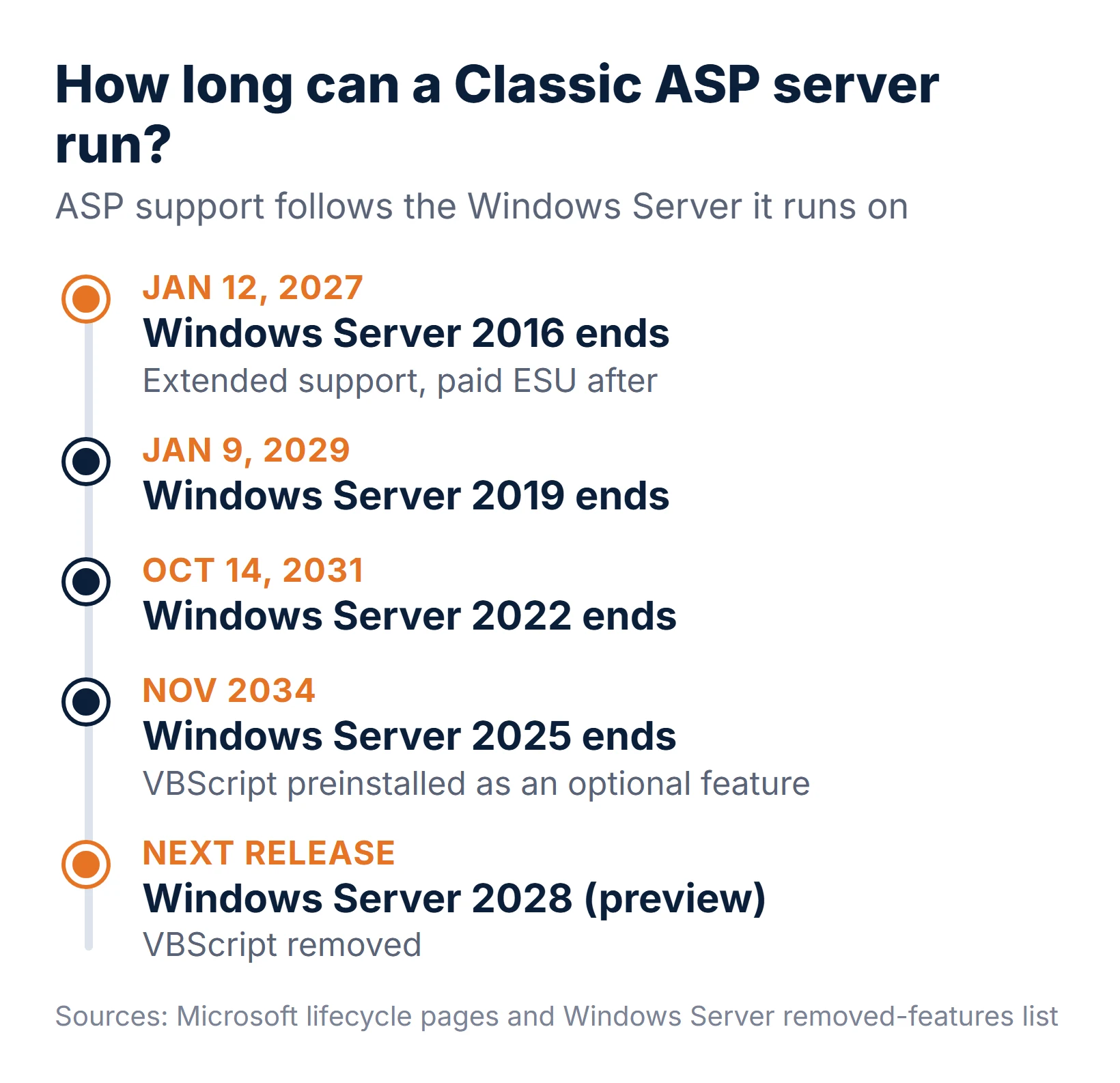
Which Windows Server versions keep Classic ASP running, and until when?
| Windows Server | VBScript | Extended support ends | For a Classic ASP site |
|---|---|---|---|
| 2016 | Built in | January 12, 2027 | Move off this server in the next few weeks |
| 2019 | Built in | January 9, 2029 | Fine for now; plan the next step |
| 2022 | Built in | October 14, 2031 | Good place to host the site during a rewrite |
| 2025 | Optional feature, preinstalled | November 2034 | Works while the feature stays installed |
| 2028 (preview) | Removed | Not released | VBScript ASP pages will not run |
Microsoft's lifecycle page lists Windows Server 2025 extended support ending in mid-November 2034; the exact day appears as November 14 or 15 depending on time zone. Either way, a business that moves a Classic ASP site onto Windows Server 2025 has years, not months. The real deadline is usually different: the day someone needs a newer server, a security review flags the site, or the last developer who understands it leaves.
How do you check what your server and site depend on?
Start with the server. On Windows Server, run PowerShell as an administrator:
# Is the IIS "ASP" role service installed?
Get-WindowsFeature Web-ASP

# Is the VBScript optional feature present? (Windows Server 2025 / Windows 11 24H2+)
Get-WindowsCapability -Online | Where-Object Name -like 'VBSCRIPT*'
Then size the site. These commands count the pages, find any written in JScript, and list every COM component the pages create, which is where most rewrite surprises hide:
$site = 'D:\inetpub\wwwroot\shop'

# How many ASP pages and include files?
Get-ChildItem $site -Recurse -Include *.asp, *.inc | Measure-Object

# Pages written in JScript instead of VBScript
Select-String -Path "$site\*.asp" -Pattern 'Language\s*=\s*"?JScript' -List

# Every COM component the site creates, with a count
Get-ChildItem $site -Recurse -Include *.asp, *.inc |
  Select-String -Pattern 'Server\.CreateObject\("([^"]+)"\)' -AllMatches |
  ForEach-Object { $_.Matches.Groups[1].Value } |
  Group-Object | Sort-Object Count -Descending
Expect to see ADODB.Connection and ADODB.Recordset for database access, Scripting.FileSystemObject for files, CDO.Message or a third-party mailer for email, and often a commercial upload or PDF component. Each one needs a .NET equivalent, and old 32-bit components are often the reason an application pool still runs with enable32BitAppOnWin64 set.
Finally, test. Build a copy of the server on a virtual machine, remove the VBScript feature with Microsoft's documented command, and browse the site:
Dism /Online /Remove-Capability /CapabilityName:VBSCRIPT~~~~What are your options for a Classic ASP site?
Effort figures are our estimates for a business site of 50 to 150 pages with a SQL Server database, not vendor numbers.
| Option | When it fits | Effort (estimate) | Risk |
|---|---|---|---|
| Keep it on Windows Server 2022 or 2025 | Low-traffic internal site, rewrite budgeted for later | Days, to move servers | No new fixes for the language; skills are scarce |
| Rewrite section by section in ASP.NET Core | Business-critical site that must stay live | 2 to 4 months | Shared login and session need design |
| Rewrite all at once | Small site, under about 30 pages | 4 to 8 weeks | One risky cut-over |
| Replace with a SaaS product | The site is a standard function: shop, booking, portal | Weeks, plus data migration | You adapt to the product's process |
How does a section-by-section rewrite to ASP.NET Core work?
It uses the strangler fig pattern, which Microsoft describes as a way to "incrementally migrate a legacy system by gradually replacing specific pieces of functionality with new applications and services", with "a façade (proxy)" in front (Azure Architecture Center). The façade is a new ASP.NET Core app on .NET 10 running YARP (Yet Another Reverse Proxy), Microsoft's reverse-proxy library. Rewritten sections are served by ASP.NET Core; every other request is forwarded to the old IIS site, so URLs never change for users or search engines.
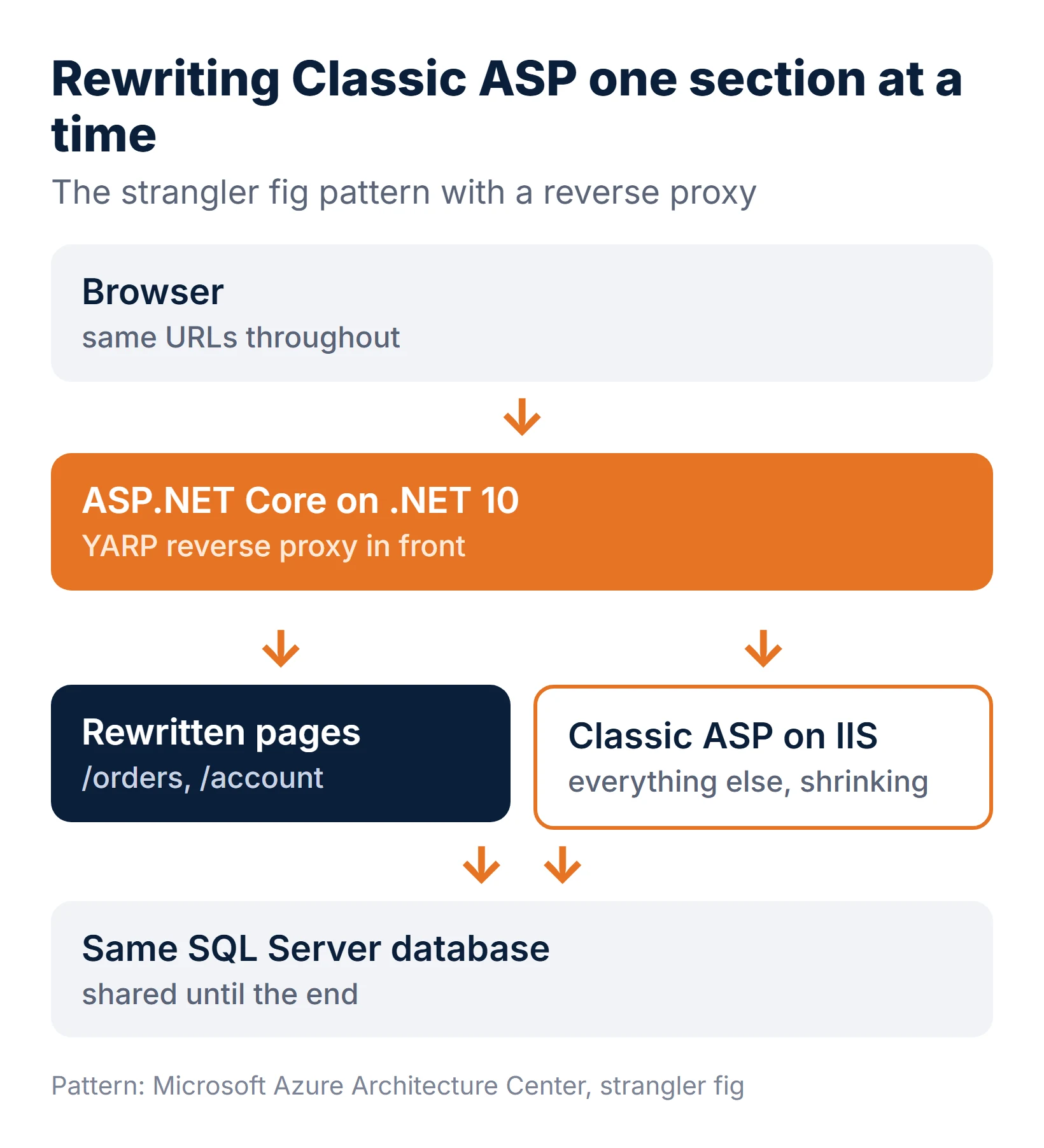
The proxy is a few lines. In Program.cs, after adding the Yarp.ReverseProxy NuGet package:
var builder = WebApplication.CreateBuilder(args);

builder.Services.AddRazorPages();
builder.Services.AddReverseProxy()
    .LoadFromConfig(builder.Configuration.GetSection("ReverseProxy"));

var app = builder.Build();

app.MapRazorPages();     // rewritten pages answer first
app.MapReverseProxy();   // everything else goes to Classic ASP

app.Run();
And in appsettings.json, a catch-all route with a high Order value so it only matches what the new app does not handle:
{
  "ReverseProxy": {
    "Routes": {
      "classic-asp": {
        "ClusterId": "legacy",
        "Order": 1000,
        "Match": { "Path": "{**catch-all}" }
      }
    },
    "Clusters": {
      "legacy": {
        "Destinations": {
          "iis": { "Address": "http://127.0.0.1:8081/" }
        }
      }
    }
  }
}
A typical page rewrite looks like this. The Classic ASP version, with the SQL injection hole most old sites have:
<%@ Language="VBScript" %>
<%
Dim conn, rs
Set conn = Server.CreateObject("ADODB.Connection")
conn.Open Application("ConnStr")
Set rs = conn.Execute("SELECT Name, Price FROM Products WHERE Id = " & Request.QueryString("id"))
If Not rs.EOF Then Response.Write Server.HTMLEncode(rs("Name")) & ": " & rs("Price")
%>
The same endpoint in ASP.NET Core with Microsoft.Data.SqlClient, typed input and a parameterized query:
app.MapGet("/product", async (int id, IConfiguration config) =>
{
    await using var conn = new SqlConnection(config.GetConnectionString("Shop"));
    await conn.OpenAsync();

    await using var cmd = new SqlCommand("SELECT Name, Price FROM Products WHERE Id = @id", conn);
    cmd.Parameters.Add("@id", SqlDbType.Int).Value = id;

    await using var reader = await cmd.ExecuteReaderAsync();
    return await reader.ReadAsync()
        ? Results.Ok(new { Name = reader.GetString(0), Price = reader.GetDecimal(1) })
        : Results.NotFound();
});
What each Classic ASP piece becomes
Most of a rewrite is translation. This mapping covers the bulk of a typical site:
| Classic ASP | ASP.NET Core on .NET 10 | Watch out for |
|---|---|---|
Request.QueryString, Request.Form | Typed parameters and model binding | Old pages trust input; add validation as you go |
ADODB.Connection / Recordset | Microsoft.Data.SqlClient, Dapper or EF Core | String-built SQL; implicit type conversions |
Session("x") | ISession backed by a distributed cache | Session is not shared with Classic ASP |
<!--#include file=...--> | Razor layouts, partials and view components | Includes that also run code |
global.asa events | Program.cs and middleware | Application variables used as a cache |
Scripting.FileSystemObject | System.IO | Hard-coded paths and drive letters |
CDO.Message email | An SMTP library or an email API | Relay settings on the old server |
Response.Write in HTML | Razor syntax with automatic HTML encoding | Pages that relied on unencoded output |
The one piece with no direct equivalent is in-page state that depends on VBScript quirks: variant types, On Error Resume Next hiding failures, and dates parsed according to the server's regional settings. Those are where tests written against the old pages pay for themselves. Record real requests and responses from the live site, replay them against the new endpoint, and compare the output before a section switches over.
The two hard parts: login and session
Microsoft's System.Web adapters, which share session and login between old and new apps, work with ASP.NET on .NET Framework, not with Classic ASP. For a Classic ASP site you design the bridge yourself. The usual choices are to move login to ASP.NET Core first and have Classic ASP trust a signed cookie it can verify, or to keep shared state in a SQL Server table keyed by a cookie both apps read. Either way, decide this before the first section moves.
What this means for owners
Your site will keep running on the servers you have, so this is not an emergency. It is a deadline you control: move anything on Windows Server 2016 now, and fund the rewrite before you need a newer Windows Server or before the people who know the code are gone.
What this means for developers
Count pages and COM components, then test on a VM with the VBSCRIPT feature removed. Put YARP in front early, even before the first rewrite, so routing changes are config, not deployments. Target net10.0, and fix SQL injection as you go rather than porting it.
What should you do in the next 90 days?
- Inventory every Classic ASP site, the Windows Server version it runs on, and who maintains it.
- Move anything on Windows Server 2016 before January 12, 2027, to 2022 or 2025.
- Protect the VBScript feature on Windows Server 2025 hosts: document it as a dependency so hardening scripts leave it alone.
- Assess the site: pages, COM components, login, and which sections change most often.
- Start the rewrite with the proxy and the busiest or riskiest section. Use .NET 10; .NET 8 is out of support, as covered in our .NET 8 end-of-support guide.
Frequently asked questions
Does Classic ASP need VBScript?
Most Classic ASP sites are written in VBScript, so yes. Pages declared as JScript use a different engine and are not part of the VBScript retirement, but they are rare.
Has Microsoft said Classic ASP will stop working?
Not in so many words. Microsoft says ASP support is tied to the lifecycle of the Windows version it runs on, and that Windows Server 2028, now in preview, removes VBScript so that scripts and apps that depend on it stop working. It has not published an ASP-specific statement.
Is Classic ASP still supported on Windows Server 2025?
Yes. Microsoft supports ASP on all supported versions of IIS, and Windows Server 2025 includes VBScript as a preinstalled optional feature. Windows Server 2025 is supported until November 2034.
Can we just keep the VBScript feature installed?
On Windows Server 2025 and earlier, yes, for as long as that Windows version is supported. Make sure no one removes the feature during hardening, and plan the rewrite before you need a newer Windows Server.
Will a Windows update turn VBScript off on our existing servers?
Microsoft has not said. Its timeline says VBScript will no longer be enabled by default around 2027, without saying whether that applies to servers already in service. Check the VBScript feature after each major update and before any server rebuild, and keep a test copy of the site to try changes on first.
What should Classic ASP be rewritten in?
For a Windows and SQL Server shop, ASP.NET Core on .NET 10 is the natural target: it runs on IIS and Linux, reads the same databases, and .NET 10 is supported to November 14, 2028. A reverse proxy lets you move one section at a time.
How long does a Classic ASP rewrite take?
It depends on page count, how much logic lives in the pages and which COM components the site uses. Our planning estimate is two to four months for a site of 50 to 150 pages with a section-by-section approach, with an assessment replacing that estimate with a real one.
Still running Classic ASP? We rewrite Classic ASP sites in ASP.NET Core for businesses in the US, UK, Canada and Australia, section by section, with the old site live until the new one takes over. See our application modernization services and .NET development pages, or application support if you need the current site kept safe while the rewrite runs.

Nikit Nandan
Strategy Director
Nikit is experienced in conducting in-depth research to stay abreast of industry trends and emerging technologies.