Updated November 21, 2026. Support dates are from Angular's release and support policy; version requirements are from Angular's version compatibility table and the official Angular and Angular CLI changelogs.
Short answer. Angular 20 reaches the end of its long-term support on
November 28, 2026, so from that date it gets no more security fixes. If your app is on Angular 14, 15, 16 or 17, it is
already unsupported, and the upgrade to Angular 22 means five to eight major-version steps, run one at a time with
ng update. Most code changes are automated; the time goes on Node.js and TypeScript jumps, Angular Material,
old third-party libraries and the switch from the webpack builder to the esbuild application builder.
Key dates and facts
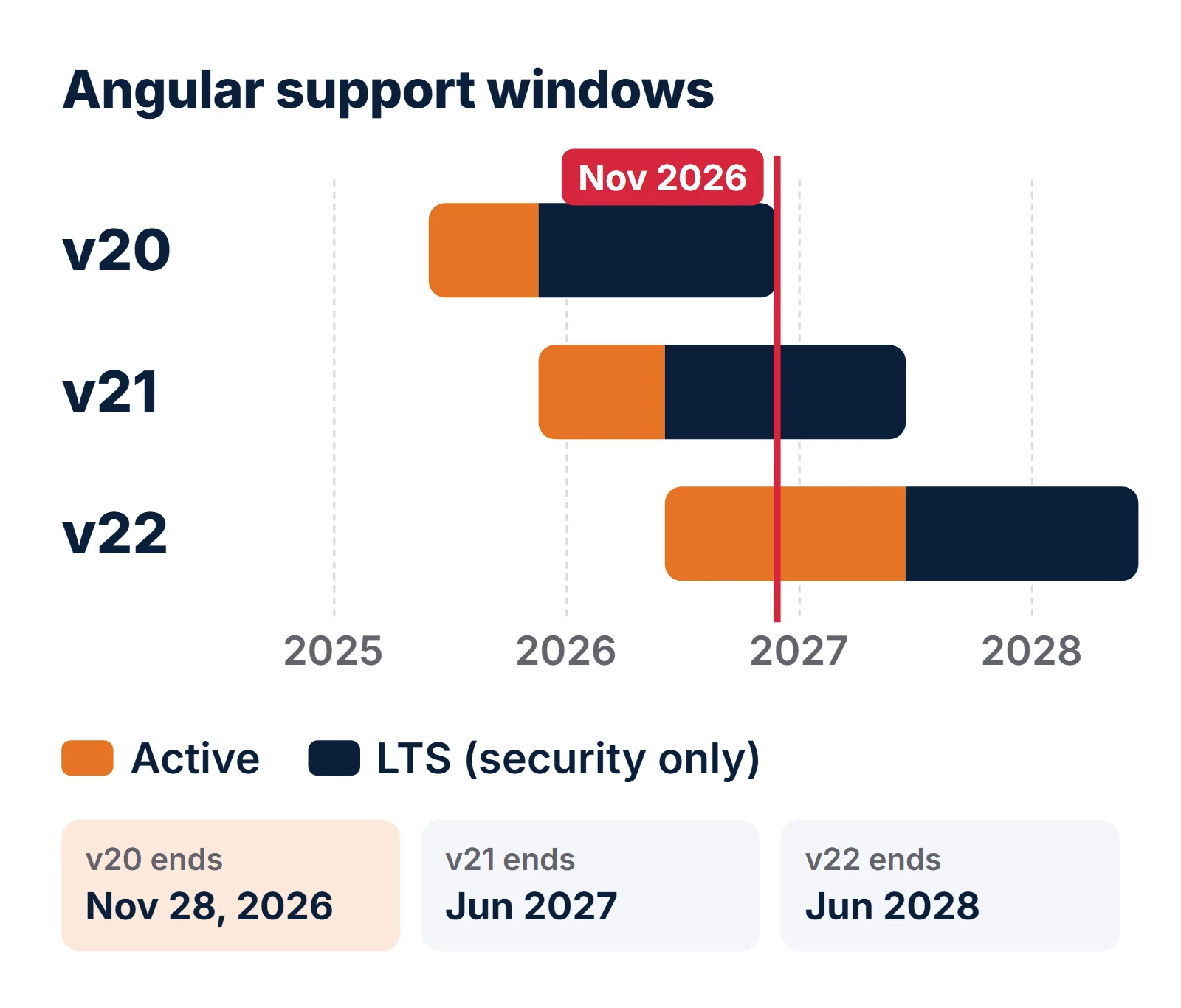
- Angular 20 end of supportNovember 28, 2026 (end of LTS)
- Angular 21 end of supportJune 2027 (Angular lists the month, not the day)
- Angular 22 (current)Released June 3, 2026; active to June 2027, LTS to June 2028
- Angular 2 to 19Already unsupported
- Support modelAbout 24 months per major: 12 months active, then 12 months LTS (critical and security fixes only)
- Release cadenceOne major a year from Angular 22 on; until v22 it was one every six months
What happens when Angular 20 support ends on November 28, 2026?
Angular gives every major version about 24 months of support. For the first 12 months it is active: regular updates and patches. For the next 12 it is in long-term support (LTS), which means only critical fixes and security patches. Angular 20 shipped on May 28, 2025, moved to LTS when Angular 21 came out on November 19, 2025, and its LTS window closes on November 28, 2026.
Nothing breaks on that day. Your app keeps building and running. What stops is the flow of fixes: when the next cross-site scripting or server-side rendering issue is found in the framework, the patch ships for Angular 21 and 22 only. Three practical consequences follow:
- Security scans start failing.
npm audit, Dependabot and similar tools flag advisories against@angular/*packages that will never get a patched 20.x release. - Customer and insurer questionnaires ask about it. "Do you run supported versions of your frameworks?" becomes a "no" you have to explain.
- The ecosystem moves on. Libraries such as component kits and state managers follow Angular's majors and stop testing old ones, so every month you wait adds work to the eventual upgrade.
If you are on Angular 14 to 19, all of this already applies: Angular's own page states that versions 2 to 19 are no longer supported.
Should you upgrade to Angular 21 or go straight to Angular 22?
Go to Angular 22. Angular 21 is already in LTS and drops out of support in June 2027, about seven months from now. Stopping there means planning the next upgrade before the first one has settled.
| Angular 21 | Angular 22 | |
|---|---|---|
| Status today | LTS (security fixes only) | Active |
| Support ends | June 2027 | June 2028 |
| TypeScript | 5.9 | 6.0 |
| Node.js | ^20.19.0, ^22.12.0 or ^24.0.0 | ^22.22.3, ^24.15.0 or ^26.0.0 |
| Change detection default | Default (renamed Eager in 22) | OnPush |
| New-project defaults | Zoneless, Vitest | Zoneless, Vitest, @Service() |
| Pick it if | A hard dependency is not ready for 22 yet | Almost every other case |
One caution on Node.js: the Angular CLI 22.0.0 release notes gave the minimums as Node 22.22.0 and 24.13.1, while the current compatibility table lists 22.22.3 and 24.15.0 for Angular 22.x. Use the newer numbers; they are what later 22.x patches expect.
Why can't you jump straight from Angular 14 to Angular 22?
Because the update tool will not let you. Angular's documentation says to update across several majors "one major
version at a time", and ng update enforces it. Try to skip and you get this:
$ ng update @angular/core@22 @angular/cli@22
Updating multiple major versions of '@angular/core' at once is not supported. Please migrate each major version individually.
Run 'ng update @angular/core@15' in your workspace directory to update to latest '15.x' version of '@angular/core'.
Each step also runs that version's automatic migrations (Angular calls them schematics), which rewrite your code for the breaking changes. Skip a step and you skip its migrations.
The second reason is Node.js. No single Node.js version runs both Angular 14 and Angular 22, so you change Node three times along the way. Run the CLI on a version it does not accept and it stops with:
Node.js version v16.20.2 detected.
The Angular CLI requires a minimum Node.js version of v22.22.3 or v24.15.0 or v26.0.0.

Please update your Node.js version or visit https://nodejs.org/ for additional instructions.| Steps | Node.js to use | TypeScript at the end of the step |
|---|---|---|
| 14 → 15 → 16 | Node 16, 16.14 or later | 4.9 (Angular 16 needs 4.9.3+) |
| 16 → 17 → 18 → 19 | Node 18, 18.19.1 or later | 5.5 to 5.8 (Angular 19) |
| 19 → 20 → 21 | Node 20, 20.19 or later | 5.9 (Angular 21) |
| 21 → 22 | Node 22.22.3+ or 24.15+ | 6.0 (Angular 22) |
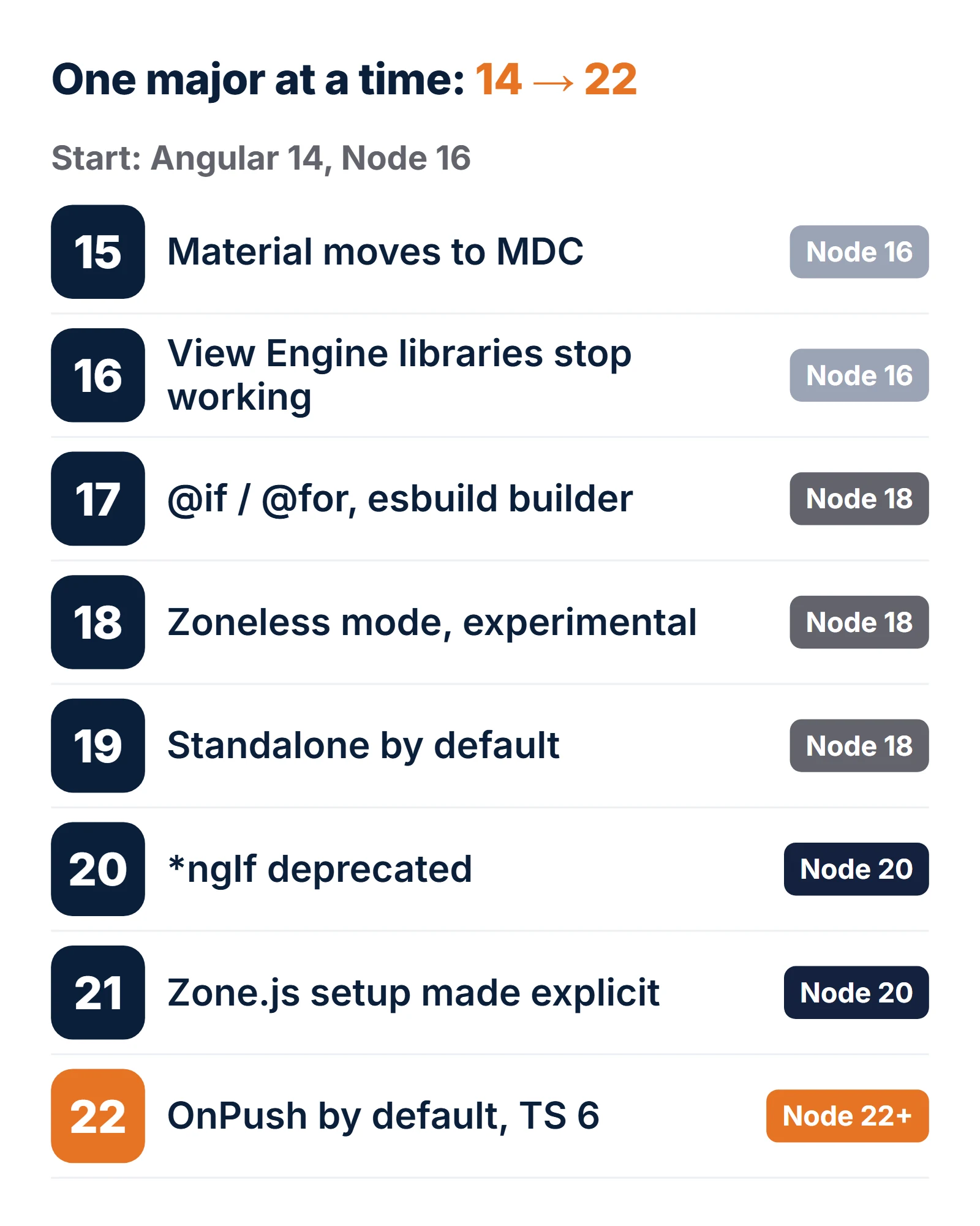
What breaks at each version from Angular 14 to 22?
This is the short list worth checking first. It is not every breaking change; the full lists are in the Angular changelog under each x.0.0 release.
| Version | What changes or breaks | Automated? |
|---|---|---|
| 15 | Angular Material components rebuilt on MDC (new DOM and CSS; old ones kept as legacy-* imports). TypeScript 4.8. enableIvy option removed. | Partly: Material MDC migration schematic |
| 16 | ngcc removed, so libraries still in View Engine format stop working. entryComponents and ReflectiveInjector removed. Node 14 dropped. Signals arrive in developer preview. | Code: yes. Old libraries: no |
| 17 | Built-in control flow (@if, @for, @switch) and @defer. esbuild application builder becomes the default for new projects. Material legacy-* components deleted. Node 18.13+, TypeScript 5.2, zone.js 0.14. | Control flow: opt-in schematic |
| 18 | Zoneless change detection appears as experimental. TypeScript 5.4. async test helper removed (use waitForAsync). | Mostly |
| 19 | Components, directives and pipes are standalone by default; ng update adds standalone: false to NgModule declarations. TypeScript 5.5. effect() timing changes. | Yes |
| 20 | *ngIf, *ngFor and *ngSwitch deprecated. TestBed.get and InjectFlags removed. afterRender renamed afterEveryRender. Node 20.19+, TypeScript 5.8. | Mostly |
| 21 | Zone-based change detection is no longer set up implicitly: the migration adds provideZoneChangeDetection(). New projects are zoneless and use Vitest. moduleId and custom interpolation removed. TypeScript 5.9. | Yes |
| 22 | OnPush is the default (the migration pins existing components to ChangeDetectionStrategy.Eager). strictTemplates on by default. HttpClient uses fetch by default. ComponentFactoryResolver, provideRoutes() and Hammer.js integration removed. Router paramsInheritanceStrategy defaults to 'always'. Webpack builders deprecated. TypeScript 6.0. | Mostly; router default is manual |
Which four changes take most of the time?
1. Angular Material and the MDC rewrite (Angular 15 to 17)
If your app uses Angular Material, this is usually the biggest single item for teams starting on 14. Version 15 rebuilt
most components on Google's Material Design Components for Web (MDC). The TypeScript APIs stayed close, but the DOM and
CSS changed, so any styles that reach into Material internals break visually, not at compile time. Chips and slider were
complete rewrites; form-field, list and tabs changed their APIs. Version 15 kept the old components as
@angular/material/legacy-* imports, and version 17 deleted them.
So the order matters: update to 15, keep the legacy imports so the app still runs, then run the MDC migration before you leave version 16:
ng update @angular/core@15 @angular/cli@15 @angular/material@15
ng generate @angular/material:mdc-migration
# then search for the TODOs it leaves behind
grep -rn "TODO(mdc-migration)" src/
Budget time for visual review of every screen with a form field, chip list or slider. Screenshot tests pay for themselves here.
2. The webpack builder to the esbuild application builder
Older projects build with @angular-devkit/build-angular:browser, which runs on webpack. Angular 22
deprecates every webpack builder and points to @angular/build. The CLI has a migration for it:
ng update @angular/cli --name use-application-builderWhat it changes in angular.json, per the build system migration guide:
mainbecomesbrowser,polyfillsbecomes an array,ngswConfigPathbecomesserviceWorker.buildOptimizer,vendorChunk,commonChunkandresourcesOutputPathgo away.- Output moves from
dist/<project>todist/<project>/browser. This breaks deploy scripts, Dockerfiles and CDN upload steps that copy the old folder, a common failure right after this step.
Projects with a custom webpack config (for example through @angular-builders/custom-webpack) need that
config rewritten as esbuild plugins or removed. Server-side rendering code must be ES modules: any require()
in your server code has to go.
3. Change detection: zone.js, then OnPush by default
Angular 21 stopped assuming zone.js. Its migration adds the provider explicitly so your app behaves as before:
// app.config.ts after the Angular 21 migration
export const appConfig: ApplicationConfig = {
  providers: [
    provideZoneChangeDetection(),
    provideRouter(routes),
    provideHttpClient(),
  ],
};
Angular 22 then makes OnPush the default for any component without a strategy, and renames the old
Default to Eager. The migration writes changeDetection: ChangeDetectionStrategy.Eager
into every component that did not set one, so nothing changes on the day. The risk comes later, when someone removes that
line: OnPush components only re-render on new input references, events, signals or the async pipe, so code
that mutates an object in place stops updating the screen. Move components to OnPush one feature at a time, with tests.
Going fully zoneless (provideZonelessChangeDetection()) is optional. Treat it as a follow-up project, not
part of the upgrade.
4. Third-party libraries
This is where estimates go wrong. Three patterns to look for before you start:
- View Engine libraries. Angular 16 removed ngcc, the compatibility compiler, so any package still published in the old View Engine format fails to build. Check old in-house libraries too.
- Abandoned packages.
@angular/flex-layoutis deprecated on npm and its last release is a 15.0 beta. Layouts built on it need moving to CSS flexbox and grid. - Version-locked UI kits. Commercial and open-source component libraries publish one major per Angular major. If a kit is not ready for 22, that decides your timeline, and it is the one good reason to stop at 21.
# list Angular-related dependencies and what is outdated
npm ls --depth=0 | grep -Ei "angular|ngx|ngrx|material|primeng|ag-grid"
npm outdated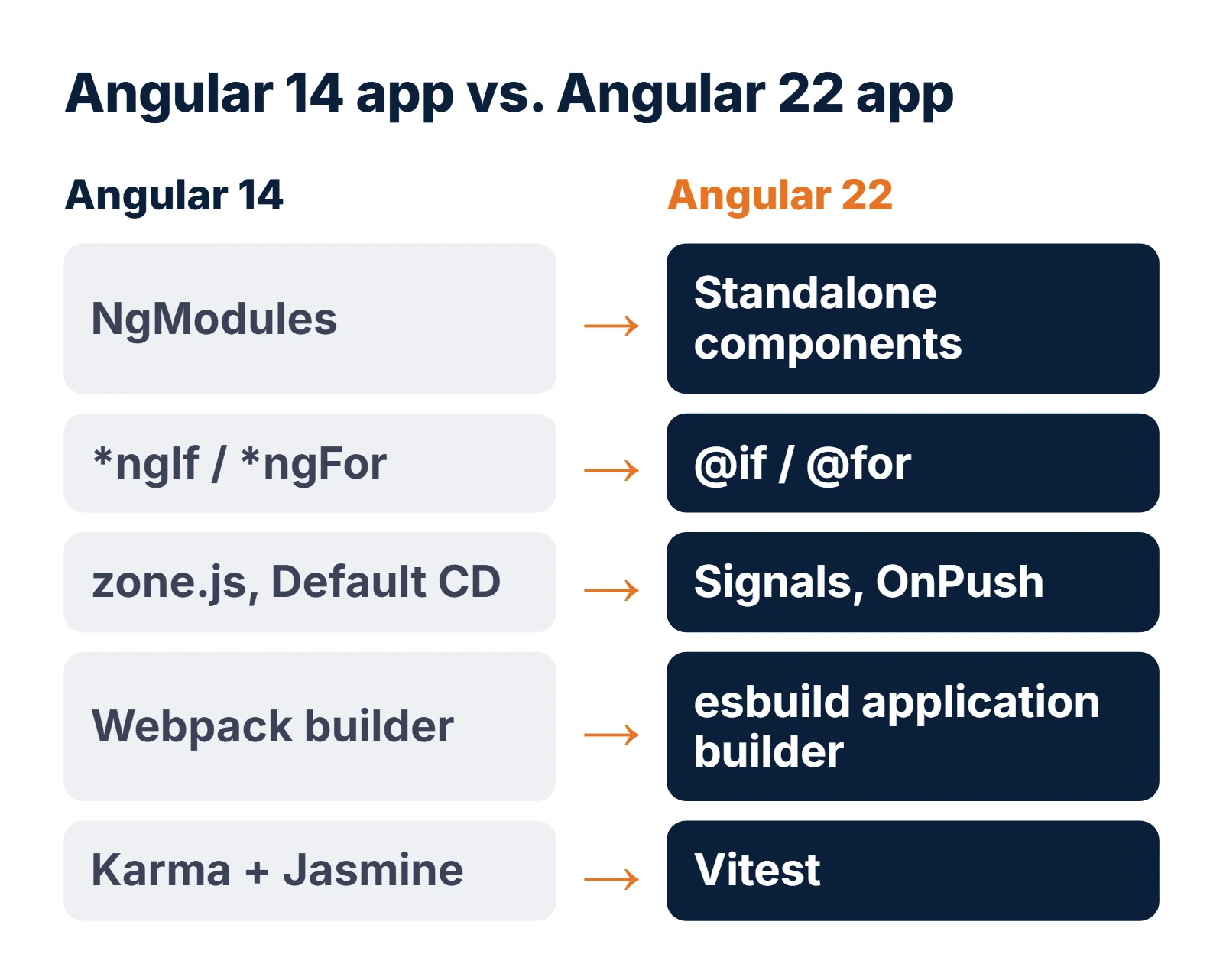
What does the ng update path look like, step by step?
Do each step on its own branch, get the build and tests green, deploy it to a test environment, then move to the next. A typical sequence from Angular 14:
# 0. Start clean: committed tree, green CI, Node 16.14+
git switch -c upgrade/angular-15
ng update @angular/core@15 @angular/cli@15 @angular/material@15
ng generate @angular/material:mdc-migration

# 1. Angular 16 (still Node 16.14+ or 18.10+)
ng update @angular/core@16 @angular/cli@16 @angular/material@16

# 2. Switch to Node 18.19.1+, then Angular 17, 18, 19
ng update @angular/core@17 @angular/cli@17 @angular/material@17
ng update @angular/cli --name use-application-builder   # optional now; do it before 22
ng update @angular/core@18 @angular/cli@18 @angular/material@18
ng update @angular/core@19 @angular/cli@19 @angular/material@19

# 3. Switch to Node 20.19+, then Angular 20 and 21
ng update @angular/core@20 @angular/cli@20 @angular/material@20
ng update @angular/core@21 @angular/cli@21 @angular/material@21

# 4. Switch to Node 22.22.3+ (or 24.15+), then Angular 22
ng update @angular/core@22 @angular/cli@22 @angular/material@22
Two optional schematics are worth running once you are past 17, because they shrink later diffs:
ng generate @angular/core:control-flow rewrites *ngIf and *ngFor into
@if and @for, and ng g @angular/core:standalone converts NgModule
declarations to standalone components. The interactive Angular update guide lists the manual steps for
your exact from/to versions; print it for each step.
Angular 22 also turns on strictTemplates. The migration sets "strictTemplates": false in
tsconfig.json if you did not have it, which keeps the build green. Turning it on afterwards is a good way to
find real template bugs, but it is a separate job.
How long does an Angular upgrade from 14–17 to 22 take?
These are our planning ranges for one experienced Angular developer, assuming a working CI pipeline and some
automated tests. They are estimates, not quotes: the real number comes from reading your code and your
package.json.
| App size (estimate) | Typical shape | From Angular 16–17 to 22 | From Angular 14–15 to 22 |
|---|---|---|---|
| Small | Under ~40 components, one app, few third-party UI libraries | 1–2 weeks | 2–4 weeks |
| Medium | 40–150 components, Angular Material or a UI kit, NgRx, SSR or a PWA | 3–6 weeks | 6–10 weeks |
| Large | 150+ components, several apps or libraries in one workspace, custom webpack config, in-house libraries | 2–3 months | 3–5 months, usually 2–3 people |
What pushes an upgrade to the top of its range:
- No unit or end-to-end tests, so every step needs manual regression testing.
- Heavy CSS overrides on Angular Material internals (the MDC step).
- A dependency with no version for your target major.
- Custom webpack configuration or build scripts that read
dist/directly. - Several apps sharing libraries in one workspace, which must move together.
What this means for you: owner or IT manager
- Angular 20 stops getting security fixes on November 28, 2026. Anything older already has none.
- Target Angular 22: it is supported to June 2028, so this upgrade buys you about eighteen months of cover.
- Ask for a dependency review before a quote. It decides whether this is a two-week or a two-month job.
- Plan it as a series of small releases, one per version, not one big switch.
What this means for you: developer
- Run one major per branch; let each
ng updaterun its migrations, then build, test and deploy. - Switch Node at 16, 19 and 21. Pin it in
.nvmrcand your CI image. - Run the Material MDC migration while you are on 15 or 16; version 17 deletes the legacy components.
- Fix deploy scripts for
dist/<project>/browserwhen you move to the application builder.
Can you stay on Angular 20 after support ends?
For a few weeks, with eyes open. The code does not expire, and for an internal tool behind a VPN the short-term risk is modest. A public, customer-facing app is different: it is the kind of software attackers scan for, and the one most likely to appear in a customer's security review.
Some third-party vendors sell paid security support for end-of-life Angular versions. That can make sense for an app you plan to retire within a year. For anything you will keep, the cost of extended support is better spent on the upgrade, because you have to do it eventually and the gap only widens. The same logic applied to the .NET 8 end of support earlier this month: many apps have an Angular front end and a .NET back end, and both clocks ran out in the same month.
What should you do before November 28, 2026?
- Inventory. List every Angular app and library, its version (
ng version) and its Node.js version in CI. - Rank by exposure. Public and customer-facing apps first, internal tools after.
- Review dependencies. For each package, find the version that supports Angular 22, or a replacement.
- Add a safety net. A small set of end-to-end tests over the main journeys, plus screenshots of key screens, makes each step safe to ship.
- Upgrade one major at a time, releasing to a test environment after each step.
- Put June 2028 in the plan, the end of Angular 22 support, so the next upgrade is a scheduled task and not a surprise.
Frequently asked questions
Does an Angular 20 app stop working after November 28, 2026?
No. It keeps building and running. What ends is support: Angular stops shipping security and critical fixes for version 20, so any vulnerability found after that date stays open in your app.
When does Angular 21 support end?
In June 2027. Angular's release page lists the month without a day. Angular 22 is supported to June 2028, which is why it is the better target for an upgrade today.
Can I upgrade from Angular 14 directly to Angular 22?
Not in one command. ng update refuses to skip majors and asks you to migrate each major version individually, so the path is 15, 16, 17, 18, 19, 20, 21 and then 22, running each version's migrations along the way.
Which Node.js version does Angular 22 need?
Angular's compatibility table lists Node.js ^22.22.3, ^24.15.0 or ^26.0.0 and TypeScript 6.0 for Angular 22. Node.js 20 is no longer supported.
Will OnPush by default in Angular 22 break my components?
Not on the day. The ng update migration adds changeDetection: ChangeDetectionStrategy.Eager to every component that did not set a strategy, so behaviour stays the same. Problems appear only when you later switch components to OnPush and they rely on mutating objects in place.
Do I have to move from webpack to the esbuild application builder?
Not immediately, but Angular 22 deprecates the webpack builders, so plan it. Run ng update @angular/cli --name use-application-builder and check deploy scripts, because the output folder moves to dist/project-name/browser.
How long does an Angular 14 to 22 upgrade take?
As a planning estimate, two to four weeks for a small app and six to ten weeks for a medium app with Angular Material, for one experienced developer. Large multi-app workspaces take months. A dependency and test review gives the real figure.
Need a hand with the upgrade? We upgrade Angular apps for businesses in the US, UK, Canada and Australia, one major version at a time, with the app staying live throughout. It starts with a code and dependency review and a fixed quote. See our application modernization service and our Angular, React and Vue development page, or ask for an Angular upgrade review.
Related work: the custom VoIP platform we built runs an Angular front end. If you would rather hand the upgrade and ongoing patching to a team, see application support and maintenance; for the regression testing each step needs, see QA and testing.

Nikit Nandan
Strategy Director
Nikit is experienced in conducting in-depth research to stay abreast of industry trends and emerging technologies.