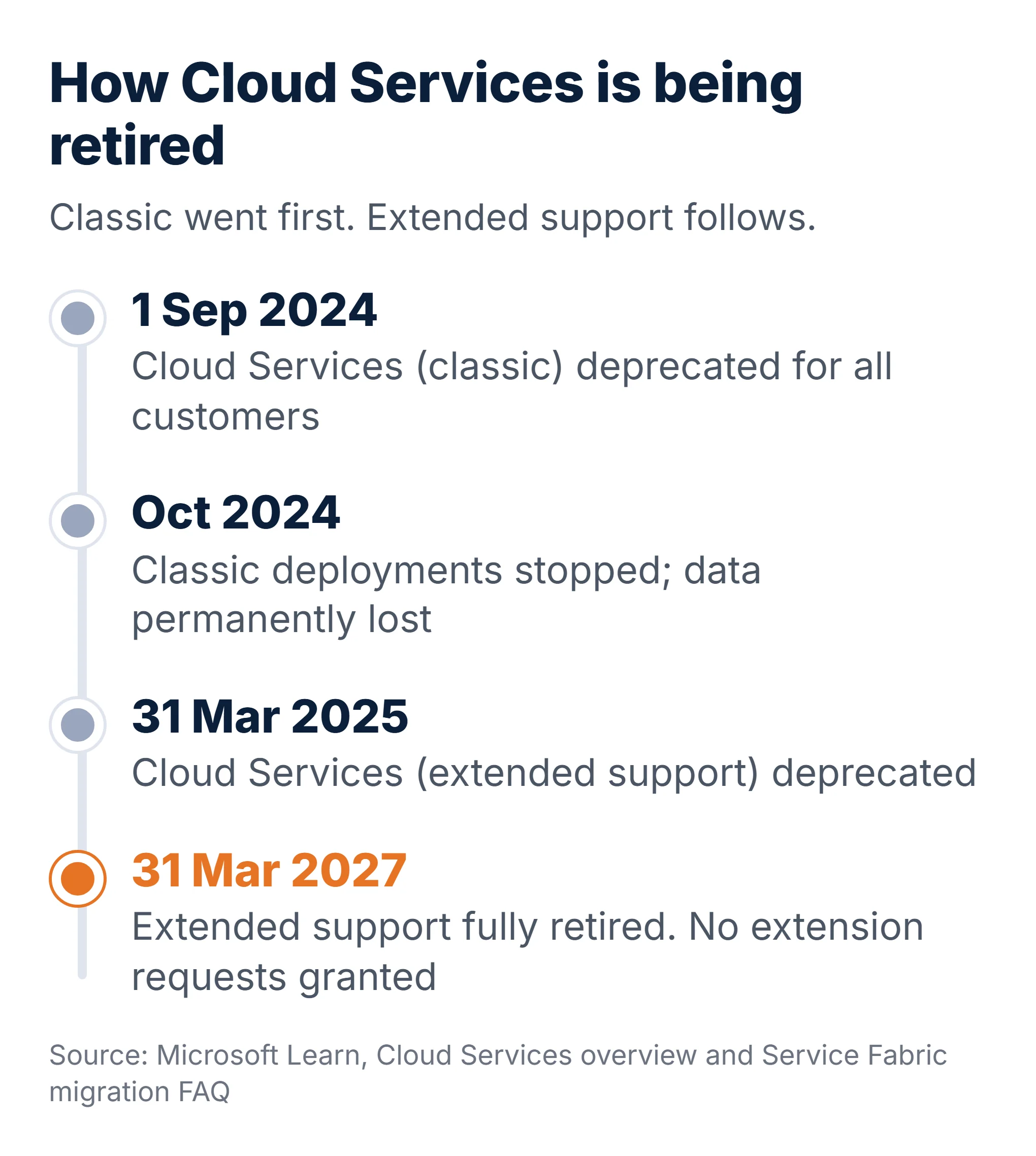
Short answer. Azure Cloud Services (extended support) is fully retired on 31 March 2027, and Microsoft says it cannot grant extension requests. Any web or worker role still running there needs to be live somewhere else before that date, which in practice means cutting over by early March. For most small and mid-sized teams the cheapest landing spots are Azure App Service for web roles and WebJobs, Functions or Container Apps for worker roles; Service Fabric managed clusters, Microsoft's stated target, suit larger multi-service systems.
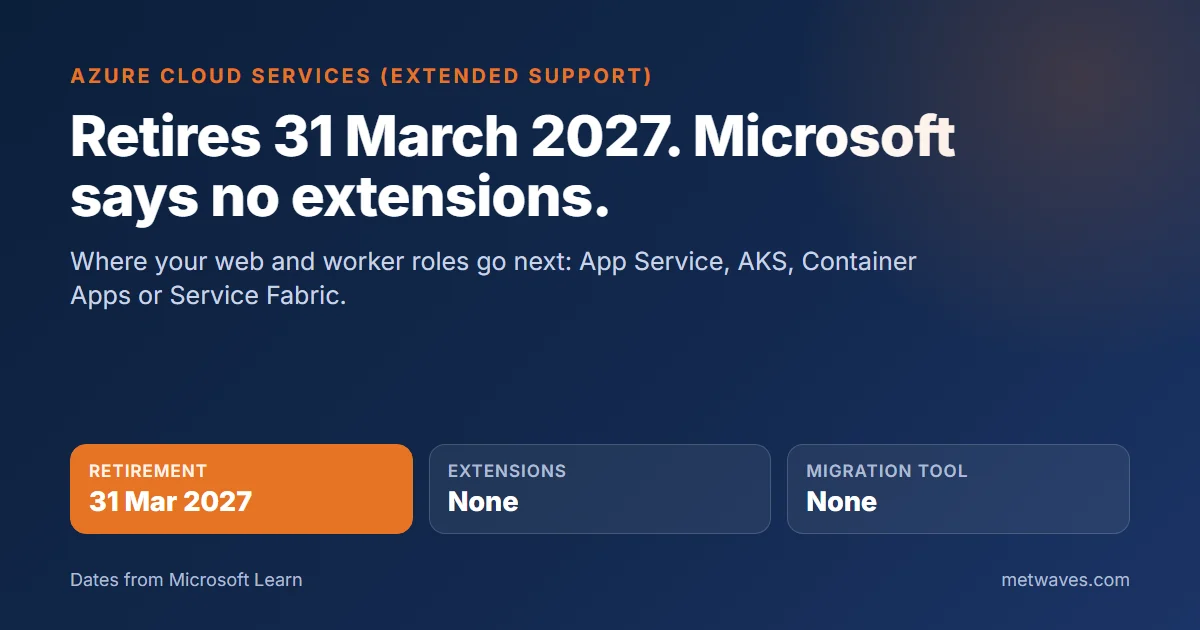
- Retirement date31 March 2027. Deprecated since 31 March 2025
- ExtensionsNone. Microsoft: "we can't grant extension requests"
- Migration toolNone. "There's no one-click migration tooling available"
- PricingMicrosoft says moving to a Service Fabric managed cluster at the same VM size bills at the same rate
- PrecedentWhen Cloud Services (classic) retired in 2024, running deployments were stopped and their data deleted
Sources: Microsoft's Cloud Services (extended support) overview and migration FAQ, checked on 21 November 2026.
What exactly happens on 31 March 2027?
Microsoft's FAQ puts it this way: "From now until March 31, 2027, you can continue to use Cloud Services (extended support) without disruption. To avoid service disruption, you must migrate workloads". Asked whether customers can get more time, the answer is: "Unfortunately, we can't grant extension requests and customers must migrate within the two year retirement window".
Microsoft has not published a step-by-step of what happens to remaining deployments after the date. The last retirement in this family is a fair guide. For Cloud Services (classic), Microsoft's notice said: "Any existing running deployments will be stopped and shut down by Microsoft and the data will be permanently lost starting October 2024" (Cloud Services classic). Plan as if the same will happen in April 2027.
Which of your Azure resources are affected?
Cloud Services (extended support) resources have the type Microsoft.Compute/cloudServices. One Azure
Resource Graph query lists them across every subscription you can see:
az graph query -q "resources
  | where type =~ 'microsoft.compute/cloudservices'
  | project name, resourceGroup, location, subscriptionId" -o table
Then open each service package and look for what ties it to the platform. These are the usual hooks:
# Code that calls the Cloud Services runtime
git grep -n -E "RoleEntryPoint|RoleEnvironment|Microsoft.WindowsAzure.ServiceRuntime|GetLocalResource" -- "*.cs"

# Service definition items that need a new home
#   <Startup><Task executionContext="elevated">   installs and registry changes at boot
#   <LocalResources>                               scratch disk paths
#   <Certificates>, <InputEndpoint>               TLS and ports
#   <Imports> (RemoteAccess, Diagnostics)         RDP and diagnostics plug-ins
findstr /s /i "Startup LocalResources Certificates InputEndpoint Imports" *.csdef
An app with no elevated startup tasks and only a few RoleEnvironment calls is a short project. One
that installs software in a startup task, writes to local resources and talks between roles over internal endpoints
needs more design work.
Where should each web and worker role go?
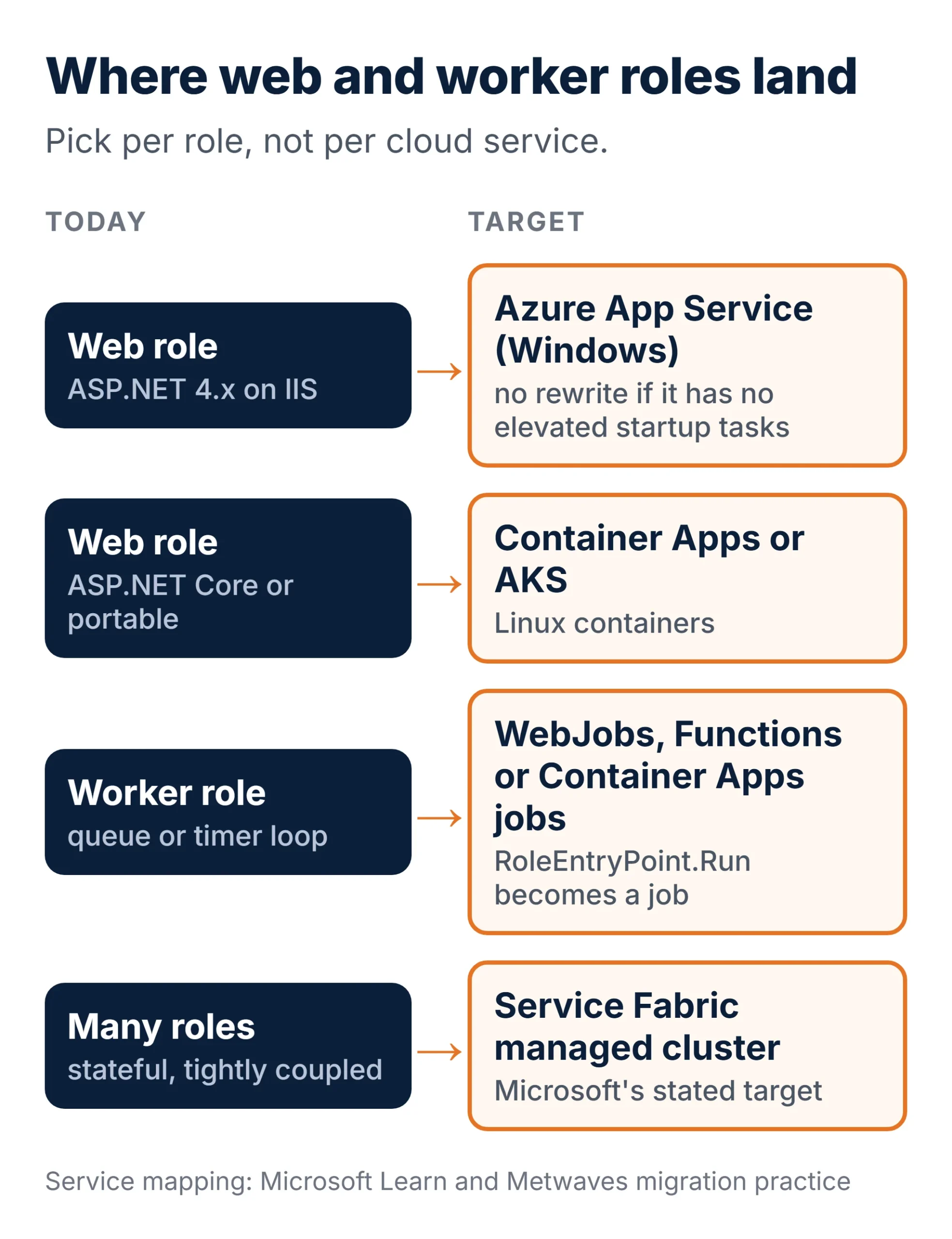
Choose per role, not per cloud service. A typical cloud service has one web role and one or two worker roles, and they often land on different targets. Effort figures are our estimates for one role with source code, including testing.
| Target | Best for | Code changes | You still operate | Effort (estimate) |
|---|---|---|---|---|
| Azure App Service (Windows) | Web roles on ASP.NET 4.x MVC, Web Forms or Web API | Replace RoleEnvironment config calls; drop startup tasks | Almost nothing; Microsoft patches the platform | 1 to 2 weeks |
| WebJobs or Azure Functions | Worker roles that poll a queue, run on a timer or process blobs | Move the Run() loop into a job or trigger | Almost nothing | 1 to 3 weeks |
| Azure Container Apps | Roles already on .NET 8 or 10, or worth porting; background workers | Containerise; use environment variables for config | Images and scaling rules | 2 to 4 weeks |
| Azure Kubernetes Service (AKS) | Teams already running Kubernetes, or many services | Containerise; Windows node pools for .NET Framework | The cluster: upgrades, node pools, ingress | 3 to 6 weeks |
| Service Fabric managed cluster | Many tightly coupled roles, stateful services, Microsoft's stated path | Roles become stateless services; web roles must leave IIS | The cluster, though Azure manages more of it than classic Service Fabric | 4 to 10 weeks |
| Virtual Machine Scale Sets | Roles with heavy machine setup you cannot change in time | Least: install as Windows services or IIS sites | Everything, including OS patching | 2 to 4 weeks |
Two constraints decide a lot. First, App Service does not allow elevated startup tasks, COM registration or writes outside the app's own folders (App Service sandbox rules). Second, Service Fabric does not host IIS, so Microsoft's own guide says a web role must first move to a self-hosted framework such as ASP.NET Core; Web Forms is listed as not supported (Microsoft's role conversion guide).
How do you replace RoleEntryPoint and RoleEnvironment in code?
The Microsoft.WindowsAzure.ServiceRuntime APIs do not exist anywhere else, so every call to them gets
replaced. A typical worker role:
public class WorkerRole : RoleEntryPoint
{
    public override void Run()
    {
        var conn = RoleEnvironment.GetConfigurationSettingValue("StorageConnectionString");
        while (true)
        {
            ProcessQueue(conn);
            Thread.Sleep(TimeSpan.FromSeconds(10));
        }
    }
}
The same loop as a .NET 10 worker service, which runs unchanged in Container Apps, AKS or as a continuous WebJob:
public sealed class QueueWorker(IConfiguration config, ILogger<QueueWorker> log) : BackgroundService
{
    protected override async Task ExecuteAsync(CancellationToken stoppingToken)
    {
        var conn = config["Storage:ConnectionString"];
        while (!stoppingToken.IsCancellationRequested)
        {
            await ProcessQueueAsync(conn, stoppingToken);
            await Task.Delay(TimeSpan.FromSeconds(10), stoppingToken);
        }
    }
}
The rest of the platform features map like this:
| Cloud Services feature | Replacement |
|---|---|
RoleEnvironment.GetConfigurationSettingValue and .cscfg settings | App settings or environment variables, with secrets as Key Vault references |
RoleEnvironment.Changed event | Configuration reload (IOptionsMonitor) or a new revision on change |
| Local storage resources | Temp folder for scratch; Azure Blob Storage or Azure Files for anything you keep |
| Startup tasks | RUN steps in the container image, or remove the dependency |
| Certificates in .cscfg and Key Vault | Key Vault with a managed identity; App Service or Container Apps managed certificates for TLS |
| Staging slot and VIP swap | App Service deployment slots, or Container Apps revisions with traffic splitting |
| Instance count and update domains | Autoscale rules and the platform's rolling deployment |
| Diagnostics extension | Application Insights or OpenTelemetry |
If the worker has to stay on .NET Framework for now, the smallest change is a console app run as a continuous WebJob next to the web app, reading its settings from environment variables. Porting to .NET 10 can come later, after the deadline.
Should you follow Microsoft to Service Fabric?
Microsoft's FAQ is written around Service Fabric managed clusters, and it is a reasonable choice for a system with many roles that call each other, or that needs stateful services. For a small team with one web role and two workers, it is usually more platform than you need: you are moving from a managed role model to a cluster of VMs that you size, upgrade and monitor. App Service and Container Apps take more of that work off you, and they are the targets we recommend first for small and mid-sized businesses unless the architecture says otherwise.
What usually goes wrong at cutover?
The code changes are rarely what delays a Cloud Services move. These are the problems we plan for up front:
- Outbound IP addresses change. Partners, payment gateways and on-premises firewalls often allow-list
the cloud service's public IP. App Service has its own set of outbound addresses
(
az webapp show -g <rg> -n <app> --query outboundIpAddresses), and Container Apps can send traffic through a NAT gateway for one fixed address. Send the new addresses to partners weeks before cutover. - Two consumers on one queue. During a side-by-side run, old and new workers both read the same Azure Storage or Service Bus queue. Make message handlers idempotent, or stop the old worker role before starting the new one, so no order or email is processed twice.
- Auth cookies and machine keys. If the web role sets a
<machineKey>inweb.config, keep the same keys on the new host so signed-in users and existing forms-authentication cookies stay valid after the switch. - Time zone and file paths. Role instances run in UTC and code sometimes assumes drive letters or a local resource path. Keep UTC, and replace hard-coded paths with configuration.
- DNS caching. Lower the TTL on your custom domain's CNAME record to five minutes a week ahead, so the switch and any rollback take effect quickly.
- Diagnostics gaps. Turn on Application Insights on the new target before cutover, not after. The first day is when you need request, dependency and exception data the most.
Write each of these into the cutover checklist with an owner and a test, and run the checklist once in a staging environment before the production switch.
How do you prove the new platform works before you switch?
Cloud Services gave you a staging slot and a VIP swap. On the new platform you rebuild that safety net yourself. Three checks are worth the time:
- Load test at peak, not average. Replay a busy hour of traffic against the new web endpoint and compare response times and error rates with the cloud service. App Service and Container Apps scale on different signals than role instance counts, so tune the autoscale rules here.
- Replay a day of queue messages. Copy a day of messages to a test queue and let the new worker process them. Compare the outputs with what the worker role produced: records written, emails sent, files created.
- Rehearse the cutover and the rollback. Run the full switch in a staging environment, time it, then roll it back. A rollback you have never practised is not a rollback plan.
Afterwards, put the new setup under infrastructure as code and a CI/CD pipeline from day one, so it does not become the next platform nobody dares to touch.
What is a realistic timeline from now to 31 March 2027?
About eighteen weeks remain. Work backwards and leave March for slippage:
- By mid-December 2026: run the Resource Graph query, open every package, list the hooks above and pick a target per role.
- January 2027: replace
RoleEnvironmentcalls, build the new deployment pipeline and stand up the target environment with infrastructure as code (Bicep or Terraform). - February 2027: run old and new side by side. Point a copy of production traffic or a set of test users at the new endpoint; compare queue throughput and error rates.
- By early March 2027: switch DNS, keep the cloud service idle for a week as a rollback, then delete it yourself so nothing depends on it when Microsoft retires the platform.
What this means for you: owner
This deadline does not move. Approve the work this month, budget per role rather than per app, and ask for a cutover date in early March with a rollback plan.
What this means for you: developer
Grep for RoleEnvironment and RoleEntryPoint, read every .csdef, and prototype one worker
role on the chosen target in the first sprint. Elevated startup tasks are the item most likely to change your plan.
Frequently asked questions
When is Azure Cloud Services (extended support) retired?
Microsoft fully retires Cloud Services (extended support) on March 31, 2027. It has been deprecated since March 31, 2025, and you can keep using it without disruption until the retirement date.
Can we get an extension past March 31, 2027?
No. Microsoft's migration FAQ says it can't grant extension requests and that customers must migrate within the two-year retirement window ending March 31, 2027.
Is there a tool that migrates Cloud Services automatically?
No. Microsoft says there is no one-click migration tooling, because moving off Cloud Services needs architecture and deployment changes. Each role has to be moved and tested.
What replaces a web role?
For ASP.NET 4.x web roles, Azure App Service on Windows is usually the shortest path, with no rewrite if the role has no elevated startup tasks. Web roles on or ported to ASP.NET Core can go to Container Apps, AKS or Service Fabric.
What replaces a worker role?
A worker role's Run loop becomes a WebJob, an Azure Functions trigger, a Container Apps job, or a .NET worker service in a container. Microsoft's Service Fabric guide maps it to a stateless service's RunAsync method.
What happens to deployments that are still running after the deadline?
Microsoft hasn't published the exact steps for extended support. When Cloud Services (classic) was retired in 2024, Microsoft stopped running deployments and the data was permanently lost, so plan to be fully moved before March 31, 2027.
Do we have to rewrite the app in .NET 10 to leave Cloud Services?
No. Azure App Service on Windows runs ASP.NET 4.8 web apps, and a .NET Framework worker can run as a continuous WebJob beside it. Only Service Fabric requires web roles to move off IIS first. Porting to .NET 10 can be a separate project after the March 31, 2027 deadline.
Need a hand? We re-platform Cloud Services apps onto App Service, Container Apps and AKS for businesses in the US, UK, Canada and Australia, starting with a code review of your packages and a fixed quote per role. See our application modernization services, Azure consulting, cloud migration consulting and .NET development pages. If the roles run on .NET 8, read is .NET 8 still safe after November 2026? before you pick a runtime.

Nikit Nandan
Strategy Director
Nikit is experienced in conducting in-depth research to stay abreast of industry trends and emerging technologies.