
CMS Development Services
Our CMS development services cover custom content systems built into your product or portal, headless CMS setups behind a React or Next.js front end, and migrations off an old or expensive CMS. Your team gets roles and approvals, preview before publish, scheduled publishing and SEO fields on every page.

Clinic staff published their own changes for six years · 5.0 on Clutch
CMS DEVELOPMENT
What CMS development services are
CMS development services design, build or migrate the content management system behind a website or app, so the people who own the content can change it themselves. Metwaves builds custom and headless CMS setups as part of larger web work, and tells you when plain WordPress or a hosted site builder is enough.
Traditional CMS
- Best for
- One website run by a small marketing team: standard pages, a blog, forms.
- You manage
- Theme, plugins and core updates, plus hosting and backups.
- Cost
- Lowest to build. Plugin and update upkeep every month.
- Editors preview pages exactly as visitors see them
- Awkward when the same content must also feed an app
Choose it when you
- run a marketing site with a small team: WordPress, or a hosted site builder if it covers you
Headless CMS
- Best for
- Content feeds a website, an app and other screens, or your front end is React or Next.js.
- You manage
- A front end your developers own, the CMS plan or hosting, and the build pipeline.
- Cost
- Higher to build: the front end is a project of its own.
- Content written once, published everywhere
- Editors need preview set up for them
Choose it when you
- feed the same content to a website, an app and other screens
- have a React front end your developers want to control
Custom CMS
- Best for
- Content lives inside your product, with rules and permissions a page CMS cannot express.
- You manage
- The code, like any other part of your application. No licence.
- Cost
- Highest per feature. Good value when editing needs are narrow.
- Content and permissions in your own database
- Every new editing feature is development work
Choose it when you
- keep content inside your product, with rules a page CMS cannot express
Paying for an enterprise CMS and using a fraction of it? Plan a migration (below). Is selling online the main job of the site? An ecommerce platform fits better: see ecommerce software development.
WHEN TO CALL US
Signs you need CMS development
If two or more of these describe your site, the CMS is costing you time every week.
Marketing waits for a developer
Days to change a sentence, a price or an opening time.
Roles and approvals let the content owner publish, with a named approver.
An old CMS that worries IT
Core and plugins not updated in years.
A supported CMS on a patch schedule, with fewer plugins.
The same content copied by hand
Text pasted into the website, the app and a partner portal.
A headless CMS stores it once; every channel reads it through the API.
Licence fees for features nobody uses
An enterprise CMS bill that has outgrown what your team uses.
Map what you really use, then move to a lighter CMS.
A custom CMS only one person understands
Every change waits for one developer.
A documented content model and the code in your repository, or a supported platform.
Slow pages, and the CMS gets the blame
Nobody knows whether the CMS is really the cause.
Measure first: image sizes, caching and a CDN often fix more than a new CMS.
Custom CMS development services we provide
Six kinds of CMS work. Most projects combine two or three of them.

Custom CMS development
Content management built into your product, portal or app, for content with rules a page builder cannot express, such as clinic notices or member-only pages.

Headless CMS development
Content stored once in Contentful, Strapi, Sanity or WordPress and delivered through an API to a React or Next.js site, an app and other screens.

CMS migration
A move off an old or expensive CMS, with content, URLs, redirects and SEO fields carried across and checked page by page.

CMS integrations
Forms into your CRM, site search, analytics and asset libraries, so nobody copies data between systems by hand.

Editor roles and workflows
Who drafts, who approves and who publishes, with preview, scheduling and version history.

Support after launch
Updates, security patches and small changes on a monthly plan, through our software maintenance services.
WHAT YOU GET
What a CMS gives your team
A CMS moves page changes from the developer's queue to the person who owns the content. These are the features we set up so that works in practice.
- Content types and reusable blocks
Editors build pages from approved parts, not new templates.
- Roles and approvals
Nothing goes live until the named approver says yes.
- Preview before publish
See the page on desktop and phone before it is live.
- Scheduled publishing
Holiday hours go live at the time you set.
- SEO fields on every page
Title, meta description, canonical URL and redirects, without a developer.
- Multilingual content
Translations linked to the original, so stale ones show.
- Media library
Images compressed on upload, with alt text required.
- Version history and rollback
Every change recorded; an earlier version back in one click.
How a CMS fits together
Editors work in one place either way. Traditional and headless differ only in the last step, where content becomes a web page, an app screen or both.
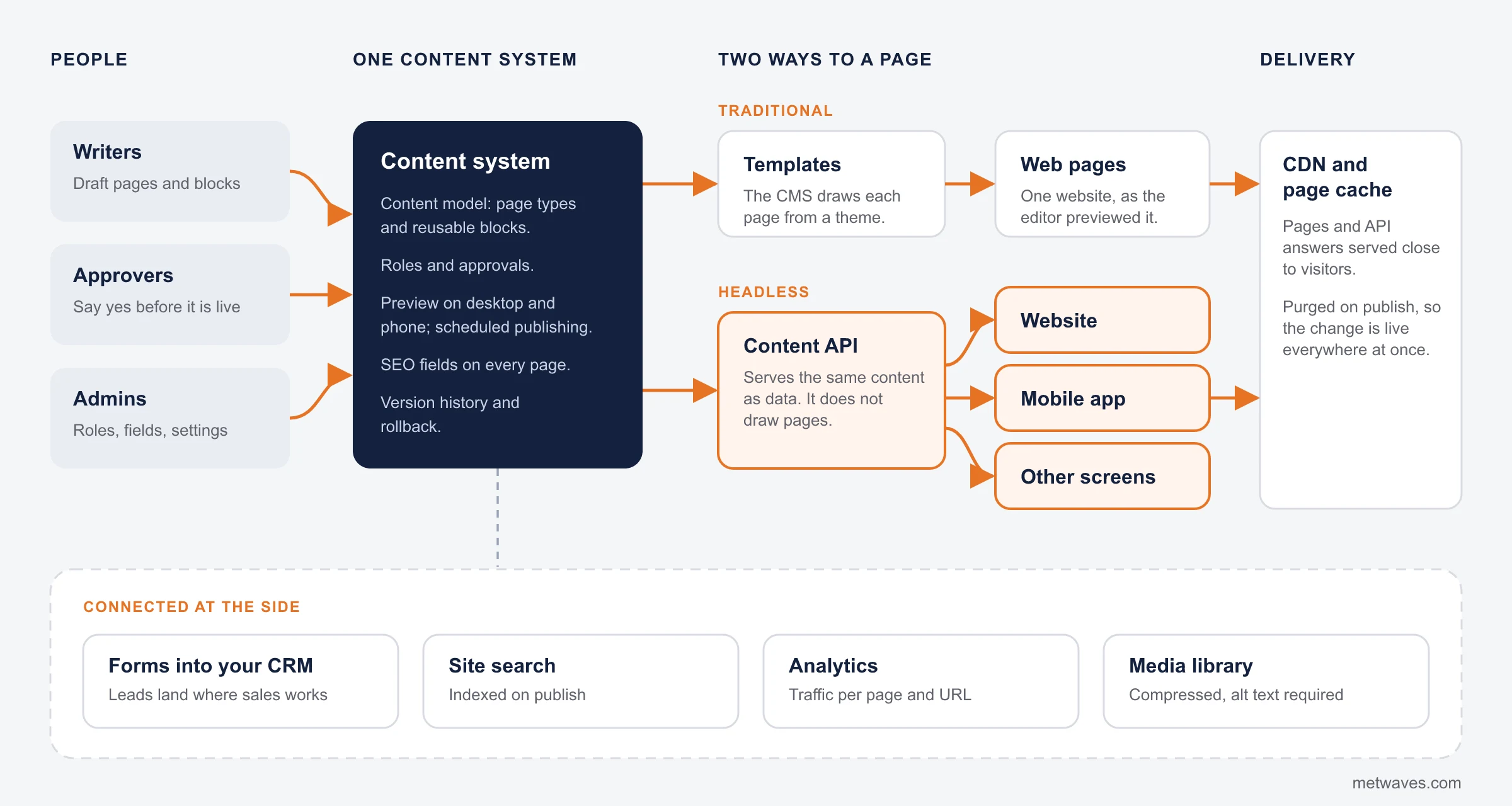
- Where content is written and approved
- Headless route, through an API
- Traditional route and shared parts
Headless CMS development: what a headless CMS agency builds for you
A headless CMS stores content and serves it through an API; it does not draw pages. What a headless CMS agency builds is everything around it: the content model, the front end, preview for editors and the pipeline that publishes changes.
| Platform | Hosting | How it is priced | Editing | Suits |
|---|---|---|---|---|
| Contentful | Hosted by Contentful (SaaS) | Subscription plans | Structured fields in a web editor | Marketing teams with several sites or languages |
| Strapi | Open source (MIT): self-host free, or Strapi Cloud | Free to self-host; paid plans add features such as live preview and SSO | Admin panel on Node.js that developers extend | Teams that want to own hosting and data |
| Sanity | Content in Sanity's hosted Content Lake; open-source Studio | Free plan, then per-seat plans with usage quotas | Editing screens customised in React | Products that need tailored editing |
| WordPress used headless | Open source, self-hosted | No licence; hosting and developer time | The editor many teams already know | WordPress teams that want a React front end |
Pricing models checked on vendor sites in November 2026; confirm current plans before you commit. We build front ends in React and Next.js, hosted on Azure or AWS in your account. Our published CMS case study is a custom content area, not a headless build.
MIGRATION
CMS migration without losing search traffic
Most of the risk in a CMS migration is in SEO and content, not code. No step starts until the last one's check has passed.
- 01
Content and URL inventory
Every page, file and URL listed, with traffic per URL from analytics and Search Console.
Check before moving onEvery URL with traffic is on the list - 02
Content model on the new CMS
Types and fields designed from the inventory, so content fits the new system.
Check before moving onEditors have signed off the content types - 03
Scripted content migration
Content moved by script, then spot-checked page by page against the old site.
Check before moving onSpot checks match the old pages - 04
URL map and 301 redirects
Every old URL points to its new home, tested before cutover.
Check before moving onEvery old URL answers with a 301 to the right page - 05
SEO fields carried over
Titles, meta descriptions, canonical URLs and structured data move with each page.
Check before moving onTitles, metas and canonicals match, page by page - 06
Cutover and 30-day check
Switch over, purge caches, then fix Search Console errors for a month.
Check before moving onSearch Console errors fixed for 30 days
- WordPress to headless
- Sitecore or Adobe Experience Manager to a lighter CMS
- An unmaintained in-house CMS to a supported one
CASE STUDY
A clinic whose staff published their own changes for six years
A new walk-in clinic in Palatine, Illinois needed a website before opening day. Hours, insurance and later COVID-19 protocols changed faster than any release cycle, so staff had to publish changes themselves.
We built a booking-first site with a notices area the clinic edits without a developer. During COVID-19 staff used it for hours, protocols and virtual appointment instructions, live the same day. We supported the site for six years.
- ClientEpic Urgent and Family Care, a walk-in clinic in Palatine, Illinois
- Built withReact, React Native, ASP.NET, C#, MySQL
- EngagementFebruary 2016 to February 2022, team of two to five
- ResultOnline appointment requests up 25% after one-click booking went live
- SupportAny request answered within 48 hours, confirmed by the founder on Clutch
How we build your CMS
Your editors try the content model before we build templates, because that is where changes are still cheap.
- 1
Content and URL audit
What you publish, who edits it and which pages bring traffic. That decides the CMS.
- 2
Content model and editor prototype
Types, fields and roles in a working editor your team clicks through.
- 3
Templates or front end
Page templates, or a React or Next.js front end with preview for editors.
- 4
Migration and testing
Content moved and checked, redirects tested, speed and accessibility checked.
- 5
Training, then support
A session for your editors, notes they keep, and a monthly plan if you want one.
What CMS development costs
We quote after the content and URL audit. These are the factors that move the price most.
Templates and content types
Ten page types with reusable blocks is a different project from three.
Volume and state of content to migrate
Clean pages move by script. Years of mixed formats and duplicates need clean-up first.
Integrations
CRM, search, analytics and single sign-on each need building and testing.
Custom editor workflows
Draft and publish is cheap. Multi-step or per-region approvals add work.
Multilingual
Each language adds structure, testing and often a translation workflow.
Hosting and CDN
A running cost rather than a build cost.
Self-hosted WordPress and Strapi carry no licence; Contentful and Sanity charge by plan, seats or usage.
Ways to work with us
Every engagement starts with the audit, so the quote reflects your content rather than a package.

Fixed cost
A defined set of templates, content and integrations, or a migration, priced after the audit.

Time and material
New blocks, templates and integrations on a live CMS, as your team asks.

Dedicated developer
A developer added to a team that owns its CMS and needs extra hands, monthly.

Hybrid
A fixed price for the build or migration, then a monthly support plan.
How to choose a CMS development company
Six questions to ask any CMS development company, ours included, and what a good answer sounds like.
| Ask | A good answer |
|---|---|
| Can I log in to a CMS you built, as an editor? | Yes, with a test account. A demo video hides what editing is like. |
| How do you handle redirects in a migration? | A URL map, redirects tested before cutover, and a month of Search Console checks. |
| Who owns the licence, hosting and admin accounts? | You do, with vendor access you can remove. |
| Would you recommend WordPress or a site builder if it is enough? | A straight yes, with the reasons. |
| What does support cost after launch? | A monthly figure, written down before you sign. |
| Is a WordPress-only agency a better fit? | Sometimes. We are not a theme shop with hundreds of WordPress builds; we build CMSs as part of larger web and application work. |
Related services
Where CMS work connects to the rest of your systems.
QUESTIONS & ANSWERS
CMS development: frequently asked questions
Straight answers on cost, platforms, migrations and who owns what. If you don't see an answer to your question, you can send us a message from our contact form.
The price depends most on the number of templates and content types, how much content has to move, and which systems the CMS connects to, plus hosting, a CDN and any SaaS licence. We quote after the content and URL audit.
A small site with a handful of templates moves in weeks; a large site with years of content takes longer, because clean-up and redirect testing take longer. You get a dated plan after the audit.
WordPress or a site builder for a marketing site run by a small team, headless when content feeds several channels or the front end is React, and custom when content lives inside your product.
A headless CMS stores content and serves it through an API to your website, app and other screens; it does not draw pages. A headless CMS agency builds what sits around it: the content model, the front end and preview for editors. For a single marketing site it is usually more than you need.
Not if every old URL is redirected and titles, meta descriptions and canonical URLs move with each page. Most losses come from missing redirects, not from the new CMS.
Yes, that is the point: roles, preview, approvals and scheduling for the people who own the content. The clinic in our case study published its own changes the same day for six years.
You do. Accounts, licences, hosting, domains and our code are in your name.
Yes, on a monthly plan through our software maintenance services.
INSIGHTS & NEWS
Discover IT Industry Insights and Technology Trends
 Nikit Nandan
November 17, 2026
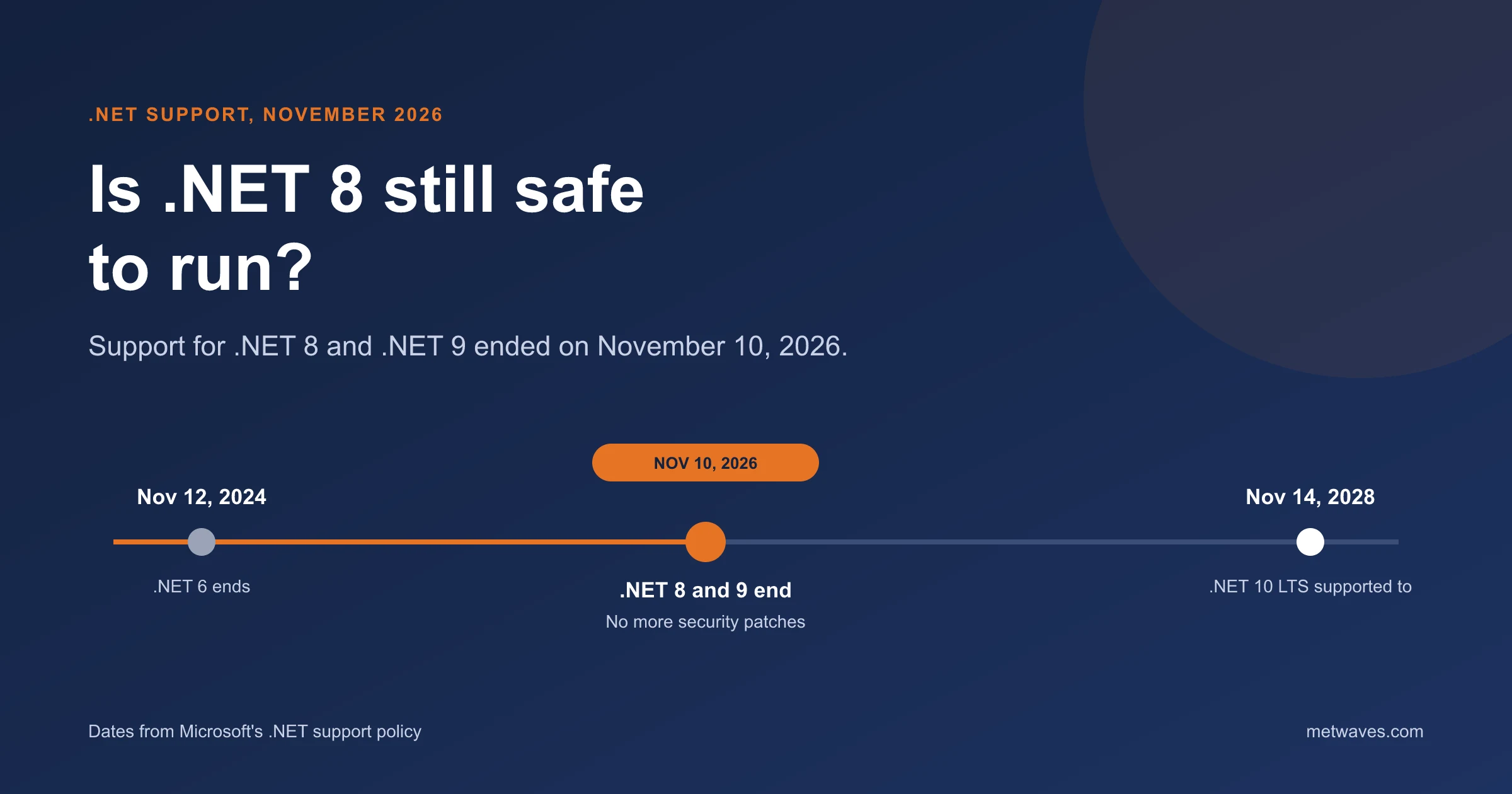
Is .NET 8 Still Safe to Run After November 2026?
Support for .NET 8 and .NET 9 ended on November 10, 2026. What that means for apps still on them, how risky it is, and how to plan the move to .NET 10.
Learn More >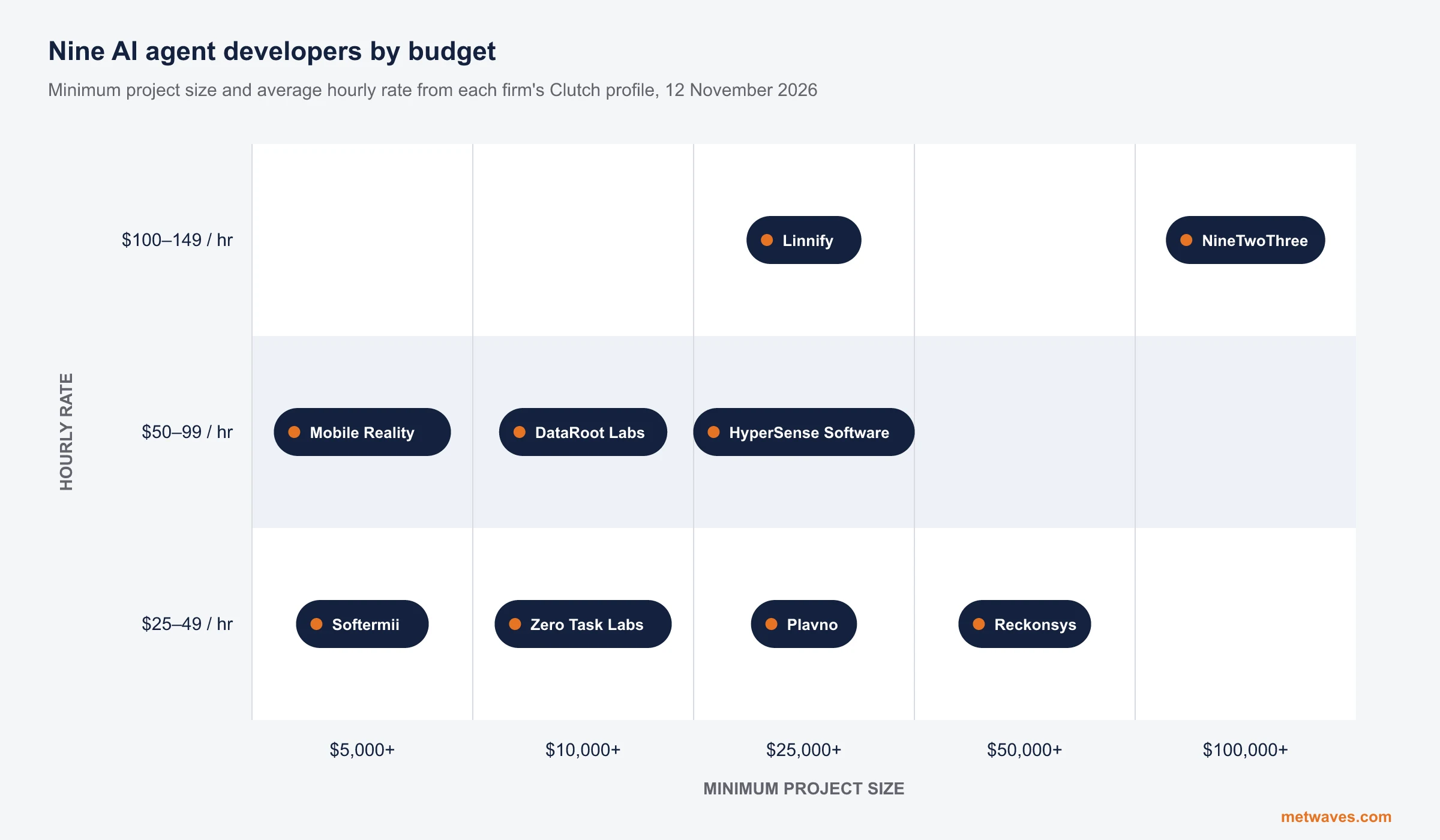 Nikit Nandan
November 12, 2026
Top AI agent development companies for small and mid-sized businesses (2026)
Nine AI agent development firms a small or mid-sized business can shortlist, with Clutch figures, minimum budgets and the weaknesses their own clients name. Published by Metwaves, which is not ranked.
Learn More >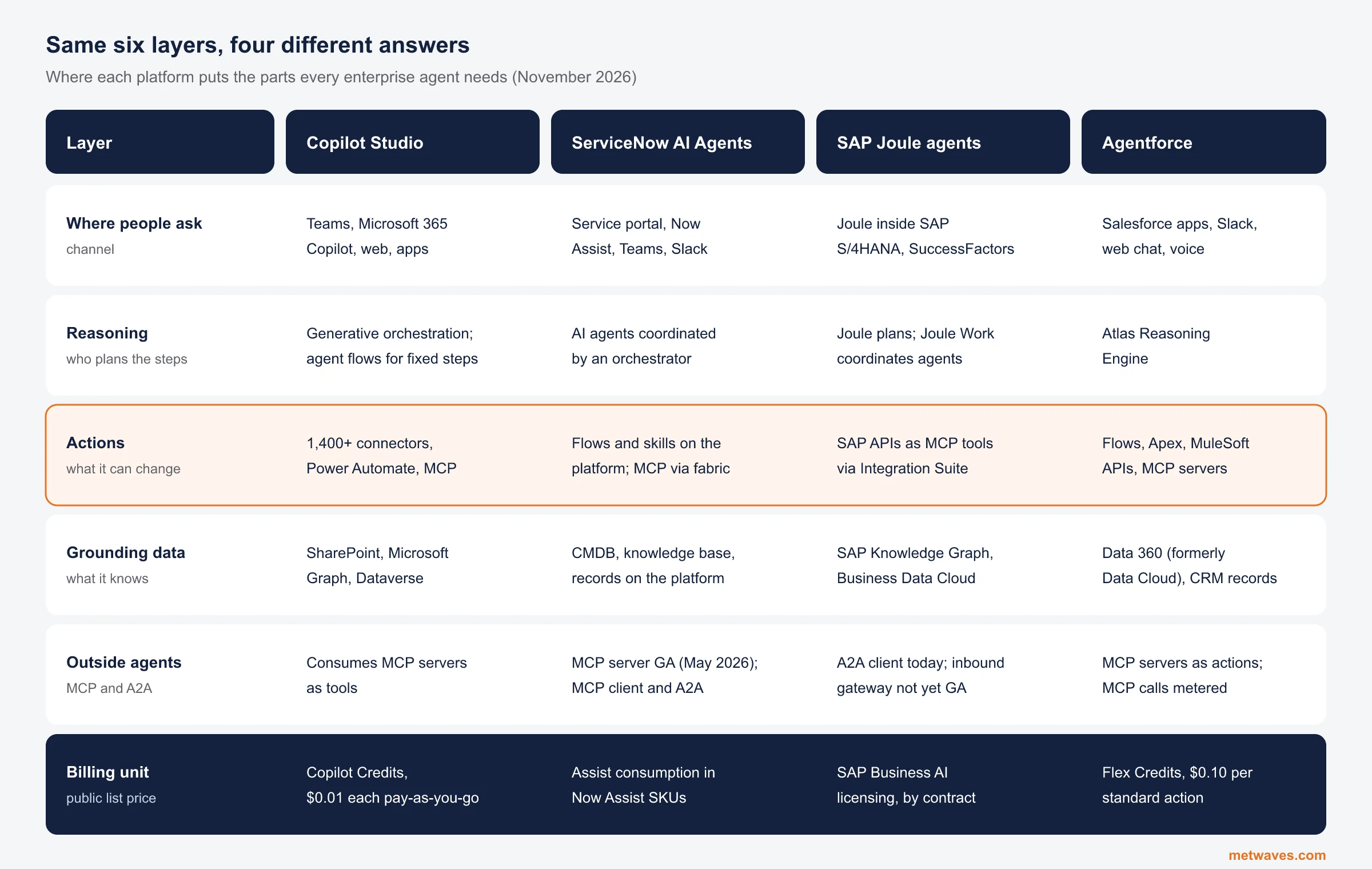 Nikit Nandan
November 12, 2026
Enterprise AI Agent Platforms Compared (2026)
An architecture review of the four big enterprise AI agent platforms: where each one reasons, acts, finds its data and connects to outside agents, what it costs, and when a custom build is the better choice.
Learn More >Let’s build your idea!
Let us help you with free analysis & estimate.
Our product expert will contact you within 12 hours.