
Enterprise Software Development Services
Our enterprise software development services build the systems your whole company works in every day: operations and approval workflows, portals and reporting, connected to the ERP, CRM and Microsoft 365 you already run. Every system gets roles, single sign-on and an audit trail, and is built to run for years.
For mid-sized companies in the US, UK, Canada and Australia · BIM integration live in 8 to 12 weeks
THE SHORT ANSWER
What enterprise software development services are
Enterprise software development services build, connect and support the systems many staff and partners use every day: operations and approval workflows, portals, reporting and the links between them. What makes software enterprise is not its size. It is roles and permissions that match the org chart, single sign-on, an audit trail of every change, and reliable links into the ERP, CRM and Microsoft 365 you already run.
For most mid-sized companies the right enterprise build is the system around the ERP, not a new ERP. These five traits are what the word enterprise should buy you.
Roles that match the org chart
Each person sees and changes only what their job needs, checked on the server for every request.
Without itEveryone sees everything, or nobody can finish their work.
Single sign-on
Staff sign in through the identity provider you already use, so access follows your directory.
Without itLeavers keep access until someone remembers to remove it.
An audit trail
Every create, change, approval and delete is logged with the person and the time.
Without itNobody can say who changed a record, or when.
Links into your systems
Records flow to and from the ERP, CRM and Microsoft 365, with retries when a link fails.
Without itStaff retype the same data into three places.
Built to run for years
Supported frameworks, backups with a tested restore, and documentation your IT team can use.
Without itA system nobody can patch in year three.
WHEN TO CALL US
Signs you need enterprise software
Two or more of these usually means a workflow has outgrown the tools around it.
Spreadsheets five people edit at once
A department runs on a shared workbook. Versions clash, formulas break and nobody trusts the totals.
One workflow app with roles and an audit trail, connected to your accounting system.
The ERP nobody uses for daily work
The ERP handles accounting well, but staff work around it in email and side files because the screens do not fit their job.
Focused screens on top of the ERP that post back through its API, so the ERP stays the record.
Approvals lost in email
Requests sit in inboxes. Nobody can say where a purchase, leave or change request is, or who is holding it up.
A request queue with an approval chain, reminders and a status anyone can check.
The same data typed three times
Staff re-key orders, suppliers or jobs into the ERP, the CRM and a spreadsheet, and the copies drift apart.
One source of truth per record and integrations that move it, with an error queue for anything that fails.
An old in-house system only one person understands
It works, but nobody else can change it, and it runs on a framework that no longer gets patches.
Wrap it with an API, move one workflow at a time to a supported stack, and retire the old screens last.
Questions you cannot answer
Auditors or customers ask who changed what, and when. The answer is somewhere in an email thread.
Every change logged with the person and the time, and reports built on the live data.
Custom enterprise software development services we provide
Most of our enterprise work sits next to a big system rather than replacing it. Pick one to see what it does and who usually asks for it.
Operations and workflow systems
Requests, approvals, scheduling and case handling in one system, with roles that match your org chart and a record of every change. This is the enterprise build we are asked for most: the workflow that lives in spreadsheets and email today.
- Usually bought by
- Heads of operations
- Requests and approvals
- Scheduling
- Case handling
- Roles per department
- Audit trail
ERP and CRM extensions and integrations
The screens and automations your ERP lacks, and the links between systems. Our invoice agent posts about 1,000 supplier documents a month into SAP Business One, with roughly 80% less manual data entry.
- Usually bought by
- Finance and IT
- Screens the ERP lacks
- Posting through the ERP's API
- Review queues
- Retries and alerts
Customer, partner and supplier portals
Outside users sign in and see their own orders, documents and requests, fed from your systems rather than emailed by staff.
- Usually bought by
- Sales, customer service and procurement
- Outside sign-in
- Own data only
- Documents
- Requests and status
Data and reporting layer
One version of each number, fed by every system, so managers stop reconciling exports before each meeting.
- Usually bought by
- Finance and leadership
- Data warehouse
- Scheduled loads
- Dashboards
- Live, not weekly exports
AI steps inside enterprise workflows
Document reading, helpdesk answers and checks, with a person reviewing anything doubtful. Our Teams helpdesk agent resolves 30 to 50% of staff requests without a person, and never shows a document the person asking cannot open.
- Usually bought by
- Operations and IT
- Document reading
- Helpdesk answers
- Permission-aware search
- Human review queue
Modernising an old internal system
Wrap the old system with an API, move one workflow at a time to a supported stack, and retire the old screens last. The business keeps running throughout.
- Usually bought by
- IT managers
- API around the old system
- One workflow at a time
- Data migration
- Old screens retired last
What enterprise-grade means in practice
Sign-in, permissions, integrations and an audit trail run through every layer. This is the shape of a typical system, hosted in your own cloud account.
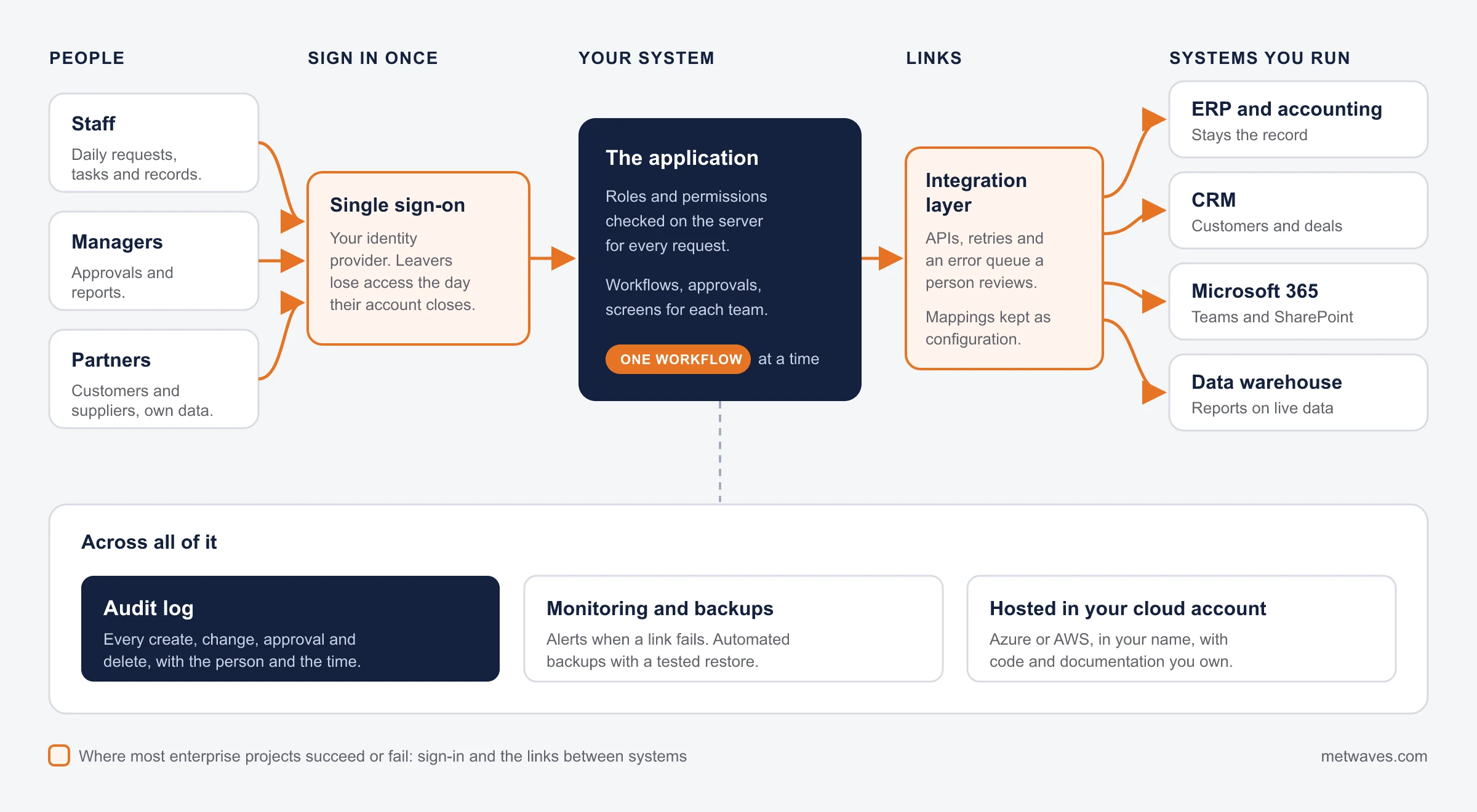
Features every enterprise system needs, and why
Each feature exists to prevent a specific failure. This is how we handle each one.
| Feature | Why it matters | How we handle it |
|---|---|---|
| Roles and permissions | People see and change only what their job needs | Defined with each department before build, checked on the server for every request |
| Single sign-on and offboarding | Leavers lose access the day they go | Sign-in through the identity provider you already use, so access follows your directory |
| Audit trail | Answers who changed what, and when | Every create, change, approval and delete logged with the user and time |
| Integrations with retries and error queues | A failed link must not lose a record | Retries, then an exception list a person reviews, as in the BIM exception report and the invoice review queue |
| Data migration | Years of history must arrive intact | Cleaned, mapped and reconciled against the old system before switch-over |
| Reporting | Managers need numbers they trust | Built on the live data, not on weekly exports |
| Backups and recovery | A system the business runs on cannot be down for days | Automated backups with a tested restore |
| Accessibility | Every member of staff must be able to use it | Keyboard use, screen reader labels and contrast checked before launch |
INTEGRATION
Enterprise software that connects your systems
Most enterprise projects are as much about the systems around the new software as the software itself. Every link follows the four rules below.
- ERP and accounting
- CRM
- Microsoft 365 and SharePoint
- Data warehouse and reports
- Estimating and specialist tools
- Supplier and customer portals
- 1
One source of truth per record
Each customer, job or invoice is owned by one system; the others read it.
- 2
Plan for the link failing
Retries, an error queue and an exception report a person reviews.
- 3
Mappings you own
Field and code mappings kept as configuration your team can change.
- 4
Test on copies of the real systems
Real data shapes, before anything touches production.
Build, buy, extend or integrate?
Build only when buying, extending or connecting will not do the job. We will tell you which on the first call.
| If | What usually fits |
|---|---|
| A mature SaaS product covers most of the need | Buy it and integrate it. We will say so. |
| The ERP is fine, but staff avoid it for daily work | A focused app on top of the ERP, which stays the record. |
| Two good systems should share data | Integration only. See software integration. |
| Your process is how you win and no product fits | A custom enterprise build. |
| The old system works but nobody can change it | Modernise in stages: wrap it with an API, move one workflow at a time, retire the old screens last. See application modernization. |
| You are not sure staff will adopt it | A clickable prototype first. See prototyping. |

Show us the spreadsheet or email chain a department runs on. We will tell you whether to build, buy or connect.
CASE STUDY
From BIM model to cost estimate in hours, not days
A construction-technology company in the United States priced projects from building models. Before every estimate, estimators measured walls, slabs, doors and windows by hand and typed the quantities into the estimating system, and did it again whenever the design changed.
We built an integration that reads the IFC model, maps each element type to the estimating system's items and cost codes, and loads quantities into the estimating system and on to the ERP through their APIs. Elements that do not map cleanly go to an exception report instead of being guessed, and the mapping rules are configuration the client's team can change. It ran beside manual takeoff on live projects before it became the standard starting point.
- ClientConstruction-technology company, United States
- Built withIFC, Python, .NET, REST APIs, estimating and ERP systems
- ResultQuantity takeoff went from days to hours
- Time to live8 to 12 weeks
Supplier invoices posted to SAP Business One
About 1,000 supplier documents a month, roughly 80% less manual data entry, and a review queue for anything doubtful.
Read the case study Professional services, UK
A Teams helpdesk that respects permissions
Answers staff from SharePoint and never shows a document the person cannot open. 30 to 50% of requests resolved without a person.
Read the case studyHow we build enterprise software
Six steps, each ending in something your staff can use or check. The first workflow goes live before the next one starts.
- 1
Discovery
We map workflows, roles, systems and data with the people who do the work, then agree the first phase.
- 2
Clickable prototype
Real users from at least two departments try it, so the design fits more than one team.
- 3
Build one workflow at a time
Short sprints with a demo each time. The first workflow goes live before the next starts.
- 4
Integrate and migrate
Links to the ERP, CRM and Microsoft 365 are tested on copies of the real systems, and old data is reconciled.
- 5
Run alongside the old process
Both run until the results match. Our BIM integration ran beside manual takeoff on live projects first.
- 6
Support and improve
Patches, upgrades and the next workflow, with your IT team trained to run it.
What stays with you
The code, the designs, the documentation and the cloud accounts are yours from the first release. Mappings between systems are kept as configuration your team can change, and your IT team is trained to run the system before we step back.
Where we may not be the right fit
- You need an SAP, Oracle or Dynamics implementation partner to install or reconfigure the ERP itself.
- The programme requires certifications we do not hold, or a delivery team of hundreds.
- A ready-made product already fits your process. We will tell you to buy it.
What enterprise software costs and how long it takes
We quote after discovery, phase by phase. The scope of the first release, and these factors, move the price most. The one timeline we can show: our integration projects went live in 8 to 12 weeks.
| Scope | Typical first release | What moves the cost |
|---|---|---|
| One department workflow | Requests and approvals for one team, one or two integrations | Number of roles and how clean the current data is |
| Portal for customers or partners | Outside sign-in, documents, requests, data from your systems | Integrations, security review, design for outside users |
| Replacing an old in-house tool | The workflows people use, moved in stages | Data migration and how much logic is hidden in the old code |
| Integration layer across ERP, CRM and Microsoft 365 | Records flowing between systems, with error handling | Number of systems and the quality of their APIs. Our integration projects went live in 8 to 12 weeks |
Every system also has a yearly running cost for hosting, support and licences. We give you that number with the build quote.
Ways to work with us
Every engagement starts with a scoping call about workflows, users and systems. Pick the model by how clear the scope is.

Discovery, then fixed-price phases
A short discovery, then each phase quoted as a fixed scope with agreed workflows, roles and integrations.

Dedicated team
A team that stays with the system as departments ask for more, priced monthly by team size.

Time and materials
For work where the unknowns are large, such as an old system nobody has documented. Billed for hours worked.

Hybrid
Discovery and the first workflow at a fixed price, then a monthly team for the roadmap that follows.
Technology in our shipped enterprise work
Every name below comes from a live project. We choose per project, guided by what your IT team already runs, and connect to systems such as SAP Business One and SharePoint through their APIs.





How to choose an enterprise software development company
Five questions to ask any firm, us included. The right partner asks about your workflows and systems before it talks about technology.
| Question to ask | A good answer | A warning sign |
|---|---|---|
| Will you map our workflows before you quote? | Yes, with the people who do the work, in a short paid discovery | A fixed price after one sales call |
| Which systems will it talk to, and what happens when a link fails? | A list of systems and an error queue a person reviews | “The integration just works” |
| Who owns the code, the cloud accounts and the documentation? | You do, from the first release | Hosting only in their account |
| Can we speak to a client whose system you still support years later? | A name and a system that is still running | Only projects that ended at launch |
| How will you move data out of the old system and prove it arrived? | Mapping, a trial run and a reconciliation report | “We will import it at go-live” |
Related services
Enterprise work usually starts with one of these, or leads to one.
QUESTIONS & ANSWERS
Enterprise software development: frequently asked questions
Straight answers on cost, timelines, ERPs, single sign-on and ownership. If you don't see an answer to your question, you can send us a message from our contact form.
It depends on the number of roles and user groups, the number of integrations, data migration, single sign-on and audit needs. We start with discovery, then quote each phase, and we also tell you the yearly running and support cost.
We release one workflow at a time, so the first one is in use long before the whole system is finished. Our integration projects went live in 8 to 12 weeks.
The craft is the same; the load is different: more users, more roles, more systems to connect and a longer life. See custom software development.
Yes, through its API. We have shipped posting into SAP Business One and loading into estimating and ERP systems, and we review any other ERP's API during discovery.
Yes. Sign-in goes through the identity provider you already use, and we answer security questionnaires honestly, including which certifications we do not hold.
You do: the code, designs, documentation and cloud accounts.
Usually not. Build the missing workflow on top and keep the ERP as the record. The exception is an ERP that is out of support or cannot be extended.
Building, connecting and supporting the systems many staff and partners use daily, with roles, single sign-on, audit trails and ERP or CRM links.
Many firms do. Pick one that maps your workflows before quoting, plans for failed integrations, gives you the code and accounts, and still supports systems it built years ago. Our list of custom software development companies is a starting shortlist.
INSIGHTS & NEWS
Discover IT Industry Insights and Technology Trends
 Nikit Nandan
November 17, 2026
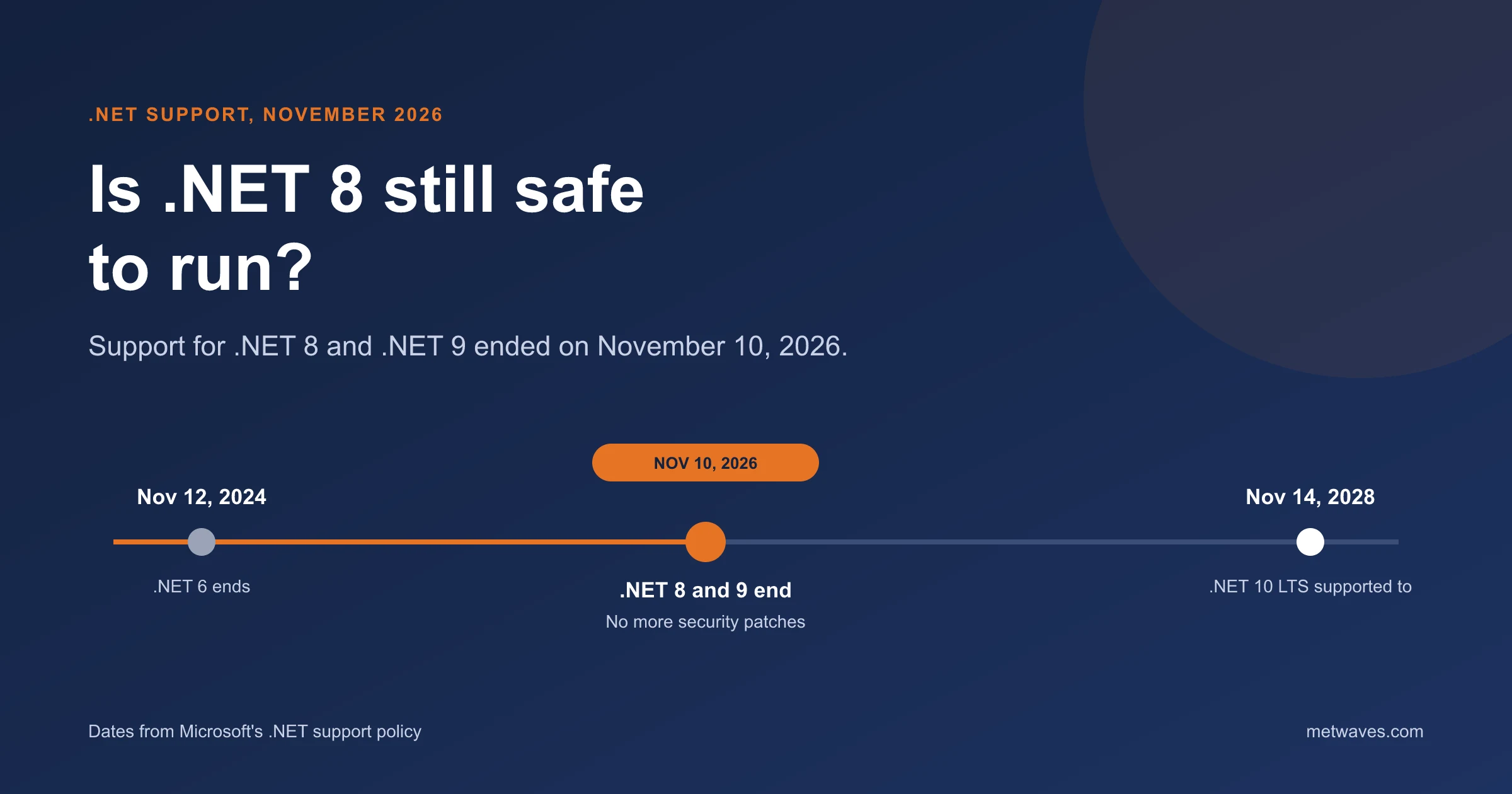
Is .NET 8 Still Safe to Run After November 2026?
Support for .NET 8 and .NET 9 ended on November 10, 2026. What that means for apps still on them, how risky it is, and how to plan the move to .NET 10.
Learn More >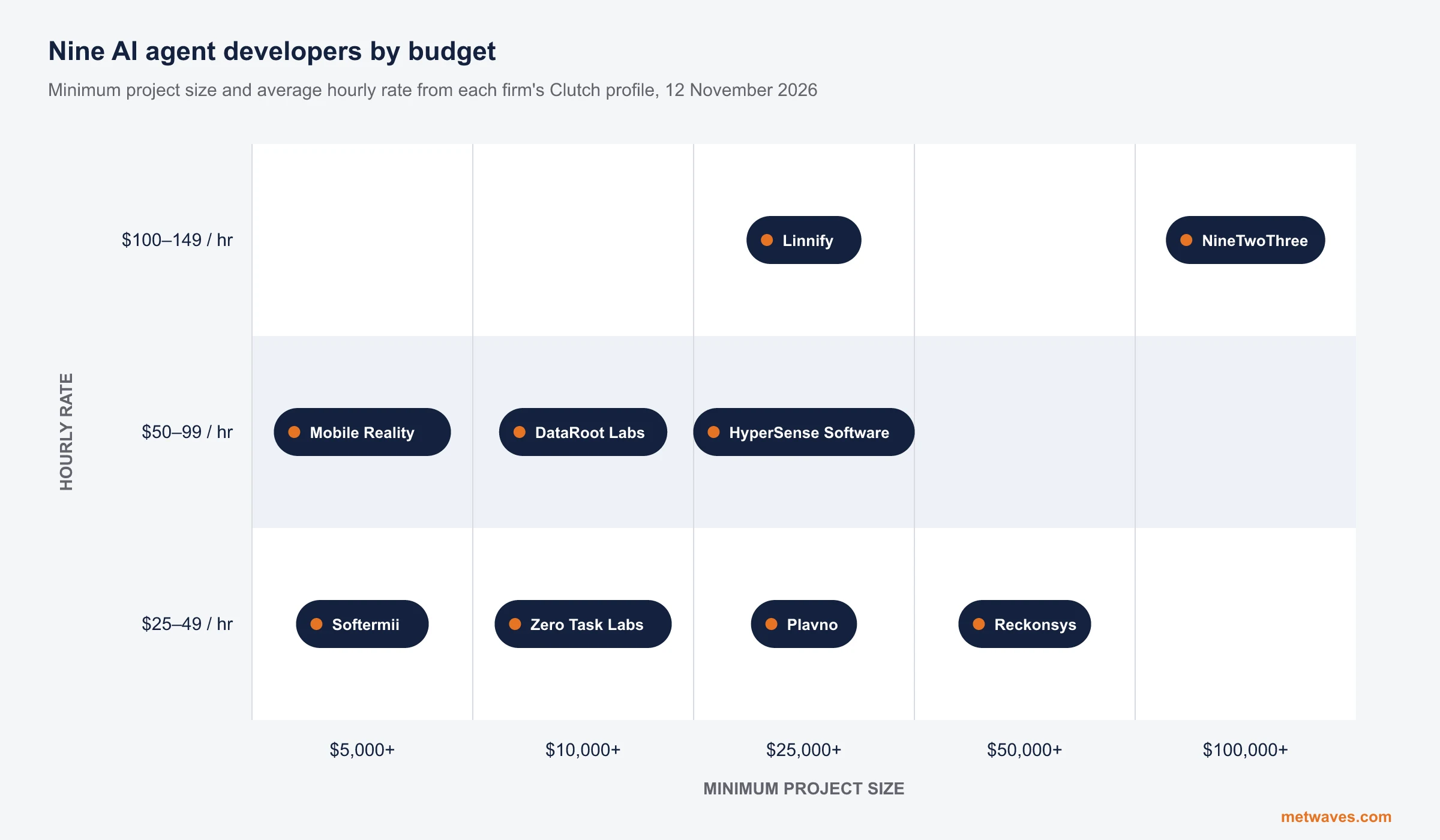 Nikit Nandan
November 12, 2026
Top AI agent development companies for small and mid-sized businesses (2026)
Nine AI agent development firms a small or mid-sized business can shortlist, with Clutch figures, minimum budgets and the weaknesses their own clients name. Published by Metwaves, which is not ranked.
Learn More >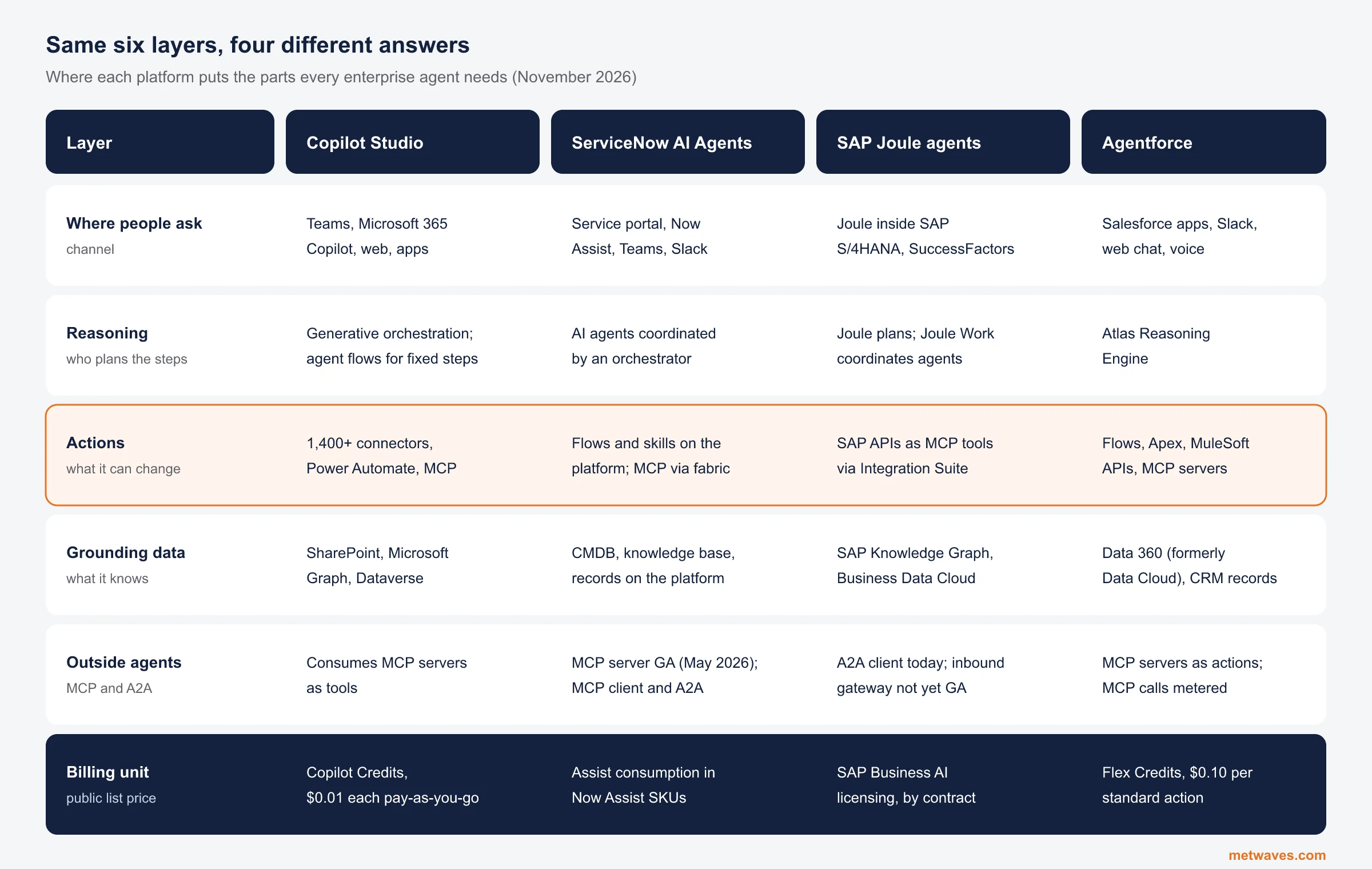 Nikit Nandan
November 12, 2026
Enterprise AI Agent Platforms Compared (2026)
An architecture review of the four big enterprise AI agent platforms: where each one reasons, acts, finds its data and connects to outside agents, what it costs, and when a custom build is the better choice.
Learn More >Let’s build your idea!
Let us help you with free analysis & estimate.
Our product expert will contact you within 12 hours.