
Software Development for Accounting, Law and Consulting Firms
Accounting software development, legal software development and AI for professional services firms in the US, UK, Canada and Australia. We build staff helpdesks in Microsoft Teams, client portals, document automation and the integrations around the practice systems you already run, with client confidentiality designed in.

Teams helpdesk for a UK professional services firm · 30% to 50% of staff requests resolved without a person
THE PROFESSIONAL SERVICES INDUSTRY
What professional services firms are, and how they earn
Professional services firms sell expertise: law firms, accounting and tax practices, management and technology consultancies, engineering and architecture practices, and the advisers around them. Accounting software development and legal software development for these firms rarely means replacing the products they run on. It means building what sits between those products and the people who use them.
Firms are paid by the hour, by fixed fee or by retainer, so profit depends on how much of each person's time is billable and how much of it is billed. Every hour a fee earner spends hunting for a policy, re-keying a client document or answering a status call is an hour the firm pays for and cannot bill.
Most firms already run a practice management system for matters or jobs, time and billing, plus document management, accounting software and Microsoft 365. The work is in the gaps: staff questions, client documents, client updates and the data that drifts between systems. And every one of those gaps holds client information the firm has promised to keep confidential.
Law firms
From sole practitioners to international firms
- Matters
- Documents
- Billing
Accounting and tax
Practices preparing accounts, returns and audits
- Client records
- Tax returns
- Bookkeeping
Consulting
Management, technology and specialist advisers
- Engagements
- Knowledge
- Proposals
Engineering and architecture
Design practices billing by project
- Projects
- Drawings
- Time
In-house teams
Legal, finance and HR inside larger companies
- Requests
- Policies
- Approvals
CHALLENGES
The challenges professional services firms face
Six things partners, practice managers and IT leads tell us, in their words, and what each one costs the firm.
“IT and HR answer the same ten questions every week.”
Leave, expenses, access resets and VPN problems take hours from people who should be fixing harder things.
“The answer is in a policy, but nobody knows which version is current.”
Old and new versions sit side by side across SharePoint sites, so staff guess, or ask someone who guesses.
“Client documents arrive by email and someone re-keys them.”
Tax packs, invoices and engagement letters are typed into the practice system by hand, and typos surface at the worst moment.
“Clients ring to ask where their matter is.”
Partners and assistants answer status calls that a client portal could answer at any hour.
“Our practice system, document store and accounts don't talk.”
The same client details live in three systems and drift apart, and month-end reports are built by hand.
“The partners want AI, but not a confidentiality breach.”
Nobody can say where prompts go, who can read them or whether a model learns from client files.
AI IN PROFESSIONAL SERVICES
How AI can help firms, graded by confidentiality
The question is less what AI can do than what client data it touches. Each use below shows the most confidential data it sees and where a person stays in charge.
Staff IT and HR helpdesk
Answers questions about leave, expenses, access and IT from the firm's own policies, cites the document and opens a ticket when it cannot help.
A person stays in charge: the service desk takes every ticket, and staff can ask for a person at any time.
The lowest-risk place to start: firm content, not client files.
Knowledge and proposal search
Finds past proposals, methods and expertise across the firm, so a team starts from its best work.
A person stays in charge: the engagement lead checks what is reused and for whom.
Past work names clients, so results must respect the same access rules as the documents.
Client document intake
Reads tax packs, invoices, bank statements and IDs into the practice system, with checks before anything is saved.
A person stays in charge: staff confirm each exception before it is saved.
In the US, tax return information may be used only to prepare the return unless the client consents (IRC section 7216).
Time capture suggestions
Drafts time entries from calendars, emails and documents, so fewer billable hours go unrecorded.
A person stays in charge: each fee earner approves their own entries before billing.
Entries carry client and matter details, so they stay inside the firm's systems.
Legal research and drafting assistants
Summarises documents and drafts clauses, letters and research notes for a lawyer to edit.
A person stays in charge: the lawyer checks every citation and signs off every word.
ABA Formal Opinion 512: informed client consent before client information goes into a self-learning AI tool; boilerplate in an engagement letter is not enough.
Contract review and due diligence
Flags unusual clauses, missing terms and deadlines across large document sets.
A person stays in charge: a lawyer reviews each flag and decides what it means.
Privileged material: keep it in the firm's own environment and log every access.
Before any AI sees client data
- AI runs in the firm's own cloud environment, under its contracts
- Answers only from documents the person asking may open
- No client data used to train a public model
- Every answer cites its source document
- Prompts and answers logged, and reviewed in a pilot
- Client consent where the professional rules require it
CLIENT CONFIDENTIALITY
Client confidentiality rules US firms must meet
Firms owe clients confidentiality, so AI and portals must keep client data inside the firm's control. In the US the duty comes from different places for lawyers, accountants and consultants.
Law firms
ABA Model Rules, as adopted by each state
Model Rule 1.1, comment [8]Competence includes keeping abreast of “the benefits and risks associated with relevant technology”.
Model Rule 1.6(c)“A lawyer shall make reasonable efforts to prevent the inadvertent or unauthorized disclosure of, or unauthorized access to, information relating to the representation of a client.”
ABA Formal Opinion 512 (July 2024)Informed consent is needed before client information goes into a self-learning generative AI tool, and boilerplate consent in an engagement letter does not count.
So the software must
- Access by matter, with ethical walls where needed
- Tools that do not learn from client data by default
- A record of who opened which document
Accounting and tax
Federal tax law and the FTC Safeguards Rule
IRC section 7216A preparer who knowingly or recklessly discloses or uses return information for anything but preparing the return commits a misdemeanour: a fine of up to $1,000, up to a year in prison, or both.
IRC section 6713A civil penalty of $250 for each unauthorised disclosure or use, up to $10,000 a year.
GLBA Safeguards RuleTax and accounting firms count as financial institutions, so they need a written information security plan. The IRS points firms to its Publication 5708 template.
So the software must
- Written client consent recorded before any other use
- Multi-factor sign-in, encryption and access logs
- Enough logging to report a breach of 500 or more people to the FTC within 30 days
Consulting and other firms
Contracts, privacy law and client audits
Client contracts and NDAsMost consulting confidentiality is set by contract, and large clients write security terms into it.
State privacy and breach lawsPersonal data about clients' staff and customers brings state privacy and breach notice laws with it.
SOC 2An examination by a CPA of a service organisation's controls relevant to security, availability, processing integrity, confidentiality or privacy, under the AICPA's framework.
So the software must
- The client's data kept separate from other clients'
- Controls you can show an auditor
- Data deleted or returned when the engagement ends
More and more clients send their law firm, accountant or consultant a security questionnaire, and many ask for a SOC 2 report. A firm can only answer well if its software was built with access control, logging and documented controls from the start.
OTHER MARKETS
Confidentiality rules in the UK, Canada and Australia, next to the US
The bodies differ, but the duty is the same in every market: keep client information confidential, understand the technology you use, and be ready to report a breach.
| Requirement | USUnited States | UKUnited Kingdom | CACanada | AUAustralia |
|---|---|---|---|---|
| Lawyers' confidentiality | ABA Model Rule 1.6, as adopted by each state | SRA Code of Conduct for Solicitors, paragraph 6.3 | Provincial law society rules based on the FLSC Model Code, rule 3.3-1 | Australian Solicitors' Conduct Rules 2015, rule 9 |
| Technology and AI | Model Rule 1.1, comment [8]; ABA Formal Opinion 512 on generative AI | ICAEW (July 2026): due diligence, contract terms and approval before client data goes into a digital or AI tool | FLSC Model Code commentary [4A] to rule 3.1-2: understand the benefits and risks of relevant technology | APES 110 technology revisions, effective January 1, 2025 |
| Accountants' confidentiality | IRC section 7216 for tax return information | ICAEW Code of Ethics, R114.1 | Provincial CPA codes, such as CPA Ontario's Rule 208 | APES 110 Code of Ethics, Subsection 114 |
| Privacy law | State privacy laws; the GLBA Safeguards Rule for tax and accounting firms | UK GDPR and the Data Protection Act 2018 | PIPEDA, plus provincial laws in Quebec, Alberta and British Columbia | Privacy Act 1988 and the Australian Privacy Principles |
| Breach reporting | State breach laws; the FTC within 30 days for 500 or more people under the Safeguards Rule | The ICO within 72 hours where there is a risk to people | The Privacy Commissioner and affected people where there is a real risk of significant harm | The OAIC and affected people under the Notifiable Data Breaches scheme |
| Who regulates | State bars and the IRS Office of Professional Responsibility | The SRA for solicitors; ICAEW and other bodies for accountants | Provincial law societies and CPA bodies | State legal regulators; accounting bodies that apply APES 110 |
A summary for planning, not legal advice. Confirm the details for your firm with your professional body or adviser.

That is the industry. Here is where Metwaves fits: firms that want AI and automation around the systems they already run, without client data leaving their control.
CASE STUDY
An AI helpdesk in Teams for a UK professional services firm
A UK professional services firm's IT and HR teams answered the same questions every week: leave, expenses, access resets, VPN problems. The answers existed, but across several SharePoint sites, with old policy versions next to current ones. The firm wanted an assistant in Microsoft Teams that would answer correctly or hand off quickly, because a confident wrong answer about leave or expenses is worse than none.
We built a Copilot Studio agent that answers from SharePoint and an Azure AI Search index of the policy library. Azure OpenAI writes each answer only from the passages it retrieved and cites the document. Superseded policies are kept out of the index, and answers only draw on documents the person asking is allowed to open. When the agent cannot help, it opens a service desk ticket with the conversation and category attached.
- ClientA UK professional services firm, name withheld
- Built withCopilot Studio, Teams, SharePoint, Azure AI Search, Azure OpenAI
- Resolved without a personBetween 30% and 50% of staff requests
- Time to go live8 to 12 weeks, from first question review to firm-wide rollout
How a firm's knowledge stays inside the firm
The map of the helpdesk we built: where the content lives, who may see it, where answers are written and what happens when the assistant cannot help.
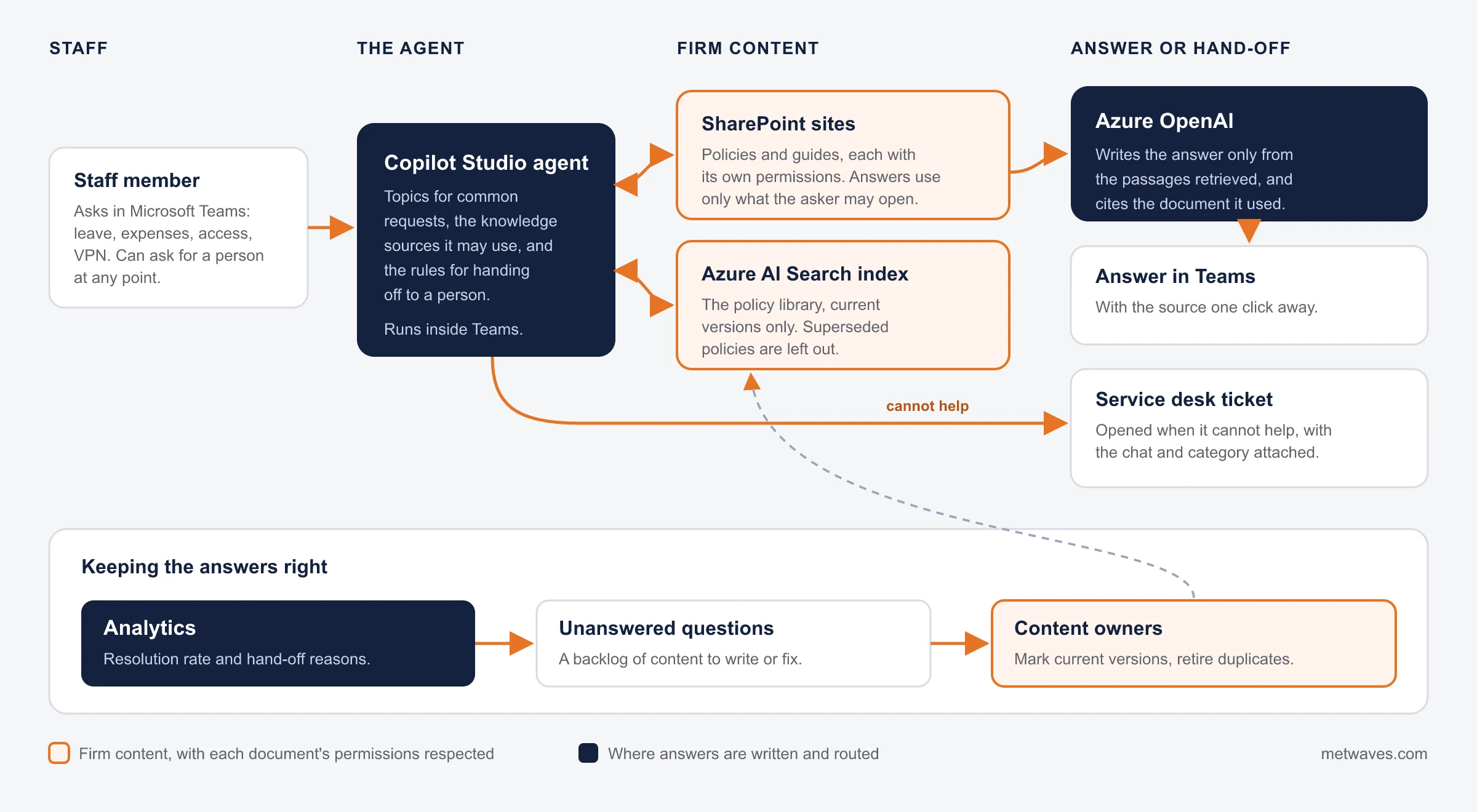
- Firm content with permissions
- Where answers are written and routed
- People and follow-up
What stays with you
In a build like this, the content, the index, the agent's configuration, the logs and the analytics sit in your own Microsoft environment and are yours from the first day. Policy owners keep control of what the assistant may say, because it only says what their current documents say.
How the helpdesk keeps firm knowledge inside the firm
- Answers draw only on documents the person asking may open
- Superseded policies are kept out of the search index
- Every answer is written from retrieved passages and cites its source
- A ticket with the conversation and category when it cannot help
- Staff can ask for a person at any point
WHAT WE BUILD
Software we build for professional services firms
Keep the products your firm runs on, connect them, and build only what is yours on top.
Where custom software earns its cost.
Staff AI helpdesk
Answers from your policies in Teams, with a ticket when it cannot help. Our case study.
AI chatbot development >Client portals
Matter or job status, secure upload, documents and messages on top of the practice system's data.
Web application development >Accounting software development
Client documents read, checked and posted. Our invoice agent does this for an Australian finance team, not a firm: about 1,000 documents a month.
AI agent development >Legal software development
Search and drafting assistants with a lawyer reviewing every output. How we think about legal AI is in our blog post.
Prompt tuning or fine-tuning for law firms >
So client details are typed once.
Practice system to accounts
Time, bills and payments flow to the ledger without re-keying.
Software integration >Documents to matters
Files land in the right matter or job folder with the right permissions.
Reporting
Utilisation, realisation and work in progress from every system in one place.
Data engineering >
We will tell you to keep them.
Practice management
Matters or jobs, time, billing and conflicts.
Document management
Versions, permissions and retention.
Accounting and Microsoft 365
The ledger, email, Teams and SharePoint.
We have not built practice management software or integrated a named practice system yet.
Buy, extend or build
Custom software is worth it where your firm's knowledge or service is the difference. Everywhere else, buy.
| If you | What usually fits | Why |
|---|---|---|
| You need time, billing and matter or job management | A practice management product | Mature products do this well. We will say so on the first call. |
| Staff cannot find policy answers | An AI helpdesk on your own content | Our case study resolved 30% to 50% of staff requests without a person. |
| Client documents are re-keyed | Document automation into the system you have | Checks before anything is saved, and a review queue for exceptions. |
| Clients want status updates and secure upload | A portal on top of the practice system's API | Clients see their own matter; staff stop answering status calls. |
| Your service or pricing model is unusual | Custom software around a bought core | Keep the ledger and billing; build the part that is yours. |
What firm software costs, and what moves the price
We quote after discovery. These are the factors that move the number most.
Content clean-up
An assistant is only as good as the documents behind it. Marking current versions and retiring duplicates is often the biggest task.
Systems to connect
Each practice, document or accounting system adds an integration, and some vendors charge for API access.
Permissions
Ethical walls, client-only folders and partner-only content all have to be respected by search and answers.
Document types and volume
The number of layouts and the checks each one needs set the size of a document automation project.
Channels
Teams alone is simplest; a client portal or the web adds design and testing.
Monthly running costs, such as Copilot Studio and Azure, are listed separately.
How we work with firms
The steps behind our helpdesk case study, which went live in 8 to 12 weeks.
- 1
Question review
We group a sample of past staff or client requests by topic, so the build starts from real demand.
- 2
Content clean-up
Your content owners mark the current version of each policy and retire duplicates.
- 3
Agent design
Topics, knowledge sources and the rules for handing off to a person.
- 4
Search index
An index over the right library, with answers that cite their source.
- 5
Pilot
One group uses it while we track answer quality and the questions it could not answer.
- 6
Rollout and monitoring
Firm-wide, with analytics feeding the content backlog every month.
How to choose a software partner for your firm
Ask these five questions of anyone you shortlist, us included. Where we may not win: we have not built practice management software.
| Question to ask | A good answer | A warning sign |
|---|---|---|
| Where are client data and AI prompts stored? | In your own cloud environment, under your contracts. | “On our platform.” |
| How does the tool respect document permissions? | It searches only what the person asking may open. | One index that everyone can query. |
| Can you show a measured result from a firm? | A named case study with its numbers. | A demo on public documents. |
| Who owns the content, logs and configuration? | You do, from day one. | The vendor's account. |
| Would you tell us to buy a product instead? | Yes, for time, billing and matters. | Every answer is a custom build. |
Related services
Engagement models and technology choices are on each service page.
QUESTIONS & ANSWERS
Software for professional services firms: frequently asked questions
Straight answers on confidentiality, AI, tax rules, cost and what to buy. If you don't see an answer to your question, you can send us a message from our contact form.
Yes, if it is built to. In our case study the assistant answers only from documents the person asking is allowed to open, keeps superseded policies out of its index, writes each answer from the passages it retrieved and cites the source. When it cannot help, it hands over to the service desk.
The helpdesk in our case study went live in 8 to 12 weeks, from the first review of past questions to firm-wide rollout. The biggest variable is how much policy content needs cleaning up first.
It depends on content clean-up, the number of systems to connect, permissions and document volume. We price after a short discovery, and list running costs such as Copilot Studio and Azure separately.
Usually not. Practice management, time and billing, and document management are mature products. Build what sits around them: the assistant, the portal, the document automation and the integrations.
We build what sits around the products firms buy. We have not built practice management software, and we have not yet integrated a named practice management system for a client. The helpdesk we built is for a professional services firm.
It should not be. Run the model in your own cloud environment under a contract that bars training on your data, send each prompt only what the task needs, and log every answer. ABA Formal Opinion 512 asks US lawyers for informed client consent before client information goes into a self-learning tool.
Under IRC section 7216, return information may be used only to prepare the return unless the client gives written consent, and tax and accounting firms need a written information security plan under the FTC Safeguards Rule. Keep the AI inside the preparation process and inside your security plan.
Since July 1, 2026, AUSTRAC obligations apply to newly covered services, including legal and other professional services listed in the amended AML/CTF Act. That adds customer checks, records and reports, which software can make routine. Confirm which of your services are covered with your adviser.
INSIGHTS & NEWS
Discover IT Industry Insights and Technology Trends
 Nikit Nandan
November 17, 2026
Is .NET 8 Still Safe to Run After November 2026?
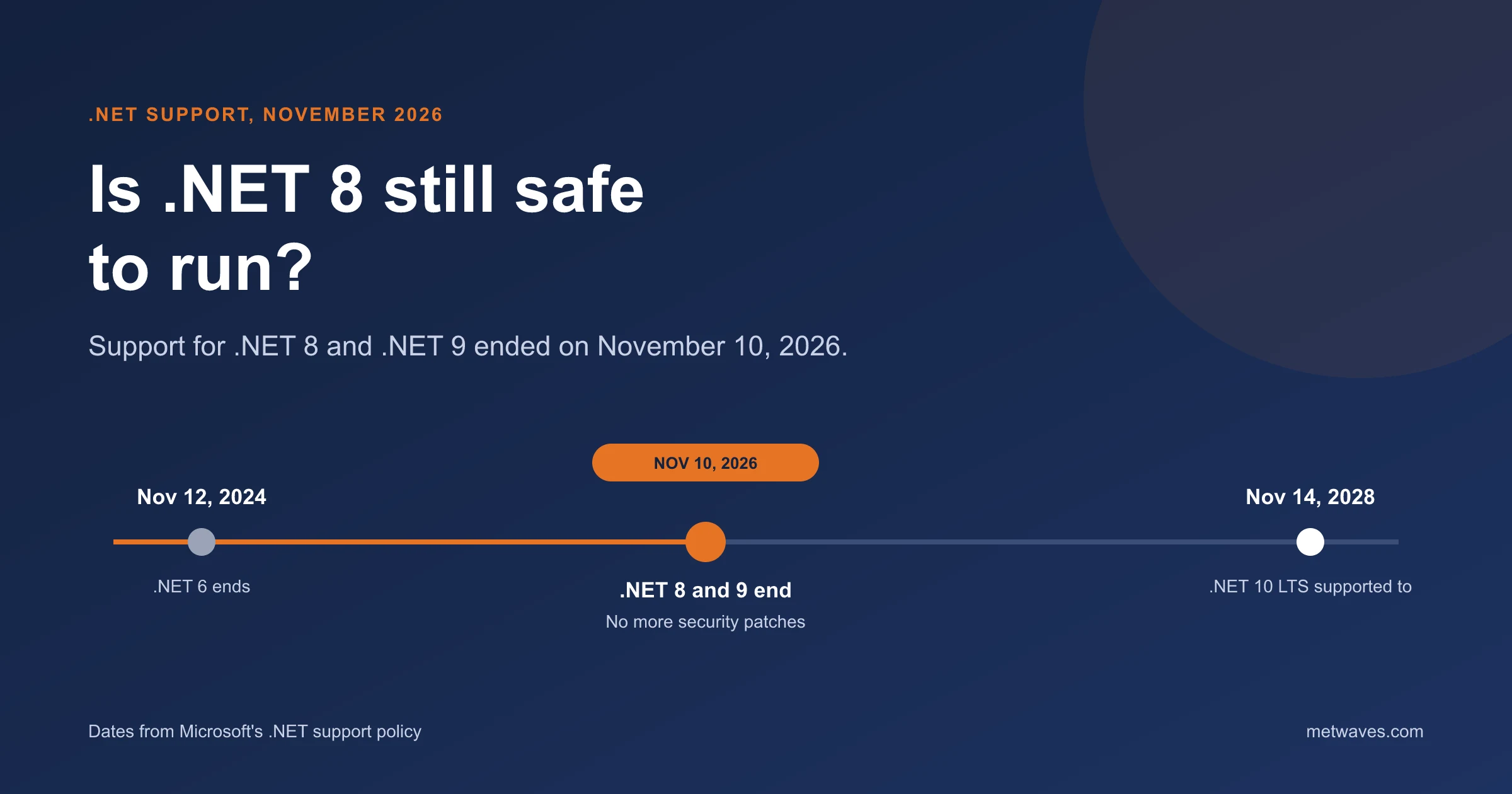
Support for .NET 8 and .NET 9 ended on November 10, 2026. What that means for apps still on them, how risky it is, and how to plan the move to .NET 10.
Learn More >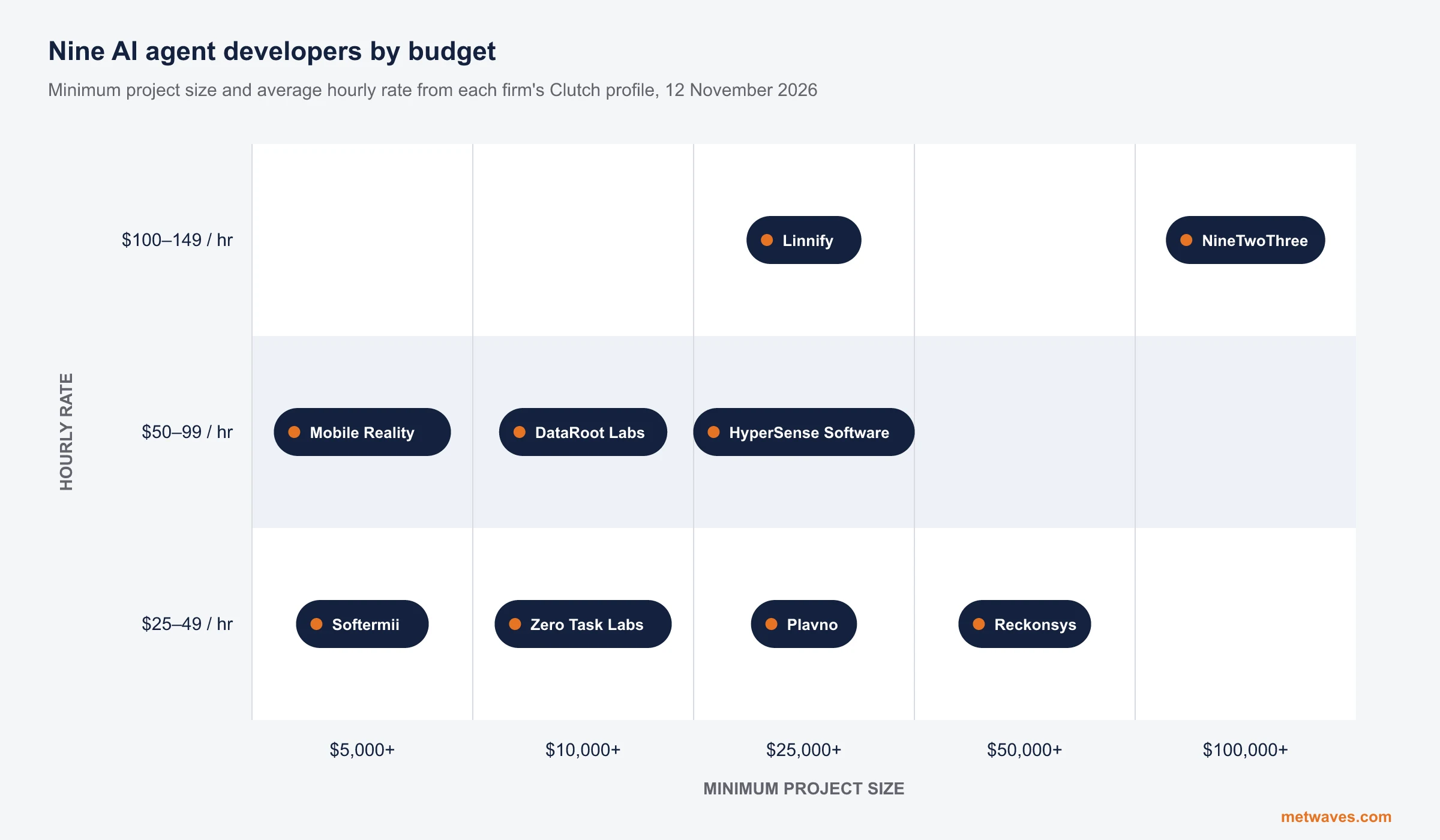 Nikit Nandan
November 12, 2026
Top AI agent development companies for small and mid-sized businesses (2026)
Nine AI agent development firms a small or mid-sized business can shortlist, with Clutch figures, minimum budgets and the weaknesses their own clients name. Published by Metwaves, which is not ranked.
Learn More >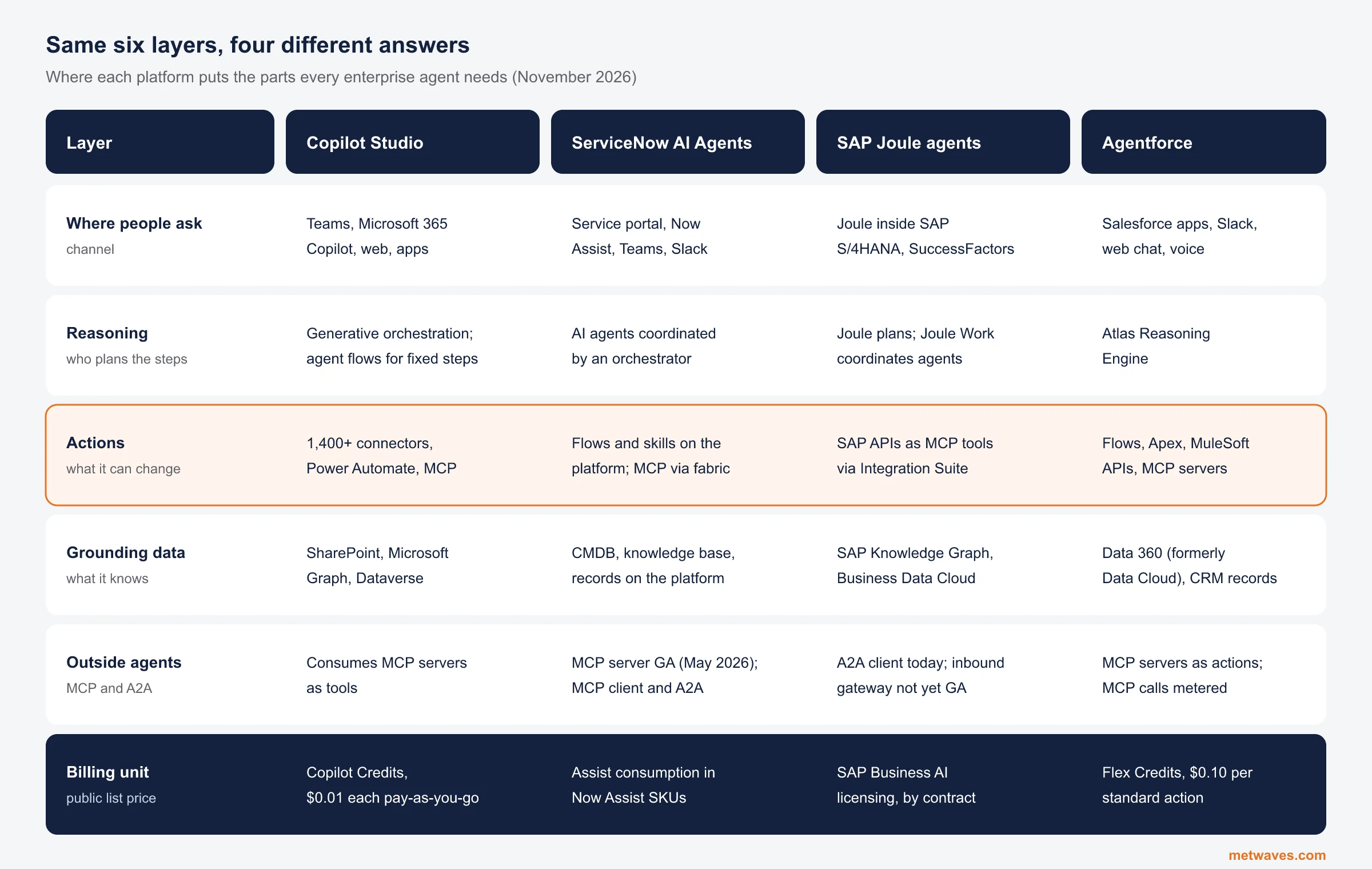 Nikit Nandan
November 12, 2026
Enterprise AI Agent Platforms Compared (2026)
An architecture review of the four big enterprise AI agent platforms: where each one reasons, acts, finds its data and connects to outside agents, what it costs, and when a custom build is the better choice.
Learn More >Let’s build your idea!
Let us help you with free analysis & estimate.
Our product expert will contact you within 12 hours.