
Application Modernization Services
Our application modernization services move .NET Framework, Web Forms, WCF and AngularJS applications onto current .NET and a supported front end, one piece at a time, while the old system keeps running. It starts with an assessment and a phased plan you keep whether or not you hire us.

For businesses in the US, UK, Canada and Australia · No big-bang rewrite
THE SHORT ANSWER
What application modernization services are
Application modernization services move an existing application onto a supported framework, architecture and hosting platform without losing what it does for the business. The safest way is in phases: tests first, then a proxy in front of the old system, then one module at a time moved to new code, so the old system keeps running until the new one has taken over. Metwaves does this for .NET Framework, ASP.NET and AngularJS applications.
Modernization is not the same as a rewrite. The goal is a system your team can change safely again, on a framework that gets security patches, without a day when everything switches over at once.
What changes
- The framework: .NET Framework, Web Forms, WCF or AngularJS moves to a supported version.
- The architecture, where it slows you down: modules come out of the monolith one at a time.
- The hosting: from a Windows server you maintain to containers or managed cloud services.
- How you release: small releases on a working day, with tests and a way back.
What stays
- What the system does for the business, including the odd cases users rely on.
- Your data, moved and reconciled, never retyped.
- The URLs and sign-in your users know, through the proxy.
- The old system, running, until the new code has taken over each part of it.
SUPPORT DATES
The dates that put a deadline on modernization
Most modernizations start because a framework is leaving support. These dates come from Microsoft's .NET and .NET Framework lifecycle pages and the AngularJS project.
AngularJS 1.x
Support endedGoogle stopped updating it. Screens are rebuilt in Angular or React, route by route.
Xamarin
Support endedIts last SDKs are older than both app stores now accept for updates. See cross-platform apps.
.NET 6
Support endedThe last long-term release before .NET 8. Upgrade straight to .NET 10.
.NET 8 and .NET 9
Support endedNo security patches since this date. The largest group of applications to move now.
.NET Framework 4.6.2
Ends soonMove to 4.8.1 as a stopgap, or plan the move to .NET 10. 4.8 and 4.8.1 follow the support of the Windows version they run on.
.NET 10
SupportedThe long-term release to modernize onto today.
Out of support means no security fixes. The application keeps running; the risk grows each month.
WHEN TO CALL US
When you need legacy application modernization
Two or more of these usually means the system costs more to keep as it is than to move in phases.
“It runs on .NET Framework with Web Forms, and nobody wants to touch it.”
Every change takes longer than the last, and new hires do not want to work on it. Modernized, the code runs on .NET 10 with tests around it, and any developer can change it safely.
“Only two people understand the code, and one is leaving.”
The knowledge walks out of the door. Characterisation tests written in phase 1 pin down what the system does, so the knowledge lives in the code, not in one head.
“Every release is a weekend event.”
The monolith ships as one piece, so every release is a risk. After modernization, small releases go out on a normal working day, with a route back if something breaks.
“The auditors flagged libraries we cannot patch.”
Unsupported frameworks and packages get no security fixes. On a supported stack, dependencies get updates again and the finding closes.
“We are tied to a Windows server and a licence we want to drop.”
Hosting decides your costs and your options. The modernized application runs in containers or managed cloud services you choose.
“The business wants an API, and AI on our data, and we cannot add either safely.”
New features are built in the new code while the old parts shrink, so the roadmap does not wait for the migration to finish.
MYTHS
Four modernization myths that make projects fail
Most failed modernizations were planned around one of these beliefs.
MythA rewrite from scratch is cleaner and faster.
What is trueA full rewrite has to match years of undocumented behaviour before it can replace anything, and it delivers nothing until it is finished. Replacing the system in slices ships value early and keeps the old one as a fallback.
MythModernization means moving to the cloud.
What is trueMoving an old application to cloud servers as it is changes where it runs, not how hard it is to change. Sometimes that is the right first step; it is rarely the last.
MythWe have to freeze features until it is done.
What is truePhases are planned around your release calendar, and new features are built in the new code.
MythIf it still runs, it is safe.
What is trueSoftware that runs but gets no security updates is a growing risk. Microsoft support for .NET 8 and .NET 9 ended on November 10, 2026, and .NET Framework 4.6.2 support ends on January 12, 2027.
Application and legacy modernization services we provide
Six services, each of which can be one phase of the plan. Most clients start with the assessment and add the rest phase by phase.

Modernization assessment
A code and dependency inventory, a target architecture, an approach for each module, a risk register and a phased plan with a cost range. You keep the plan whether or not you hire us.

Framework upgrade
.NET Framework and older .NET versions moved to .NET 10, with tests added where they are missing. See .NET development.

UI rebuild, screen by screen
Web Forms or AngularJS screens rebuilt in ASP.NET Core, Angular or React, while the business rules underneath are kept and reused.

Monolith to services
Modules extracted behind a reverse proxy or API gateway, with a plan for splitting the database they share.

Rehost or replatform to the cloud
Containers, managed databases, CI/CD and infrastructure as code on Azure or AWS. See cloud consulting.

Legacy stacks and what they usually move to
We list only the stacks we work on. Support dates are from Microsoft's lifecycle pages and the AngularJS project.
| From | Usually to | Notes |
|---|---|---|
| ASP.NET Web Forms | ASP.NET Core MVC, Razor Pages or Blazor | No direct port: pages are rebuilt, business logic is moved and reused |
| ASP.NET MVC or Web API on .NET Framework | ASP.NET Core on .NET 10 | Run both side by side behind a reverse proxy such as YARP and move routes over in batches |
| WCF services | REST or gRPC on ASP.NET Core, or CoreWCF | CoreWCF keeps existing SOAP clients working while you migrate |
| .NET Framework 4.6.2 | .NET 10, or 4.8.1 as a stopgap | Microsoft support ends January 12, 2027. 4.8 and 4.8.1 follow the support of the Windows version they run on |
| AngularJS 1.x | Angular or React | Support officially ended in January 2022. Replace route by route so users never see a cut-over day. See React, Angular and Vue |
| On-premises Windows servers | Azure App Service, Azure Kubernetes Service or AWS containers | Chosen on your existing cloud contract and your team's skills |
CHOOSING
Rehost, replatform, refactor, rebuild, replace or retire?
Choose per module, not per system. Most systems end up with a mix, and the assessment says which module gets which.
Rehost
If the moduleworks well, but the hosting or the operating system is the problem
Move it as it is to new hosting, and modernize the code later. Quick, and it changes nothing about how hard the code is to change.
Replatform
If the modulehas sound logic on an old framework version
Upgrade the framework with targeted code changes, for example .NET Framework MVC to ASP.NET Core.
Refactor
If the moduleis a large monolith that several teams change at once
Take modules out one at a time with the strangler pattern, over several releases.
Rebuild the front end
If the modulehas a UI with no upgrade path, such as Web Forms or AngularJS
Rebuild the screens and reuse the business rules behind them. Usually the largest single piece of work.
Replace
If the moduledoes a job that a SaaS product now does well
Buy the product, migrate the data and connect it to the rest of your systems.
Retire
If the moduleis barely used
Switch it off and archive the data where people can still find it.
The orange squares show relative effort: one is the least work of the six, four the most.
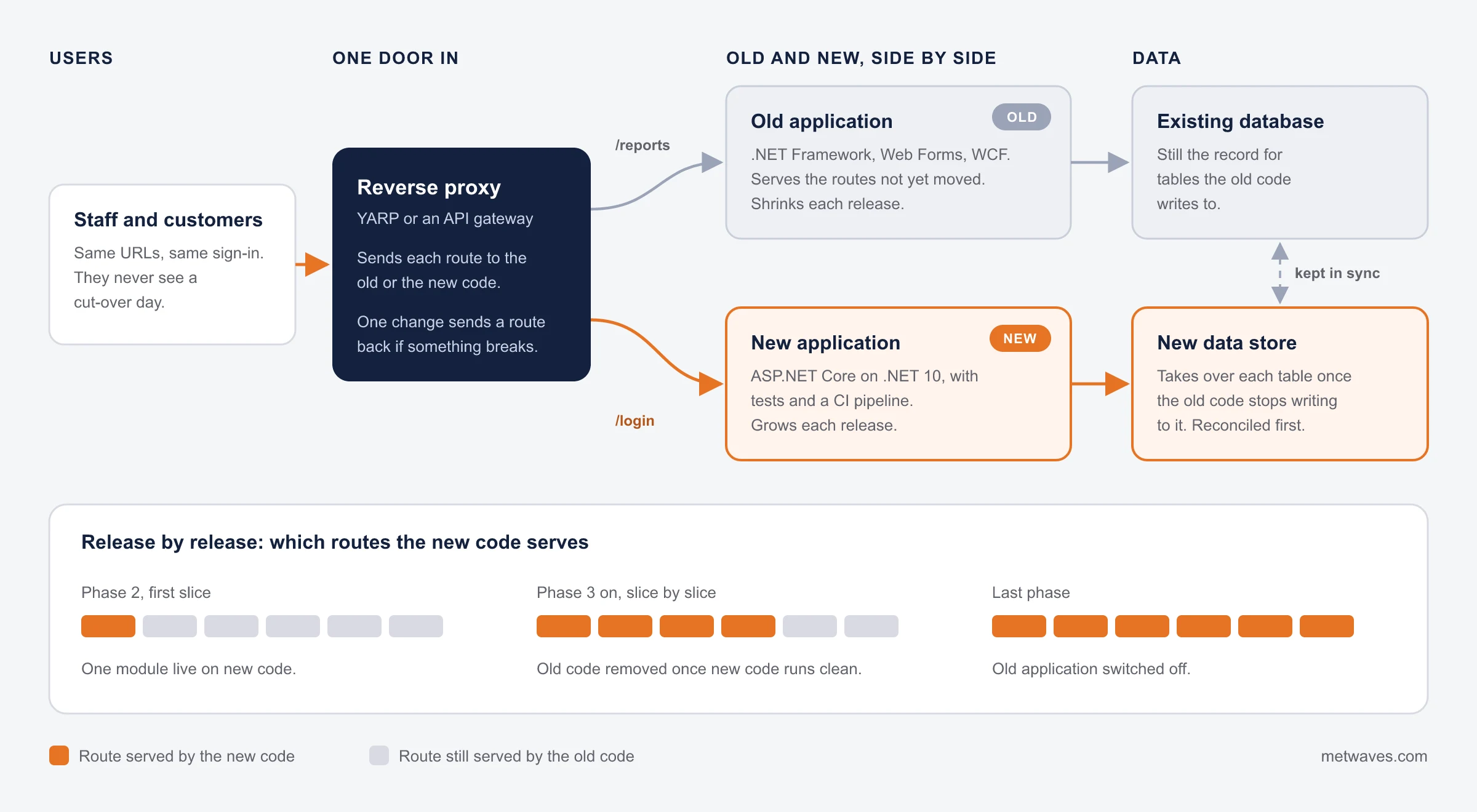
How the strangler pattern replaces a legacy system safely
A reverse proxy sits in front of the old application. Each release sends a few more routes to the new code, and the data is kept in sync until the old system has nothing left to do.
PHASES
A phased modernization plan, from assessment to switch-off
Every phase ends with something running in production. How long each takes depends on your code; the assessment gives the estimate.
- Phase 0
Assessment
Read the code, map dependencies and data, and score each module: keep, upgrade, rebuild or retire.
Live at the endNothing changes in production. You have a phased plan, a risk register and a cost range per phase.
- Phase 1
Safety net
Characterisation tests around the behaviour that matters, a CI pipeline and monitoring on the old system.
Live at the endThe old system, now with tests, automated builds and alerts.
- Phase 2
First slice live
A reverse proxy goes in front of the old application, and the first module takes over its routes.
Live at the endOne module served by new code, in production, with real users.
- Phase 3 on
Slice by slice
Each release moves more routes. Old code is removed only after the new code has run clean.
Live at the endA growing share of the system on the new stack, release after release.
- Late
Move the data
Shared tables are split or kept in sync until the old code no longer writes to them.
Live at the endEach table owned by the new code, reconciled against the old one.
- Last
Retire and hand over
The old system is switched off. Architecture notes and runbooks go to your team.
Live at the endOne supported system, documented, and an old server you can stop paying for.

Not sure which approach fits each part of your system? The assessment answers that before anything changes.
WHAT WE CAN SHOW
No modernization case study yet. Here is the work it builds on
We have not published an application modernization project, and we will not stretch other work to fit. What we can show is .NET and ASP.NET work in production, built and supported the way this page describes.
For a construction-technology company in the United States we built .NET and Python services that read IFC building models and load quantities into the estimating and ERP systems through their APIs. It ran beside manual takeoff on live projects before it became the standard starting point. Takeoff went from days to hours, and it was live in 8 to 12 weeks.
For an urgent care clinic we built a website on ASP.NET and C#, then supported it for six years: the long-run upkeep a modernized system needs.
- Closest workBIM model to cost estimate integration, .NET and Python
- Time to live8 to 12 weeks
- Long-run .NETUrgent care clinic website, supported for six years
- Where we stopJava EE and mainframe systems
What moves the cost of application modernization
We do not publish prices. The assessment ends with a cost range for each phase, and these six factors decide most of it.
Test coverage today
Little or none means building the safety net first. It is usually the largest early cost, and the one that makes every later phase cheaper.
Approach per module
Rehosting costs least and rebuilding a UI costs most. Most systems mix approaches, so the plan is priced module by module.
Size and age of the code
More code and more undocumented behaviour mean more tests to write before anything changes.
Integrations
Every system that calls the old application, or is called by it, has to keep working through each phase.
Shared database
Splitting data that several modules write to is slow, careful work, and it is planned last.
Your release calendar
Phases fit around busy seasons and feature work. A tight window costs more than a flexible one.
Most modernizations start at a fixed price for the assessment, then move to a monthly team for the phases.
Ways to work with us
Pick the model by how clear the scope is. You can change model between phases.
| Model | Best for | How it is priced |
|---|---|---|
| Fixed price | An assessment, or one framework upgrade with a clear scope | One price agreed before the work starts. Fixed-cost model |
| Dedicated team | A multi-phase strangler migration where priorities shift | Monthly, by team size. Dedicated resources or a dedicated development team |
| Time and materials | Exploratory work, such as untangling a shared database | Hours worked, reported weekly. Time and materials |
| Hybrid | A fixed-price assessment and first phase, then a team for the rest | Fixed where the scope is clear, monthly where it is not. Hybrid model |
The platforms we move applications to
Old and new code run side by side behind a reverse proxy such as YARP. WCF clients keep working through CoreWCF while services move to REST or gRPC.


How to choose an application modernization company
Six questions to ask any firm, us included, with the answer to hope for and the one to walk away from.
| Question to ask | A good answer | A warning sign |
|---|---|---|
| Can we see a phased plan with a rollback for each step? | A plan where every phase ends live and any route can go back to the old code | One cut-over date for the whole system |
| Who writes the characterisation tests, and when? | Their own team, before the first line of code changes | Tests promised “at the end” |
| What ships in phase 1? | A named module in production | A design document and a status report |
| How will the old and new systems share data? | A plan for each shared table, done late and reconciled | “We will migrate the database first” |
| Have you shipped this kind of migration before? | The project, or a plain “not yet”. We have not published a modernization case study, and we say so | Logos with no detail |
| Where would you not be a fit? | A clear limit. Ours: Java EE and mainframe systems. We work on .NET, ASP.NET and JavaScript front ends | “We can modernize anything” |
Related services
Modernization usually touches hosting, integrations and support. These pages cover each.
QUESTIONS & ANSWERS
Application modernization: frequently asked questions
Straight answers on rewrites, the strangler pattern, .NET upgrades, time and cost. If you don't see an answer to your question, you can send us a message from our contact form.
Work that moves an existing application onto a supported framework, architecture and hosting platform while keeping what it does for the business. It ranges from a framework upgrade to rebuilding the UI, splitting a monolith into services and moving it to the cloud.
Rarely in one go. A full rewrite must match years of undocumented behaviour before it can replace the old system, and it delivers nothing until it is finished. Replacing the system in slices ships value early and keeps the old system as a fallback.
A proxy or gateway sits in front of the legacy application. New code takes over one feature or route at a time, the proxy sends those requests to it, and the old code for that feature is removed once the new code is proven. Over time the old system shrinks until it can be switched off.
For most MVC and Web API applications, yes. The old and new apps run side by side behind a reverse proxy such as YARP and routes move over in batches. Web Forms and WCF need more work: pages are rebuilt, and WCF services move to REST, gRPC or CoreWCF.
A framework upgrade of a mid-sized application can take weeks; breaking up a large monolith takes months, in phases that each go live. The assessment gives a phase-by-phase estimate for your system.
It depends on code size, test coverage, the number of integrations and the approach chosen per module. We do not publish prices; the assessment ends with a cost range for each phase.
Yes. Phases are planned around your release calendar, and new features are built in the new code rather than the old. Feature work and migration share one backlog, so you decide what comes first in each release.
We have not published a modernization case study yet. What we can show is .NET and ASP.NET work in production, linked above, and the phased method on this page. Ask us on the call and we will tell you plainly what we have and have not done.
INSIGHTS & NEWS
Discover IT Industry Insights and Technology Trends
 Nikit Nandan
November 17, 2026
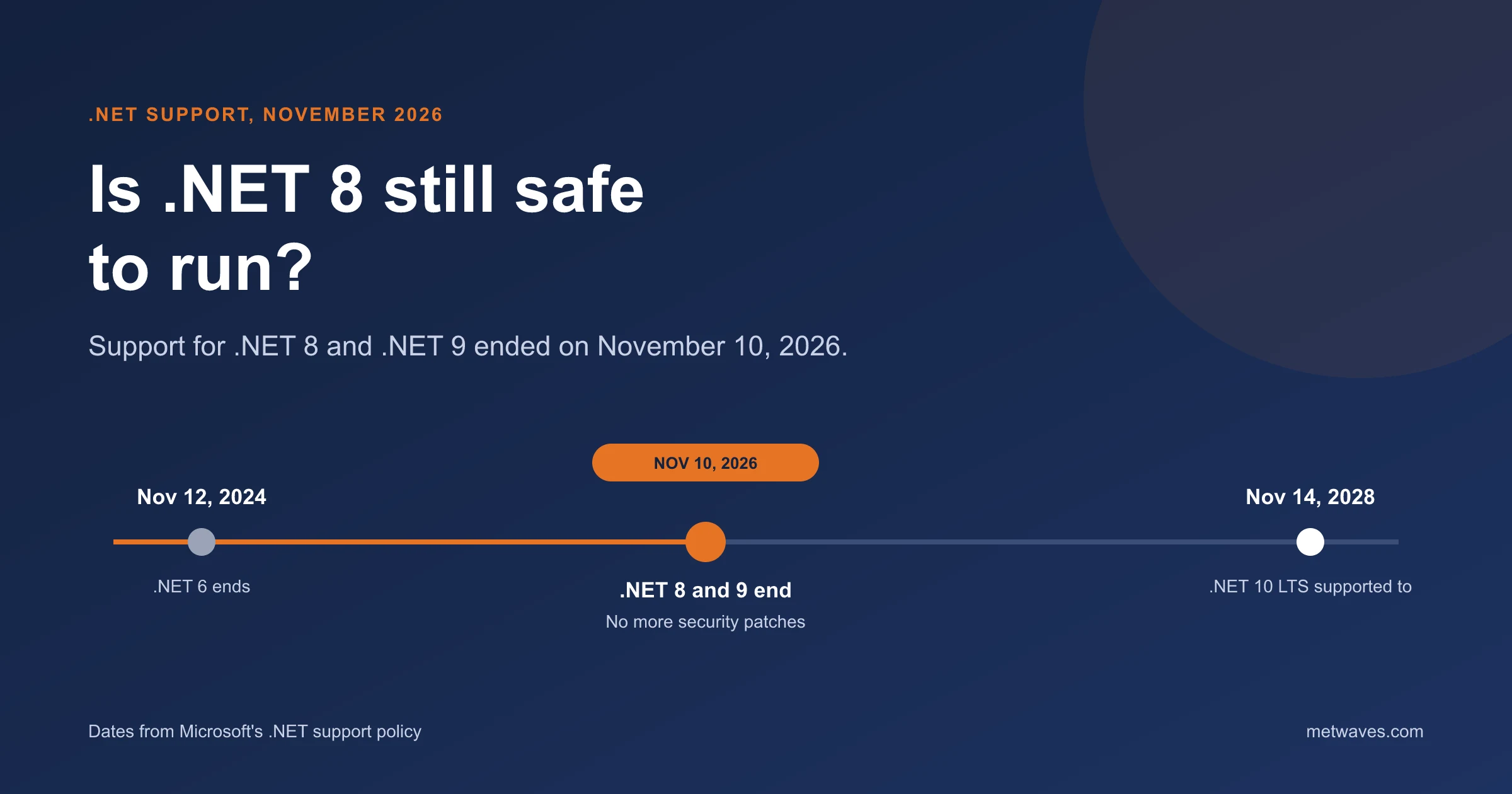
Is .NET 8 Still Safe to Run After November 2026?
Support for .NET 8 and .NET 9 ended on November 10, 2026. What that means for apps still on them, how risky it is, and how to plan the move to .NET 10.
Learn More >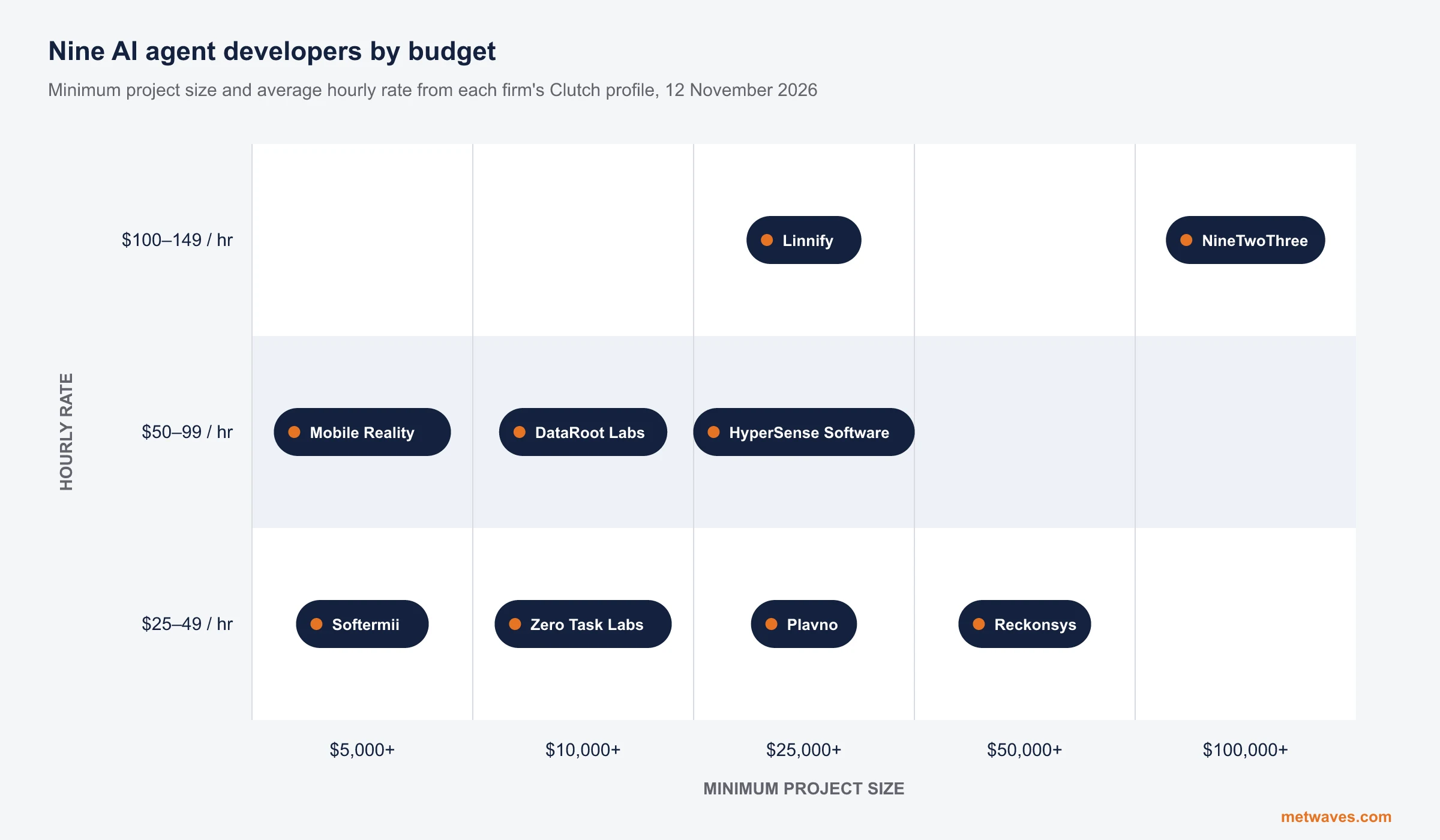 Nikit Nandan
November 12, 2026
Top AI agent development companies for small and mid-sized businesses (2026)
Nine AI agent development firms a small or mid-sized business can shortlist, with Clutch figures, minimum budgets and the weaknesses their own clients name. Published by Metwaves, which is not ranked.
Learn More >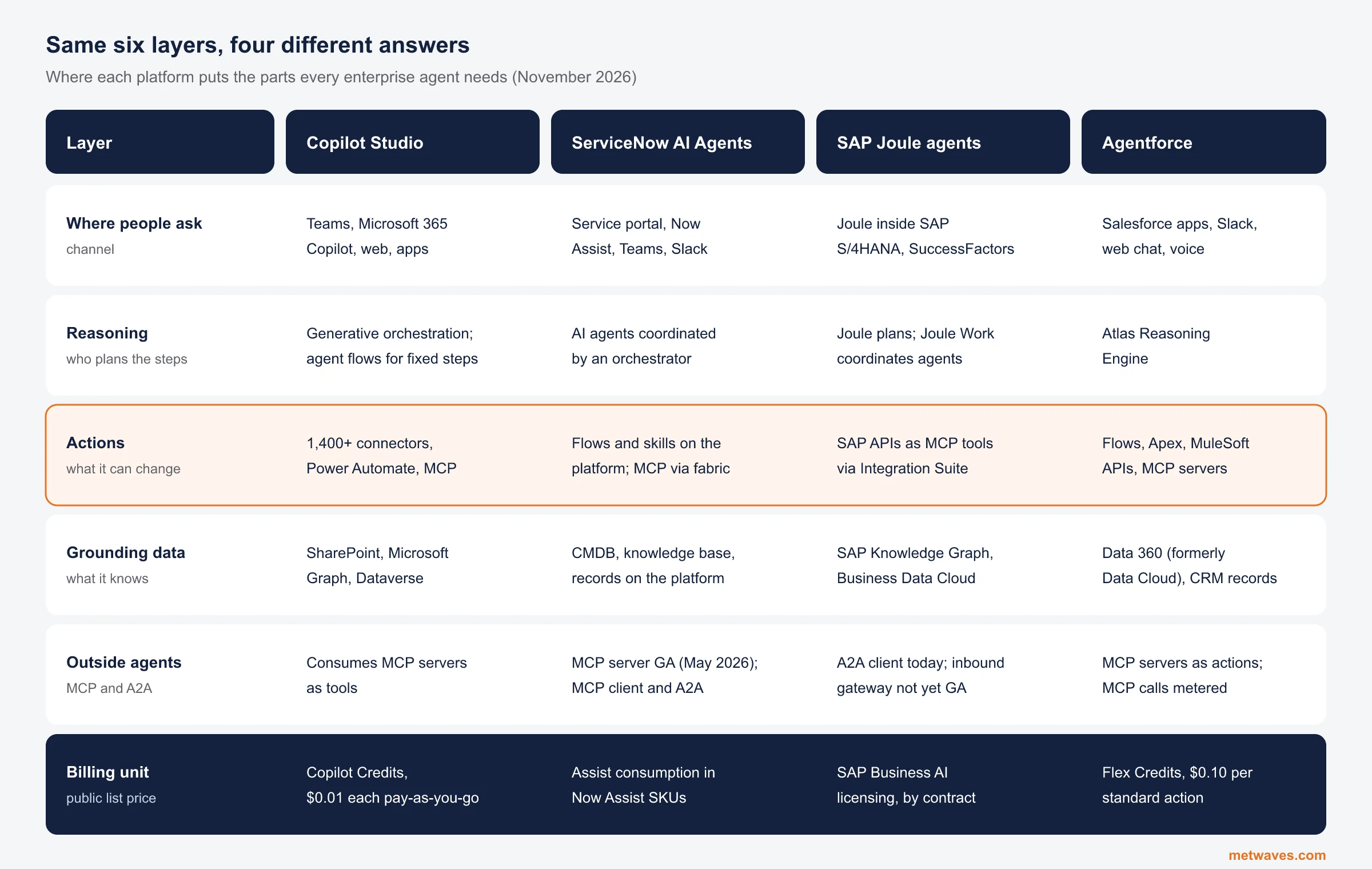 Nikit Nandan
November 12, 2026
Enterprise AI Agent Platforms Compared (2026)
An architecture review of the four big enterprise AI agent platforms: where each one reasons, acts, finds its data and connects to outside agents, what it costs, and when a custom build is the better choice.
Learn More >Let’s build your idea!
Let us help you with free analysis & estimate.
Our product expert will contact you within 12 hours.