
Custom Android App Development Services
Native Kotlin apps for Android phones and tablets, released on Google Play and kept within Google's yearly rules. We build for businesses in the US, UK, Canada and Australia, test on the phones your users actually own, and you keep the code and the Play Console account in your company's name.

Trusted by businesses across the world

What Google Play requires in 2026
To publish an update today, your app must target Android 16 (API level 36). Apps already live that target lower than Android 15 stop showing to new users on newer phones.
Target API for new apps and updates
Since 31 August 2026, new apps and app updates must target Android 16 (API level 36) or higher. Wear OS and Android Automotive OS apps need API level 35; Android TV and Android XR apps need API level 34. Extensions ran to 1 November 2026.
Source: Android DevelopersTarget API for apps already live
Existing apps must target Android 15 (API level 35) or higher to stay available to new users on phones running a newer Android version. Below that, the app only shows to people whose phones run the same Android version or older.
Source: Android DevelopersPublishing format
New apps have had to publish as Android App Bundles since August 2021. Google Play builds the download for each device and signs it.
Source: Android DevelopersData safety form
Play Console's Data safety form declares what user data the app, and every SDK inside it, collects and shares. Google can take action when the app behaves differently from the form.
Source: Android DevelopersTesting before the first release
Personal developer accounts created after 13 November 2023 must run a closed test with at least 12 testers, opted in for at least 14 days in a row, before the app can go to production.
Source: Play Console HelpDeveloper registration
A one-time US$25 registration fee for the Play Console account.
Source: Play Console HelpChecked against Google's documentation on 15 November 2026. Google has raised the target API level by one Android version a year, with recent deadlines at the end of August, so budget for one target API update every year.
Android app development services we provide
Custom Android app development services plan, build, release and maintain an Android app made for one business rather than adapted from a template. In 2026 that means a Kotlin codebase, testing on the phones your users own, release through Google Play's testing tracks, and a yearly update for Google's target API rule: since 31 August 2026, new apps and app updates must target Android 16 (API level 36). Metwaves built the Android app for Fiberpipe's business VoIP service in Kotlin, alongside its iOS app in Swift.
Six jobs, from a new Kotlin app to keeping an old one listed on Google Play.

Native Android apps in Kotlin
Customer and staff apps built in Kotlin with Google's Jetpack libraries, from the first screen to the Google Play listing. Our Android application development services cover design, build, release and support. See Mobile app development.

Rebuilds of older Android apps
Java apps move to Kotlin file by file while they keep shipping. Apps on abandoned frameworks are rebuilt, keeping your API, designs and Play listing. See Application modernization.

Google Play release and yearly updates
Store listing, Data safety form, testing tracks, staged rollout, and the target API update Google requires every year. See Support and maintenance.

Integrations with your systems
Payments, push notifications, sign-in, your own API, and the ERP or CRM your staff already use. See Software integration.

Device and Android version testing
A test list built from your users' real phones and Android versions, and crash monitoring after every release. See QA and testing.

The iOS app, when you need both
For our VoIP client we built the Android app in Kotlin and the iOS app in Swift, on one shared back end. See iOS development.
Signs you need an Android developer
Most Android work we are asked about starts with one of these, rather than with a brand-new idea.





When native Android is the right choice, and when it isn't
Native Kotlin fits when the app leans on the phone's hardware or must keep working in the background. Cross-platform fits when you need iPhone and Android on one budget.
| If the app… | What usually fits | Why |
|---|---|---|
| Uses device hardware or runs in the background, and is Android only | Native Android in Kotlin | Full access to the hardware and background work, and early use of each new Android feature. |
| Uses device hardware or real-time media, and must run on iPhone too | Native apps on each platform | Kotlin for Android and Swift for iOS, sharing one API, as in our VoIP project. See iOS development. |
| Needs the same app in both stores, without heavy hardware use | A cross-platform app | One codebase for both stores, usually Flutter or React Native, at a lower cost than two native apps. See cross-platform app development. |
| Is mostly forms, lists and content | A responsive web app | No store release and one codebase for every device. See web application development. |
Moving an older Android app to Kotlin
Java apps move to Kotlin file by file while they keep shipping. Xamarin apps need a rebuild.
We check the language mix, libraries, target API level, build set-up and who owns the Play Console account before anything changes. A Xamarin app is rebuilt rather than converted, because Xamarin's last Android SDK targets API level 34, below both of Google Play's current requirements.
Kotlin and Java run side by side in the same app, so every new feature is written in Kotlin from day one.
Java files move to Kotlin when a change touches them, so the app keeps shipping instead of pausing for a rewrite.
Compose, Google's current way to build screens, works only from Kotlin. Older screens move one at a time.
The new app goes out as an update to the existing listing, so users, reviews and ratings stay.
Which Android devices we test on
We test on the phones your users actually have, plus the oldest Android version you decide to support. These are the decisions we make with you.
| Decision | How we make it | Why it matters |
|---|---|---|
| Which phones | Top device models from your Play Console or analytics data, plus a low-memory phone | Android runs on thousands of models. Your users own a few dozen of them, and those are the ones that matter. |
| Oldest Android version | Agreed at the start from your user data and the features the app needs | Each older version you support adds testing and workarounds, so the cut-off is a budget decision. |
| Screen sizes | Phones, plus tablets or foldables if your users have them | A layout that works on a phone can break on a tablet in landscape. |
| Real phones or emulators | Emulators while building, real phones before every release | Battery limits, camera, Bluetooth and networks behave differently on real hardware. |
| Network conditions | Weak and switching connections, when the app works in the field or in real time | Our VoIP apps were tested under varying network conditions to keep call quality steady. |
| After release | Crash and ANR rates in Android vitals, by device model, during each staged rollout | A crash on one model is caught while the release is still at a small share of users. |

Play Console warning about your target API level? Fix it before the app stops reaching new users.
CASE STUDY
A real-time calling app built in Kotlin for Android
Fiberpipe, a telecommunications provider, needed its own VoIP service for business clients after off-the-shelf products proved too rigid. We built the Android app in Kotlin and the iOS app in Swift, with an Angular web app on an ASP.NET Core and PostgreSQL back end.
The apps carry high-definition voice and video calls, SRTP and ZRTP encryption, multimedia messages, and call transfer, forwarding, voicemail and history. Call quality was tested under varying network conditions before rollout.
- ClientFiberpipe, telecommunications provider
- Built withKotlin, Swift, Angular, ASP.NET Core, PostgreSQL
- SecuritySRTP and ZRTP: voice and video encrypted on every device
- Shipped oniOS, Android, Windows, macOS and web
What an Android app costs and how long it takes
Cost and time depend mostly on screens and roles, the back end behind the app, and how much of the phone's hardware it uses. We quote after scoping, and a clickable prototype comes first.
Screens and user roles
A customer app with sign-in and five screens is a different project from a staff app with roles, approvals and reports.
Back end and integrations
If your API already exists, the app moves fast. Building the API, or connecting payments, an ERP or a CRM, is often the larger part of the work.
Device features and background work
Bluetooth, NFC, scanning, location tracking and calls that run in the background each need their own code, permissions and testing on real phones.
Offline use and sync
An app that works without a signal has to store data on the phone and resolve conflicts when it reconnects.
Number of test devices
Every phone model and Android version on the test list adds testing time.
Phone and tablet layouts
Tablet and foldable layouts add design and testing, but reuse the same code.
Google's own costs are small: a one-time US$25 developer registration fee. Budget for the yearly target API update and ongoing support on top of the build.
How we build and release your Android app
Five steps, and every one ends with something you can install or read.
Every engagement starts with a scoping call about your app, your users and their phones.
First call, with an NDA if you need one
We talk through the app, your users and their phones, and what must happen first. You get a written scope back.
Scope and clickable prototype
A clickable prototype of the main screens, so you can test the idea with real users before paying for the full build.
Builds on your own phone
Each sprint's build goes to Google Play's internal testing track, so you install it like any other app and tell us what to change.
Play submission and staged rollout
We prepare the listing and Data safety form, pass Google's review, and roll out to a small share of users first while we watch crash rates.
Target API and Android updates
When Google raises the required target API level, we update the app, test it on your device list and release it before the deadline.
Our Android tech stack
Kotlin, Swift, Angular, ASP.NET Core and PostgreSQL are listed in our VoIP case study. Android Studio, Gradle and the Jetpack libraries, including Jetpack Compose, Coroutines and Flow, Room and WorkManager, are Google's standard toolchain for Kotlin apps, and Java covers older apps.


Ways to work with us on an Android app
Pick the model by who owns the roadmap. A defined app suits a fixed quote; a product that keeps changing suits a dedicated team.

Fixed-scope app
A defined app with agreed screens, integrations and release. Fixed quote after scoping.

Dedicated Android team
A product with a roadmap that needs Android, back-end and testing people. Monthly, per team.

Developers in your team
Your team owns the app and needs more Kotlin hands. Monthly, per developer.

Maintenance and yearly updates
A live app that needs fixes, Android updates and the target API change. Time and materials.
Need Kotlin hands on your own team? Add one Android developer, or a team that owns the app.
Good signs and warning signs
How to choose an Android app development company

Apps built by the people on your project
They show you Android apps built by the people who will work on yours. Our honest line: one Android app is in our case studies, the VoIP app, and we have no consumer app with large download numbers to show.

A Play Console account in your company's name
The app is published in a Play Console organisation account in your company's name. Warning sign: the app would be published under the agency's own developer account.

A named device test list
They name the devices they will test on, and explain why those ones. Warning sign: "Works on all Android phones", with no device list behind it.

Crash and ANR rates watched after release
They watch crash and ANR rates after each release, not only before it. Warning sign: a quote for the build only, with no staged rollout, monitoring or support.

A price for the yearly target API update
They tell you what the yearly target API update costs. Warning sign: no plan or price for Google's yearly target API change.
New Android code in Kotlin
They write new Android code in Kotlin. Warning sign: a new app in 2026 started in Java.

Where Android fits in the rest of your product
Send us your Play Store link or your idea. We will tell you what the app needs to stay listed on Google Play, and what a build or rebuild would involve.
| Service | What it covers |
|---|---|
| Mobile app development | Planning and building mobile apps across iPhone and Android. |
| iOS development | The Swift app for iPhone and iPad, alongside the Android one. |
| Cross-platform app development | One codebase for both stores when native is more than you need. |
| Software prototyping | A clickable prototype to test the app before the full build. |
| Support and maintenance | Fixes, Android updates and the yearly target API change for a live app. |
Frequently asked questions
Straight answers on cost, Kotlin, Google Play's rules and who owns the app.
It depends mostly on the number of screens and user roles, the back end and integrations behind the app, and how much of the phone's hardware it uses. We quote after scoping, once we have seen your screens and systems. Google's own costs are small: a one-time US$25 developer registration fee. Plan for the yearly target API update and ongoing support on top of the build.
It depends on the same factors as cost. We start with a clickable prototype of the main screens, so you can test the idea before the full build, and give you a timeline with the scope. If you open a new personal Play Console account, add at least 14 days for Google's closed-testing rule before the first release.
Kotlin for new work. Google calls Android development Kotlin-first and recommends Kotlin for new apps, and Jetpack Compose, its current way to build screens, works only from Kotlin. Java apps still run and can be extended; they move to Kotlin file by file as they are changed.
Google Play raises the minimum target API level every year. Since 31 August 2026, every update must target Android 16 (API level 36), and an app already live that targets lower than Android 15 (API level 35) stops showing to new users on newer phones. Skipping the update does not remove the app, but it slowly loses new users and you cannot ship fixes until it is done.
Not all, by design. We agree a minimum Android version and a test list of real devices from your users' data, then watch crash rates by device after every release. That covers the phones your users actually own.
Yes, starting with a review of the code, the build and the Play Console account. Xamarin support ended on 1 May 2024 and its last Android SDK targets API level 34, below both of Google Play's current requirements, so a Xamarin app has to be rebuilt; the back end, API and designs usually stay. We built our Telemeds+ telemedicine app on Xamarin, so we know how these apps are put together.
You do. The code lives in your repository and the app is published in a Play Console account in your company's name, so it stays yours whoever builds the next version.
Yes. The usual route is for the app to call a model through your own API, so keys and data rules stay on the server; Google also offers on-device tools such as ML Kit. We build AI agents and chatbots, but we have not yet shipped an AI feature inside an Android app, and we will say so in scoping.
The best one for you has shipped Android apps like yours, publishes in your Play Console account, and can name the devices it tests on. Use the good and warning signs above to compare any shortlist, including us.
Ask to see Android apps on Google Play built by the people on your project, confirm the Play Console account will be in your name, and ask for a device test list based on your users.
INSIGHTS & NEWS
Discover IT Industry Insights and Technology Trends
 Nikit Nandan
November 12, 2026
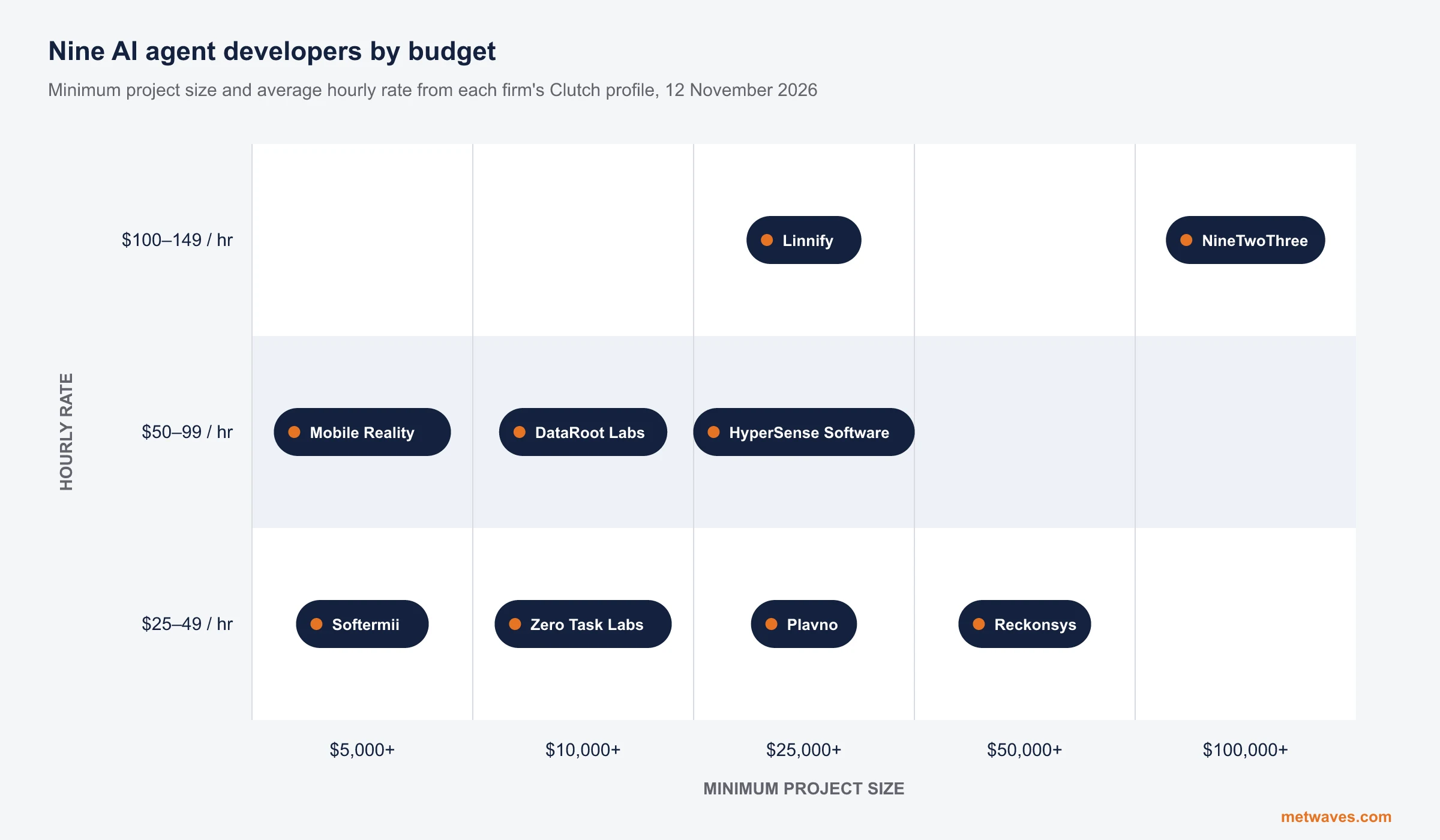
Top AI agent development companies for small and mid-sized businesses (2026)
Nine AI agent development firms a small or mid-sized business can shortlist, with Clutch figures, minimum budgets and the weaknesses their own clients name. Published by Metwaves, which is not ranked.
Learn More >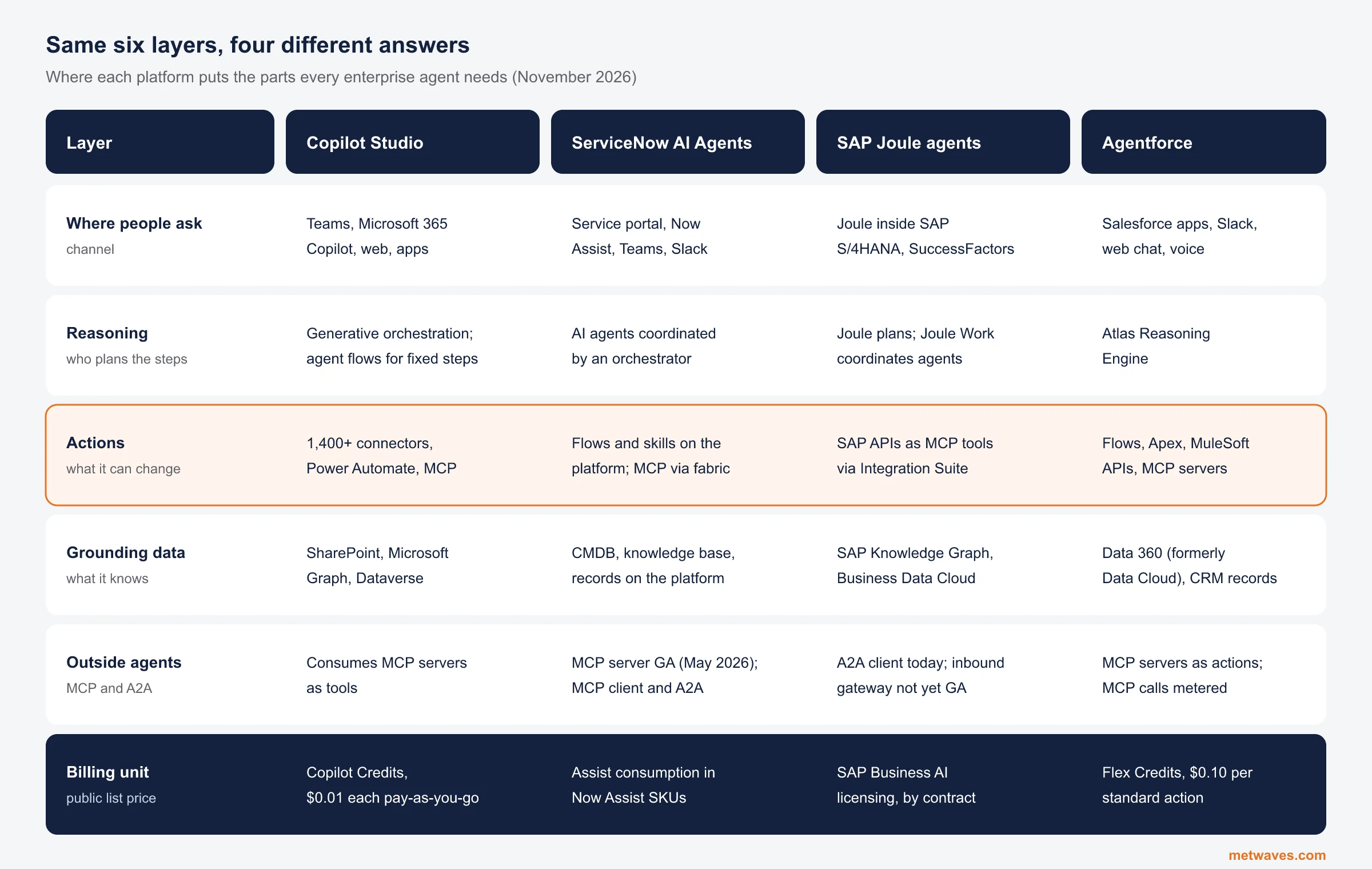 Nikit Nandan
November 12, 2026
Enterprise AI Agent Platforms Compared (2026)
An architecture review of the four big enterprise AI agent platforms: where each one reasons, acts, finds its data and connects to outside agents, what it costs, and when a custom build is the better choice.
Learn More > Nikit Nandan
November 01, 2026
Top custom software development companies for small and mid-sized businesses (2026)
Ten custom software firms a small or mid-sized business can shortlist, with Clutch figures, minimum budgets and the weaknesses their own clients name. Published by Metwaves, which is not ranked.
Learn More >Let’s build your idea!
Let us help you with free analysis & estimate.
Our product expert will contact you within 12 hours.