
Azure consulting services for small and mid-sized businesses
Architecture and cost reviews, .NET and Python apps, and Azure AI built on your own documents. We work for businesses on Microsoft 365 that run one or a few Azure subscriptions and have no cloud team of their own. The tenant, the subscriptions and the code stay in your name.

Trusted by businesses across the world

Four Azure projects we have shipped, three of them AI
Azure keeps the model, the search index and your documents inside your own tenant. That is why our AI work for businesses on Microsoft 365 runs there: the documents never leave, and existing permissions carry through. The fourth project is a telemedicine platform built on .NET, Azure and SQL Server.




Azure consulting services we provide
Azure consulting services help a business design, secure, review, cut the cost of and build on Microsoft Azure. For a small or mid-sized business that usually means a written review of how the tenant and subscriptions are set up, fixes for access and cost, and new builds such as .NET apps or AI assistants that answer from your own documents. Metwaves does this work inside your own tenant, and four of our live case studies run on Azure.
Most small Azure tenants were set up once and never reviewed. The bill, the access rights and the AI pilots grew on top of that first setup. Azure consulting puts them back in order: who can get in, what each resource costs, and what to build next. We start with a written review, so you see the findings before you pay for any change.

Azure architecture review
A written review of how your tenant and subscriptions are set up, with every finding ranked by risk: who holds owner or global admin rights, whether MFA and conditional access cover every account, whether production and test are separated, backups and regions, and resources nobody owns or uses. You get what to fix first, what each fix involves and what can wait.

Azure cost review and clean-up
We go through the bill resource by resource with Cost Management and Azure Advisor, then resize, schedule or delete what is oversized or forgotten. Budgets and alerts go in last, so the next surprise is an email, not an invoice. The cost table below lists where small Azure bills usually grow.

Azure AI on your own data
Assistants and agents that answer from, or act on, your own documents with Azure OpenAI, Azure AI Search and Azure Document Intelligence. Three of our live Azure projects are AI builds, each live in 8 to 12 weeks or, for BioBuild, in use since January 2025. See AI agent development and AI chatbot development.

Apps on App Service, Functions or containers
We build and move .NET and Python apps onto managed Azure services, so nobody patches a server by hand and a release goes out through a pipeline. For older .NET apps, see our .NET development services and the support dates there.

Copilot Studio and Teams agents
When your staff already work in Microsoft 365, an agent in Teams that answers from SharePoint is often the fastest useful AI project. Ours resolves 30–50% of staff requests without a person and respects document permissions. Read the case study.

Migration to Azure
Moving servers, databases and apps into Azure is its own project with its own plan. We cover it on our cloud solutions and cloud consulting pages.
Azure AI on your own data, inside your own tenant
Each source below feeds one live project. The model, the index and the documents stay in the client's tenant, and existing permissions carry through to every answer.
| Your source | Azure services | What it produces | Project |
|---|---|---|---|
| SharePoint policies and Teams | Azure OpenAI, Azure AI Search | Helpdesk agent in Teams that cites the policy it used | Copilot Studio helpdesk agent |
| Supplier invoices and PDFs | Azure Document Intelligence, Azure OpenAI | Invoices posted to SAP Business One | Invoice processing agent |
| BIM and building models | TensorFlow model hosted on Azure | Material recommendations in BIM | Material recommendation system |

Did the Azure bill go up after an AI pilot? Find out which resources grew, and what each fix saves.
Where Azure costs hide in a small tenant
Small Azure bills grow in a handful of predictable places. Azure Cost Management, budgets with alerts and Azure Advisor show most of them; the work is acting on what they show.
| Cost source | What to check | Typical fix |
|---|---|---|
| App Service plans and virtual machines sized for a peak | Average CPU and memory over the last month in Azure Monitor | Scale down, or scale out only during busy hours |
| Development and test resources left running | Resources with no owner tag or no traffic | Delete them, or shut them down outside working hours |
| Azure SQL Database above the tier it needs | Compute used against the tier you pay for | Move to a smaller tier, or to serverless for quiet databases |
| Azure OpenAI and AI Search set up for a pilot | Search tier, replicas and model usage since the pilot ended | Resize the search service and match the model deployment to real traffic |
| Log Analytics with no limits | Data ingested per day and how long it is kept | Set retention and a daily cap, and stop collecting logs nobody reads |
| Data leaving Azure | Bandwidth charges by resource | Keep services that talk to each other in the same region |
| Steady workloads on pay-as-you-go prices | Resources that run all day, every day | A one- or three-year reservation or savings plan for the steady part |
What a sound Azure setup looks like for a small business
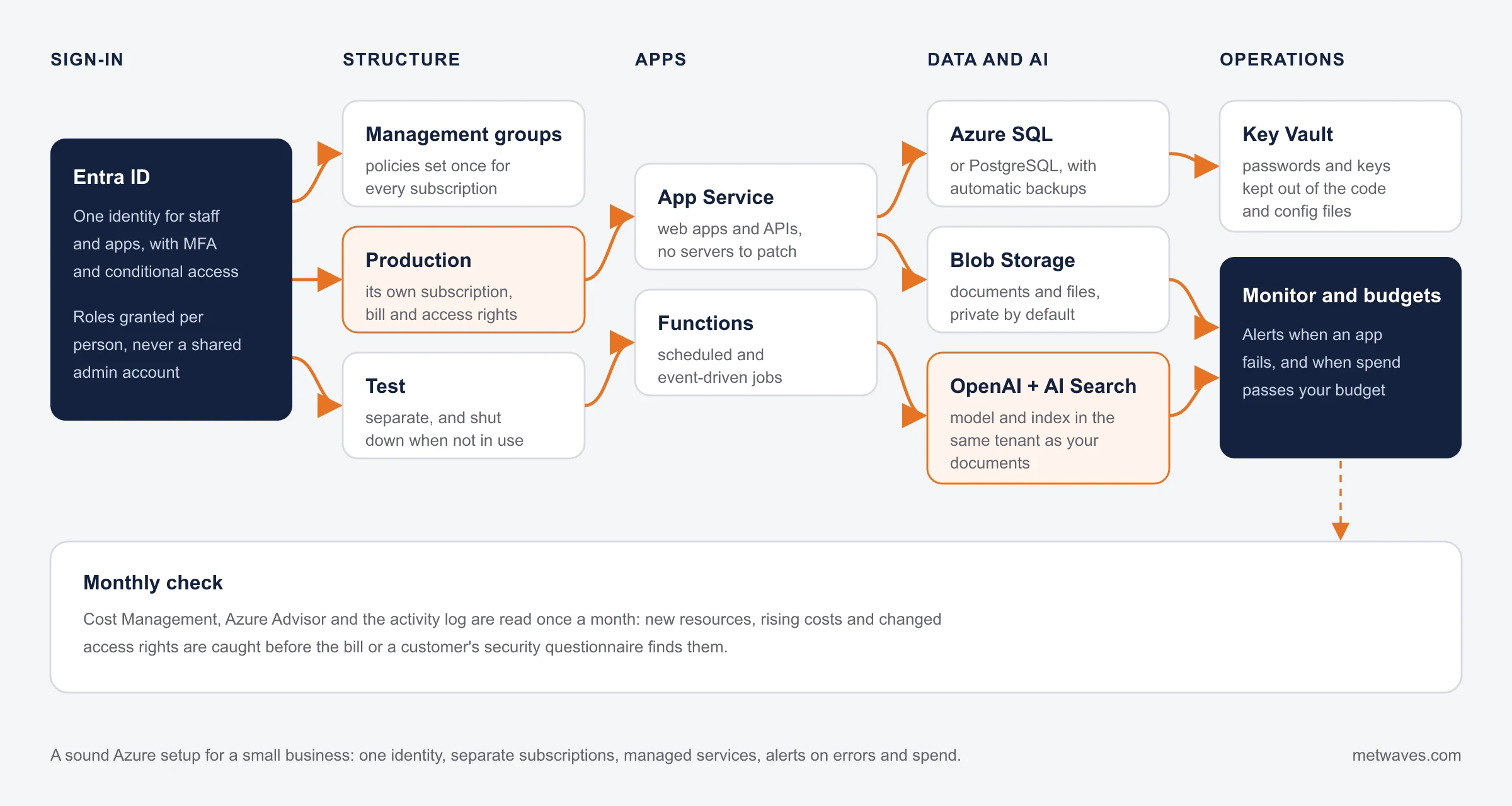
A sound Azure setup has one identity with MFA, separate subscriptions for production and test, managed services instead of hand-patched servers, and alerts on both errors and spend. It does not need the landing zone a large enterprise builds.
When to call us
Signs you need an Azure consultant

A bill that grew after an AI pilot
The Azure bill went up after an AI pilot, and nobody owns it.

A tenant set up by someone who left
One admin set up the tenant years ago and has since left.

Everything in one subscription
Everything runs in one subscription, and several people have owner rights to all of it.

AI you cannot trust with your permissions
You want Copilot or a chatbot to answer from SharePoint, but you do not trust it with your permissions.

A .NET app on a hand-patched server
A .NET app still runs on a virtual machine that someone updates by hand.
A security questionnaire you cannot answer
A customer sent a security questionnaire about your cloud setup, and you cannot answer it.
See our cloud consulting services >

When Azure is the right choice, and when it isn't
Azure is the right choice when your business already runs on Microsoft, or needs AI over Microsoft 365 content. It is the wrong choice when your product and team already live on another cloud.
| If you | What usually fits | Why |
|---|---|---|
| Run Microsoft 365, Entra ID, SQL Server and .NET | Azure | Sign-in, licences, databases and apps already speak to each other, and one identity covers staff and apps. |
| Need AI that answers from SharePoint and respects its permissions | Azure AI Search with Copilot Studio or Azure OpenAI | The index, the model and the documents stay in your tenant, and document permissions carry through to answers. |
| Already run your product on AWS | Stay on AWS | Moving clouds rarely pays for itself. See our AWS page. |
| Have an analytics team built around BigQuery | Google Cloud may fit | Put the analytics where your data team already works, and connect Microsoft 365 to it. |
| Run a small app with steady traffic | One App Service plan | Not a full landing zone with hubs and firewalls. We will say so. |
| Must keep data in the UK, Canada or Australia | Azure, with the region chosen first | Azure has regions in all three. Choose the region before anything else, because moving data later is work. |
Our Azure tech stack
The first tab runs in our live Azure projects, alongside Azure OpenAI, Azure AI Search, Azure Document Intelligence, Teams, SharePoint, LangGraph, Neo4j and SAP Business One. The second is the managed core of a sound setup; other services, such as Key Vault and Monitor, are chosen per project and named in the review.


How to choose an Azure consulting company
Ask these before you give anyone access to your tenant. Each answer ends with ours, including where we fall short.
A good answer: You, from day one. Our answer: Everything we build sits in your tenant and your repository.
A good answer: Yes, with each finding ranked by risk and saving. Our answer: Every engagement starts with one.
A good answer: A list of named resources to resize, schedule or delete. Our answer: Cost is part of every review we run.
A good answer: A role you assign and can remove, read-only for the review, never a shared global admin account. Our answer: Read-only for the review; wider rights only for agreed work.
A good answer: It matters if you want Microsoft-funded migration help or licences through a partner. Our answer: Check any vendor's status in Microsoft's partner directory. For a review, a cost clean-up or an AI build, the engineers matter more.
A good answer: Named people and their current certifications. Our answer: Ask us for the engineers on your project and check them yourself.
A good answer: Named projects with measured results. Our answer: Four Azure case studies on this page, three of them AI.
Staff already in Microsoft 365? A Teams agent that answers from SharePoint is often the fastest useful AI project.
How an Azure engagement runs
It starts with read-only access and a written review. Nothing changes in your tenant until you have read the findings and agreed the fixes.
You get the risks and savings we find, ranked, with a fixed quote for the fixes. You decide what happens next.
Day one: Call and read-only access
We agree the scope, then you grant us a read-only role that you can remove at any time. Every action we take shows in your activity log.
Review: Architecture, identity and cost
We map subscriptions, access rights, networking, backups and the bill, resource by resource.
Findings: Written findings ranked by risk and saving
Each finding says what is wrong, why it matters and what fixing it involves, with a fixed quote for the fixes.
Fix or build: Changes made as code where possible
We make the agreed changes, or build the new app or AI assistant, with wider access granted only for that work.
After: Monthly check-ins or a clean hand-over
Either we review cost and access with you each month, or we hand over documentation and step out.
What Azure consulting costs
We quote a review after a short scoping call, and fixes or builds after the review. These factors move the price most.
Number of subscriptions and resources
A single subscription with a few apps is a short review. Several subscriptions built by different people take longer to map before anything can be judged.
Review only, or review and fixes
A written review is a fixed piece of work. Fixes depend on what it finds, so we quote them after it.
AI builds: sources and integrations
Each document source to index and each system the assistant writes to, such as an ERP or helpdesk, adds building and testing.
Security and compliance requirements
A customer security questionnaire or a data-residency rule adds evidence to collect and settings to prove.
Changes made as code
Writing existing resources as code takes longer than a fix in the portal, and makes every later change repeatable and reviewable.
We do not publish prices, because two tenants of the same size can need very different amounts of work. A fixed quote comes before any work starts.
Ways to work with us on Azure
Most clients start with a review, then choose a fixed-scope build or ongoing support.

One-off Azure review
For a tenant nobody has checked, a rising bill or a security questionnaire. A fixed quote after a scoping call.

Build on Azure
For an AI assistant, an agent or a .NET or Python app. A fixed scope, or a dedicated team for a product that keeps changing.

Ongoing Azure support
For fixes, small changes and monthly cost and access checks. Billed by the hours used.
Where Azure work connects to the rest of your systems
Azure work rarely stands alone. These pages cover the work on either side of it.
| Service | When it fits |
|---|---|
| .NET development services | Build new .NET apps for Azure, or move older ones to a supported version. |
| AI agent development | Agents that read documents and act in your systems, like our invoice agent. |
| Cloud consulting | Cloud strategy and migration planning, before any move starts. |
| AWS | When your product already runs on Amazon Web Services. |
Frequently asked questions
Straight answers on Azure cost, access, AI and where your data stays.
An Azure consultant reviews how your tenant and subscriptions are set up, fixes access, security and cost problems, and builds on Azure: apps, integrations and AI assistants. For a small business without a cloud team, the consultant often acts as that team for a defined piece of work.
A review is a fixed piece of work quoted after a scoping call, and depends mostly on how many subscriptions and resources you have. Fixes and builds are quoted after the review, by scope. We do not publish prices, because two tenants of the same size can need very different amounts of work.
A partner designation matters when you want Microsoft-funded migration programmes or licences bought through a partner. For a review, a cost clean-up or an AI build, ask about the engineers on your project and the work they have shipped.
Yes. Our Copilot Studio helpdesk agent answers staff from SharePoint through an Azure AI Search index, cites the policy it used and respects document permissions. It went live in 8 to 12 weeks and resolves 30–50% of staff requests without a person.
Choose Azure if your business runs on Microsoft 365, Entra ID, SQL Server and .NET, or needs AI over SharePoint content. If your product already runs on AWS, stay there unless there is a specific reason to move. See our AWS page and cloud solutions.
Usually, yes. Small Azure bills tend to grow in the same places: oversized App Service plans and databases, test resources left running, AI services sized for a pilot, and logs kept with no limit. We name the resources, the change and the effect before anything is touched.
You assign us a role and can remove it at any time. For a review it is read-only, so we can see settings and costs but change nothing, and every action is recorded in your activity log. We never ask for a shared global admin account.
Yes. Azure has regions in all three countries. We choose the region at the start of a project, and for AI builds we check which models and services are available in it.
Microsoft states that prompts, completions and your data in Azure OpenAI are not used to train OpenAI's models. Your documents stay in your tenant, in the region you choose.
INSIGHTS & NEWS
Discover IT Industry Insights and Technology Trends
 Nikit Nandan
November 12, 2026
Top AI agent development companies for small and mid-sized businesses (2026)
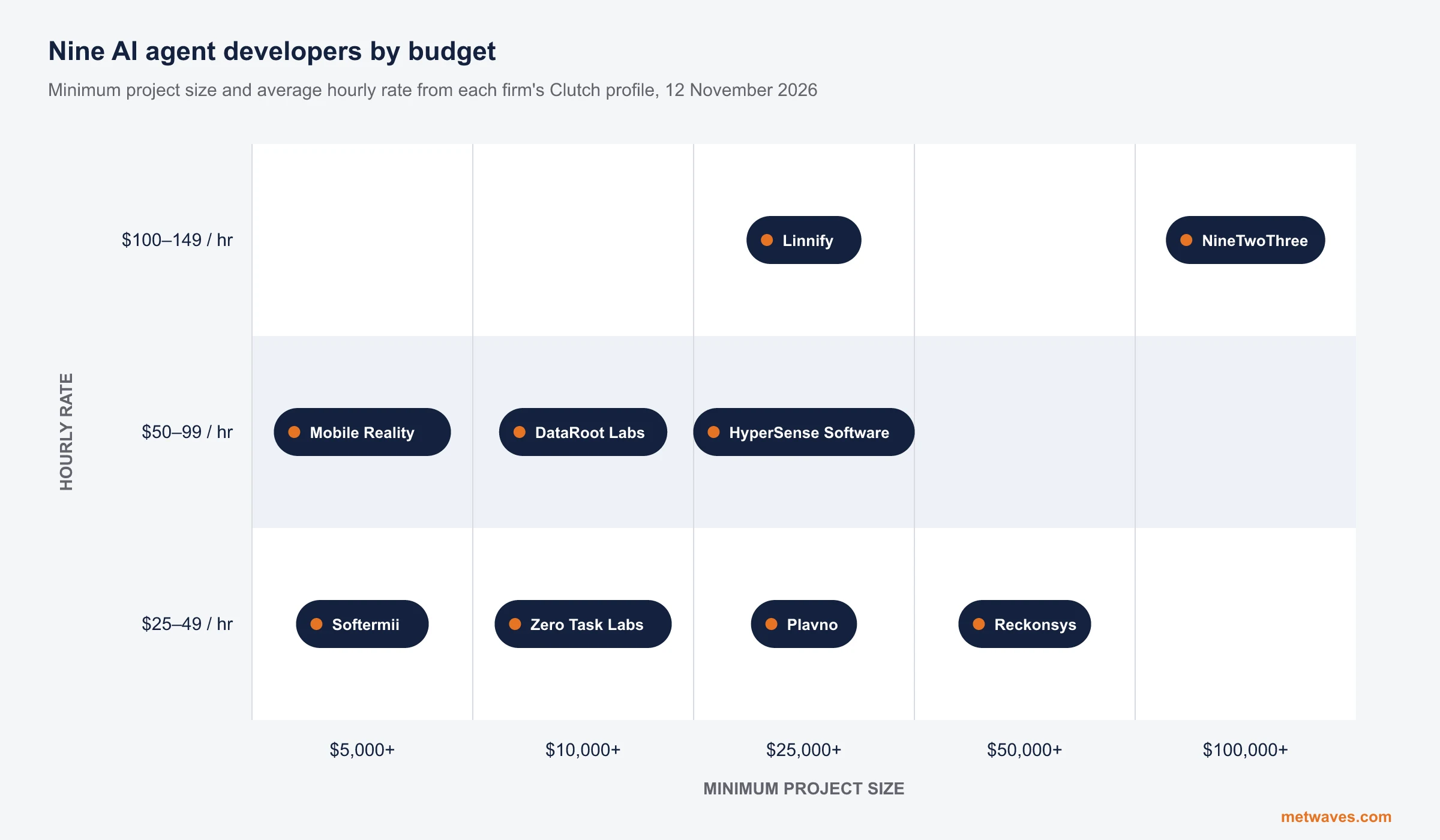
Nine AI agent development firms a small or mid-sized business can shortlist, with Clutch figures, minimum budgets and the weaknesses their own clients name. Published by Metwaves, which is not ranked.
Learn More >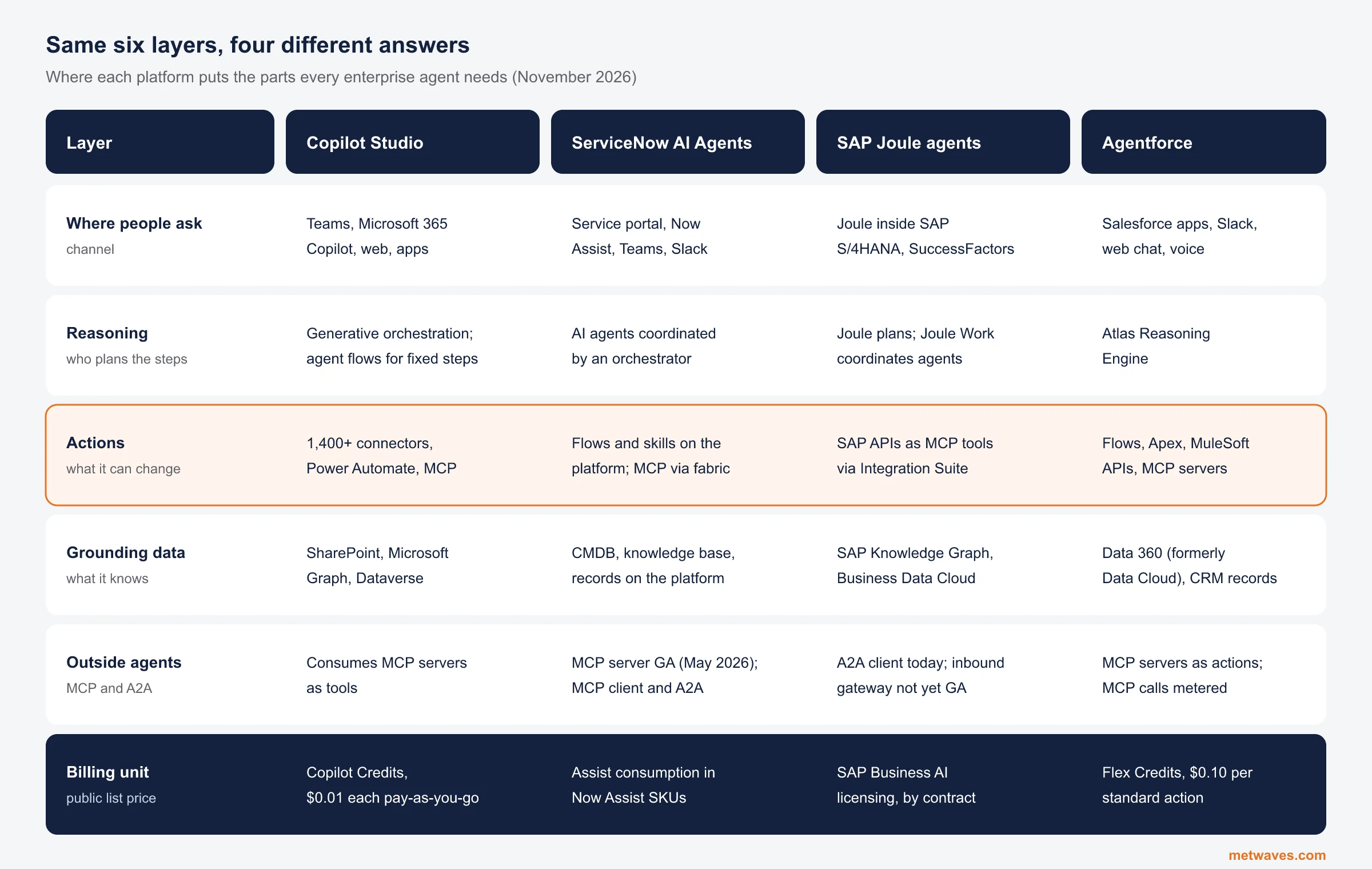 Nikit Nandan
November 12, 2026
Enterprise AI Agent Platforms Compared (2026)
An architecture review of the four big enterprise AI agent platforms: where each one reasons, acts, finds its data and connects to outside agents, what it costs, and when a custom build is the better choice.
Learn More > Nikit Nandan
November 01, 2026
Top custom software development companies for small and mid-sized businesses (2026)
Ten custom software firms a small or mid-sized business can shortlist, with Clutch figures, minimum budgets and the weaknesses their own clients name. Published by Metwaves, which is not ranked.
Learn More >Let’s build your idea!
Let us help you with free analysis & estimate.
Our product expert will contact you within 12 hours.